> For the complete documentation index, see [llms.txt](https://docs.ipor.io/llms.txt). Markdown versions of documentation pages are available by appending `.md` to page URLs; this page is available as [Markdown](https://docs.ipor.io/build-on-fusion/architecture-overview/what-is-a-fusion-vault.md).
# What is a Fusion vault?
The Plasma Vault's implemented standards (ERC-4626, ERC-20, OZ Votes, Access Manager), redemption delay, rewards, fees and configuration surface.
## Architecture
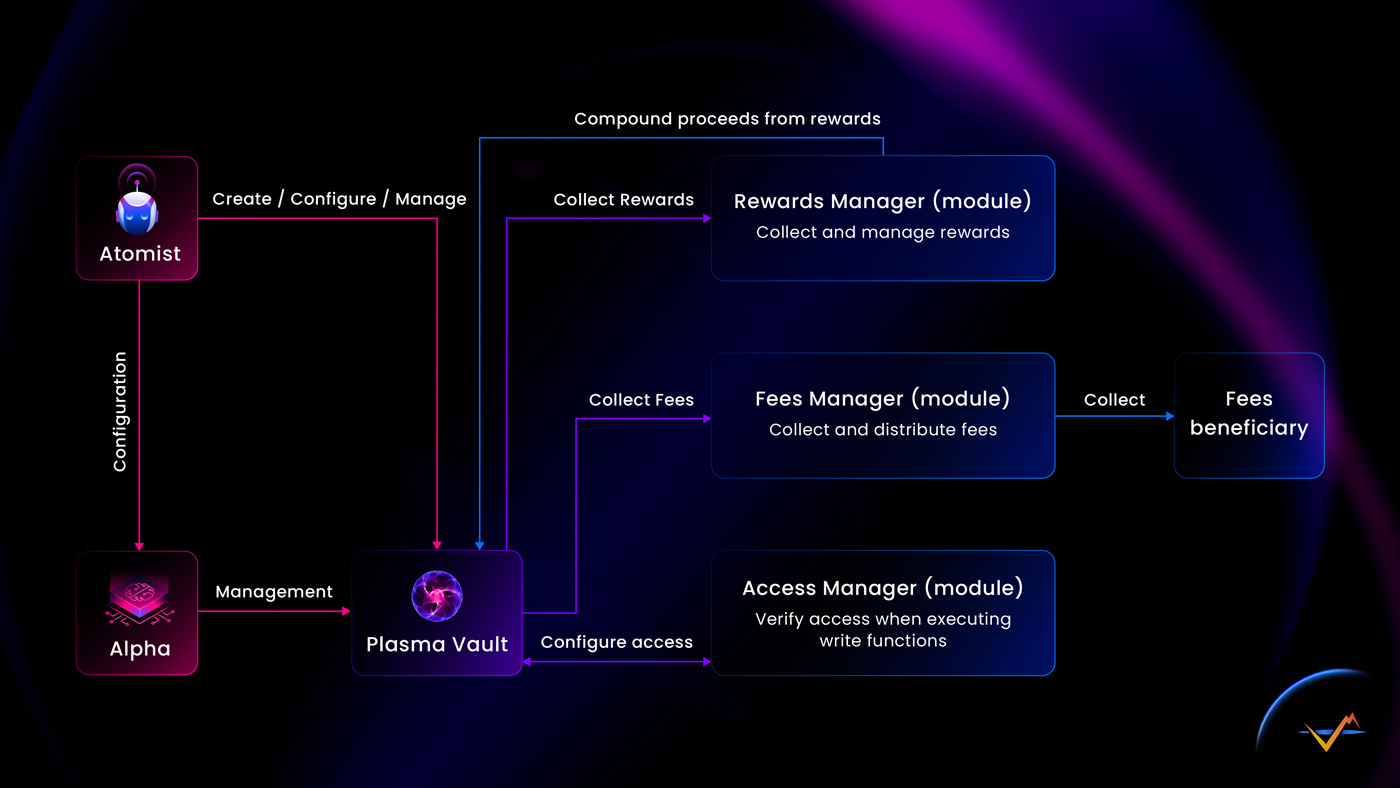
Vaults in IPOR Fusion are called Plasma Vaults and are the central part of the Fusion system. Plasma Vaults implement a Diamond Proxy pattern and delegate calls to fuses and attached contracts to manage this such as fees and rewards collection.
A Plasma Vault's relation to other elements of the system
### Implemented Standards
Plasma Vaults implement multiple standards that enable an array of desired functionalities.
### ERC4626
All Plasma Vaults implement the ERC4626 standard.
### ERC20
All Plasma Vaults implement the ERC20 standard.
Standard functionality can be restricted at the time of the vault creation, namely:
* **Minting and redemption** can be restricted by the vault creator so that only the whitelisted addresses have access to those methods. This setting can only be lifted, not added later. That means if the vault is created as closed/whitelisted it can later become an open vault, however if it is already unrestricted then it cannot be moved to a restricted mode
* Transferability can be restricted upon vault creation. This setting can only be lifted making transferability possible but not the other way around
### Open Zeppelin Votes
Plasma Vaults implement OpenZeppelin Votes.sol to enable integration with DAOs and DAO Protocols such as [Aragon](/build-on-fusion/atomists/vault-configuration-step-by-step/vault-governance-and-depositor-led-security-best-practices.md). This implementation allows for counting shares for any given block and allows voting on proposals without the need for locking or wrapping the share tokens.
OpenZeppelin Votes add to gas cost when dealing with shares, and Vault Creators can opt-out of this integration at the time of vault creation.
### Open Zeppelin Access Manager
Plasma Vaults rely on [OpenZeppelin Access Manager](https://docs.openzeppelin.com/contracts/5.x/api/access#AccessManager). This system is used by the vault to validate access to all the restricted methods. More information about the access manager configuration can be found in the [dedicated documentation](/build-on-fusion/atomists/vault-configuration-step-by-step/access-management.md).
{% embed url="" %}
## Redemption Delay
Fusion allows Atomists to set a mandatory delay between deposit and redemptions of assets from the vault. In other words, if configured to a value higher than 0 the user would not be able to deposit and withdraw assets in the same block. That helps with preventing malicious attacks to sandwich a vault and take advantage of the events when the exchange of the vault token changes. By default the vaults are configured so that flash loans can't be used, but the Atomists can set the timeout to higher value to operate the Vault according to a specific strategy.
## Handling of Rewards
As the vault delegates assets it may also happen, that it will accrue rewards or points from the protocols it connects to. The strategy and how to deal with those incentives may vary depending on the Atomist's strategy and the Plasma Vault allows for great flexibility in this regard. \
\
Plasma Vaults utilize a dedicated sub-module called `Rewards Manager` to handle the process of counting, claiming, passing rewards for further processing, and handling the proceeds from of the rewards for example auto compounding pw- or ve- rewards, automatic sale, or TWAP.
* **Accounting** - vaults don't account for the accrued rewards by design. Usually, rewards would be issued in the reward token other than the vault's accounting token and it could lead to issues with accounting and vulnerabilities when calculating the exchange rate of the share token.
* Dealing with claimed rewards - After the rewards have been claimed, they can be requested by another contract or an entity.
* Phasing rewards back into the vault
## Fees
There are two types of fees that can be charged in a Fusion Vault:
* Performance fee - charged as a percentage of the increase of the exchange rate between vault's underlying asset and the vault token. A [high-water mark method](https://www.investopedia.com/terms/h/highwatermark.asp) is used.
* Management fee - charged on the vault's annualized TVL.
The Atomists configure both fees. The IPOR DAO also earns part of both fees to support its operations. See [here](https://docs.ipor.io/build-on-fusion/architecture-overview/pages/fpMOFttt8UazU5qsfQzZ#id-8.-fees).
## Configuration
Basic configuration:
* Name and token ticker - immutable
* Underlying asset - immutable
* Total supply cap - configurable by the Atomist
### Timelocks - configurable
Each role (check the [access management](/build-on-fusion/atomists/vault-configuration-step-by-step/access-management.md)) has a timelock attached. For every action taken the role holder is subject to a timelock. The timelock value can be changed by granting the role again by authorized user.
### Restricting minting and redemptions (whitelist) - partially configurable by the Atomist
Atomists can launch the vault with the whitelist, they can amend the addresses on the whitelist and also turn off the whitelist altogether. A whitelist can not be added to vaults already launched or made public.
### Restricting transfers - partially configurable by the Atomist
Vault can be launched with restrictions on transfers of vault tokens. This restriction can be lifted by the Atomist after the launch of the vault. However if the restriction on transfers has already been lifted, or vault was launched without the restriction then the transferability can not be imposed.
### Withdrawing assets - immutable
Depending on the trading strategy of the Vault, it can configured to have either instant or "scheduled" withdrawals. All vaults are launched hybrid as default, meaning they can support both instant and scheduled withdrawals.
### Fees - configurable
Fees changes are subject to a timelock and caps hardcoded in the vault contract.
### [Access management](/build-on-fusion/atomists/vault-configuration-step-by-step/access-management.md) - configurable
## Operation
### Creating a Plasma Vault
Vaults can be [created](/build-on-fusion/atomists/vault-configuration-step-by-step.md) manually by deploying a configured version of the Fusion Vault using the repository or by using the factory.
The detailed instruction on how to use the factory and it's UI can be found in the [Quick Start Guide](/build-on-fusion/developer-guide/quick-start-guide.md)
### Editing a Vault
A vault's configuration can be edited by authorized users - see [Access Management](/build-on-fusion/atomists/vault-configuration-step-by-step/access-management.md) for more information.
### Creating transactions
Step 1 : Define data structures
```solidity
struct AaveV2SupplyFuseEnterData {
address asset;
uint256 amount;
}
struct Erc4626SupplyFuseEnterData {
address vault;
uint256 vaultAssetAmount;
}
struct FuseAction {
address target;
bytes data;
}
```
Step 2: Prepare Data
```solidity
address usdcAddress = 0xFF970A61A04b1cA14834A43f5de4533eBDDB5CC8; // Arbitrum USDC Address
AaveV2SupplyFuseEnterData memory aaveData = AaveV3SupplyFuseEnterData({
asset: usdcAddress,
amount: 1000 // amount to supply
});
Erc4626SupplyFuseEnterData memory erc4626Data = Erc4626SupplyFuseEnterData({
vault: 0xabcdefabcdefabcdefabcdefabcdefabcdef, // Adres vaulta
vaultAssetAmount: 500 // amount to supply
});
FuseAction[] memory actions = new FuseAction[](2);
actions[0] = FuseAction({
target: address(aaveV3SupplyFuse), // AaveV3SupplyFuse
data: abi.encodeWithSignature("enter((address,uint256))", aaveData) // params to call the method
});
actions[1] = FuseAction({
target: address(erc4626SupplyFuse), // Erc4626SupplyFuse contract address
data: abi.encodeWithSignature("enter((address,uint256))", erc4626Data) // params to call the method
});
```
Step 3: Invoke method
```solidity
plasmaVault.execute(actions);
```