> For the complete documentation index, see [llms.txt](https://docs.ipor.io/llms.txt). Markdown versions of documentation pages are available by appending `.md` to page URLs; this page is available as [Markdown](https://docs.ipor.io/fusion-for-depositors/user-guide/depositing.md).
# Depositing
Depositing into Fusion vaults is identical to depositing into other DeFi vaults, even if the underlying strategy is sophisticated in nature.
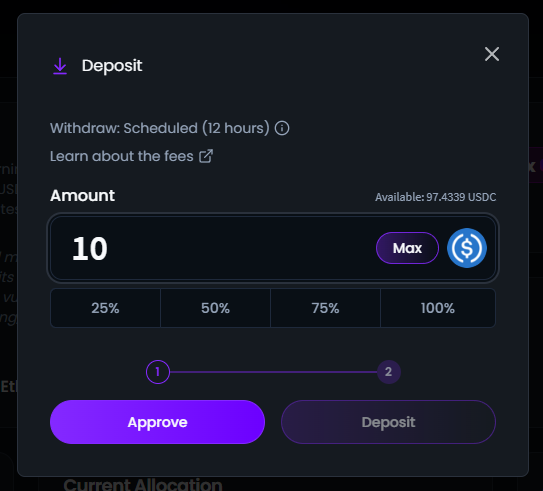
1. Determine the amount you want to deposit (make sure you have the correct wallet connected).
2. Click "Approve."
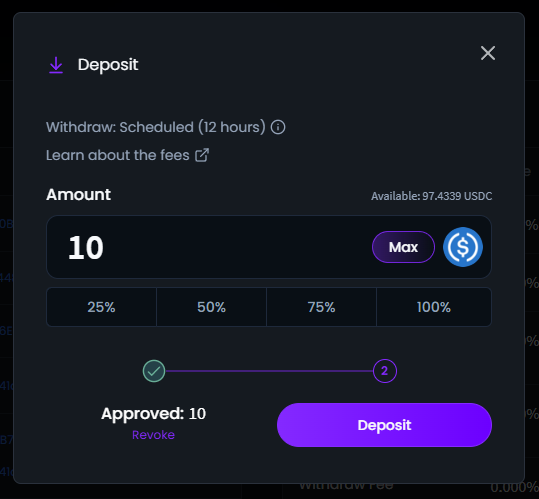
3. Once the transaction is approved, click "Deposit" and confirm the transaction in your wallet.
4. Upon successful deposit, you will receive ERC-4626 vault shares, which are fully ERC-20 compliant. Depending on your wallet type, you may need to manually add the vault share's address for your deposits to appear in your wallet.