# IPOR Fusion Docs

Welcome to your team’s developer platform

<h2 align="center">The Prime Brokerage Protocol of DeFi</h2>

<p align="center">Welcome to the IPOR Fusion Protocol's documentation.</p>

<table data-view="cards"><thead><tr><th></th><th></th><th></th><th data-hidden data-card-target data-type="content-ref"></th></tr></thead><tbody><tr><td><h4><i class="fa-atom">:atom:</i></h4></td><td><strong>Fusion for Depositors</strong></td><td>Access professionally curated, auto-optimized yield strategies with a click.</td><td><a href="/spaces/tCmHUPokv1qQ5OTCbUd2/pages/ZPnJ3JUpURN882ZodcUz">/spaces/tCmHUPokv1qQ5OTCbUd2/pages/ZPnJ3JUpURN882ZodcUz</a></td></tr><tr><td><h4><i class="fa-dial-min">:dial-min:</i></h4></td><td><strong>Fusion for Curators and Builders</strong></td><td>Discover Fusion infrastructure and build your first automated onchain vault.</td><td><a href="/spaces/oaErR6oxxmjeJRJYOuXH">/spaces/oaErR6oxxmjeJRJYOuXH</a></td></tr><tr><td><h4><i class="fa-building-columns">:building-columns:</i></h4></td><td><strong>Fusion for Institutions</strong></td><td>Sovereign vault infrastructure for institutional-grade, onchain asset management.</td><td><a href="/spaces/NlpNBFwZZK4rTKh0FLlW">/spaces/NlpNBFwZZK4rTKh0FLlW</a></td></tr><tr><td><h4><i class="fa-chart-line-up-down">:chart-line-up-down:</i></h4></td><td><strong>IPOR Benchmarks and Derivatives</strong></td><td>Learn about IPOR Protocol's onchain, plain vanilla interest and stake rate swaps and benchmarks.</td><td><a href="/spaces/OtovJE7zoKEcRr7kInUn">/spaces/OtovJE7zoKEcRr7kInUn</a></td></tr><tr><td><h4><i class="fa-messages">:messages:</i></h4></td><td><strong>Governance and Tokenomics</strong></td><td>Join the DAO and participate in community-decision making.</td><td><a href="/spaces/rnPKLL9Vf8RCRWXKSfBa/pages/f8GZWy62ePkA61MfltFy">/spaces/rnPKLL9Vf8RCRWXKSfBa/pages/f8GZWy62ePkA61MfltFy</a></td></tr><tr><td><h4><i class="fa-floppy-disk">:floppy-disk:</i></h4></td><td><strong>Resources</strong></td><td>Access IPOR Protocol's Glossary, research and whitepapers, and brand assets.</td><td><a href="/spaces/jGQQPXdjn2n6lSDZWK3Y">/spaces/jGQQPXdjn2n6lSDZWK3Y</a></td></tr></tbody></table>


# Introduction to Fusion

## Professional DeFi Asset Management Simplified

IPOR Fusion is a professional-grade asset management layer that provides **one-click access to sophisticated DeFi strategies**. It acts as an intelligent gateway to the broader DeFi ecosystem, offering a non-custodial and transparent way to grow your capital using institutional-grade infrastructure.

By depositing into a Fusion vault, you delegate the complexity of yield optimization to strategists ("[Atomists](/build-on-fusion/architecture-overview/what-is-an-atomist)") who actively manage your assets across protocols in the ecosystem.

## How It Works

Fusion is designed to make participating in advanced DeFi strategies as simple as using a standard "Earn" button:

1. **Select a Strategy:** Choose a vault based on your risk profile and desired underlying asset (e.g., USDC or ETH).
2. **Provide Liquidity:** Deposit assets to receive vault shares. These shares represent your ownership of the pool and the yield it generates.
3. **Passive Management:** Professional strategists ("[Alphas](/build-on-fusion/architecture-overview/what-is-an-alpha)") manage the portfolio behind the scenes, e.g. automatically rebalancing funds across different DeFi protocols to capture optimal returns.
4. **Withdraw Anytime:** Monitor your growth in real-time and withdraw your assets whenever you need them.

## Core Features

* **Expert Management:** Benefit from active management by professional strategists.
* **Universal Access:** Tap into liquidity across all major DeFi protocols from a single entry point.
* **Cost-Efficient Management:** Strategy execution and rebalancing are handled by the vault, meaning depositors don't pay direct gas costs for complex portfolio operations.
* **Total Transparency:** Every strategy move and performance metric is verifiable on-chain 24/7.

> **Want to understand the specific advantages?** Check out the [TL;DR: Why Fusion?](/fusion-for-depositors/why-fusion) page.
>
> **Ready to dive in?** Explore the [available vaults](https://app.ipor.io/fusion).


# What is a Fusion Vault?

Fusion vaults are the central part of the Fusion asset management infrastructure. They enable sophisticated asset management automation in the background, accessible via a standard front-end deposit.

All the sophisticated data collection, processing, and execution is handled in the back end by the [Alpha](/build-on-fusion/architecture-overview/what-is-an-alpha) role. Users enjoy full transparency on the front end. They can check which markets are connected to any Fusion vault, view the vault's performance, and learn the current and historical allocation of funds.

<figure><img src="/files/FX0y8JA6hWIyAHnSjyM5" alt="" width="563"><figcaption></figcaption></figure>

<figure><img src="/files/o5kJVEi0z0FdHxfirCV6" alt="" width="563"><figcaption></figcaption></figure>

[Here](/build-on-fusion/architecture-overview/what-is-a-fusion-vault) you can find a more technical documentation.


# TL;DR: Why Fusion?

## **Smart Automation** <a href="#optimized-yield" id="optimized-yield"></a>

Fusion provides intelligence-driven execution for various DeFi operations, including lending optimization, leveraged looping, carry trades, arbitrage, leveraged farming, and more, curated by professional curators ("[Atomists](/build-on-fusion/architecture-overview/what-is-an-atomist)").

## **One-Click Yield Optimization** <a href="#efficiency" id="efficiency"></a>

Fusion provides a single access point to multiple yield venues, reducing operational burden and enhancing capital deployment efficiency. Liquidity providers can deposit in a vault with a single click, and their funds are automatically distributed across the vault's connected markets to optimize yield.

## **Modularity and Adaptability** <a href="#time-to-market" id="time-to-market"></a>

DeFi moves fast. IPOR Fusion enables seamless, swift, and secure integration of new DeFi protocols, empowering curators and liquidity providers to seize the latest opportunities as they arise. A new market is to be added to the vault strategy? No need to move funds to a new vault; Fusion strategies can be upgraded on the fly thanks to [Fuses](/build-on-fusion/architecture-overview/what-is-a-fuse).

## **Automated Risk Management** <a href="#risk-management" id="risk-management"></a>

Fusion incorporates an intelligent layer that is capable of automating rebalancing, optimization, and risk management, enabling swift and effective responses to evolving market conditions. Under normal circumstances, Fusion vaults actively perform yield-optimization operations. In periods of market stress, however, Fusion can automatically withdraw liquidity to minimize or entirely eliminate exposure to DeFi markets.

To learn more, [read this piece](https://x.com/compose/articles/edit/1988586935124705280) on Fusion's performance during the xUSD market stress.

## **Institutional-grade Security** <a href="#security" id="security"></a>

Built by seasoned developers, IPOR Fusion Protocol infrastructure prioritizes security and robust smart contract design. For more security-related information, please refer to the [Security Features](/fusion-for-depositors/why-fusion/security-features) section.

## **Network Effect Without Risk “Spill-over”** <a href="#network-effect-without-risk-spill-over" id="network-effect-without-risk-spill-over"></a>

IPOR Fusion adoption offers a growing “palette” of protocol integrations and business logic, paired with “siloed” risk exposure, protecting users from spillover effects. Siloed risk exposure between Fusion vaults ensures potential losses are not socialized.


# Security Features

IPOR Fusion infrastructure is developed to deliver peace of mind for Atomists and liquidity providers.

## Siloed Risk Management

IPOR Fusion's modular architecture isolates risks within individual vaults, ensuring that potential losses in one vault do not affect others. Risks are siloed to the particular markets and assets a vault is connected with via Fuses and substrates. This design bolsters security by preventing risk spillover across the ecosystem, empowering investors to choose strategies that match their risk appetite.

## Balance Fuses

Fusion's accounting uses [Balance Fuses](/build-on-fusion/developer-guide/balance-fuses). That means the vaults account for them self. While other vaults require "trust me bro" accounting fed from offchain by the curator, Fusion vaults known their own balance.

## Audits

Fusion is [audited](/build-on-fusion/developer-guide/security-and-audits).

## Active Risk Monitoring

To ensure ongoing security, the IPOR Fusion infrastructure supports Guardian roles that can be assigned to specialized security firms such as smart contract exploit detectors. These entities actively monitor onchain risks and can take immediate protective actions, such as pausing strategies if anomalies are detected.

An [Atomist](/build-on-fusion/architecture-overview/what-is-an-atomist) could also delegate a special Alpha role to recall funds from external protocols to the vault in case of threats.

Other risk modules can be built and customized, such as monitoring for things like asset depegs, economic risks, and more.

This proactive approach reduces the likelihood of loss, reinforcing the integrity of vault assets.


# Advantages

IPOR Fusion vaults offer several key advantages to liquidity providers:

<details>

<summary>Automatic Yield Optimization</summary>

Fusion delivers intelligence-driven, automated execution for diverse DeFi operations, including lending optimization, leveraged looping, carry trades, arbitrage, and leveraged farming.&#x20;

The strategy type is displayed in the first column of the Fusion dashboard.

<figure><img src="/files/lIxwoDdUCExu7NRqdUNe" alt=""><figcaption></figcaption></figure>

### Yield Optimizers

An offchain infrastructure ([Alpha](/build-on-fusion/architecture-overview/what-is-an-alpha)) monitors onchain market conditions and responds to changes in near real-time. Fusion Vaults can automatically rebalance as often as the strategy requires to ensure deposited funds are allocated for [maximum yield](/build-on-fusion/atomists/curating-a-fusion-vault/yield-scalability-and-market-impact).&#x20;

Users can track a vault’s current and historical allocations on the vault page.

<figure><img src="/files/SSUy3yY8dSgPlzZ1mbLr" alt=""><figcaption></figcaption></figure>

In the example above, Harvest's USDC Autopilot Vault on Base has rebalanced across 17 Harvest vaults more than 200 times in a single month.&#x20;

### Automated Leveraged Looping

In the case of Leverage Looping vaults, Fusion [Alphas](/build-on-fusion/architecture-overview/what-is-an-alpha) automatically manage leverage, loop via flash loans, and unwind positions. Looping can consist of one, or multiple loops across multiple markets.

For the [IPOR stETH looping vault on Ethereum](https://app.ipor.io/fusion/ethereum/0xb8a451107a9f87fde481d4d686247d6e43ed715e), Fusion's Alpha monitors:

🔹 stETH staking rate

🔹 stETH/ETH DEX exchange rate

🔹 WETH borrow rates on multiple blue chip credit markets

🔹 WETH market depths

🔹 available assets and pending withdrawal requests

</details>

<details>

<summary>One-click Earn Opportunities</summary>

> One-click, auto-optimized Earn opportunities for all.

The DeFi landscape is rapidly evolving, with new venues, integrations, and primitives emerging daily. While this drives innovation, it also leads to liquidity fragmentation, volatile rates, and an increasingly complex array of protocol integrations, making it challenging for passive liquidity providers (LPs) to optimize their positions effectively.

IPOR Fusion vaults simplify DeFi’s complexity, enabling LPs to deposit with a single click while providing access to the most attractive, risk-adjusted opportunities in the DeFi ecosystem.

> The best infrastructure is invisible.

LPs only need to connect a wallet and deposit—Fusion handles the intricacies of DeFi for them.

<figure><img src="/files/7JLzc1Tsh0xJp2dj5GuW" alt=""><figcaption></figcaption></figure>

</details>

<details>

<summary>Professional Curation</summary>

Fusion infrastructure enables LPs to participate in automated yield optimization, lending optimization, leveraged looping, staking, and many other types of strategies curated by the best teams in DeFi and TradFi ([Atomists](/build-on-fusion/architecture-overview/what-is-an-atomist)).

Each strategy features a detailed settings tab where LPs can learn more about the onchain setup and fees for each vault.

</details>


# Depositing

Depositing into Fusion vaults is identical to depositing into other DeFi vaults, even if the underlying strategy is sophisticated in nature.

1. Determine the amount you want to deposit (make sure you have the correct wallet connected).
2. Click "Approve."

<figure><img src="/files/k4j4Vx1JHNY3jO3nhcgp" alt="" width="407"><figcaption></figcaption></figure>

3. Once the transaction is approved, click "Deposit" and confirm the transaction in your wallet.

<figure><img src="/files/KWlbOhQgB96OLWWRndHe" alt="" width="404"><figcaption></figcaption></figure>

4. Upon successful deposit, you will receive ERC-4626 vault shares, which are fully ERC-20 compliant. Depending on your wallet type, you may need to manually add the vault share's address for your deposits to appear in your wallet.


# How to Choose a Vault

IPOR Fusion is a neutral infrastructure layer that provides the technology - the Fusion Vault - to enable professional DeFi management. Fusion is the vault protocol, while each vault is curated and managed by its own third-party [**Atomist**](/build-on-fusion/architecture-overview/what-is-an-atomist) (the Curator).

When selecting a vault, your primary focus should be the specific strategy provided by the Atomist. Here are some tips to evaluate your options:

### 1. Read the Strategy Description

The most important step is to read the vault's description provided by the Atomist. This text explains the vault’s "mission profile"- for example, whether it focuses on stable yield from lending protocols like Aave and Compound, or seeks higher returns through leveraged looping.

The description should align with your own risk tolerance and investment goals.

### 2. KYC- Know Your Curator (Atomist)

In the IPOR Fusion ecosystem, the Atomist is the architect. They are responsible for:

* **Whitelisting:** Choosing which protocols and assets the vault is allowed to interact with.
* **Risk Management:** Setting limits on how much capital can be placed in a single protocol.
* **Execution:** Directing the [**Alpha**](/build-on-fusion/architecture-overview/what-is-an-alpha) (strategy execution) on how to deploy capital.

As a user, you are essentially selecting a manager you trust to navigate the DeFi landscape on your behalf.

### 3. Check the Underlying Asset

Every Fusion Vault is built around a single underlying token (e.g., USDC, USDT, or ETH). Your investment relates to that asset. When you deposit, you receive vault shares. Yield generated by the strategy is reflected in the rising price of these shares relative to the underlying token.

### 4. Understand Fees

To support the management of the vault, Atomists may implement two types of [fees](/fusion-for-depositors/user-guide/vault-fees). These are automatically handled by the protocol and are reflected in the share price:

* **Management Fee:** An annualized percentage for the ongoing operation of the vault.
* **Performance Fee:** A percentage of the profits earned.&#x20;

### 5. Liquidity and Withdrawals

Check if the vault is optimized for your time horizon. IPOR Fusion offers flexibility in how you [exit](/fusion-for-depositors/user-guide/withdrawing):

* **Instant Withdrawals:** Many vaults keep a portion of "idle" liquidity or use automated tools to pull funds back from lending markets instantly.
* **Scheduled Withdrawals:** Some advanced strategies (like leveraged looping) may require a "Request and Release" process. If a vault uses this, it will be noted in the interface, and you may need to wait a short period (the **Redemption Delay**) after requesting your funds to complete the withdrawal.

### 6. Notifications

Atomists have the option to display announcements directly on the vault details page. Additionally, each Atomist has a dedicated channel in the [IPOR Labs Discord server](https://discord.gg/zGUZUY43FE). It's recommended that you join the channels for all Fusion vaults where you have funds to stay up to date on announcements.

### 7. Summary: The Neutral Layer

Always remember that IPOR Fusion is the vault protocol. While the protocol includes hardcoded safety features, such as price validation and market limits, the actual performance and risk-taking decisions are the sole responsibility of the **Atomist**. Choose a vault where the strategy and the Atomist's reputation meet your expectations.


# FAQ: Why is my position worth less than my deposit?

A position in a Fusion Vault trading below its initial deposit is typically an exception rather than the norm. Under normal market conditions, the vault’s share price tends to appreciate over time as the underlying strategy generates yield. That said, temporary deviations can occur.

The most common reason is the vault's strategy, which can cause short-term fluctuations in Net Asset Value (NAV). This is particularly true for strategies involving borrowing and swapping assets, especially those with leveraged looping. For instance, even minor shifts in a stablecoin's peg can lead to small, yet measurable, NAV fluctuations. Consider a scenario where the vault has borrowed USDC and swapped it for USDe. If the USDC/USDe exchange rate, as reported by the market price oracle, drops from 1.00 to 0.999, the vault's NAV will decrease. Consequently, the share price and the value of each user's position will also fall. The extent of this fluctuation depends on the vault's leverage. Historically, such exchange rate imbalances tend to normalize over time, as illustrated in the following example:

<div data-full-width="false"><figure><img src="/files/AHhcYAgH3xwbzUkHY9qo" alt=""><figcaption></figcaption></figure></div>

See also:&#x20;

[Share Price Dynamics](/build-on-fusion/atomists/curating-a-fusion-vault/share-price-dynamics)

[Understanding Performance of a Vault](/build-on-fusion/atomists/curating-a-fusion-vault/understanding-performance-of-a-vault)


# Withdrawing

Withdrawing from Fusion vaults depends on the type of vault. Please refer to the next subsections to learn more.

## Instant Withdrawal

<figure><img src="/files/NIYSDjiHjXbTHCF0YtBg" alt=""><figcaption></figcaption></figure>

Vaults that support the instant withdrawal method allow users to withdraw their assets immediately without any waiting period. This is particularly true for vaults with liquid strategies, such as a lending optimizer vault.

## Scheduled Withdrawal

Withdrawing from some types of Fusion vaults (like leveraged looping) requires unwinding a complex \[leveraged] position. As a result, withdrawals must be scheduled in advance to give the Atomist sufficient time to prepare the necessary liquidity.

Scheduling a withdrawal is a two-step process:

1. **Request Withdrawal**: First, submit a withdrawal request.&#x20;

<figure><img src="/files/HbxIuCmCYtclvTAKVl6L" alt="" width="377"><figcaption></figcaption></figure>

2. The vault manager has a specific time, individually specified for each vault, to process and fulfill it.&#x20;
3. Monitor the withdrawal page to check the status.
4. **Finalize Withdrawal**: Once ready, the funds will become available for withdrawal.

> NOTE: Missing the withdrawal window will restart the two-step process and incur an additional [Offboarding Contribution](/fusion-for-depositors/user-guide/vault-fees/onboarding-and-offboarding-contributions), if this is levied in the respective vault.

## Hybrid Withdrawal

All vaults have hybrid withdrawals enabled, which means that they can support both scheduled and instant withdrawals. If a scheduled withdrawal vault has a buffer of liquid assets, it may permit instant withdrawals when the requested amount is equal to or less than the available (unused) liquidity.


# Tracking Your Position

Once you deposit funds in a Fusion vault, your total position will be displayed at the top of the Fusion dashboard in the My Assets box.

<figure><img src="/files/oQJ6ChLYr8eAEl5tMI5v" alt=""><figcaption></figcaption></figure>

You will also be able to review your deposits per vault in the "My Positions" tab.

<figure><img src="/files/rgtr2RjZsuO6a82uLdg9" alt=""><figcaption></figcaption></figure>


# Tracking Your Fusion Points

You can track your Fusion Points per vault in the Points page.

<figure><img src="/files/khoMHq4UilZjJh8L3D1w" alt=""><figcaption></figcaption></figure>

To earn a 10% points boost for yourself and other users, generate a referral code and share it with your community/friends. The bonus will only be activated if the user is not already a Fusion user or has not been one in the past.

<figure><img src="/files/UxmfZHkGth7s1dSSjHIj" alt=""><figcaption></figcaption></figure>

<figure><img src="/files/uZLB668ZYDLEJBC6Fl2x" alt=""><figcaption></figcaption></figure>


# Vault Fees

Detailed information about each vault's fee structure can be found on the "Vault Info" page (next to "Overview") for each Fusion vault.

<figure><img src="/files/b8bVfuJSD9SoNCalC05A" alt="" width="407"><figcaption></figcaption></figure>

Fusion vaults aim to set a standard for transparency in DeFi. The "Vault Info" page includes essential information in that respect, including the wallets of vault-related roles and contracts, as well as, all fees, contributions, and other essential information.

<figure><img src="/files/oaN02vxB2KVYJudnlEba" alt="" width="543"><figcaption></figcaption></figure>

It's recommended that users check the "Vault Info" page before depositing in a vault, so they are informed about fees and the deposit/withdrawal policy.

## Fee Accounting Schedule

Fees are not charged on a fixed calendar schedule (such as monthly or annually). Instead:

* **Automated Deductions**: The fee is calculated and deducted automatically whenever the vault's share price updates—such as during user deposits, withdrawals, or strategy rebalances.
* **Real-Time Share Pricing**: Because fees are processed in parallel with share price updates, the price displayed on your dashboard is always fully up-to-date and net of fees, ensuring no hidden charges at withdrawal.

## Where Do the Fees Go?

When performance fees are collected, they are held in a secure contract and split between:

1. **The IPOR DAO**: A portion goes to the protocol to support the network.
2. **The Vault Curator**: A portion goes directly to the strategists and partners who build and manage the vault.


# Management Fee

## Management Fee

The Management Fee is a time-based fee charged on the total assets under management (AUM) in a vault.

### How It Works

* **Continuous Accrual**: The fee does not wait for a monthly or yearly bill. Instead, it accrues continuously, second-by-second, based on how long your assets remain in the vault.
* **Always Net of Fees**: The fee is calculated and updated automatically whenever any user deposits, withdraws, or when the strategy rebalances. This ensures the vault balance and share price shown on your dashboard are always up-to-date and net of fees.

### A Simple Example

* You deposit 1,000 USDC into a vault.
* The vault has a 0.2% annual management fee.
* **After One Year**: If you leave your funds in the vault for a full year, the total accrued fee is 2 USDC (0.2% of 1,000 USDC).
* **After Six Months**: If you decide to withdraw your funds after exactly six months, the fee calculated up to that second is 1 USDC (half of the annual fee).
* **The Result**: The fee recipient receives 1 USDC worth of minted vault shares. Your remaining shares are worth 999 USDC (plus any yield the strategy generated during those six months)


# Performance Fee

The Performance Fee is a profit-based fee charged only on the gains earned by a vault's strategy.

The total amount is displayed on the "Vault Info" page of each vault.

## How It Works

* **Only on Profit**: You only pay a fee when your investment grows. If the vault doesn't make a profit, you do not pay a performance fee.
* **The "Peak" Rule (High Water Mark)**: We track the highest value (the "peak") the vault has ever reached. If the market dips and then recovers, you are never charged a fee twice for the same growth. You only pay a fee when the vault sets a brand-new profit peak.

## A Simple Example

* You deposit 1,000 USDC into a vault with a 10% performance fee.
* The strategy successfully earns interest, and your share of the vault grows to 1,100 USDC.
* **The Gain**: You made a profit of 100 USDC.
* **The Fee (10%)**: The fee is 10 USDC (10% of 100 USDC).
* **The Result**: The strategist receives 10 USDC worth of vault shares. You keep 90 USDC (90% of the profit) and your vault balance is now worth 1,090 USDC.


# Onboarding and Offboarding Contributions

In many DeFi vaults, the arrival or departure of large amounts of liquidity can create hidden costs for existing participants. IPOR Fusion provides the infrastructure for **Onboarding and Offboarding Contributions**—mechanisms designed to protect long-term depositors and ensure the vault's health.

Unlike traditional protocol fees, these contributions are not kept by a central authority or DAO. Instead, they are distributed directly back to the vault's internal liquidity, effectively benefiting all remaining share holders.

### Why are these contributions necessary?

When a user joins or leaves a vault, the vault's composition changes. This may require the Alpha to rebalance assets across various protocols, which involves:

* **Slippage and Swap Fees:** The price impact of moving large volumes of assets through decentralized exchanges, as well as the fundamental trading fees charged by those protocols.
* **Yield Dilution:** If a user enters a vault right before a significant yield realization, they would "dilute" the profit meant for those who held through the risk period.

Onboarding and Offboarding contributions ensure that the person causing these actions covers the associated costs, rather than the existing liquidity providers.

### Onboarding Contributions

When you deposit assets into an IPOR Fusion vault, an **Onboarding Contribution** may be applied.

#### How it works:

1. You deposit an amount of underlying assets (e.g., USDC).
2. A small percentage (defined by the vault's configuration) is calculated as a contribution.
3. The remaining assets are used to mint your vault shares.
4. The "contribution" amount remains within the vault, instantly increasing the **Total Assets** value for every existing share.

**Result:** The Joiner pays a small entry premium, and the Stayers see a slight increase in their share price.

### Offboarding Contributions

Similarly, when you withdraw assets from a vault, an **Offboarding Contribution** may be applied to the transaction.

#### How it works:

1. You request a withdrawal or redemption of your shares.
2. The vault calculates the asset value of those shares.
3. A small percentage is deducted from the outgoing amount.
4. These assets stay in the vault or the shares are burned, which increases the proportional ownership of the remaining participants.

**Result:** The Leaver covers the potential liquidity extraction costs, and the Stayers are compensated for the cost of rebalancing.

### Individual Vault Management

As a neutral infrastructure, IPOR Fusion allows individual vaults to determine their own contribution policies. These are managed by **Atomists**, who decide the specific amounts for onboarding or offboarding contributions based on the vault's specific strategy and goals.

By implementing these contributions, a vault can achieve:

* **Value Accrual:** Every time a user joins or leaves, the internal value of the vault's assets is redistributed, resulting in a marginal accrual for existing holders.
* **Fairness:** Users who move in and out of the vault frequently contribute more to the vault's pool than those who remain deposited for long periods.
* **Sustainability:** The vault can cover the operational costs of rebalancing liquidity without eating into the organic yield generated by the underlying strategies.

> Tip:
>
> You can always check the current contribution rates in the **Vault Info** section of the IPOR Fusion interface before committing your transaction.

Watch the short video below to learn more. &#x20;

{% embed url="<https://youtu.be/Ed7J_1Oeltg>" %}


# Risks

While no protocol is entirely risk-free, the Fusion infrastructure has implemented [extensive measures](broken://pages/lOzi0hcW7Jh2pJWFKPUU) to minimize potential issues. The protocol's code is publicly available, has undergone multiple smart contract [audits](/fusion-for-depositors/why-fusion/security-features#audits), and is subject to an ongoing bug bounty campaign and specialized technical reviews.

Key risk categories and their corresponding mitigation strategies are detailed below. For more in-depth information, refer to the security and audits sections.

| Risk Category       | Description                                                                                                                                                                                                                                                                                                    | Mitigation Strategy                                                                                                                                                                                                   |
| ------------------- | -------------------------------------------------------------------------------------------------------------------------------------------------------------------------------------------------------------------------------------------------------------------------------------------------------------- | --------------------------------------------------------------------------------------------------------------------------------------------------------------------------------------------------------------------- |
| Smart Contract Risk | Potential for bugs or vulnerabilities in the Fusion Protocol code or underlying reserve tokens.                                                                                                                                                                                                                | Audits and Governance: Code is public, audited by multiple firms, and any changes require thorough vetting and community approval via onchain governance. An ongoing bug bounty program is also in place.             |
| Oracle Risk         | Reliance on third-party data providers (oracles) for price feeds and other external data (e.g., liquid staking token redemption ratios). A compromised or failed oracle could lead to incorrect asset valuations.                                                                                              | Decentralized Oracles: Uses robust, tamper-resistant decentralized oracle solutions, such as Chainlink, for reliable data feeds.                                                                                      |
| Strategy Risk       | Inherent in DeFi vaults, involving potential losses from the failure of underlying investment strategies defined by Atomists. This includes poorly performing strategies, improper asset management, and external risks from interacting with other protocols (e.g., impermanent loss, liquidation, exploits). | Transparency and Oversight: All Atomist-defined investment strategies are publicly visible, allowing for continuous scrutiny by the community, security experts, and contributors.                                    |
| Network Risk        | Issues related to the underlying blockchain networks on which Fusion operates, such as congestion, censorship, or security vulnerabilities.                                                                                                                                                                    | Robust Onboarding Framework: Fusion Governance employs a rigorous network onboarding framework to vet new networks before integration, with all integration decisions overseen by community-based onchain governance. |


# Fusion Introduction

## What is Fusion?

IPOR Fusion is an [institutional-grade](https://docs.ipor.io/fusion-for-institutions/) asset management infrastructure for automated execution. It is an unopinionated and customizable framework that asset managers can use to deploy assets onchain while implementing custom algorithms offchain.

It can be considered the *Prime Brokerage Protocol of DeFi*. From a TradFi asset manager's perspective Fusion is a single entry point for integration, coordination, monitoring, execution, and accounting of sophisticated DeFi strategies.

[Fusion vaults](/build-on-fusion/architecture-overview/what-is-a-fusion-vault) offer one-click curated and automated yield opportunities for liquidity providers, simplifying the DeFi experience.

Smart contracts ensure transparent and secure allocation of assets onchain, while offchain agents (called "[Alphas](/build-on-fusion/architecture-overview/what-is-an-alpha)") allow curators (called "[Atomists](/build-on-fusion/architecture-overview/what-is-an-atomist)") to design custom algorithms or implement logic for allocating and rebalancing assets.

## Who is this documentation for?

This section is for everyone who wants to build on the Fusion infrastructure: Atomists, Alphas, Risk Managers, Guardians, smart contract engineers, backend wizards and all forms of integrators.&#x20;

Should you have any further questions, please feel free to contact IPOR Labs via a ticket on our Discord server. We are happy to help.

{% hint style="info" %}
To stay up to date on frontend, MCP and SDK feature updates, join the [announcement channel on Telegram](https://t.me/fusionsdk)
{% endhint %}


# General

> IPOR Fusion's architecture is modular, built with flexibility and composability in mind.&#x20;

It consists of three core elements:

* [**Vaults**](/build-on-fusion/architecture-overview/what-is-a-fusion-vault) (ERC4626 compliant) accept deposits and put capital to work by deploying it in a series of strategies that will be dynamically managed by Alpha Keepers (Alphas for short);
* [**Fuses**](/build-on-fusion/architecture-overview/what-is-a-fuse) are small contracts that connect vaults with specific actions within DeFi protocols;
* [**Atomists**](/build-on-fusion/architecture-overview/what-is-an-atomist) are curators that design the strategy of the vault;&#x20;
* [**Alphas**](/build-on-fusion/architecture-overview/what-is-an-alpha) are the off-chain agents or bots responsible for maintaining the strategy operations of a specific vault. They run off-chain automated software to optimize asset allocation by calling functions on Fuses within the limits set by the Atomist.

<figure><img src="/files/MZNuPEfstgEkdG70Kl1T" alt=""><figcaption><p>Diagram of operational vaults with fuses and alpha connected</p></figcaption></figure>

## Asset Ownership&#x20;

All deposited assets are held by the vault and can not be shared in any way between multiple vaults. That makes things like taking loans against deposited assets possible so that the strategies like leveraged looping are possible on Fusion.

<figure><img src="/files/B7MOMbxIAO6Di5dmMu0P" alt=""><figcaption></figcaption></figure>

## Upgradability and Configuration

Vaults and fuses are not upgradable. Their functionality, however, can be extended by connecting new fuses, or removing unused fuses. Vaults allow for a certain degree of configuration (see more here: [Configuration](/build-on-fusion/atomists/vault-configuration-step-by-step))

## Supported Blockchains

Fusion is currently available on the following blockchains.&#x20;

* Ethereum&#x20;
* Base
* Arbitrum
* Unichain
* Ink
* Avalanche
* Plasma
* TAC

Depending on demand, Fusion will also be deployed to other blockchains.


# What is a Fusion vault?

## Architecture

Vaults in IPOR Fusion are called Plasma Vaults and are the central part of the Fusion system. Plasma Vaults implement a Diamond Proxy pattern and delegate calls to fuses and attached contracts to manage this such as fees and rewards collection.

<figure><img src="/files/8LlOQuomuLGLHNaopeYj" alt=""><figcaption><p>A Plasma Vault's relation to other elements of the system</p></figcaption></figure>

### Implemented Standards

Plasma Vaults implement multiple standards that enable an array of desired functionalities. &#x20;

### ERC4626

All Plasma Vaults implement the ERC4626 standard.

### ERC20

All Plasma Vaults implement the ERC20 standard.&#x20;

Standard functionality can be restricted at the time of the vault creation, namely:&#x20;

* **Minting and redemption** can be restricted by the vault creator so that only the whitelisted addresses have access to those methods. This setting can only be lifted, not added later. That means if the vault is created as closed/whitelisted it can later become an open vault, however if it is already unrestricted then it cannot be moved to a restricted mode
* Transferability can be restricted upon vault creation. This setting can only be lifted making transferability possible but not the other way around

### Open Zeppelin Votes

Plasma Vaults implement OpenZeppelin Votes.sol to enable integration with DAOs and DAO Protocols such as [Aragon](/build-on-fusion/atomists/vault-configuration-step-by-step/vault-governance-and-depositor-led-security-best-practices). This implementation allows for counting shares for any given block and allows voting on proposals without the need for locking or wrapping the share tokens.

OpenZeppelin Votes add to gas cost when dealing with shares, and Vault Creators can opt-out of this integration at the time of vault creation.

### Open Zeppelin Access Manager&#x20;

Plasma Vaults rely on [OpenZeppelin Access Manager](https://docs.openzeppelin.com/contracts/5.x/api/access#AccessManager). This system is used by the vault to validate access to all the restricted methods. More information about the access manager configuration can be found in the [dedicated documentation](broken://pages/rw19FoIZMjyxMOxvBCm4).&#x20;

{% embed url="<https://github.com/OpenZeppelin/openzeppelin-contracts/blob/master/contracts/governance/utils/Votes.sol>" %}

## Redemption Delay&#x20;

Fusion allows Atomists to set a mandatory delay between deposit and redemptions of assets from the vault. In other words, if configured to a value higher than 0 the user would not be able to deposit and withdraw assets in the same block. That helps with preventing malicious attacks to sandwich a vault and take advantage of the events when the exchange of the vault token changes. By default the vaults are configured so that flash loans can't be used, but the Atomists can set the timeout to higher value to operate the Vault according to a specific strategy.

## Handling of Rewards&#x20;

As the vault delegates assets it may also happen, that it will accrue rewards or points from the protocols it connects to. The strategy and how to deal with those incentives may vary depending on the Atomist's strategy and the Plasma Vault allows for great flexibility in this regard. \
\
Plasma Vaults utilize a dedicated sub-module called `Rewards Manager` to handle the process of counting, claiming, passing rewards for further processing, and handling the proceeds from of the rewards for example auto compounding pw- or ve- rewards, automatic sale, or TWAP.

* **Accounting** - vaults don't account for the accrued rewards by design. Usually, rewards would be issued in the reward token other than the vault's accounting token and it could lead to issues with accounting and vulnerabilities when calculating the exchange rate of the share token.&#x20;
* Dealing with claimed rewards - After the rewards have been claimed, they can be requested by another contract or an entity.&#x20;
* Phasing rewards back into the vault

## Fees <a href="#fees" id="fees"></a>

There are two types of fees that can be charged in a Fusion Vault:

* Performance fee - charged as a percentage of the increase of the exchange rate between vault's underlying asset and the vault token. A [high-water mark method](https://www.investopedia.com/terms/h/highwatermark.asp) is used.
* Management fee - charged on the vault's annualized TVL.&#x20;

The Atomists configure both fees. The IPOR DAO also earns part of both fees to support its operations. See [here](https://docs.ipor.io/build-on-fusion/architecture-overview/pages/fpMOFttt8UazU5qsfQzZ#id-8.-fees).

## Configuration

Basic configuration:

* Name and token ticker - immutable
* Underlying asset - immutable&#x20;
* Total supply cap - configurable by the Atomist

### Timelocks - configurable

Each role (check the [access management](/build-on-fusion/atomists/vault-configuration-step-by-step/access-management)) has a timelock attached. For every action taken the role holder is subject to a timelock. The timelock value can be changed by granting the role again by authorized user.&#x20;

### Restricting minting and redemptions (whitelist) - partially configurable by the Atomist

Atomists can launch the vault with the whitelist, they can amend the addresses on the whitelist and also turn off the whitelist altogether. A whitelist can not be added to vaults already launched or made public.

### Restricting transfers - partially configurable by the Atomist

Vault can be launched with restrictions on transfers of vault tokens. This restriction can be lifted by the Atomist after the launch of the vault. However if the restriction on transfers has already been lifted, or vault was launched without the restriction then the transferability can not be imposed.

### Withdrawing assets - immutable

Depending on the trading strategy of the Vault, it can configured to have either instant or "scheduled" withdrawals. All vaults are launched hybrid as default, meaning they can support both instant and scheduled withdrawals.

### Fees - configurable&#x20;

Fees changes are subject to a timelock and caps hardcoded in the vault contract.&#x20;

### [Access management](/build-on-fusion/atomists/vault-configuration-step-by-step/access-management) - configurable

## Operation

### Creating a Plasma Vault

Vaults can be [created](/build-on-fusion/atomists/vault-configuration-step-by-step) manually by deploying a configured version of the Fusion Vault using the repository or by using the factory.&#x20;

The detailed instruction on how to use the factory and it's UI can be found in the [Quick Start Guide](/build-on-fusion/developer-guide/quick-start-guide)

### Editing a Vault

A vault's configuration can be edited by authorized users - see [Access Management](/build-on-fusion/atomists/vault-configuration-step-by-step/access-management) for more information.

### Creating transactions&#x20;

Step 1 : Define data structures

```solidity
struct AaveV2SupplyFuseEnterData {
    address asset;
    uint256 amount;
}

struct Erc4626SupplyFuseEnterData {
    address vault;
    uint256 vaultAssetAmount;
}

struct FuseAction {
    address target;
    bytes data;
}
```

Step 2: Prepare Data

```solidity
address usdcAddress = 0xFF970A61A04b1cA14834A43f5de4533eBDDB5CC8; // Arbitrum USDC Address

AaveV2SupplyFuseEnterData memory aaveData = AaveV3SupplyFuseEnterData({
    asset: usdcAddress,
    amount: 1000 // amount to supply 
});

Erc4626SupplyFuseEnterData memory erc4626Data = Erc4626SupplyFuseEnterData({
    vault: 0xabcdefabcdefabcdefabcdefabcdefabcdef, // Adres vaulta
    vaultAssetAmount: 500 // amount to supply 
});

FuseAction[] memory actions = new FuseAction[](2);
actions[0] = FuseAction({
    target: address(aaveV3SupplyFuse), // AaveV3SupplyFuse 
    data: abi.encodeWithSignature("enter((address,uint256))", aaveData) // params to call the method
});
actions[1] = FuseAction({
    target: address(erc4626SupplyFuse), // Erc4626SupplyFuse contract address
    data: abi.encodeWithSignature("enter((address,uint256))", erc4626Data) // params to call the method
});
```

Step 3: Invoke method

```solidity
plasmaVault.execute(actions);
```


# What is a Fuse?

> Fuses are one of three pillars on which Fusion stands. Fuses are the remedy providing permissionlessness, transparency, security, and speed of development.

**Fuses** are small contracts that are attached to vaults to perform atomic actions on integrated protocols.

All Fuses must meet the following requirements:

* **Stateless** — They have no memory, no configuration, and they store no data. Thanks to that they can be used by multiple vaults at the same time without the risk of interfering with one another.
* **Non-upgradable** — Fuses, by nature, are simple contracts that can not be altered. That assures a Plasma Vault’s actions can be trusted and Fuses can be shared without additional risk. Should the destination market’s ABI change, a new Fuse needs to be deployed.\*
* **Standard ABI** — One of the tasks of the Fuse is to bring the interface of the market down to a standard ABI. Fuses implement two core functions: Enter and Exit that, depending on context deploy or withdraw assets, take a loan or repay it, etc. On top of that some Fuses can implement instantWithdraw — a function with predefined params to pull the assets from the market without the need for Alpha’s interaction. This is relevant if the Vault allows for instant redemptions of shares.
* **Configurability** — Because Fuses are stateless, any configuration is delegated to the vault. The Fuse is built to accept the calls with the configuration.

## Types of Fuses

Fuses, by design, are limited to specific uses. One protocol may allow many use cases such as providing liquidity, trading derivatives, staking, etc. Outside of functions that can be performed, there are other kinds of actions that need to be performed such as checking balance or claiming incentives. Below is the detailed list of kinds of fuses used by Fusion.

### Functional fuses

These bi-directional fuses allow for action and its reversion. What that means depends on the protocol but some examples would include:

* **Provide** and **withdraw** liquidity from a DEX or a Credit Market
* **Borrow** against collateral and **repay** the loan
* **Open** and **close** a derivative such as an option, an interest rate swap, or a perpetual future

### Balance Fuses

Each project may require slightly different steps to price assets that are deposited into it by the vault. Vault may be depositing liquidity and at the same time borrowing against collateral. Balance fuse provides a standard way to account for the balance that is then taken when calculating the exchange of the vault's shares. When supporting a given protocol, a balance fuse is the mandatory fuse to provide. See also [here](/build-on-fusion/developer-guide/balance-fuses).

### Rewards Fuses&#x20;

Each Vault comes standard with a Rewards module. It is responsible for claiming the rewards on behalf of the Vault and allows to pass the claimed incentives to a dedicated agent for processing. If the rewards are sold, the proceeds can be deposited back to the rewards manager and vested into the vault. Claiming of the rewards is done via a specialized fuse, that when invoked, will handle the logic of claiming the rewards.&#x20;

### Swap Fuses

Swapping in the context of Fusion is not reversible. Therefore the swap fuses have slightly different interfaces. They allow for the swapping of two approved assets.&#x20;

### Custom Fuse

Besides the typical fuses listed above, custom fuses can be created and used by the vault. Since fuses follow a delegate call, the fuse custom function can also be executed. This can extend the functionality of the vault to accommodate new workflows. It is important to note that custom fuses must be thoroughly tested, and possibly audited before use.

## Developing a Fuse

The Fusion DAO is dedicating efforts to provide lots of quality fuses. However, if you would like to see a fuse developed that is not on the DAO's backlog, you may want to develop it yourself.  If you're the protocol administrator and wish Fusion to integrate with you, this is the fastest way to integrate. You can find detailed instructions on the [dedicated page](/build-on-fusion/developer-guide/developing-a-fuse).

### Currently available fuses developed by IPOR Labs

The readme of below repository has the latest list of deployed fuses <https://github.com/IPOR-Labs/ipor-abi>


# What is an Atomist?

> An Atomist is a strategy designer.

Atomists are curators that design the strategy of the vault. They construct their investment universe by selecting assets, actions, and markets via Fuses and substrates. Atomists can commission an external [Alpha](/build-on-fusion/architecture-overview/what-is-an-alpha) or run their own internal Alpha using their own optimization and risk parameters to automate the Vault. \
\
An Atomist might be one of the following profiles:

* Risk Curators
* Asset Managers
* Crypto native Funds
* TradFi Funds
* Protocols
* DAO Treasuries
* and so on

Fusion is particularly suitable for [institutional](https://docs.ipor.io/fusion-for-institutions/) use.


# What is an Alpha?

Most fundamentally, the Alpha is a role granted by the [Atomist](/build-on-fusion/architecture-overview/what-is-an-atomist). You can think of the Alpha as the active management function of a fund. The privilege that an Alpha has is preparing and executing transactions on behalf of the Fusion Vault. Alphas can be smart contracts, AI agents, EOAs, or automated services that hold their private keys. Each vault can have multiple Alphas so it is important that, if multiple Alphas are connected to a particular vault, they should be coordinated so that they don't interfere with one another.&#x20;

The transactions an Alpha can perform are defined and limited by the vault's strategy. An Alpha can only execute transactions for which the necessary fuses have been connected to the vault. This ensures that an Alpha cannot misuse the vault's assets.


# Benefits for Atomists

## Architecture advantages

Fusion infrastructure was developed to address the needs of both traditional finance (TradFi) and decentralized finance (DeFi) asset managers (Atomists). It offers several key technological advantages:

* No-code Strategy Deployment
* Modularity
* Onchain-enforced Security
* Infrastructure neutrality
* Admin Dashboard - intuitive GUI for Atomists
* Support

Atomists can select from multiple vault configurations to match their needs:

* Public Vault: Visible on the IPOR Fusion webapp, fostering community trust and network effects.
* Private Vault: Hidden from the webapp, ideal for exclusive strategies.
* Whitelisted: Restricted access for select participants, balancing privacy and collaboration.
* Open: Fully accessible, encouraging widespread adoption and liquidity.

Atomists can build multiple strategies - Fusion Vaults - for different base assets, risk profiles, Fuses, etc. Atomists can also build Funds of Funds - ERC-4626 vaults, which sit above multiple Fusion Vaults and can deploy across a diverse range of strategies.

Whitelisting and permissioning can be a compliance-friendly tool for Atomists to meet regulatory considerations.

### No-code Strategy Deployment

Atomists can design and deploy complex strategies without coding expertise, using an intuitive interface to configure vaults and Fuses. This accelerates strategy implementation and reduces operational overhead.

### Modularity

IPOR Fusion's polymorphic architecture design enables Atomists to mix and match components — such as base assets, markets, and Fuses to create tailored Fusion vaults. This "controlled composability" enables significantly improved transparency and significantly enhanced security when compared to existing solutions.

This modular design enables strategy updates over time while maintaining the security of smart contracts.

### Onchain-enforced Security

Security is embedded in smart contracts, ensuring vault operations are transparent and trustless. This eliminates reliance on unverifiable offchain logic, providing peace of mind and optimized yield with minimized risk exposure.

> In IPOR Fusion, anything that can be onchain is onchain.

Unlike Fusion, many other onchain asset management solutions build contract calls offchain. They usually use a sidechain construction to validate them, but the calls can be unbounded and potentially malicious. Validation is mostly a blackbox. Fusion offers a restricted onchain investment universe thanks to the Fuse system. All possible assets, markets, and actions are defined by the Atomist, setting limits on what the strategy is allowed to do. Put differently, a Fusion vault is a walled garden - a safe onchain environment where even an AI Agent can play, without being able to go beyond the limits of the strategy. Fusion Vault managers can use offchain logic or delegate the asset management automation function (Alpha) to anyone. Alphas can't instruct Fusion Vaults to perform operations that are not encoded in the onchain Vault logic.

### Infrastructure neutrality

IPOR Fusion Atomists are empowered to exercise full control over their asset management workflows, including the ability to establish fully private vaults and tailor their strategies according to their specific requirements. They may also customize the fee structure to suit their business models and extend these vaults as offerings to their existing clientele. Onchain strategies facilitated by IPOR Fusion can further attract new clients based on their risk profiles. From a business perspective, IPOR Labs imposes no exclusivity constraints, allowing Atomists the flexibility to collaborate with other infrastructure providers.

> Fusion is a neutral infrastructure. IPOR Labs builds functionality for asset managers to succeed, it does not compete with Atomists.

### Admin dashboard

An intuitive GUI enables Atomists to manage permissions, monitor vault performance, and adjust strategies via Web3 wallet interactions, enhancing operational control. Fusion is fully permissionless and vaults can be built and configured at will. IPOR Labs can also guide Atomists through an onboarding phase and even help wire up a vault. After the onboarding phase, the IPOR Labs team can transfer operational control over a Fusion Vault to the Atomist. From that point on, the Atomist is in full control.

### Support

IPOR Labs provides comprehensive onboarding assistance to Atomists, guiding them through a structured process to articulate and implement their strategies effectively. IPOR Labs collaborates closely, recommending optimal approaches and can connect them with appropriate Alpha builders where necessary. Both DeFi and TradFi managers may leverage pre-existing Alpha solutions or, with sufficient technical expertise, create their own, ensuring a tailored and supported entry into DeFi.

## Verified Fuses&#x20;

As an Atomist, your responsibility is to create the vault's strategy. Part of that is selecting Fuses that will be used by the Alpha to operate the vault. All interactions with external parties are governed by the fuses. It is therefore vital that you verify the integrity of the Fuses. IPOR DAO keeps a record of the Fuses and their verification status. Also, each Fuse, on this list is open-sourced and verified on Etherscan.

## Alphas

Actions that an Alpha can take are limited by the connected Fuses and substrates, actions such as swaps are constrained by the fuse configuration that you, as an Atomist set up when adding or modifying the Fuse list. Configuration is Fuse-specific, but generally, you can limit the tokens that can be used or slippage in case of swapping.

## Timelocks

When creating a vault, the Atomist has to decide what the "minimum timelock" should be. This value defines how much time has to pass, from when the Atomist initiates changes to the vault's configuration until those changes can take effect. The minimum timelock will define how fast the Atomist can enact the changes, at the same time it will communicate to vault shareholders how much time will they have to act if they wish to move assets. The timelock can also be set to 0 in which case, all the changes would be instant.&#x20;

## Access Management&#x20;

Access management in IPOR Fusion is handled by the [OpenZeppelin Access Manager](https://docs.openzeppelin.com/contracts/5.x/api/access#AccessManager). Roles are assigned during vault creation but some can be changed later. Please refer to a dedicated [Access Management](#access-mangement) page


# Vault configuration step-by-step

Below best practices and vault setup algorithm is a guide you can use to configure your own Fusion Vault. All settings described below can be accomplished by using the

[**Build on Fusion web application**](https://app.ipor.io/build-on-fusion)**.**&#x20;

There is also a [Quick Start Guide](/build-on-fusion/developer-guide/quick-start-guide) and a [Video Documentation](https://www.youtube.com/playlist?list=PLTda9D8MCj4QafXFkFPR_i27CakEUdBeg) available.

## Access Management

See [here](/build-on-fusion/atomists/vault-configuration-step-by-step/access-management).

## Strategy

Strategy Configuration: Defining the vault’s strategy is the primary responsibility of Atomists and Fuse Managers. The following instructions provide a step-by-step guide to configuring the most critical aspects of the strategy settings.

<figure><img src="/files/LIPzxwm2PEXds7wpjp1S" alt=""><figcaption></figcaption></figure>

**Setting up Fuses:** Configuring fuses is the most critical process in defining the vault’s strategy and must be executed carefully. A list of available fuses for supported blockchains is available in the whitelist contract or the IPOR Labs repository [(https://github.com/IPOR-Labs/ipor-fusion)](https://github.com/IPOR-Labs/ipor-fusion). Below is a step-by-step guide to configuring the key aspects of fuse settings.

### 1. Balance Fuses

Fuses are paired as "Balance Fuses" and "Functional Fuses." Balance Fuses track the vault’s asset balances after transactions, while Functional Fuses perform actions. Each fuse is identified by a unique marketId, assigned during deployment. All Functional Fuses must be paired with a Balance Fuse. If a Balance Fuse reads no balance, use the ZeroBalanceFuse [(https://github.com/IPOR-Labs/ipor-fusion/blob/main/contracts/fuses/ZeroBalanceFuse.sol)](https://github.com/IPOR-Labs/ipor-fusion/blob/main/contracts/fuses/ZeroBalanceFuse.sol).

* ERC20 Balance Fuse: Tracks ERC20 token balances held directly by the vault. Include this fuse in most vaults to monitor ERC20 assets.
* Standard Balance Fuses: Market-specific fuses, including:
  * ERC4626 Balance Fuses: Configurable in two ways:
    * Separate ERC4626 per Market: Tracks each market’s balance individually for easier monitoring.
    * Single ERC4626 for All Markets: Simplifies integration and reduces gas costs but tracks balances as a single sum.\
      Best Practices:
* Always pair Functional Fuses with a corresponding Balance Fuse or ZeroBalanceFuse.
* Use separate ERC4626 fuses for complex strategies requiring granular balance tracking.

### 2. Functional Fuses

Each market integration requires at least one Balance Fuse and typically one or more Functional Fuses. Some markets support multiple Functional Fuses for additional functionality (e.g., Morpho supports Deposit, Borrow, and Flash Loan fuses, plus an ERC4626 fuse for MetaMorpho deposits). Non-standard fuses include:

* Universal Swapper Fuse: A flexible interface for complex transactions (e.g., aggregators, staking, DEX interactions). It validates:
  * Whitelisted assets (only substrate-defined assets).
  * Whitelisted markets (e.g., DEXes, aggregator proxy contracts, staking contracts).
  * Beneficiaries (default: the vault).
  * Allowed method signatures.
* ERC4626 Fuse: Enables deposits to any ERC4626 vault, including IPOR vaults.
* Custom Fuses: Built for unique scenarios (e.g., airdrops). Non-whitelisted custom fuses trigger alerts in the IPOR Fusion interface.
* Rewards Fuses: Used by the rewards manager to harvest token incentives.\
  Best Practices:
* Whitelist all assets and markets for Universal Swapper transactions to ensure safety.
* Add custom fuses to the whitelist to avoid user alerts.

### 3. Fuse Configuration

* Substrates: Configure substrates (e.g., asset or market addresses) based on fuse requirements. Consult individual fuse documentation if managing substrates manually (outside the IPOR Fusion interface). Common substrates include asset addresses (e.g., for DEXes, Universal Swapper) or market addresses (e.g., for Morpho, ERC4626).
* Price Feeds: All Balance Fuses, except ZeroBalanceFuse, rely on the Price Oracle and its feeds. Ensure matching price feeds are configured (see "Price Oracle" section below). Price feeds can be set via the IPOR Fusion interface.
* Dependency Graph: Fusion caches asset balances for gas efficiency, updated when Alpha adjusts allocations or balances are manually refreshed. For some markets (e.g., DEXes), update related balances (e.g., ERC20 after a swap). Configure the dependency graph by selecting a market and defining additional balances to update.\
  Best Practices:
* Verify substrate compatibility with each fuse to avoid misconfiguration.
* Configure the dependency graph for markets requiring multi-balance updates (e.g., DEX swaps).

### 4. Price Oracle&#x20;

Vaults include a standard Price Oracle middleware provided by Fusion, with verified price feeds from reputable sources (e.g., Chainlink). Additional price feeds or custom middleware can be added as needed.\
Best Practices:

* Ensure price feeds match the assets and markets used by Balance Fuses.
* Use verified price feeds to maintain reliability and security.

### 5. Pre-Hooks

See the dedicated pre-hooks documentation for configuration details [here](/build-on-fusion/developer-guide/configuring-pre-hooks).

### 6. Scheduled Withdrawals

Fusion vaults support two withdrawal types: Scheduled and Instant (both can be used in the same time). To disable scheduled withdrawals, set the withdrawal window to 0. Otherwise, define the withdrawal window (in seconds) before requests expire. Alpha should prepare assets well before expiration to allow LPs time to claim.\
Best Practices:

* Set a withdrawal window that balances LP convenience and vault stability.
* Ensure Alpha prepares assets early to avoid expiration issues.

### 7. Instant Withdrawal Order

Unallocated assets and specific fuses configured for instant withdrawals are available immediately. Define the order of markets for instant withdrawals via the IPOR Fusion interface. Important: Avoid including markets where withdrawals could cause liquidations (e.g., if assets are used as collateral for borrowing).\
Best Practices:

* Exclude collateralized markets from instant withdrawals to prevent liquidations.
* Use timelocks for changes to instant withdrawal configurations.

### 8. Fees

There are two types of fees:

* Performance fee - charged as a percentage of the increase of the exchange rate between vault's underlying asset and the vault token. A [high-water mark method](https://www.investopedia.com/terms/h/highwatermark.asp) is used.
* Management fee - charged on the vault's annualized TVL.&#x20;

The fees can also be split and sent to several different addresses.

By default, each vault charges a fixed management fee and performance fee that goes to the Fusion DAO. The Atomist can choose between 3 fee tiers during the vault creation process:

| Tier | Management Fee | Performance Fee |
| ---- | -------------- | --------------- |
| A    | 0.05%          | 10%             |
| B    | 0.3%           | 2%              |
| C    | 0.5%           | 0%              |

{% hint style="info" %}
The fee tier cannot be changed after the vault has been created.
{% endhint %}

Atomists can define additional fees by specifying addresses and rates, ensuring total fees do not exceed 5% (management) or 50% (performance). Fees are displayed in the vault overview for LPs.

Best Practices:

* Use a multisig wallet for fee management to enhance security.
* Clearly communicate fee structures to LPs to maintain transparency.

### 9. On- and Offboarding Contributions

[What are On- and Offboarding Contributions?](https://docs.ipor.io/fusion-for-liquidity-providers/user-guide/vault-fees/onboarding-and-offboarding-contributions)

[Decision aid for Atomists](/build-on-fusion/atomists/curating-a-fusion-vault/on-and-offboarding-contributions)


# Access Management

## Overview <a href="#admin-role" id="admin-role"></a>

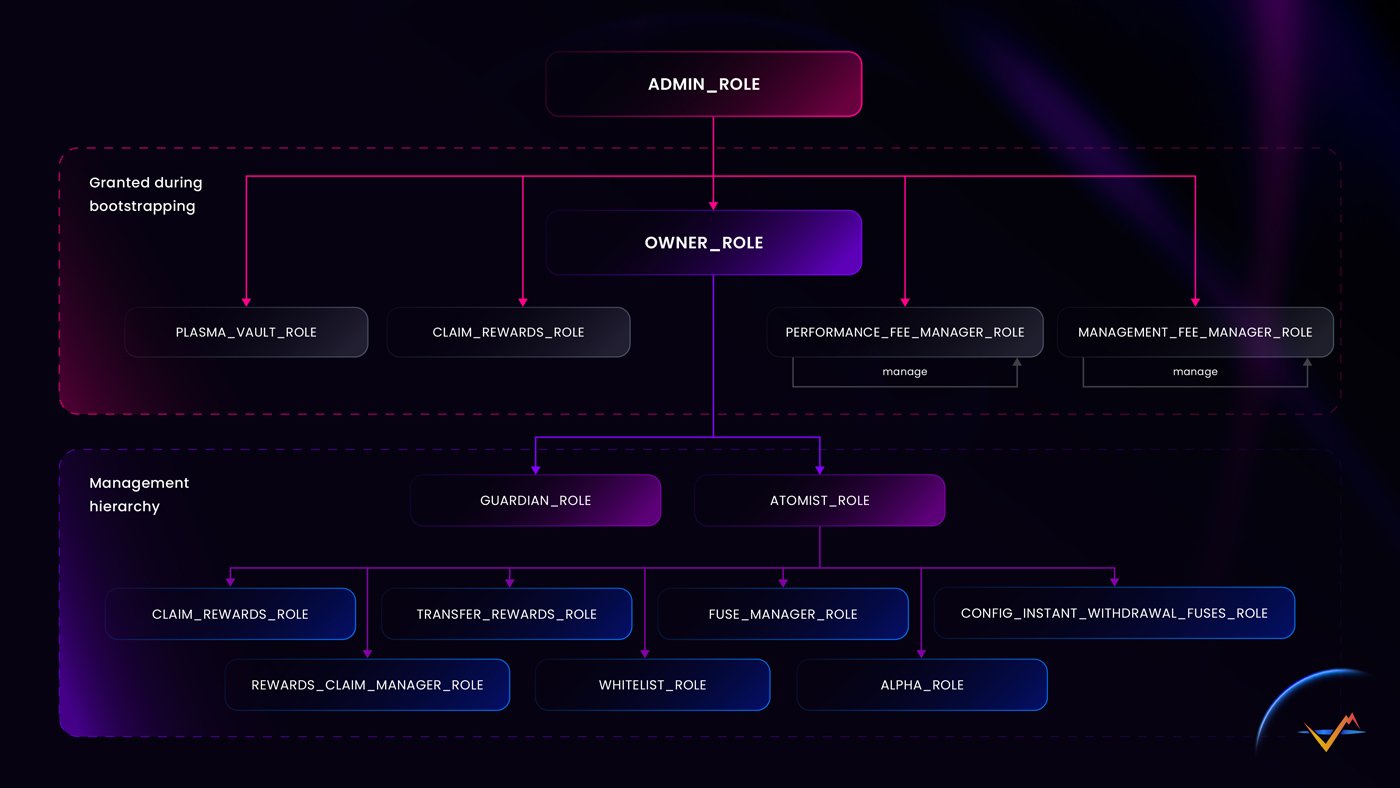
IPOR Fusion utilizes OpenZeppelin's AccessManager to restrict function access through a role-based system. The roles below are ordered from highest to lowest authority. (Developer note: The list of roles is available in the GitHub repository: <https://github.com/IPOR-Labs/ipor-fusion/blob/main/contracts/libraries/Roles.sol>)&#x20;

<figure><img src="/files/BR7RYOtHf0CGHnykapcf" alt=""><figcaption></figcaption></figure>

<figure><img src="https://images.gitbook.com/__img/dpr=2,width=760,onerror=redirect,format=auto,signature=384369813/https%3A%2F%2Fcontent.gitbook.com%2Fcontent%2Fr8w71un6csI2mPkvQqk9%2Fblobs%2FvAhGf3hhxzzbAnrGnR6J%2FChart-1.jpg" alt=""><figcaption></figcaption></figure>

## Grant Delays (The Waiting Room)

When [timelocks](/build-on-fusion/atomists/vault-configuration-step-by-step/timelocks-and-execution-delays) are enabled, adding a new account to an important role follows a strict procedure to prevent the sudden injection of foreign keys into governance.

When a new account is granted an important role, its membership does not activate immediately — it waits out that role's grant delay first (recommended: 14 days for `OWNER`, 3 days for the configuration tier). This closes the "inject a key into governance" path: even a grant that completes successfully produces an account that cannot act yet.

The rule itself is protected too. Changing a grant delay via `setGrantDelay` arms only after a hardcoded 5-day minimum setback (`minSetback`) — and reducing one takes the larger of 5 days and the size of the reduction. Nobody, including a legitimate administrator, can shorten the waiting room and walk a new key straight in. Note that grant delays are `ADMIN`-gated: they must be configured before `ADMIN` is renounced, or they become permanently unavailable.

*Developer Note:* Re-granting an existing member — for example raising their execution delay — is not subject to the grant delay. This is deliberate: it keeps hardening instantaneous.

## Admin Role

An account with this role has the rights to manage the IporFusionAccessManager in general. It is the highest role, capable of managing all roles including `ADMIN_ROLE` and `OWNER_ROLE`.

This is a technical role used during the bootstrapping phase of a vault. In a fully secured, timelocked vault deployment, the `ADMIN` role is ultimately **renounced**. *Note:* When a vault is created in supervised mode, the `ADMIN` role must be **manually renounced** (after making the `OWNER` self-administered) to remove the "skeleton key" that could override all security mechanisms instantly.

## Owner Role <a href="#owner-role" id="owner-role"></a>

The highest administrative role, defined during the vault's bootstrapping process. The account with this role has rights to manage Owners, Guardians, Atomists, and configure execution delays (timelocks).

* Self-managed (if `getRoleAdmin(OWNER) == OWNER`, the Owner can change itself to another Owner)
* Single user (recommended use of multisig for this role)

**Best practices**

* **14-Day Timelock:** The Owner role should be configured with a 14-day execution delay to ensure all top-level administrative changes are publicly visible well in advance.
* **Strict Key Separation:** Use a highly secure, dedicated multisig wallet. The accounts holding the Owner role must be strictly separated from accounts holding operational roles (like Atomist or Alpha) and must be completely distinct from Guardian keys.
* **Cold Wallet Usage:** Treat the Owner multisig effectively as a cold wallet used only for structural vault changes.

## Atomist Role <a href="#atomist-role" id="atomist-role"></a>

This role serves as the primary managing accounts for the vault, overseeing most day-to-day settings, such as configuring Fuse Managers, Alphas, fees, and other parameters.&#x20;

* Configurable by the Owner
* Allows multiple users

#### Best practices

* Use multiple Atomists to ensure redundancy.
* Apply timelocks to selected Atomist actions whenever feasible.

## Alpha <a href="#alpha-role" id="alpha-role"></a>

The account with this role has rights to execute the strategy on the vault using execute method, typically as an automated strategy manager.

* Configurable by the Atomist
* Allows multiple users

Depending on the level of automation, the following roles can be assigned to the same wallet managed by Alpha in the IPOR Fusion system:

### CONFIG\_INSTANT\_WITHDRAWAL\_FUSES\_ROLE (900)

This role configures fuses, such as credit market deposit fuses, to enable instant withdrawals, allowing liquidity providers (LPs) to withdraw assets from the vault immediately. The role holder defines the order of configured markets to ensure asset availability for LPs. A key requirement is that the market (a collection of fuses linked to an external platform) must be fully liquid from the vault’s perspective. If liquidity is used as collateral for borrowing, instant withdrawals could trigger liquidation, so such markets should not be used. For complex vault strategies involving adding or removing credit positions, assign this role to Alpha for efficiency. Alternatively, a dedicated address or Atomist can manage it.

#### Best Practices

* Ensure markets selected for instant withdrawals are highly liquid to avoid liquidation risks.
* Use timelocks for changes to fuse configurations to allow review by Guardians or LPs.

### WITHDRAW\_MANAGER\_REQUEST\_FEE\_ROLE (901)

This role sets the request fee, charged when an LP submits a withdrawal request from a scheduled withdrawal vault. The fee is applied at the time of the request, not redemption. For strategies with algorithmically adjusting fees, assign this role to Alpha. Alternatively, Atomists can manage it based on the vault’s strategy.

#### Best Practices

* Use a multisig wallet for managing this role to enhance security.
* Monitor fee adjustments to align with the vault’s strategy and LP expectations.

### WITHDRAW\_MANAGER\_WITHDRAW\_FEE\_ROLE (902)

This role sets the withdrawal fee, analogous to the request fee but charged during instant withdrawals.

#### Best Practices

* Align withdrawal fees with the vault’s operational strategy.
* Use a multisig wallet for secure management.

### UPDATE\_MARKETS\_BALANCES\_ROLE (1000)

This role manually updates cached market balances for deposits or withdrawals if automation (e.g., via pre-hooks) is not enabled. This is necessary for less active vaults to ensure accurate balance reporting. For efficiency, assign this role to an automated service.

#### Best Practices

* Automate balance updates with pre-hooks when possible to reduce manual intervention.
* Grant this role to a secure, automated service to ensure timely updates.

### UPDATE\_REWARDS\_BALANCE\_ROLE (1100)

Similar to the previous role, this role updates the balances of incentives claimable by the vault through the rewards manager. For automated workflows, assign this role to Alpha.

#### Best Practices

* Integrate with automated reward tracking systems to streamline updates.
* Use a secure wallet or service for this role to prevent unauthorized access.

### CLAIM\_REWARDS\_ROLE (600)

This role allows claiming rewards on behalf of the vault. For practical reasons, assign this role to Alpha to automate reward collection.

#### Best Practices

* Use a secure, automated system like Alpha to ensure timely reward claims.
* Monitor reward claims to verify correct distribution.

### TRANSFER\_REWARDS\_ROLE (700)

This role enables the transfer of claimed rewards to the rewards claim manager. In the IPOR Fusion Plasma Vault, reward management (e.g., selling, staking, or transferring) can be handled by a dedicated module. If no such module exists, Alpha can manage rewards manually. Assigning this role to Alpha allows it to transfer rewards to itself for processing.

#### Best Practices

* Use a dedicated rewards management module when available to streamline operations.

## Guardian Role

This role serves as the emergency brake for the vault. The Guardian has the authority to reject time-locked actions and to pause or unpause the vault in case of an emergency.

* Configurable by the Owner
* Allows for multiple users
* **Cannot be timelocked:** Guardians must always retain a 0-day execution delay to function as an instant emergency brake.

**Guardian Capabilities & Limitations:**

* **Veto Configuration Changes:** The Guardian can unilaterally cancel pending operational and configuration transactions scheduled by the Owner, Atomist, or Fuse Manager (any function gated through the access manager's target-function-role map).
* **Emergency Pause:** The Guardian can instantly pause the vault, freezing all execution actions (including user deposits and withdrawals).
* **LIMITATION - No Role Management Veto:** Crucially, role-management calls (`grantRole`, `revokeRole`, `setGrantDelay`) are OpenZeppelin admin functions. **Guardians CANNOT cancel these actions.** Only the scheduler themselves or an `ADMIN` can cancel role changes. For permission changes, the timelock provides a *detection-and-exit window* for depositors, not a Guardian veto.

#### **Best Practices**

* **Instant Reaction:** Guardians must hold a **0-day execution delay** so they can react instantly to emergencies.
* **Key Separation:** Guardian keys must be independent and separate from Owner keys. The emergency brake must fail independently of the roles it is meant to brake.
* **Monitoring is Mandatory:** Because Guardians cannot veto role changes, robust on-chain monitoring for `RoleGranted` and `RoleRevoked` events is required to alert depositors of unauthorized permission changes during the exit window.
* If using automated risk monitoring, consider granting the Guardian role to an emergency mechanism to enable automatic vault pausing.

## Fuse Manager Role <a href="#fuse-manager-role" id="fuse-manager-role"></a>

The account with this role has rights to manage the FuseManager contract, add or remove fuses, balance fuses and reward fuses.

* Configurable by the Atomist
* Allows for multiple users

#### Best Practices

* For a more decentralized setup, use a dedicated, time-locked account to manage fuses, as they impact the strategy.

## Claim Rewards Role <a href="#claim-rewards-role" id="claim-rewards-role"></a>

Account with this role has rights to claim rewards from the PlasmaVault using and interacting with the RewardsClaimManager contract.If PlasmaVault has a dedicated smart contract to handle the harvested rewards, the role should be granted to that contract.

* Configurable by the Atomist
* Allows for multiple users

## Transfer Rewards Role <a href="#transfer-rewards-role" id="transfer-rewards-role"></a>

An account with this role has rights to transfer rewards from the PlasmaVault to the RewardsClaimManager.If PlasmaVault has a dedicated smart contract to handle the harvested rewards, the role could be granted to that contract.

* Configurable by the Atomist
* Allows for multiple users

## Rewards Claim Manager Role <a href="#rewards-claim-manager-role" id="rewards-claim-manager-role"></a>

Technical role for the RewardsClaimManager contract. Account with this role has rights to claim rewards from the PlasmaVault. For practical reasons, it can be granted to the same entity holding either an Alpha or Atomist role.Configurable by the AtomistAllows for multiple usersPerformance Fee Manager RoleThe account with this role has rights to manage the performance fee, define the performance fee rate, and manage the performance fee recipient.Self managedAllows for multiple usersManagement Fee Manager RoleThe account with this role has rights to manage the management fee, define the management fee rate, and manage the management fee recipient.Self-managedAllows for multiple usersWhitelist RoleThe account with this role has rights to deposit/mint and withdraw/redeem assets from the Plasma Vault.Configurable by the AtomistAllows for multiple usersConfig Instant Withdrawal Fuses RoleAn account with this role has rights to configure instant withdrawal fuses order.

## Technical Roles (Must remain at 0-day delay)

Certain roles act as the internal plumbing of the IPOR Fusion system. These roles are held by system contracts (or automated keepers) and are essential for the fundamental operation of the vault.

Applying an execution delay (timelock) to any of these roles will break the vault's core mechanics. The following roles **must always remain at a 0-day execution delay** and should never have a minimal execution delay (floor) set:

* `TECH_PLASMA_VAULT` (3)
* `TECH_CONTEXT_MANAGER` (5)
* `TECH_WITHDRAW_MANAGER` (6)
* `TECH_VAULT_TRANSFER_SHARES` (7)
* `TECH_REWARDS_CLAIM` (601)
* `TECH_PERF_FEE` (400) and `TECH_MGMT_FEE` (500) *(Only when held by the internal FeeManager/plumbing on factory vaults. If held by governance, these require a 3-day delay).*

## **PreHooksManager** Role

As outlined in the [pre-hook configuration](/build-on-fusion/developer-guide/configuring-pre-hooks), all changes made by the PreHooksManager must be subject to a timelock. This delay allows liquidity providers (LPs) and other administrators to respond if pre-hooks are set incorrectly.

#### Best practices

* Implement a sufficiently long timelock for PreHooksManager actions.
* Use a multisig wallet to administer pre-hooks for enhanced security.

## **Whitelist / Open Vault**

By default, each new vault in the IPOR Fusion system is initialized with a whitelist, restricting minting and redeeming of shares to whitelisted addresses only. Atomists can add addresses to the whitelist or disable it entirely, making the vault open to all users. Once the whitelist is disabled, it cannot be re-enabled.

#### Best Practices

* Retain the whitelist during the testing period, even if you plan to open the vault to all users.
* Use a secure multisig wallet for Atomists managing the whitelist to enhance security.


# Timelocks and Execution Delays

This guide explains the conceptual model, governance rules, and operational safeguards of **timelocks (execution delays)** in IPOR Fusion.

## 1. Executive Summary: What is a Timelock?

A **timelock** (technically referred to as an **execution delay**) is a mandatory, onchain "cooling-off" period enforced between the time an administrative action is proposed and the time it actually takes effect on the blockchain.

In IPOR Fusion, no single administrative key can immediately alter critical vault parameters (such as changing performance fees, updating assets, or modifying Fuses) if a timelock is active. This design enforces complete transparency and provides a vital window for depositors and Guardians to react before any high-impact change is executed.

## 2. The Core Value Proposition

Timelocks are not meant to slow down routine operations, but rather to establish a robust line of defense for depositors and operators. They solve three primary security problems:

| **Risk Mitigated**       | **How Timelock Solves It**                                                                                                                                                                |
| ------------------------ | ----------------------------------------------------------------------------------------------------------------------------------------------------------------------------------------- |
| **Admin Key Compromise** | If an Atomist or Owner private key is stolen, the attacker cannot drain or hijack the vault instantly. They must schedule their malicious transaction, triggering public alerts.          |
| **Human Error**          | If an operator inputes an incorrect fee percentage (e.g., 50% instead of 5%), the mistake is caught while sitting in the queue and can be cancelled before execution.                     |
| **User Transparency**    | Depositors are never surprised by sudden policy shifts. If a vault owner increases performance fees, depositors have the entire timelock window to withdraw their funds if they disagree. |

## 3. The Three Shields of Vault Security

Timelocks turn governance from something that *can* happen instantly into something that *must* happen slowly and in the open. To achieve this, the system relies on three distinct defensive shields working together.

**Shield 1: The Notice Period (Execution Delay)** A protected role cannot act on the spot. It must publicly announce an operation and may carry it out only after its delay elapses (e.g., 14 days for the Owner, 3 days for the Atomist). The pending operation is visible on-chain throughout this period.

**Shield 2: The Waiting Room (Grant Delay)** When a new account is granted an important role, its membership does not activate immediately — it waits out that role's grant delay first (recommended: 14 days for `OWNER`, 3 days for the configuration tier). This closes the "inject a key into governance" path: even a grant that completes successfully produces an account that cannot act yet.

The rule itself is protected too. Changing a grant delay via `setGrantDelay` arms only after a hardcoded 5-day minimum setback — and reducing one takes the larger of 5 days and the size of the reduction. Nobody, including a legitimate administrator, can shorten the waiting room and walk a new key straight in. Note that grant delays are `ADMIN`-gated: they must be configured before `ADMIN` is renounced, or they become permanently unavailable.

Re-granting an existing member — for example raising their execution delay — is not subject to the grant delay. This is deliberate: it keeps hardening instantaneous.

**Shield 3: The Minimum Threshold (Floors)** Without a minimum threshold, a timelock could theoretically be bypassed in minutes by removing a role and granting it back with a zero-day waiting period. The Access Manager prevents this by enforcing a hard floor (a minimum execution delay) for critical roles. The contract will reject any attempt to grant a role with a delay shorter than its established floor. Crucially, lowering this floor is itself an Owner action, meaning it also requires a 14-day public notice.

*Developer Note:* Setting a floor is **not retroactive**. It constrains future grants only. If an account already holds a role, setting a new floor does not increase their current delay. To apply the new floor to existing accounts, they must be explicitly re-granted their roles.

> **The Golden Rule:** Tightening security is fast; loosening security is slow. Raising any protection (e.g., increasing a delay) takes effect immediately, allowing a vault to be hardened the moment a problem is suspected. Conversely, every weakening of security is visible long before it lands.

## 4. Timelock Levels and Configuration

Timelocks are highly granular and can be configured at two distinct levels to fit your organization's security posture:

### A. Account-Role Level (Individual Delays)

You can apply different timelock durations to different accounts, even if they hold the exact same administrative role.

* **Operational Example**: A vault owner might grant the Atomist role to a **multi-signature cold wallet** with a &#x30;**-second delay** (for rapid emergency adjustments), while granting the same Atomist role to a **single-signature hot wallet** or automated keeper with a &#x32;**-day delay** for routine rebalancing.

### B. Minimal Role Delay (The Safety Floor)

To prevent key administrators from overriding security thresholds, the system supports a "Minimal Role Delay". Once set, no account can be granted that specific role with a delay lower than the established floor.

* **Operational Example**: If the Minimal Role Delay for the Atomist role is set to 1 day, any attempt by a compromised Owner account to grant an instant, 0-day Atomist role will be automatically rejected by the access manager.

## 5. Who Can Set, Edit, and Remove Timelocks?

The editing and removal of timelocks is governed by the **Role Admin Hierarchy**. Under this model, only the designated "Admin" of a specific role has the authority to grant that role or modify its execution delay:

```
                             ┌───────┐
                             │ Admin │
      ┌──────────────────────┐◄──────┘
      │      OWNER ROLE      │
      └──────────┬───────────┘
                 │ Admin of
                 │
                 ├──────────────────────────────────────┐
                 ▼                   ▼                  ▼
┌─────────────────┐ ┌─────────────────┐ ┌──────────────────┐
│  ATOMIST ROLE   │ │  GUARDIAN ROLE  │ │ PRE HOOKS ROLE   │
└────────┬────────┘ └─────────────────┘ └──────────────────┘
         │ Admin of
         ├───────────────────┐
         ▼                   ▼
┌─────────────────┐ ┌─────────────────┐
│   ALPHA ROLE    │ │FUSE MANAGER ROLE│
└─────────────────┘ └─────────────────┘
```

* **Owners Only**: The Owner administers the Atomist and Guardian . Only Owners can set, edit, or remove timelocks on Atomists or Guardians.
* **Atomists Only**: The Atomist administers operational roles like Alpha or Fuse Manager. Only the Atomists can configure timelocks for those roles.
* **Self-Governance**: The Owner role is self-administered. Only existing Owner accounts can modify the delay settings of other Owner accounts.

## 6. The "Admin Timelock" Constraint

A common security vulnerability in DeFi occurs when an administrator with a timelock simply uses their admin power to change their own timelock to 0 seconds, bypassing the safety window.

IPOR Fusion closes this loophole using **Self-Referential Security**:

> **Rule**: Administrators are strictly bound by their own timelocks.

If a vault Owner is subject to a 14-day timelock (which is the strictly recommended default for this role), they cannot instantly change their own timelock or the timelock of any other user. Any attempt to modify a timelock, grant a role, or change minimal role delays must itself be scheduled as a proposed transaction and wait out the 14-day cooling-off period before taking effect.

## 7. The Guardian: The Emergency Brake

While a timelock prevents malicious changes from occurring instantly, it is only effective if there is a mechanism to stop a malicious transaction while it sits in the queue. This is the responsibility of the [**Guardian**](/build-on-fusion/atomists/vault-configuration-step-by-step/access-management#guardian-role).

The Guardian acts as the vault’s emergency security sentinel:

* **The Sentinel Power**: Guardians have the unilateral authority to **cancel** any pending scheduled operational and configuration transaction in the access manager's queue.
* **Instant Cancellation**: Guardians are granted roles with a &#x30;**-day delay**, enabling them to intervene instantly.
* **Safety Isolation**: Guardians can *only* cancel pending actions; they cannot schedule new administrative configurations or authorize movements of capital.

If a monitoring bot or offline cold wallet detects an unauthorized transaction in the queue, the Guardian executes a cancellation. The malicious transaction is instantly deleted, and the compromised key is rendered harmless while the operators coordinate a key rotation.

## 8. Enabling Timelocks on an Existing Vault (High-Level)

Activating timelocks is a configuration change, not a redeployment. No funds move, no migration is required, and the vault keeps operating normally throughout the process.

Before enabling timelocks, the Vault Owner must make several key decisions:

* **Owner Notice Period:** Starting at 14 days is the recommended default. Raising a delay is always immediate, so starting lower and tightening later costs nothing, but lowering it takes time.
* **Guardian Line-up:** Guardians may be individual keys held by people who react within hours. They may also be third-party security providers. Providers that monitor the mempool can react within the same block. Guardians should hold no other role, and their keys must be strictly separate from the Owner's keys.
* **Key Separation:** The Owner should operate via a dedicated multisig that is rarely used (effectively a cold wallet). Timelocks protect against rushed malicious actions; they do not protect against a stolen key. Separation limits the damage if a single key is compromised.
* **Monitoring:** Someone must actively watch for on-chain alerts (`RoleGranted`, `OperationScheduled`) and know how to respond. Without active monitoring, the 3-day and 14-day notice windows provide no actual protection.
* **Re-granting is Required:** Remember that simply setting minimum thresholds (floors) does not magically update the delays of accounts that already hold those roles. During setup, every existing account must be explicitly re-granted its role to apply the target execution delay.

## 9. Frequently Asked Questions (FAQ)

**Are everyday user operations delayed by timelocks?** No. Everyday operations such as deposits, withdrawals, and redemptions remain immediate. Timelocks govern rule changes and administrative parameters, not user activity.

**Can a change be announced and then quietly executed much later?** No. An announced operation expires 7 days after its earliest execution date. If it is not carried out within that execution window, it lapses entirely. The whole announcement process must then be restarted from scratch.

**Why does the automated Alpha (Keeper) operator have no timelock?** The Alpha operator is fast *because* it is strictly boxed in by rules that only the slow roles can change. It moves funds only within the limits, substrates, and protocols explicitly pre-approved by the Atomist and Fuse Manager. Delaying the Alpha would break daily rebalancing and yield harvesting without adding protection, as the dangerous power lies in changing the boundaries, not operating within them.

**What happens if Guardians pause a vault?** The emergency pause is a full freeze. It halts all execution actions, including user deposits and withdrawals. It is designed as an emergency brake for genuine incidents, not a convenience switch, and it is lifted once the situation is resolved.

**What stops an attacker from removing a role and re-granting it instantly?** The Minimum Threshold (Shield 3). The contract rejects any grant below the established floor. Lowering that floor first costs the Owner their own 14-day notice period, in plain sight.


# Timelocks and Execution Delays: Developer Reference

This document provides a deep technical breakdown of the implementation, contract interactions, state machine, and programmatic execution of timelocks within the IPOR Fusion protocol. It is intended for smart contract engineers, audit teams, and automation developers. For high-level conceptual guidance, refer to the [Curator Manual](/build-on-fusion/atomists/vault-configuration-step-by-step/timelocks-and-execution-delays).

## 1. Smart Contract Architecture

The timelock framework in IPOR Fusion is built natively into `IporFusionAccessManager`, which extends and customizes OpenZeppelin's `AccessManager` contract.

Every restricted function across the IPOR Fusion ecosystem (including `PlasmaVault`, `PlasmaVaultGovernance`, and market connectors) is decorated with the `onlyAuthorized` modifier. This modifier queries the `IporFusionAccessManager` to verify if the caller is authorized and whether they must satisfy an execution delay.

## 2. The Transaction Lifecycle State Machine

A scheduled operation transitions through four distinct state phases inside `IporFusionAccessManager`:

```
          ┌──────────────┐
          │    Unset     │
          └──────┬───────┘
                 │ schedule() called
                 ▼
          ┌──────────────┐
          │   Pending    │ ◄─── block.timestamp < scheduledTime
          └──────┬───────┘
                 │ block.timestamp >= scheduledTime
                 ▼
          ┌──────────────┐
          │    Ready     │ ─── cancel() called ──► [ Unset ]
          └──────┬───────┘
                 │ execute() called
                 ▼
          ┌──────────────┐
          │   Executed   │ (Removed from state / closed)
          └──────────────┘

```

The execution lifecycle of a delayed operation is mathematically bounded by:

$$T\_{scheduled} = T\_{proposal} + D\_{delay}$$

Where:

* $$T\_{proposal}$$ is the block timestamp when `schedule()` is transactionally processed.
* $$D\_{delay}$$ is the configured `executionDelay` of the calling account-role pairing.
* $$T\_{scheduled}$$ is the earliest timestamp at which `execute()` can successfully resolve.

## 3. Operation Hashing & Identification

Every scheduled transaction is tracked using a unique `bytes32` digest called the `operationId`. The `operationId` is computed by hashing the components of the execution target:

$$\text{operationId} = \text{keccak256}(\text{abi.encode}(caller, target, data))$$

Where:

* `caller`: The address initiating the action.
* `target`: The address of the destination contract being called.
* `data`: The exact encoded execution calldata (function selector + parameters).

This hashing mechanism guarantees that an authorized account can only execute the **exact** payload that was originally audited and scheduled. Any alteration to the calldata parameters will result in a completely different `operationId` and fail verification.

## 4. Programmatic Administration: Set, Edit, and Remove

Developers can programmatically manage individual timelocks or set system floors through the access manager's admin interface. Because these actions are protected, they are subject to any execution delays assigned to the administrator address itself.

### A. Setting or Editing an Individual Delay

To set or edit a delay on a specific account, call `grantRole` with the target `executionDelay`:

```
function grantRole(
    uint64 roleId, 
    address account, 
    uint32 executionDelay
) external;
```

* **Behavior**:
  * If the account does not yet possess `roleId`, the role is granted with the specified `executionDelay`.
  * If the account already possesses `roleId`, calling this updates their individual execution delay to the new value.
  * **Emits**: `RoleGranted(roleId, account, executionDelay, newMember)`

### B. Removing an Individual Timelock

To remove a timelock entirely (enabling instant execution), grant the role with a delay of `0`:

```
accessManager.grantRole(Roles.ATOMIST_ROLE, operatorAddress, 0);
```

* **Result**: `operatorAddress` can now directly call Atomist functions on target contracts without going through the `schedule()` workflow.

### C. Restricting Bypasses via Minimal Role Delays

To establish a global safety floor that prevents any administrator from granting zero-delay configurations, set a minimal delay floor:

```
function setMinimalExecutionDelaysForRoles(
    uint64[] calldata roleIds, 
    uint32[] calldata delays
) external;
```

* **Validation**: Once configured, any subsequent call to `grantRole()` that attempts to set an `executionDelay` lower than the registered floor will transactionally revert with the custom error `TooShortExecutionDelayForRole(roleId, executionDelay)`.
* **Emits**: `MinimalExecutionDelaySet(roleId, delay)` per updated role.

## 5. Technical API Reference

### A. Scheduling an Operation

To propose a transaction when subject to a timelock, an account must invoke `schedule`:

```
function schedule(
    address target, 
    bytes calldata data, 
    uint48 when
) external returns (bytes32 operationId, uint32 delay);

```

* **Parameters**:
  * `target`: The destination contract address.
  * `data`: The full encoded payload of the transaction to execute.
  * `when`: The intended execution timestamp. This value must be equal to or greater than $$block.timestamp + D\_{delay}$$.
* **Returns**:
  * `operationId`: The unique cryptographic hash identifying the proposal.
  * `delay`: The exact delay (in seconds) that must elapse before execution.

### B. Executing a Scheduled Operation

Once the delay period has passed, any account can trigger the execution of the scheduled operation by calling `execute`:

```
function execute(
    address target, 
    bytes calldata data
) external payable returns (bytes memory);

```

* **Execution Constraints**:
  * Reverts with `AccessManagerNotReady(operationId)` if $$block.timestamp < T\_{scheduled}$$.
  * Reverts with `AccessManagerExpired(operationId)` if the current time exceeds the expiration threshold ($$T\_{scheduled} + \text{PERIOD\_OF\_GRACE}$$, where the standard Grace Period is typically $$5\text{ days}$$).
  * Executes the payload using a low-level solidity `call`. If the target reverts, `execute` bubbles up the revert data.

### C. Cancelling an Operation

Authorized role administrators or accounts holding the `GUARDIAN_ROLE` can wipe a pending operation from state:

```
function cancel(
    address target, 
    bytes calldata data
) external returns (uint32);
```

* **Behavior**: Clears the execution timestamp of the `operationId` from the storage mapping, reverting its status to `Unset`. A cancelled operation can never be executed. To run the transaction again, it must be scheduled anew.
* **Security Guard (Cancel Semantics)**: `AM.cancel` succeeds only for the **scheduler**, a member of the `ADMIN_ROLE`, or a member of the role returned by `getRoleGuardian(getTargetFunctionRole(target, selector))`.
* **CRITICAL LIMITATION**: This creates two distinct behaviors in the Fusion Access Manager:
  * **Vault Configuration Targets (Cancelable):** For functions on the Vault (e.g., `addFuses`), initialization assigns `GUARDIAN` as the role guardian in the function mapping. Thus, Guardians **can** cancel these.
  * **Access Manager Targets (Not Cancelable by Guardian):** Role management calls (`grantRole`, `revokeRole`, `setGrantDelay`) are targeted at the Access Manager itself. These selectors are not in the custom function mapping, so `getTargetFunctionRole` returns the default OpenZeppelin `ADMIN_ROLE`, whose role guardian is unset.
  * *Conclusion:* Once `ADMIN` is renounced, a scheduled permission change can be cancelled **only by the account that scheduled it**.

### D. Enforcing Safety Floors

The access manager supports establishing minimum execution delays on a per-role basis to prevent administrative oversight or fast-path exploit pathing:

```
function setMinimalExecutionDelaysForRoles(
    uint64[] calldata roleIds, 
    uint32[] calldata delays
) external;

```

* **Constraints**:
  * `roleIds` and `delays` arrays must match in length.
  * Once configured, calling `grantRole()` with an execution delay below the specified floor will revert.

## 6. Security Architecture Notes

#### Self-Referential Timelocks (Admin Constraint)

The administrative capabilities of the `IporFusionAccessManager` are completely governed by its own permission rules. If an administrative account (e.g., `OWNER_ROLE`) has an individual delay, it is strictly bound by that delay when performing administrative actions:

```
// This call will fail if the owner attempts immediate execution:
accessManager.grantRole(Roles.ATOMIST_ROLE, newAtomist, 0);

// Instead, the delayed owner MUST call:
accessManager.schedule(
    address(accessManager),
    abi.encodeWithSelector(accessManager.grantRole.selector, Roles.ATOMIST_ROLE, newAtomist, 0),
    block.timestamp + ownerDelay
);

```

#### Reentrancy & Context Preservation

* To prevent exploitation of state checks, `execute()` implements a reentrancy guard or execution lock during the execution of the call.
* The access manager preserves the execution context using `msg.sender` routing. When a target contract receives a call, it verifies that `msg.sender` is the `IporFusionAccessManager` address, and reads the originating caller context.

## 7. Code Examples & Scripts

#### Scenario: Programmatic Scheduling and Execution of a Performance Fee Update

Below is a hardhat/ethers-style script demonstrating how an automation bot or multisig relayer interacts with the timelocked workflow to update performance fees on a `PlasmaVault` via `PlasmaVaultGovernance`.

```
import { ethers } from "hardhat";

async function main() {
  const [operator] = await ethers.getSigners();

  // Addresses of deployed contracts
  const accessManagerAddress = "0x...AccessManagerAddress";
  const governanceAddress = "0x...PlasmaVaultGovernanceAddress";
  const vaultAddress = "0x...PlasmaVaultAddress";

  // Get contract instances
  const accessManager = await ethers.getContractAt("IporFusionAccessManager", accessManagerAddress);
  const governance = await ethers.getContractAt("PlasmaVaultGovernance", governanceAddress);

  // 1. Prepare the exact calldata payload for the target execution
  const feeAccount = "0x...FeeCollectorAddress";
  const performanceFeeBasisPoints = 1500; // 15.00% performance fee
  
  const targetCalldata = governance.interface.encodeFunctionData("configurePerformanceFee", [
    vaultAddress,
    performanceFeeBasisPoints
  ]);

  console.log("Preparing to schedule fee update...");

  // 2. Fetch the current execution delay of the operator for this role
  const executionDelay = await accessManager.getExecutionDelay(operator.address);
  const blockNumber = await ethers.provider.getBlockNumber();
  const currentBlock = await ethers.provider.getBlock(blockNumber);
  const executionTime = currentBlock.timestamp + Number(executionDelay);

  // 3. Schedule the transaction
  const scheduleTx = await accessManager.schedule(
    governanceAddress,
    targetCalldata,
    executionTime
  );
  const receipt = await scheduleTx.wait();

  // Extract the operationId from the Scheduled event
  const event = receipt.events?.find((e) => e.event === "OperationScheduled");
  const operationId = event?.args?.operationId;
  console.log(`Successfully scheduled. Operation ID: ${operationId}`);
  console.log(`Execution is locked until block timestamp: ${executionTime}`);

  // 4. Fast-forward simulation (Wait Phase)
  // In a real environment, you would wait executionDelay seconds.
  // In tests, you can fast-forward the EVM:
  // await ethers.provider.send("evm_increaseTime", [Number(executionDelay)]);
  // await ethers.provider.send("evm_mine", []);

  // 5. Execute the transaction after the delay has passed
  console.log("Execution delay satisfied. Initiating execution...");
  const executeTx = await accessManager.execute(
    governanceAddress,
    targetCalldata
  );
  await executeTx.wait();
  console.log("Fee configuration successfully executed!");
}

main()
  .then(() => process.exit(0))
  .catch((error) => {
    console.error(error);
    process.exit(1);
  });

```

## 8. Enabling Timelocks: Canonical Call Order

Enabling timelocks on an existing vault is a sequence of permission updates on the existing `IporFusionAccessManager`. No funds move and no redeployment is required.

**Batch vs. Step-by-Step Execution:** Executing all calls atomically in a single batch (via a governance multisig) is highly recommended. A wrong order in a batch reverts everything harmlessly. If executing sequentially, you must finish everything a role must do *before* raising that role's delay, otherwise you lock the remainder of your setup sequence behind the timelock you just created.

The **canonical call order** is load-bearing and must be executed as follows:

1. **Guardians:** `grantRole(2, <account>, 0)` for each new guardian, then `revokeRole(2, <old key>)`. Do this first as they are the emergency brake.
2. **Migration (if needed):** Grant every governance role to the target multisig at a `0` delay (raised later). Revoke the old account afterwards (with `ATOMIST` last, since it administers other roles).
3. **Grant Delays:** While `ADMIN` still has members, call `setGrantDelay` (e.g., `14 days` for `ADMIN`/`OWNER`, `3 days` for governance tier). Note: These arm only at T+5 days due to the OpenZeppelin 5-day `minSetback`.
4. **Floors:** Call `setMinimalExecutionDelaysForRoles` on the vault (e.g., 14 days for `OWNER`, 3 days for `ATOMIST` and `FUSE_MANAGER`).
5. **Re-grants (CRITICAL):** Setting a floor is **not retroactive**. It does not magically update the delays of accounts that already hold those roles. Every existing membership must be explicitly re-granted its role to apply the target delay, bottom-up (3-day tier first, then `ATOMIST`, then `OWNER` at 14 days). Raising delays takes effect immediately.
6. **Self-Admin and Renounce:** Call `setRoleAdmin(1, 1)` to repoint the admin of `OWNER` to `OWNER` itself. Finally, call `renounceRole(0, <account>)` as the **final call**.

*Developer Note:* Never renounce `ADMIN` without repointing `OWNER` first, or `OWNER` membership and delays will freeze permanently.

## 9. Layout Variants and Post-Execution Verification

Because the entire configuration lives onchain, the timelock state must be verified post-execution.

**Layout Variants**

Depending on when the vault was deployed, the starting state dictates the available protections:

* **Factory (Current):** `ADMIN` has no members, and `OWNER` is already self-administered. The rollout skips grant delays and the renounce steps.
* **Legacy (Live ADMIN):** Governance multisig holds `ADMIN`. Requires the full sequence including `setGrantDelay` and renouncing.
* **Legacy (Dead ADMIN):** `ADMIN` is renounced, but `getRoleAdmin(OWNER) == ADMIN`. *Warning:* This offers partial protection. The `OWNER` delay can never be raised and grant delays are unreachable. The complete fix requires migrating to a new vault.


# Vault Governance & Depositor-Led Security Best Practices

## 1. Introduction: The Mechanics of Decentralized Checks and Balances

The IPOR Fusion architecture uses a system of complementary, interlocking roles and optional, structured timelocks to achieve checks and balances. While the system defines an **Owner** role with top-level administrative privileges, this power can be dynamically restricted, which is the primary focus of this document. In a fully secured deployment, the Owner's authority is bounded by temporal barriers and defensive mechanisms, preventing any single administrative entity from acting unilaterally or compromising depositor assets.

Restricting and balancing this administrative power to protect depositors is the primary objective of the governance framework detailed in this document. Operational and protective power is distributed across the following roles:

* **Owner**: The primary administrative authority in the system. The Owner governs the access control manager, dictates which accounts hold administrative roles, and configures the execution delays (timelocks) for other roles. Crucially, the Owner's constructive actions can be restricted by the Guardian and configured temporal parameters, ensuring they cannot bypass the system's checks and balances.
* **Atomist**: The primary risk and configuration manager. Operating under the oversight of the Owner, the Atomist manages economic and risk boundaries. The Atomist configures price oracle middleware, sets overall supply caps, and dictates market allocation limits. To maintain a strict separation of concerns, the Atomist does not manage technical integration parameters such as substrates or fuses.
* **Fuse Manager**: The specialized technical integration manager. Operating under the oversight of the Atomist, the Fuse Manager is dedicated strictly to protocol integrations. The Fuse Manager manages which operation fuses (e.g., supply, borrow, or swap) are supported by the vault, attaches position-tracking balance fuses to specific market IDs, configures callback handlers, and manages market substrates (allowed assets, pools, and positions).
* **Alpha**: The strategic executor. Operating with maximum agility, the Alpha is responsible for active capital routing. Using only the whitelisted fuses, substrates, and parameters configured by the Fuse Manager, the Alpha routes capital across DeFi protocols in real-time to harvest yield.
* **Guardian**: The emergency protective backstop. The Guardian is purely defensive. It cannot execute strategies or alter configurations, but it can instantly trigger global contract pauses or veto pending, time-locked operational and configuration transactions scheduled by other roles.
* **Pre Hooks Manager**: The technical authority over pre-execution validation checks. Configures which pre-hooks (e.g., rate limiters, validation checks) execute before specific target functions to enforce strict safety boundaries.
* **Withdraw Manager Request Fee**: A technical role dedicated to configuring the fee rates charged to depositors when scheduling a withdrawal request.
* **Withdraw Manager Withdraw Fee**: A technical role dedicated to configuring and adjusting the fee rate charged to users withdrawing directly from unallocated balances.
* **Price Oracle Middleware Manager**: Manages price validation thresholds and maps individual assets to their respective oracle price feeds, ensuring the oracle middleware returns accurate valuation data.

### 1.1 Temporal Segregation: Optional Roles and Execution Delays

The fundamental mechanism of checks and balances in IPOR Fusion relies on *configurable, optional* execution delays (timelocks). By default, the access control manager allows for immediate, zero-delay execution of administrative and operational actions. However, deploying vaults with non-zero execution delays is a recommended security best practice for decentralized setups.

When configured, if the Owner, Atomist, or Fuse Manager initiates a change — such as updating fee parameters, setting market limits, or granting new substrates or removing a balance fuse — the access control manager enforces a mandatory temporal buffer.

During this delay, the proposed action sits in a transparent, pending state onchain. This structural delay serves a vital purpose: it gives the defensive Guardian role a reliable window to analyze the pending transaction. If the proposed change is malicious, accidental, or the result of a key compromise, the Guardian can execute an instant, zero-delay veto to cancel the operational and configuration transaction.

### 1.2 Strategic Agility vs. Structural Guardrails

Capital efficiency is highly dependent on the speed at which a vault can react to shifting market conditions. If a vault must wait days for a governance vote to exit a protocol when yields collapse, it suffers significant opportunity costs.

Fusion resolves the tension between responsiveness and safety by separating **structural vault management** from **active strategy execution**:

* **Capital Security** is maintained because the structural parameters of the vault—governed by the Owner, Atomist, and Fuse Manager—can be bound by configured timelocks. When activated, these parameters cannot be altered instantly, giving depositors a reliable window to evaluate changes or withdraw their funds.
* **Operational Responsiveness** is maintained because the Alpha role operates with a zero-delay timelock. As long as the Alpha's actions conform to the pre-approved, strictly bounded "sandbox" defined by the enabled fuses, whitelisted substrates, and market limits, strategy execution occurs at block speed.

#### 1.3 Tailoring Parameters to Depositor Coordination Dynamics

The optimal balance of parameters is determined by the depositor profile and vault access model, which dictates the coordination capacity of the participants:

* **Open Public Vaults**: These vaults are permissionless and open to a fragmented, uncoordinated depositor base. Because especially retail depositors face high coordination hurdles, they cannot easily organize a rapid veto or collective exit on short notice. Consequently, these setups highly benefit from configured, long timelocks on constructive administrative actions to guarantee depositors a reliable exit window before changes take effect.
* **Closed Institutional (Whitelisted) Vaults**: These vaults restrict entry to a pre-whitelisted, highly sophisticated set of large-ticket depositors. These depositors have direct communication channels and high coordination capacity and these vaults can securely operate with zero-delay or very short timelock profiles to maximize operational agility and market responsiveness.

## 2. Aragon Depositor DAO: Institutionalizing Depositor Power

To give depositors a direct voice, we recommend establishing an external Depositor DAO. While optional and not natively built into the core smart contracts, introducing an external Depositor DAO is a powerful best practice. [Aragon](https://aragon.org/) is one popular protocol that enables this, and we use it throughout this document as our running example. Membership and voting power in this Aragon-based Depositor DAO are natively tied to the vault's share tokens (minted by the vault upon deposit).

### 2.1 Aragon DAO as the Vault's Guardian

The Aragon DAO is granted the Guardian role in the access control manager. This role serves as the vault’s primary security veto and emergency circuit breaker.

**Guardian Capabilities:**

* **Veto and Cancellation**: The Guardian can cancel the Owner's operational and configuration transactions during their timelock (any function gated through the access manager's target-function-role map). Role-management calls (`grantRole` / `revokeRole`) are OpenZeppelin admin functions and are NOT guardian-cancellable — only the scheduler or an `ADMIN` can cancel those.
* **Emergency Pausing**: In the event of a suspected exploit or key compromise, the Aragon DAO can instantly pause target contracts, freezing all execution actions.

**Limits of the Guardian:** The Guardian is an emergency backstop for operational actions and pausing. It is not a defense against a compromised Owner's role escalation: it cannot cancel role grants/revocations and can itself be removed by the Owner. Defending against Owner compromise relies on (a) making the Owner a multisig with an execution delay, (b) the depositor exit window during timelocks, and — for a hard on-chain veto — (c) retaining a trusted `ADMIN` (via `cloneSupervised`) rather than renouncing it. Note that `grantDelay` is not configurable after `ADMIN` is renounced.

### 2.2 Voting Safeguards and Composability

Because the Guardian role holds these critical emergency powers, securing the underlying voting mechanism is paramount. Using live token balances for onchain voting creates a severe vulnerability where capital can be temporarily acquired or borrowed (e.g., via flash loans) to force malicious proposals through governance.

**The Solution: Checkpointed Voting**

To defend against this, the core token framework natively routes voting-related queries to an active votes plugin if enabled, implementing the following safeguards and trade-offs:

* **Historical Checkpoints:** The Aragon DAO must be configured with a voting plugin that queries historical votes at a snapshot checkpoint (e.g., the state of balances before the proposal was submitted) rather than the active, live state.
* **DeFi Composability Trade-offs:** While delegation allows passive depositors to assign their voting rights, it does not solve the challenges of deep DeFi composability. If vault shares are deposited into an external protocol (e.g., as collateral), the external contract becomes the token holder of record. Because checkpointing snapshots the contract's aggregate balance, the original depositor loses their voting power unless the external protocol implements bespoke delegation logic.
* **Future-Proofing for Composability:** Currently, IPOR Fusion vault shares are primarily held directly by depositors, making standard checkpointing highly functional. However, if deep composability becomes a priority as the ecosystem matures, token-level checkpointing can be bypassed entirely. For instance, using an Aragon **LockToVote** plugin, users would simply lock their shares in a dedicated voting contract to acquire voting power, ensuring governance scales seamlessly with external DeFi integrations.

## 3. Preserving the Balance of Power (Anti-Subversion)

A common flaw in standard role hierarchies is that the Owner role retains the right to unilaterally revoke roles, which would allow a compromised or malicious owner to strip the Aragon DAO of its Guardian role. Timelocks make an Owner's actions — including revoking the Guardian — visible on-chain during the delay, but they do not let the Guardian veto them. The Owner is the admin of the Guardian role and can remove it after the delay; the Guardian cannot cancel its own removal. Timelocks provide detection and a depositor exit window, not a Guardian veto over role management.

### 3.1 Optional Timelocks as an Exit Window

Any administrative action initiated by the Owner (such as granting or revoking roles) can be subjected to an optional, long-duration execution delay (e.g., 14 days) configured via the access control manager.

* **The Detection Window**: If a malicious Owner attempts to revoke the Aragon DAO's Guardian role, and a timelock is active, the transaction must be scheduled first.
* **The Reaction**: During this delay the Aragon DAO can detect the pending revocation on-chain. It cannot cancel it as the Guardian — `revokeRole` is an admin function, cancelable only by the scheduler or an `ADMIN` — but the delay guarantees a rage-quit / exit window: depositors (and the DAO) can redeem before the Guardian is removed. If an onchain veto of this action is required, the DAO must retain `ADMIN` (deploy via `cloneSupervised`), not merely hold the Guardian role.

### 3.2 Graded Timelocks for Centralized and Decentralized Owners

Depending on the operational model and depositor base of the vault, the Owner role can be securely assigned in one of two configurations, aligning execution delays directly with the coordination profile of the participating entities:

1. **Decentralized Institutional MultiSig (Short or 0-Day Timelock) — Ideal for Closed Institutional Vaults**: The Owner role can be assigned to a highly decentralized, multi-institutional MultiSig consisting of a threshold of 4/6 or 5/8 keys consisting of e.g.:

   * Core vault developers (2 keys).
   * Independent, highly reputable partner protocols or DAOs (2 keys).
   * Professional third-party custodians or security firms (2 keys).

   Because this configuration distributes key management among independent, highly reputable entities, the risk of a single-party exploit, key compromise, or collusive attack is virtually non-existent. Under this setup, the Owner role can operate with a 0-day timelock, allowing for rapid administrative reactions and maximum responsiveness when market conditions pivot.
2. **Economic Owner / Asset Manager (Optional Long Timelock) — Ideal for Retail-Focused Public Vaults**:

   Alternatively, the vault's economic owner (the core asset manager or developer team) may choose to retain direct administrative control of the Owner role (e.g., via their own team MultiSig or EOA keys) to ensure operational independence.<br>

   If this centralized approach is taken, binding the Owner role with a long execution timelock (e.g., 14 days) is highly recommended. This timelock ensures that any administrative change proposed by the team is visible onchain for a substantial period, giving the Aragon Depositor DAO (acting as the Guardian) a clear veto window to spot and cancel operational transactions or utilize the exit window before role changes are executed.

### 3.3 Optional Co-Ownership and Rage-Quit Guarantees

The real protection against a malicious Owner or Atomist relies on a combination of factors: a decentralized MultiSig Owner, a long timelock ensuring detection, and a guaranteed rage-quit exit window for depositors. For absolute worst-case protection and a true on-chain veto, the Aragon DAO must either retain the `ADMIN` role (via `cloneSupervised`) or be configured as an additional Owner.

If this administrative configuration is used, the Aragon DAO's Owner actions can be subjected to a long execution timelock (e.g., 21 to 30 days) to prevent coordination issues or sudden governance takeovers. This optional long timelock provides several fundamental security and game-theoretic advantages:

1. **Defense Against Hostile Takeovers and Capital Accumulation**:

   While checkpointed voting prevents instantaneous flash loan exploits, it does not prevent a wealthy hostile entity from gradually purchasing a large volume of vault shares on the open market. If this entity accumulates a majority voting share (greater than 50%), they could pass a malicious DAO proposal to alter critical vault parameters or redirect fees. A long timelock (21 to 30 days) forces any approved proposal to sit in a pending state, giving the core development team, partner protocols, and remaining depositors ample time to detect the hostile takeover and coordinate a counter-strategy.
2. **Ensuring a Minority Exit (Rage-Quit) Window Tailored to Depositor Coordination Dynamics**:

   In decentralized systems, a voting majority may choose to steer the protocol in a direction that is highly detrimental or unacceptable to the minority. An optional long timelock provides a guaranteed escape window, but its necessity and duration are strictly aligned with the coordination capabilities of the depositor base:

   * **Retail-Focused (Open Public) Vaults**: Dissenting retail depositors cannot coordinate quickly to execute counter-governance. They require a long timelock (typically 21 to 30 days) as an absolute guarantee that they can redeem their shares and exit the vault cleanly before the proposed governance parameters go live.
   * **Closed Institutional Vaults**: Because of the whitelisted, high-coordination nature of the depositors, a lengthy timelock is often counterproductive. Dissenting institutions can quickly communicate and use off-chain agreements or rapid multisig vetoes, allowing these vaults to safely deploy shorter timelock profiles (e.g., 7 to 14 days) if desired.
3. **Mitigating Coordination Errors and Governance Quorum Failures**:

   DAO governance processes can occasionally suffer from low voter turnout, rushed voting windows, or coordination errors where a flawed proposal is inadvertently passed. A long timelock acts as an essential sanity buffer, ensuring that even if a problematic proposal successfully passes a vote, it cannot be executed instantly. This delay provides dissenting members and the Guardian a crucial window to analyze the transaction, sound the alarm, and deploy emergency overrides before permanent changes are finalized.
4. **Resolution of Dual-Deadlock Scenarios (Long-Term Unwinding)**:

   This slow-path recovery mechanism is designed specifically to resolve a catastrophic **dual-deadlock** scenario where **both** of the following conditions are simultaneously met:

   * The Alpha is permanently offline or abandoned, leaving the vault unable to adjust active positions.
   * The normal administrative entities (Owner and Atomist) have also abandoned the vault, lost access to their signing keys, or become completely unresponsive.

   Conversely, if only the Alpha is offline or inactive, the Owner/Atomist can hire a new Alpha service provider to re-activate capital routing. If only the Owner or Atomist loses access or abandons the vault, the active Alpha continues executing the automated capital routing strategies without interruption. Only when *both* entities are entirely incapacitated does this Aragon DAO co-ownership path become the necessary fail-safe. Over the course of the 21-to-30-day delay, the Aragon DAO can reassign the Alpha role to a backup keeper.&#x20;
5. **Strategic Asymmetry: Guardian (0-Day Delay) vs. Owner Timelock Profiles**:

   A robust governance model requires a fundamental timing asymmetry:

   * **Defensive Actions (The Guardian Role)**: Must always have zero delay (0-day timelock). When pausing an exploit or canceling a compromised Owner transaction, the Aragon DAO must act instantly to preserve vault safety, regardless of whether the vault is retail-focused or institutional.
   * **Constructive/Structural Actions (The Owner Role)**: The timelock is dependent on the Owner configuration:
     * *Under Option A (Decentralized MultiSig)*: Structural changes can be executed with a short or 0-day delay because the multi-entity signer structure itself acts as the preventative collusion buffer.
     * *Under Option B (Economic/Centralized Owner) or Aragon DAO ownership*: Structural changes are best bound by a long delay (21 to 30 days), ensuring that absolute transparency and exit rights are guaranteed to uncoordinated participants before changes go live.

### 3.4 Key Separation and Operational Hygiene

Timelocks constrain *actions*; they do not protect against a *compromised key*. A robust governance model requires strict separation of key infrastructure to limit the blast radius of a security breach:

* **The Owner as a Cold Wallet:** The `OWNER` role should reside on a dedicated multisig that is separate from day-to-day governance. It should be used rarely, effectively functioning as a cold wallet. Signer keys must be generated from independent seed phrases, and signers should never reuse these devices for operational signing (e.g., as an Atomist or Alpha).
* **Independent Emergency Brakes (Guardians):** Guardians require rapid reaction times, meaning they are typically operated as "hot keys." Because of this risk profile, a Guardian must *never* hold any other role within the vault (e.g., they cannot also be an Atomist). The emergency brake must fail independently of the roles it is designed to brake.
* **Avoid Role Consolidation:** Granting the `OWNER` role and operational roles (like `ATOMIST` or `FUSE_MANAGER`) to the same multisig collapses the security tiers. A single quorum compromise would instantly escalate to top-level administrative control, bypassing the layered defense design entirely.

### 3.5 Monitoring as a Mandatory Security Control

As established, Guardians cannot veto role-management changes (such as a compromised Owner granting a new zero-delay malicious admin role). For these actions, the timelock serves entirely as a detection-and-exit window.

Because of this architectural reality, **on-chain monitoring is not an optional extra—it is a structural requirement of the security model.**

The Aragon DAO, core developers, and sophisticated depositors must actively monitor the Access Manager for `RoleGranted`, `RoleRevoked`, and `OperationScheduled` events. If an unauthorized role change is scheduled, the 14-day timelock only protects depositors if an alert is fired, recognized, and acted upon (via a mass rage-quit or emergency pause) before the delay expires.

## 4. The Graded Timelock and Security Matrix (Reference Policy)

To achieve optimal operations, security settings must scale with the risk profile of each role. We define a graded hierarchy where execution delays (timelocks), grant delays (waiting rooms), and floors (minimum delays) correspond directly to the signing threshold, risk profile, and decentralization of the entity holding the role.

> **CRITICAL WARNING - Technical Roles:** Certain roles act as the internal plumbing of the IPOR Fusion system (e.g., `TECH_PLASMA_VAULT` (3), `TECH_CONTEXT_MANAGER` (5), `TECH_WITHDRAW_MANAGER` (6), `TECH_VAULT_TRANSFER_SHARES` (7), `TECH_REWARDS_CLAIM` (601), and the factory `TECH_PERF_FEE`/`TECH_MGMT_FEE` (400/500) when held by the internal FeeManager). **Applying an execution delay to any of these system roles will break the vault's core mechanics.** They must permanently remain at a 0-day execution delay with no floor.

<table data-header-hidden><thead><tr><th></th><th width="114.6666259765625"></th><th width="99.5555419921875"></th><th width="94.22216796875"></th><th width="101.3333740234375"></th><th width="93.3333740234375"></th><th></th></tr></thead><tbody><tr><td>Role Category &#x26; Names</td><td>Suggested Holder</td><td>Execution Delay</td><td>Grant Delay</td><td>Floor (Min. Delay)</td><td>Guardian Veto?</td><td>Operational Purpose &#x26; Notes</td></tr><tr><td><p><strong>Owner (Option A)</strong></p><p><code>OWNER</code></p></td><td>4/6 Institutional MultiSig</td><td><strong>0 - 24 Hours</strong></td><td>14 Days</td><td>14 Days</td><td><strong>Yes</strong></td><td>Top-level config. Low delay is safe due to the multi-institutional collusion buffer.</td></tr><tr><td><p><strong>Owner (Option B)</strong></p><p><code>OWNER</code></p></td><td>Asset Manager MultiSig</td><td><strong>14 Days</strong></td><td>14 Days</td><td>14 Days</td><td><strong>Yes</strong></td><td>Traditional admin control. Long delay guarantees a safe depositor exit window.</td></tr><tr><td><p><strong>Governance Tier</strong></p><p><code>ATOMIST</code>, <code>FUSE_MANAGER</code>, <code>PRE_HOOKS_MANAGER</code>, <code>PRICE_ORACLE_MW</code>, Gov-held <code>FEES</code></p></td><td>3/5 Developer MultiSig</td><td><strong>3 Days</strong></td><td>3 Days</td><td>3 Days</td><td><strong>Yes</strong></td><td>Day-to-day vault configuration, managing market limits, total supply caps, price oracles, and integration fuses.</td></tr><tr><td><p><strong>Guardian</strong></p><p><code>GUARDIAN</code></p></td><td>Aragon DAO / Independent Keys</td><td><strong>0 Days</strong></td><td>None</td><td>None</td><td><strong>No</strong> (Direct)</td><td>Emergency pausing and transaction cancellation. Must remain instant to function.</td></tr><tr><td><p><strong>Operational Tier</strong></p><p><code>ALPHA</code>, <code>CLAIM_REWARDS</code>, <code>TRANSFER_REWARDS</code>, <code>UPDATE_BALANCES</code></p></td><td>Automated Keeper / EOA (1 Active, 1 Standby)</td><td><strong>0 Days</strong></td><td>None</td><td>None</td><td><strong>No</strong></td><td>High-speed strategy execution and asset routing within pre-approved boundaries.</td></tr><tr><td><p><strong>Withdrawal Routing</strong></p><p><code>CONFIG_INSTANT_WITHDRAWAL_FUSES</code></p></td><td>Automated Keeper / EOA</td><td><strong>0 Days</strong></td><td>None</td><td>None</td><td><strong>Yes</strong></td><td>Orders instant withdrawals. Must be 0-day to instantly bypass a failing external venue.</td></tr><tr><td><p><strong>Technical Plumbing</strong></p><p><code>TECH_PLASMA_VAULT</code> (3), <code>TECH_CONTEXT_MANAGER</code> (5), <code>TECH_WITHDRAW_MANAGER</code> (6), <code>TECH_VAULT_TRANSFER_SHARES</code> (7)</p></td><td>System Contracts</td><td><p>0 Days</p><p>(MANDATORY)</p></td><td>None</td><td>None</td><td><strong>No</strong></td><td>Internal contract routing. <strong>Any delay here breaks the vault.</strong></td></tr></tbody></table>

## 5. Summary: A Unified Framework for Fusion Vaults

By combining checkpointed voting, optional role-based execution delays, and a MultiSig matrix, IPOR Fusion vaults can achieve maximum onchain decentralization and Aragon DAO-led depositor security without sacrificing the agility required to capture market yields. Setting strict boundaries around constructive, risk-increasing modifications while keeping defensive, de-escalation pathways completely unencumbered ensures that the system is both highly secured against internal subversion and highly responsive to systemic market failures.


# Substrates

In IPOR Fusion, the Atomist defines the "walled garden" in which the strategy logic (Alpha) can operate. While Fuses define *how* to interact with a protocol (e.g., "supply to Aave"), Substrates define *where* and with *what* specifically those Fuses are allowed to interact.

#### What are Substrates?

Substrates are specific identifiers or permissioned parameters granted to a Market within a Fusion Vault. They act as the granular configuration that tells the vault which underlying components of an external protocol are "visible" and "authorized."

Think of a Market (like Aave V3) as a building. The Fuse is the door you use to enter. Substrates are the specific rooms inside that building that the Atomist has unlocked for the Alpha.

Common examples of Substrates include:

* Asset Addresses: Specific ERC20 tokens allowed for supply/borrow.
* Sub-Market IDs: Specific pool IDs or market identifiers within a larger protocol (e.g., a specific Morpho Blue market).
* Target Limits: Constraints on asset amounts or specific function selectors allowed for execution.

#### Why are Substrates necessary?

Substrates serve two primary purposes:

1. Security: They prevent an Alpha from interacting with unauthorized, risky, or unverified pools within a protocol.
2. Accounting: The Plasma Vault uses Substrates to know which balances it needs to track. If a Substrate isn't configured, the vault won't "see" the assets held in that sub-market, ensuring the vault's Net Asset Value (NAV) and share price remain accurate and protected.

#### Configuration Step-by-Step

As an Atomist, you configure Substrates after adding a Fuse to your vault. This is done via the `grantMarketSubstrates` method.

**1. Identify the Market ID**

Every external protocol integration in Fusion has a unique `uint256` Market ID defined in the `IporFusionMarkets` library.

* *Example:* `AAVE_V3 = 1`, `COMPOUND_V3_USDC = 2`, `MORPHO_BLUE = 5`.

**2. Define the Substrate Data**

The data required for a substrate varies depending on the Market type.

* For Lending Markets (Aave, Spark, etc.): The substrate is typically the address of the underlying asset (e.g., the USDC token address).
* For Complex Markets (Morpho Blue, Uniswap V3): The substrate might be a specific Market ID or a pool address.
* For Async Actions: Substrates can include encoded limits (`ALLOWED_AMOUNT_TO_OUTSIDE`) or permitted function selectors (`ALLOWED_TARGETS`).

**3. Grant Permissions**

Using the Vault's management interface (or directly via the `PlasmaVault` contract), the Atomist calls:

`grantMarketSubstrates(uint256 marketId, bytes[] calldata substrates)`

This registers the list of authorized IDs for that specific market.

#### Technical Example: Morpho Blue

If you are setting up a vault to supply USDC to a specific Morpho Blue market, you wouldn't just grant access to "Morpho." You would:

1. Identify the Morpho Market ID (the unique hash for the specific collateral/loan pair).
2. Add this ID as a Substrate to the Morpho Blue Market in your vault.
3. The vault now knows to track the balance of the `Id` and allows the Alpha to call `enter` or `exit` for that specific pool.

#### Summary for Atomists

* Fuses = Actions (Supply, Withdraw, Swap).
* Markets = Protocols (Aave, Morpho, Gearbox).
* Substrates = Specifics (USDC, Market ID `0x123...`, Function selectors).

Without the correct Substrates, your Alpha will not be able to execute trades, even if the Fuse is correctly installed.

***

#### Related Resources

* [Video: Explaining Substrates (YouTube)](https://www.google.com/search?q=https://youtube.com/watch%3Fv%3DzYXwfeUp7Og)


# Vault Ownership Changes

## Transfer via Fusion Web App

1. Grant the Owner role to another address.
2. Test with the new address whether the action was successful.
3. If so, renounce your own role.

<figure><img src="/files/orSRG7sQNmzbY5ecJSpa" alt=""><figcaption></figcaption></figure>

## Transfer via Smart Contract

For the core `PlasmaVault`, control is managed through role-based access control via `IporFusionAccessManager` rather than traditional ownership. You can transfer control by:

1. **Granting roles**: Use `grantRole()` to assign roles like `OWNER_ROLE`, `ADMIN_ROLE`, or `ATOMIST_ROLE` to new addresses&#x20;
2. **Revoking old roles**: Remove roles from previous controllers using the access manager

The role hierarchy must be respected (e.g., `ADMIN_ROLE` can grant `OWNER_ROLE`)


# Curating a Fusion vault

This section will focus on some topics that are important for designing the strategy and determining the necessary parameters:

* [Share Price Dynamics](/build-on-fusion/atomists/curating-a-fusion-vault/share-price-dynamics)
* [On- and Offboarding Contributions](/build-on-fusion/atomists/curating-a-fusion-vault/on-and-offboarding-contributions)
* [Understanding Performance of a Vault](/build-on-fusion/atomists/curating-a-fusion-vault/understanding-performance-of-a-vault)
* [Choosing the right price oracle](/build-on-fusion/atomists/curating-a-fusion-vault/choosing-the-right-price-oracle)
* [Asynchronous Reward Compounding](/build-on-fusion/atomists/curating-a-fusion-vault/asynchronous-reward-compounding)
* [Dependency Graphs](/build-on-fusion/atomists/curating-a-fusion-vault/dependency-graphs)
* [Managing Redemption Delays](/build-on-fusion/atomists/curating-a-fusion-vault/managing-redemption-delays)
* [Deposit Caps](/build-on-fusion/atomists/curating-a-fusion-vault/deposit-caps)
* [Yield Scalability and Market Impact](/build-on-fusion/atomists/curating-a-fusion-vault/yield-scalability-and-market-impact)
* [Integrating Pendle PT Tokens](/build-on-fusion/atomists/curating-a-fusion-vault/integrating-pendle-pt-tokens)

  <br>


# Share Price Dynamics

A Guide (not only) for Atomists

This document aims to provide Atomists with a comprehensive understanding of fusion vault share price behavior and its influencing factors, thereby equipping them to answer user inquiries more effectively.

## What is the share price?

The share price in a DeFi vault represents the vault's Net Asset Value (NAV) per share. It increases as the vault's underlying assets generate yield through automated strategies, allowing users to redeem their shares for a greater value than their initial deposit.&#x20;

## Influencing factors

There are numerous events that influence the share price. Some depend on user interactions with the vault, others on the execution of the underlying strategies (Alpha’s actions), and still others on market developments and asset prices. The most important influencing factors will be listed below and illustrated with some examples.

### Yield Generated from Strategies

* Explanation: The primary driver of share price appreciation is the successful execution of the vault's yield-farming strategies. As the vault earns interest, trading fees, or other rewards from its deployed assets, the total value locked (TVL) in the vault increases, directly raising the NAV per share.
* Example: A vault depositing USDC into Aave to earn lending interest will see its share price increase as the accrued interest on the USDC is reinvested.\
  \ <br>

  <figure><img src="/files/qDKp02rnMCXlwv35WlNL" alt=""><figcaption></figcaption></figure>

### Gas Fees

Explanation: Gas fees for Alpha actions do not affect the share price; they are covered by a gas tank funded by either the Atomist or Alpha. Transaction costs are financed through asset management and performance fees.

### Borrow cost

* Explanation: In vaults that employ leveraged strategies, borrow costs (interest paid on borrowed assets) directly impact the share price. These costs are typically accrued continuously (e.g., every block) and reduce the net yield generated by the vault's strategies.<br>
* Example: Consider a vault that borrows ETH to amplify its yield-farming position. If the borrowed ETH incurs an interest rate that is calculated and applied per block, these continuous deductions will eat into the vault's profits. If the underlying asset's price, which contributes to the vault's NAV, is only updated once a day (like wstETH for example), there can be a mismatch. The share price will reflect the continuous reduction from borrow costs in real-time, while the positive impact of the invested asset's daily price appreciation will only be visible after its price update. This can lead to a perceived short-term stagnation or slight decrease in share price, even if the underlying asset is gaining value, until the asset price update factors in (this can be continuous, daily, or less frequently depending on the asset issuer).&#x20;

<br>

<figure><img src="/files/HQxuPrEJ9KFdORjMsybq" alt=""><figcaption></figcaption></figure>

### Swap Costs

* Explanation: DEX fees, typically incurred when a strategy necessitates an asset swap, negatively affect the share price. The share price is also impacted by the swap's exchange rate, which is determined by the volume of assets swapped and the liquidity depth of the DEX pool. However, a swap doesn't always result in a lower share price; positive slippage can occur, leading to a higher Net Asset Value (NAV) post-swap.<br>
* Example: In a leveraged looping vault (wstETH/ETH), the share price is reduced by transaction costs incurred when ETH is borrowed and swapped for wstETH. The impact of these swap-related costs on the share price increases with the leverage of the strategy. Deposit and withdrawal operations typically involve leverage and de-leverage actions. To protect existing users from these costs, they can be counterbalanced by imposing on- and offboarding contributions.\ <br>

  <figure><img src="/files/YvSTeRqibAk6aUmiYYKg" alt=""><figcaption></figcaption></figure>

*A user deposit made without a onboarding contribution led to a leverage action, which subsequently caused a drop in share price.*

### On- and Offboarding contributions

* Explanation: Fusion Vaults have optional implement on- and offboarding contributions by adjusting the number of vault shares. These are selected by the Atomist to give the best user experience depending on the vault strategy. During deposits, fewer shares are minted, and during withdrawals, shares are burned. Both actions reduce the total number of shares relative to the Net Asset Value (NAV), consequently increasing the share price.

### Other Strategy Costs

Explanation: Expenses deemed strategic, including those associated with token minting or burning, or the deposit/withdrawal of funds from external vaults, may arise from transactions initiated by the Alpha. Such expenditures directly diminish the share price.

### Claiming and Compounding Token Rewards

Explanation: In strategies that generate yield via token rewards from external protocols, Alphas may regularly or irregularly claim these rewards. This action increases the vault's NAV, consequently increasing the share price. When these tokens are then swapped for the underlying asset (compounding), the resulting swap fees can cause a slight share price change (see “Swap Costs”).

### Asset price movements

* Explanation: The share price of vaults whose strategy consists entirely or partially of investing in assets other than the vault's base (accounting) asset fluctuates depending on the price fluctuations of the respective assets. Even minimal price fluctuations in otherwise highly correlated assets such as stablecoins can cause significant short-term share price fluctuations, especially in a highly leveraged vault.<br>
* Example: If the vault is denominated in USDC and the strategy is to swap USDC for scrvUSD and loop 20x, even a price fluctuation of 0.0001 USDC/crvUSD can cause a share price change of 0.2%.\
  \ <br>

  <figure><img src="/files/S9Xg1rYkWiSiAARidKKl" alt=""><figcaption></figcaption></figure>
* The type of oracle employed by a vault is critical. While market price oracles can lead to share price volatility, hard-coded share price oracles (particularly for pegged assets) mitigate or eliminate such fluctuations. However, this stability comes with the risk that a genuine depreciation might not be reflected in the vault's pricing, potentially triggering a vault run.

### Impermanent Loss (for liquidity provision strategies)

* Explanation: If a vault's strategy involves providing liquidity to an Automated Market Maker (AMM) pool with volatile assets, impermanent loss can occur. This happens when the price ratio of the deposited assets diverges significantly from the initial deposit, leading to a temporary (or permanent if withdrawn) loss in dollar value compared to simply holding the assets.<br>
* Example: A vault providing liquidity to an ETH/USDC pool on Uniswap will experience impermanent loss if the price of ETH rises sharply against USDC. The vault would end up with a higher proportion of USDC and a lower proportion of ETH than if it had just held both assets separately, potentially lowering the vault's overall NAV and thus its share price.

### Smart Contract Risk and Exploits

* Explanation: Although not a direct influencing factor on development of share price, smart contract vulnerabilities or exploits can lead to a sudden and drastic decline in share price due to loss of funds within the vault. This risk is inherent in DeFi.<br>
* Example: If a vault holding large amounts of USDT in a particular lending protocol's smart contract is exploited, and funds are drained, the vault's TVL would plummet, causing its share price also to drop.

### Vault Fees

Explanation: Fusion vaults charge small performance and management fees by minting shares for recipients like Atomists and the IPOR DAO. This process effectively lowers the share price.<br>

see also: [General share price calculation rules](/build-on-fusion/developer-guide/general-share-price-calculation-rules)


# On- and Offboarding Contributions

{% hint style="info" %}
Read first: [What are On- and Offboarding Contributions?](/fusion-for-depositors/user-guide/vault-fees/onboarding-and-offboarding-contributions)
{% endhint %}

This document is intended to serve as a decision-making aid for Atomists who are considering whether or not to charge on- or offboarding contributions in their Fusion vault.

In principle, any Fusion vault can charge on- and offboarding contributions. They can either be set when the vault is created or added later. The amount of the contributions can also be changed.&#x20;

## When can it make sense to charge contributions?

There are some fusion vaults that contain strategies whose execution is associated with costs. The classic example is a leveraged looping vault. For example, the user deposits asset A, which is then deposited by the vault as collateral on a credit market to borrow asset B, which is then swapped into asset A and also deposited on the credit market. Each swap in these loops is associated with costs, the amount of which depends on the A/B exchange rate and the DEX fees. Transaction costs are not considered here.

These costs are socialized in the vault and reflected in the share prices.

If a new looping vault is set up, which must first grow, each new user deposit causes the leverage to initially decrease and then increase again through further looping, incurring costs that are socialized. This leads to the growth of the share price being lower than it should be based on the profitability of the strategy. In extreme cases, it can even lead to share prices falling even though the strategy is profitable:

<figure><img src="/files/MVsdBjyr9lHyiAxxqOMN" alt=""><figcaption></figcaption></figure>

*Example: falling share price despite positive 7d APY*

This result can be frustrating for existing users, as they pay for new users to join the vault. A vault with a declining share price can also discourage new users.

On- and offboarding contributions in such vaults would be a way to create more fairness between individual users, as they lead to an increase in the share price. The amount of the contribution should roughly correspond to the costs that experience shows when opening a new leveraged position.

However, charging contributions also has disadvantages, as they could be perceived as a hindrance by users themselves or could impair the composability of the vault.

Ultimately, each Atomist must assess the vault's goals and target audience and, based on this analysis, decide whether or not to charge a contribution. If fairness and a rising share price are particularly important, the Atomist could even choose to slightly overcharge, so that the share price still does not decrease even with unfavorable swap conditions. If integrability is particularly important, the Atomist could also charge a low contribution or even waive a contribution altogether.

### Preventing Arbitrage through Predictable Rebasing

Vaults that utilize rebasing assets, such as `stETH` in a leveraged looping strategy, often exhibit predictable share price movements. Because the underlying protocol distributes yield through a daily rebase at a fixed time, the share price effectively follows a "stair-step" pattern, as illustrated in the chart below.

<figure><img src="/files/ywNiDcfoOCnBkwf9QOEV" alt=""><figcaption></figcaption></figure>

Without onboarding contributions, opportunistic users can time their deposits to occur just minutes before a scheduled rebase, capturing immediate appreciation without having their capital at risk for a meaningful duration. This behavior socializes the accrued yield across a larger number of shares than contributed to the actual yield generation, directly diluting the returns of long-term participants. By implementing a small onboarding contribution, Atomists can ensure that the cost of entry offsets the immediate arbitrage gain from the rebase event. This protective measure aligns the incentives of all vault participants and preserves the integrity of the share price for those providing continuous liquidity.


# Understanding Performance of a Vault

The performance of a Fusion vault can be measured and displayed in two ways:

* Strategy APY
* Share Price

## Strategy APY

The Strategy APY indicates the short-term performance of the strategy.&#x20;

Depending on the strategy's elements, this may also be merely a forecast. For example, if part of the strategy's yield consists of token rewards that can only be claimed and compounded at a later date, it is impossible to predict what value these tokens will have. The current value of the respective token is used to calculate the Strategy APY. The actual realized performance of the strategy can then be higher or lower than forecast depending on the token price.

## Share Price

The second way to display vault performance is the share price.

The share price is the **exchange rate** that determines how much of the underlying asset a single vault share token is currently worth.&#x20;

It essentially represents the **value of one share of ownership** in the vault's total pool of assets.

#### Key Concepts

* **Shares**: When a user deposits an underlying asset (like USDC, ETH) into a Fusion vault, they receive vault share tokens in return. These tokens represent their proportional ownership of the vault's total assets.
* **Total Value Locked (TVL) / Total Assets:** This is the collective amount of the underlying asset held by the vault, including the initial deposits plus any accrued profits from the vault's automated yield-generating strategies.
* **Calculation:** The share price is calculated by dividing the vault's Total Assets by the Total Supply of Vault Shares:

<figure><img src="/files/VAs88ArssmITRdi052yi" alt=""><figcaption></figcaption></figure>

[This document](/build-on-fusion/atomists/curating-a-fusion-vault/share-price-dynamics) explains which factors influence the share price.

## Relationship between Strategy APY and Share Price

For the reasons mentioned above, Strategy APY and share price do not always move synchronously. It can even happen that they temporarily move in different directions. For example, if the vault uses a strategy involving leveraged looping, and the exchange rate (e.g., stETH/ETH) fluctuates, this will affect the share price if the vault uses a market price oracle to calculate it. For instance, if the stETH/ETH exchange rate drops from 1.00 to 0.999 and the vault is leveraged 10x, then, to put it simply, the share price will decrease by 10 x 0.1% = 1%.

However, the performance of Strategy APY and share price generally coincides over the long term. In individual cases, however, larger deviations may occur. Unfortunately, this cannot be completely avoided due to the numerous factors influencing the share price.


# Choosing the right price oracle

This document is intended to serve as a decision-making aid for Atomists when selecting the appropriate price oracle.

As an Atomist, the choice between a **Market Price Oracle** and a **Fundamental Oracle** (e.g., wstETH/stETH conversion rate) defines the vault’s internal accounting logic. This decision directly dictates how the **Share Price** is calculated and how users experience volatility and liquidity.

#### At a Glance: Impact on Vault Mechanics

| **Feature**              | **Market Price Oracle**                                                           | **Fundamental Oracle**                                                            |
| ------------------------ | --------------------------------------------------------------------------------- | --------------------------------------------------------------------------------- |
| **Share Price Behavior** | Directly reflects secondary market volatility and depegs.                         | Decoupled from market noise; tied to programmatic asset backing.                  |
| **UX Impact**            | Real-time transparency of liquid value.                                           | "Synthetic stability" that prevents panic during market dips.                     |
| **Arbitrage Risk**       | Sophisticated actors can "snipe" the vault during dips to dilute long-term yield. | Neutralizes predatory arbitrage by ensuring shares are minted at intrinsic value. |
| **Primary Use Case**     | Transparent value tracking for liquid assets.                                     | High-leverage looping strategies (e.g., LST/ETH).                                 |

***

#### 1. Market Price Oracles: Transparency & Liquidity

Market oracles (like Chainlink) reflect what you would receive if you sold the asset immediately.

* **Impact on Share Price:** Every market fluctuation—including "scam wicks" or temporary liquidity imbalances—is immediately visible in the vault’s share price. While this provides absolute transparency, it can lead to high volatility in leveraged vaults.
* **User Experience:** Informed users can track the exact market value of their investment. However, uninformed users may be deterred by seeing their portfolio "crash" during a temporary de-peg.
* **The "Sniping" Risk:** If the share price drops due to a market dip, new users can enter the vault cheaply. Unless onboarding contributions are adjusted, this dilutes the realized returns of existing depositors.

#### 2. Fundamental Oracles: Stability & Protection

Fundamental oracles ignore market prices in favor of the programmatic exchange rate (e.g., how much stETH backs one wstETH).

* **Impact on Share Price:** The share price remains stable even if the secondary market panics. This creates a "hold-to-maturity" environment where the vault's internal value is protected from external liquidity shocks.
* **User Experience:** This provides a much smoother UX, preventing psychological panic and unnecessary offboarding during market stress.
* **The Exit Liquidity Gap:** A stable share price can be misleading during a crisis. While the vault says a user is "in the green," the actual underlying liquidity might be insufficient to fulfill a withdrawal at that price. This can create a "first-out" advantage where early withdrawers drain liquid reserves.

## Best Practices for Atomists

For Leveraged Looping strategies, **fundamental oracles** are generally preferred. They prevent liquidation risks caused by "market noise" and stop savvy traders from acquiring cheap shares during temporary depegs.

**Market oracles** prioritize absolute transparency and are best when users need to see the real-time liquid value of their investment. They are particularly suitable when the vault is private or targets sophisticated investors who understand the underlying protocol risk.&#x20;

**Protecting the Net Asset Value (NAV) with dynamic contributions**

The choice of oracle requires different **automated contribution strategies** to protect the vault's NAV:

1. With **Market Oracles:** The vault (**automatically executed by Alpha**) should increase [onboarding contributions](/build-on-fusion/atomists/curating-a-fusion-vault/on-and-offboarding-contributions) during a depeg dip to ensure new entrants do not exploit the lower share price at the expense of existing users.&#x20;
2. With **Fundamental Oracles:** The vault should increase [offboarding contributions](/build-on-fusion/atomists/curating-a-fusion-vault/on-and-offboarding-contributions) if the market price deviates from the fundamental rate. This ensures exiting users compensate the vault for the "liquidity gap" rather than leaving the remaining depositors to shoulder the cost.

**Dynamic contributions**, the amount of which is constantly adjusted by the Alpha based on exchange rate oracle prices, ensure that users can only withdraw the current market value of their position. This ensures that the share price is not affected by withdrawals.


# Asynchronous Reward Compounding

In sophisticated DeFi strategies, yield is often composed of **Synchronous Yield** (intrinsic interest accrual) and **Asynchronous Rewards** (external incentives). For an Atomist curating a Fusion Vault, the temporal gap between earning a reward and compounding it into the vault's `totalAssets()` creates a dynamic where the share price may temporarily deviate from the strategy's "true" economic value.

This gap results in one of two effects depending on TVL fluctuations: **Dilution** or **Concentration**.

### The Compounding Gap

#### Synchronous Accrual

Base lending protocols (like Aave or Morpho) usually provide synchronous yield. When a Fusion Vault calls `updateMarketsBalances()`, the vault's share price immediately reflects the interest earned or the costs incurred (e.g., borrowing fees).

#### Asynchronous Accrual

Many incentive programs (e.g., $ARB, $OP, or $MORPHO) accrue rewards on external distributor contracts. These assets are "invisible" to the vault's exchange rate until the Atomist:

1. **Claims** tokens via the `RewardsClaimManager`.
2. **Converts** them to the underlying asset via the `UniversalTokenSwapper`.
3. **Re-deposits** them, effectively increasing `totalAssets()`.

### Temporal Effects: Inflow vs. Outflow

Because the share price only accounts for assets currently tracked within the vault's storage, the value of pending (unclaimed) rewards exists "off-balance-sheet."

#### 1. Reward Dilution (Capital Inflow)

If a large deposit occurs after a reward has been earned but before it is compounded, the new capital receives a pro-rata share of rewards it did not help earn. This is particularly noticeable in leveraged strategies where the vault has already realized the synchronous *cost* of the leverage (borrowing fees) but has not yet realized the asynchronous *upside* (incentives).

#### 2. Reward Concentration (Capital Outflow)

Conversely, if a significant portion of the TVL is withdrawn before the compounding point, the remaining shareholders benefit from "positive dilution." The rewards earned by the total capital are now distributed among a smaller pool of shares, making the compounding event accretive to the remaining users.

### Technical Example: 7-Day Compounding Cycle

Consider a Fusion Vault utilizing a leveraged supply strategy.

**Initial State:**

* **TVL:** 1,000,000 USDC
* **Total Supply:** 1,000,000 shares (Price: 1.0000)
* **Strategy:** 3% APY borrow cost to farm a reward token yielding 5% APY.

**Accrual Period (7 Days):**

The vault maintains the position for one week.

**Synchronous Cost (C):**

$$
C = \frac{Assets \times Rate\_{borrow} \times Days}{365} = \frac{1,000,000 \times 0.03 \times 7}{365} \approx 575.34
$$

**Asynchronous Reward (R):**

$$
R = \frac{Assets \times Rate\_{reward} \times Days}{365} = \frac{1,000,000 \times 0.05 \times 7}{365} \approx 958.90
$$

**State at Day 7 (Pre-Compounding):**

The borrow cost is realized via `updateMarketsBalances()`, but the reward is pending.

* **Total Assets:** 999,424.66 USDC
* **Share Price:** 0.99942

#### Scenario A: Large Inflow (Dilution)

A user deposits 4,000,000 USDC right before compounding.

* **New Total Supply:** $$1,000,000 + (4,000,000 / 0.99942) \approx 5,002,321$$ shares.
* **Post-Compounding Price:** After adding the 958.90 USDC reward:

$$Price = \frac{4,999,424.66 + 958.90}{5,002,321} \approx 1.00001$$

*Note: The original users lose nearly all their net yield to the new capital inflow.*

#### Scenario B: Large Outflow (Concentration)

Users withdraw 500,000 USDC right before compounding.

* **New Total Supply:** 500,000 shares remaining.
* **Post-Compounding Price:** After adding the 958.90 USDC reward to the remaining 499,424.66 USDC assets:

$$Price = \frac{499,424.66 + 958.90}{500,000} \approx 1.00076$$

*Note: The remaining users receive a higher share price because they capture the rewards earned by the capital that just exited.*

### Strategic Management for Atomists

Atomists should manage the compounding gap to ensure fairness and strategy stability.

#### 1. Compounding Frequency

Increasing the frequency of reward realization (e.g., daily instead of weekly) minimizes the window for both dilution and concentration, keeping the share price closer to the strategy's fair value.

If rewards can be claimed at specific time intervals, the compounding period should correspond to these intervals. Otherwise, fluctuations in the share price can occur, which could be exploited through timed depositing and withdrawing, leading to yield leakage from the vault.

#### 2. Onboarding Contributions

The `FeeManager` can be used to set a [**Onboarding Contribution**](/build-on-fusion/atomists/curating-a-fusion-vault/on-and-offboarding-contributions). This fee acts as an "entry contribution" that can offset the dilution of existing shareholders, effectively pricing in the value of pending rewards for new participants.

#### 3. Scaling and Velocity

Atomists should monitor TVL Velocity. Strategies with high asynchronous components should be scaled carefully. Sudden spikes in TVL can be managed using `setTotalSupplyCap()`, allowing the vault to grow in stages that align with compounding cycles.


# Dependency Graphs

Dependency graphs in IPOR Fusion are a mechanism that defines relationships between markets where one market's balance calculation depends on another market's balance. They ensure accurate asset valuation and prevent double-counting when markets have nested or interconnected positions.

### Purpose

Dependency graphs serve three critical purposes in Fusion:

1. **Prevent Asset Double-Counting**: When a market holds assets that are themselves tracked in another market (e.g., LP tokens staked in a gauge), dependency graphs ensure the underlying assets aren't counted twice in `totalAssets()` .
2. **Ensure Atomic Balance Updates**: When a market balance changes, all dependent markets are automatically updated to maintain consistency across the vault's accounting system.
3. **Support Complex Market Relationships**: Enable sophisticated DeFi strategies where positions span multiple protocols (e.g., lending markets depending on underlying asset markets, or LP token markets depending on constituent tokens).

### Implementation

The dependency graph system is implemented through:

* **Storage Structure**: A mapping from each market ID to an array of dependent market IDs.
* **Configuration Functions**: `updateDependencyBalanceGraphs()` for setting up relationships.
* **Query Functions**: `getDependencyBalanceGraph()` for retrieving dependencies.


# Integration Maintenance and Deprecation

## Purpose and Scope

This document outlines critical security best practices for the ongoing maintenance and monitoring of Fuses, Market Substrates, and Balance Fuses within Fusion vaults. It highlights the severe security risks associated with leaving unused or deprecated integrations active and provides actionable guidelines for Atomists and Fuse Managers to minimize attack vectors on existing deployments.

## The Risk of Dormant Integrations

In the modular architecture of IPOR Fusion, Fuses and Market Substrates allow vaults to interact directly with external DeFi protocols. While this deep composability is a core strength, it inherently expands the smart contract surface area.

A common and highly critical DeFi vulnerability involves the **state manipulation of dormant integrations**. Attackers frequently use flash loans to artificially alter the balances or prices within a deprecated external pool. If a vault still actively queries this legacy pool for its accounting, the attackers can exploit this discrepancy to manipulate the vault's perceived total assets, allowing them to drain significant value from the vault.

This underscores a vital DeFi security principle for IPOR Fusion vault operators: **Integrations must be actively maintained, and anything that is no longer in use must be explicitly removed.**

## The Critical Role of Balance Fuses

Balance Fuses serve as the accounting layer of IPOR Fusion. They query external protocols to calculate the vault's net position, which directly dictates the vault's `totalAssets()` and, consequently, the share price for all depositors.

If a vault maintains a connection to an unused or deprecated Balance Fuse:

1. **Accounting Manipulation:** Attackers can use flash loans to manipulate the state of the external pool. If your vault's Balance Fuse still queries this pool, the vault will register an artificial spike or drop in `totalAssets()`.
2. **Share Price Arbitrage:** A manipulated `totalAssets()` value allows attackers to mint shares at an artificially low price or redeem them at a highly inflated price, draining the underlying assets from legitimate users.

For this reason, if a vault is no longer utilizing a specific market, the `ATOMIST_ROLE` or `FUSE_MANAGER_ROLE` **must** ensure the position is fully exited and the corresponding Balance Fuse is immediately removed via `PlasmaVaultGovernance.removeBalanceFuse()`.

## Managing Market Substrates

Substrates define the specific assets, pools, or external vault parameters permitted for a given market. Leaving unused substrates granted creates unnecessary risk:

* If a whitelisted token or pool experiences a smart contract issue (e.g., an underlying bridge is compromised or a pool is hacked), and the substrate is still active, the vault remains exposed to potential contagion.
* Attackers might find ways to route malicious logic through forgotten pools that remain authorized by the vault's configuration.

Substrates that are no longer part of the vault's active strategy must be explicitly revoked using `PlasmaVaultGovernance.revokeMarketSubstrate()`.

## Actionable Guidelines for Vault Managers

To maintain a robust security posture and minimize the attack surface, vault operators (`ATOMIST_ROLE` and `FUSE_MANAGER_ROLE`) must adhere to the following lifecycle management practices:

### 1. Principle of Least Privilege (Minimal Attack Surface)

Only grant the exact substrates and fuses required for the vault's *current* strategy. Do not whitelist assets, grant market IDs, or add operation fuses "just in case" they might be needed in the future.

### 2. Routine Integration Audits

Regularly review the `CFG_FUSES_ARRAY`, active balance fuses, and granted market substrates. Cross-reference these with the active strategies being executed by the `ALPHA_ROLE`. If a strategy is paused, abandoned, or migrated, its supporting infrastructure must be dismantled.

### 3. Safe Deprecation of Markets

When retiring a market from a vault's strategy, follow this strict sequence to avoid locking funds or leaving vulnerabilities behind:

1. **Exit Positions:** The `ALPHA_ROLE` must execute the `exit()` operations on the relevant operation fuses (e.g., Supply Fuses) to withdraw all assets from the target external protocol, returning the liquidity to the Vault's idle balance.
2. **Remove Operation Fuses:** Call `PlasmaVaultGovernance.removeFuses()` to remove the supply/borrow/swap fuses associated with the retired market.
3. **Verify Dust Threshold:** Ensure the remaining balance in the external protocol is at or below the acceptable dust threshold.
4. **Remove Balance Fuse:** Call `PlasmaVaultGovernance.removeBalanceFuse()` to detach the accounting layer from the deprecated market. *(Note: IPOR Fusion enforces that a balance fuse cannot be removed if it still reports a significant balance to protect user funds).*
5. **Revoke Substrates:** Call `PlasmaVaultGovernance.revokeMarketSubstrate()` to remove the allowed parameters and tokens for that market.

### 4. Monitor the Fuse Whitelist Registry

The IPOR DAO maintains a global Fuse Whitelist Registry that tracks the status of all Fuses (`ACTIVE`, `DEPRECATED`, `REMOVED`). Vault managers should actively monitor this registry. If a Fuse used by your vault is marked as `DEPRECATED` or `REMOVED` by the DAO (due to external protocol upgrades or discovered vulnerabilities), you must migrate away from it and remove it from your vault immediately.

## Conclusion

Smart contract composability requires active and vigilant maintenance. By ruthlessly pruning unused fuses, outdated balance trackers, and dormant substrates, vault operators can effectively protect user funds and prevent accounting manipulation attacks. A clean, minimal vault configuration is a secure vault configuration.


# Managing Redemption Delays

A critical decision for any Atomist when curating a Fusion vault is whether to implement a **Redemption Delay**. While this feature is a powerful security tool, it introduces significant trade-offs regarding how the vault interacts with the broader DeFi ecosystem.

### What is a Redemption Delay?

A redemption delay is a mandatory waiting period enforced between a user's deposit and their ability to withdraw or transfer their shares. In IPOR Fusion, this can be configured from 0 seconds (disabled) up to a maximum of 7 days.

When enabled, the vault records the timestamp of a user's last deposit. Any attempt to `withdraw`, `redeem`, or `transfer` shares before the delay period has passed will result in an `AccountIsLocked` revert.

The redemption delay parameter is set during the vault creation process in the Fusion Factory. Once the vault is created, this value is **immutable**. Atomists cannot change the delay period later, so careful consideration of the integration trade-offs is required before deployment.

### The Security Motivation: Breaking Atomicity

In DeFi, an **atomic transaction** is a sequence of operations that must all succeed or fail together within a single block. Flash loan attacks rely entirely on this property: an attacker borrows funds, manipulates a vault's share price, and repays the loan—all in one block.

By requiring even a 1-second delay, the vault forces the user to wait at least until the next block. This makes flash loan attacks impossible because the loan cannot be repaid in the same transaction it was taken.

#### Pros and Cons at a Glance

| Feature             | Pros                                                        | Cons                                                                        |
| ------------------- | ----------------------------------------------------------- | --------------------------------------------------------------------------- |
| **Security**        | Hard protection against flash loans and price manipulation. | Does not prevent "sandwich attacks" that span across blocks.                |
| **Integrations**    | Simple to understand for retail users.                      | Breaks "Money Lego" composability; causes issues with Zaps and Liquidators. |
| **User Experience** | Prevents "in-and-out" gaming of the vault.                  | Can be frustrating for users expecting instant liquidity.                   |

### Integration Issues with DeFi Protocols

Implementing a redemption delay, even one as short as 1 second, can cause "silent" failures for other protocols treating your Fusion Vault as a building block.

#### 1. Zaps and Aggregators

Many DEX aggregators and "Zap" contracts bundle multiple actions. A user might swap ETH to USDC and deposit into your vault in one click. If the Zap contract needs to "pull back" a tiny amount of shares for fee coverage or slippage adjustment in the same transaction, the entire sequence will fail.

#### 2. Liquidation Friction and Collateral Utility

If a lending protocol accepts your vault shares as collateral, a redemption delay creates a major risk. During a liquidation, the protocol needs to seize and redeem those shares for the underlying asset immediately to cover debt. If the vault enforces a delay, the liquidation fails, potentially leading to **bad debt** for the lending protocol.

While bad debt is a risk for the lender, the indirect consequence for the Fusion vault is **reduced collateral utility**. Risk managers at lending protocols are likely to reject vault shares with redemption delays or apply much higher "haircuts" (lower LTVs), making your vault less attractive for power users and institutional integrators.

#### 3. Yield Optimizers and Bots

Automated rebalancing bots often deposit into a vault and immediately check solvency or re-calculate a strategy. If these bots need to move funds out in the same block (common in volatile markets), they will get stuck in a revert loop.

### The Alternative: On-boarding and Off-boarding Contributions

If your goal is to protect the vault from manipulation without breaking its composability, consider using **On-boarding and Off-boarding Contributions** (Deposit and Withdrawal fees).

In IPOR Fusion, these are shares minted or burned during the entry/exit process.

#### How Fees Protect the Vault

Instead of a time-based lock, you can implement a small fee (e.g., 0.1%). This "tax" on atomicity makes flash loan attacks and sandwich attacks economically unviable because the cost of the fee typically exceeds the potential profit from the manipulation.

* **Composability stays intact**: Zaps and Liquidators can still interact with the vault instantly.
* **Protection remains**: Flash loaners are deterred by the upfront cost.

### Recommendation for Atomists

* **For Private/Curated Vaults**: If you expect your vault to be used primarily by retail users through a frontend, a **short redemption delay (e.g., 1 hour)** is a robust security measure.
* **For Ecosystem Building Blocks**: If you want your vault to be used as collateral in lending markets or included in yield aggregators, set the **Redemption Delay to 0** and utilize **On-boarding/Off-boarding Contributions** to provide security while maintaining high composability.


# Deposit Caps

A Deposit Cap (technically referred to as the **Total Supply Cap**) is a core security and risk management parameter that defines the maximum number of shares a Fusion Vault can issue. It serves as a vital circuit breaker to limit protocol exposure and protect vault participants from specific attack vectors.

## Overview

In IPOR Fusion, the Deposit Cap is enforced at the share-minting level. By limiting the total supply of shares, the Atomist indirectly controls the maximum Total Value Locked (TVL) in the vault.

Every vault should ideally be configured with a deposit cap that aligns with the strategy's current liquidity capacity and the desired risk profile.

## Security Rationale

Setting an appropriate cap is a primary defense mechanism against several DeFi risks:

### 1. Mitigating Flash Loan and Share Price Attacks

Vaults that offer **instant deposits and redemptions** without charging an onboarding/offboarding contribution (entry/exit fees) are potentially vulnerable to share price manipulation.

* **The Vector:** An attacker could use a flash loan to significantly inflate the vault's assets or manipulate external price feeds used by balance fuses. If they can enter and exit in the same block for free, they can exploit temporary discrepancies in share price calculation.
* **The Defense:** While [Redemption Delays](/build-on-fusion/atomists/curating-a-fusion-vault/managing-redemption-delays) are the primary defense against same-block attacks, a **Deposit Cap** bounds the maximum potential impact. It ensures that even if a manipulation is attempted, the attacker cannot use an unlimited amount of capital to exploit the vault's share price calculation.

### 2. Strategy Capacity and Liquidity Management

Many DeFi protocols have finite liquidity. If a Fusion vault grows too large for its underlying protocol integrations, it may suffer from excessive slippage during rebalancing or be unable to exit positions quickly during market stress. A cap ensures the vault stays within the "sweet spot" of the underlying strategy's liquidity.

### 3. Risk Contamination

In the early stages of a new strategy, a cap allows the Atomist to observe the performance and oracle stability with a controlled amount of capital before scaling up.

## Technical Implementation

### Role Requirements

Only accounts with the `ATOMIST_ROLE` are authorized to modify the supply cap.

### Setting the Deposit Cap

The cap is set using the `setTotalSupplyCap` function within the `PlasmaVaultGovernance` contract:

```
function setTotalSupplyCap(uint256 cap_) external restricted;

```

**Important Note on Denomination:**

Unlike many other protocols, the cap in IPOR Fusion is denominated in **Shares**, not underlying assets. Because the share price increases over time as yield accrues, the asset-equivalent value of a fixed share cap will also increase.

The precision of shares is calculated as:

$$Share\ Decimals = Underlying\ Asset\ Decimals + 2$$

### Management Interface

Atomists can manage these limits through the IPOR Fusion Web App in the Vault Management section.

1. Navigate to the **Curation** tab of your vault.
2. Locate the **Vault Limits** section.
3. Enter the new cap value in the underlying asset denomination (the UI automatically handles the conversion to share decimals for the transaction).
4. Execute the transaction.

## Best Practices for Atomists

### 1. The Inverse Relationship with Delays

The importance of a strict deposit cap is inversely proportional to your **Redemption Delay**. If your vault has a `redemptionDelay` of 0 and no entry/exit contributions, a tight cap is your absolute primary line of defense against share price manipulation.

> For more information on managing waiting periods, see [Managing Redemption Delays](/build-on-fusion/atomists/curating-a-fusion-vault/managing-redemption-delays).

### 2. Frequency of Balance Updates

The enforcement of the cap happens during the `deposit` and `mint` flows. However, the calculation of available "headroom" depends on an accurate share price.

**Reminder:** Atomists must ensure that `updateMarketsBalances` is called regularly (manually or via keepers). If market balances are stale, the share price might be incorrect, leading to a cap enforcement that doesn't reflect the true value of the vault.

### 3. Strategy Capacity Monitoring

Regularly monitor the capacity of the underlying strategy. If the integrated protocols or pools reach their own liquidity limits, the Fusion vault's cap should be adjusted accordingly. While the cap can be increased as the strategy demonstrates deeper liquidity, it should be lowered if market conditions change or if protocol limits are reached to maintain desired slippage parameters.


# Economics of Deposit Caps

In modular asset management layers like IPOR Fusion, deposit caps are not merely safety boundaries to prevent smart contract risk; they are critical economic instruments. For **Atomists** and **Alphas**, managing deposit caps is an essential part of maintaining a vault's yield profile, protecting depositors from share price distortions, and managing rebalancing friction.

This page explores the economic implications of deposit caps, with a particular focus on the mathematical and structural phenomena that occur in vaults when deposit caps are adjusted.

## The Economic Function of Deposit Caps

As described in the core architecture of the protocol in **IPOR Fusion Modular DeFi Vault Infrastructure** and **IPOR Fusion Modular DeFi Vault Infrastructure\_2**, each PlasmaVault accepts a single underlying asset and issues shares. To manage this capital efficiently, deposit caps serve several vital economic functions:

1. **Preventing Yield Dilution:** Many DeFi yield strategies have capacity constraints (e.g., limited liquidity pools, borrowing caps, or falling APRs as TVL increases). Deposit caps prevent excess capital from diluting the annualized percentage yield (APY) of existing depositors.
2. **Managing Onboarding Friction:** When new capital enters a vault, it remains idle as a base asset until the strategy executes a rebalance. During this transition phase, the net APY of the vault can experience a temporary drag.
3. **Controlling Slippage Costs:** Deploying large amounts of capital into a strategy in a single transaction can cause severe slippage, which ultimately harms the share price of all vault depositors.

### The Onboarding Contribution and Share Price Mismatch

In vaults configured with an **onboarding contribution** (an entry fee or contribution designed to offset the rebalancing, deployment, and slippage costs of deploying new capital), managing deposit caps requires extreme precision.

While this onboarding fee is designed to protect existing depositors from capital deployment friction, a rapid influx of deposits can create a temporary **share price mismatch**.

### Why the Mismatch Occurs

The core formula for the valuation of vault shares is:

Share Price = Total Assets / Total Supply

Because the PlasmaVault is an ERC4626-compliant contract, deposits directly modify this ratio:

1. **Immediate Fee Accrual:** When a new user deposits, their onboarding contribution is immediately realized by the vault. If the contribution is added directly to the vault's assets (or minted as fee shares that are burned or reallocated), the overall vault's Total Assets relative to the outstanding Total Supply increases, which runs up the share price.
2. **Delayed Execution:** The Alpha (strategy manager) does not execute a deployment or rebalance transaction for every single micro-deposit due to gas optimization and execution batching. Therefore, there is a time lag between individual deposits and the actual execution of the underlying strategy.
3. **The Share Price Run-Up:** If the deposit cap is opened too wide, multiple depositors will enter consecutively while the strategy remains undeployed. Because early depositors paid onboarding contributions that raised the share price, subsequent depositors are forced to enter at an artificially higher share price before their capital is actually yielding the target rate.

## Economic Example: Leverage stETH Loop Vault

Let us analyze a concrete scenario in a leveraged looping vault to visualize this economic distortion.

### Vault Parameters

* **Underlying Asset:** stETH
* **Initial TVL:** 1,000 stETH
* **Target Leverage:** 10x (utilizing recursive borrowing)
* **Onboarding Contribution:** 25 bps (0.25% or 0.0025)
* **State:** The vault is currently at its cap of 1,000 stETH and fully leveraged.

The Atomist decides to raise the deposit cap by 1,000 stETH to a new cap of 2,000 stETH in a single step. Depositors rapidly fill this new capacity before the Alpha executes the next leveraging transaction.

### The Share Price Distortion Sequence

| **Initial State**                           | Deployed (10x Leverage) | 1,000.000 | 1,000.00 | 1.00000     | Base benchmark.                                                                                                           |
| ------------------------------------------- | ----------------------- | --------- | -------- | ----------- | ------------------------------------------------------------------------------------------------------------------------- |
| **Depositor 1** (Deposits 1st 10 stETH)     | 10 stETH Idle           | 1,009.975 | 1,010.00 | 1.00002     | Enters near fair value. The 25 bps fee (0.025 stETH) remains as asset value.                                              |
| **Depositor 2** (Deposits 2nd 10 stETH)     | 20 stETH Idle           | 1,019.950 | 1,020.00 | 1.00005     | Enters at a slightly inflated price. Receives marginally fewer shares than Depositor 1.                                   |
| **Depositor 50** (Deposits 50th 10 stETH)   | 500 stETH Idle          | 1,498.480 | 1,500.00 | 1.00101     | Price continuously compounds upward as idle cash accumulates.                                                             |
| **Depositor 100** (Deposits 100th 10 stETH) | 1000 stETH Idle         | 1,996.535 | 2,000.00 | **1.00173** | **Distortion Peak:** Enters at a \~17.3 bps higher share price than the initial state, before any new yield is generated. |

### The Impact

* **Depositor 1** bought shares at a clean 1.00000 rate.
* **Depositor 100** bought shares at 1.00173, receiving fewer shares per deposited stETH.
* Once the vault reaches 2,000 stETH and the Alpha executes the leverage loop (increasing the exposure from 10,000 stETH to 20,000 stETH), swap fees and slippage of that loop will pull the share price back down.
* This means **Depositor 100** immediately absorbs a disproportionate share of the slippage penalty because they entered at an inflated price, while their capital was not yet deployed.

## Best Practices for Atomists: Gradual Capacity Scaling

This share price behavior can never be entirely resolved in a pool-based architecture, but its economic impact can be minimized through disciplined operational management.

Instead of opening the cap by a massive amount all at once, Atomists should practice **Gradual Capacity Scaling**:

```
[Current Cap: C]
       │
       ▼
Raise Cap by 10% increment (New Cap: C + 0.1C)
       │
       ▼
[Wait for Deposits to Fill] ───► [Vault holds idle base assets]
       │
       ▼
Alpha Executes Strategy/Deployment (Vault reaches Target Leverage)
       │
       ▼
Share Price and Exposure Stabilize
       │
       ▼
Raise Cap by another 10% increment of current capacity

```

### Operational Rules of Thumb:

1. **Scale in Increments:** For any large planned vault expansion, raise the cap in step-by-step increments rather than all at once. A standard recommendation is to scale in increments of 10% of the current capacity (for example, raising the cap in 100-token steps if the current capacity is 1,000 tokens).
2. **Coordinate with the Alpha:** Only raise the next increment after the Alpha has successfully executed the leverage-up, rebalance, or deployment transaction. This ensures that newly onboarded capital is active and earning yield before the next wave of deposits is allowed to enter.
3. **Calibrate Onboarding Fees:** Ensure the [Onboarding Contribution](/build-on-fusion/atomists/curating-a-fusion-vault/on-and-offboarding-contributions) is optimized to reflect the true onboarding cost.


# Yield Scalability and Market Impact

In Decentralized Finance, yield is rarely a static figure. For an **Atomist** curating a Fusion Vault, selecting the market with the highest "headline" APR is only the first step. To truly optimize a vault's performance, one must account for **Market Impact**—the effect that the vault’s own capital has on the equilibrium of the target protocol.

This page explains why Fusion vaults often distribute capital across multiple markets, even when one appears to offer superior returns, and how to approach allocation limits through the lens of yield scalability.

## The Scalability of Yield

Most DeFi yield strategies (particularly lending via Aave, Compound, or Morpho) are not infinitely scalable. The APR offered by these protocols is a function of the **Utilization Rate** ($$U$$).

The Utilization Rate is defined as:

$$
U = \frac{\text{Total Borrows}}{\text{Total Liquidity}}
$$

As a Fusion vault supplies more assets to a market, the **Total Liquidity** increases. If the **Total Borrows** remain constant, the Utilization Rate decreases, which in turn moves the market down the interest rate curve, reducing the APR for all suppliers in that pool. This phenomenon is known as **Yield Slippage**.

## Interest Rate Curves and "The Kink"

Most lending protocols utilize a "kinked" interest rate curve. This model ensures there is always liquidity available for withdrawers while incentivizing borrowing up to an optimal point ($$U\_{opt}$$).

The interest rate $$R\_t$$ typically follows a two-part slope:

1. **Before the Kink (**$$U < U\_{opt}$$**):** A shallow slope where interest increases slowly to encourage borrowing.
2. **After the Kink (**$$U > U\_{opt}$$**):** A steep slope where interest rises sharply to discourage further borrowing and attract new suppliers.

### The Impact of Large Allocations

When a market is operating "above the kink," it offers an elevated APR because liquidity is scarce. However, these markets are also the most sensitive to new capital.

If an [Alpha](/build-on-fusion/architecture-overview/what-is-an-alpha) sees a market offering a headline APR of 12%, it might only take a relatively small deposit to push the utilization back below the kink, causing the APR to drop precipitously to a base rate (e.g., 4%).

## Marginal Yield vs. Average Yield

The goal of a Fusion vault is often to maximize the aggregate yield of the **Total Assets** ($$A\_{total}$$) across all integrated markets. The Alpha must calculate the **Marginal Yield**—the yield generated by the *next* dollar allocated—rather than relying solely on the current headline yield.

### The Mathematical Rationale for Splitting

To illustrate the impact of yield slippage, let's assume the following interest rate model:

* **Optimal Utilization (**$$U\_{opt}$$**):** 90%
* **Slope 1 (Below Kink):** 4% max
* **Slope 2 (Above Kink):** 60% max

An Alpha has **$2,000,000 USDC** to allocate between two markets:

* **Market A (thin liquidity):**
  * Total Liquidity: $10,000,000
  * Total Borrows: $9,500,000
  * Current Utilization: **95%** (Operating high on the steep slope).
  * Current Headline Supply APR: **29.07%**
* **Market B (deep liquidity):**
  * Current Headline Supply APR: **6.00%** (Stable; deep enough that a $2M deposit has negligible impact).

**Scenario 1: Single Allocation (The Yield Trap)** The Alpha chases the 29.07% headline rate and allocates the full $2,000,000 to Market A.

* New Liquidity in Market A: $12,000,000
* New Utilization: $9,500,000 / $12,000,000 = **79.16%**
* Because utilization has fallen *below* the 90% kink, the market crashes down to the shallow slope (Slope 1).
* New Supply APR on Market A drops to **2.51%**.
* **Total Annual Yield:** $2,000,000 $$\times 2.51%$$ = $$\mathbf{$50,200}$$&#x20;

**Scenario 2: Distributed Allocation (Optimal Splitting)** The Alpha calculates the capacity of Market A and decides to split the capital, allocating $400,000 to Market A and $1,600,000 to Market B.

* **Market A ($400,000):** New Liquidity is $10.4M. Utilization drops slightly to **91.35%**. Because it stays *above* the kink, the new Supply APR remains strong at **9.93%**.
  * Yield from A: $$400,000 \times 9.93% = $39,720$$
* **Market B ($1,600,000):** Earns the stable **6.00%**.
  * Yield from B: $$1,600,000 \times 6.00% = $96,000$$
* **Total Annual Yield:** $$$39,720 + $96,000 = \mathbf{$135,720}$$

By strategically splitting the allocation to respect the target market's "kink," the distributed strategy generates **over 2.7x more yield** ($135,720 vs. $50,200) than simply dumping capital into the market with the highest headline APR.

## Examples

Good examples of split asset allocation for yield optimization are the stablecoin lending optimizers of the IPOR Fusion DAO, like the [IPOR USDC Prime](https://app.ipor.io/fusion/ethereum/0x43ee0243ea8cf02f7087d8b16c8d2007cc9c7ca2):

<figure><img src="/files/SwE2bLUEkNa3pKQZiW2R" alt=""><figcaption></figcaption></figure>


# Integrating Pendle PT Tokens

Integrating Pendle Principal Tokens (PT) into an IPOR Fusion vault enables fixed-yield strategies. However, because PTs are yield-bearing assets with unique pricing and maturity mechanics, Atomists must follow a specific configuration workflow to ensure the vault correctly accounts for these assets.

This guide covers the three pillars of PT integration: **Tracking**, **Valuation**, and **Execution**.

### 1. Asset Tracking

By default, a Fusion Vault only "sees" the assets explicitly defined in its configuration. If an Alpha strategist swaps vault collateral for a Pendle PT, the asset will not appear in the vault's balance or the UI unless it is registered.

#### Adding Tracked Assets

Atomists must add the specific PT ERC20 address to the **Tracked Assets** list.

* **Why:** This ensures the vault's `totalAssets()` logic includes the PT balance.
* **Action:** Use the `PlasmaVaultGovernance` interface to add the PT contract address to the vault’s tracked ERC20 tokens (Market ID 7).

### 2. Valuation (Price Oracles)

Pendle PT tokens are not typically supported by standard Chainlink price feeds. Without a valid price feed, the vault cannot calculate its Total Value Locked (TVL) or the share price, often leading to a "0.00" display or transaction reverts.

#### Custom Price Feeds

Atomists must configure a **Custom Price Feed** via the `PriceOracleMiddleware`.

* **Mechanism:** PT tokens should be priced based on the underlying Pendle Market.
* **Configuration:** Instead of a direct spot price, use a specialized oracle that pulls the PT price from the **Pendle Market contract**. This is then registered in the `PriceOracleMiddleware` under the **Custom Price Feeds** section. Navigate to the `Price Feed` section in the Fusion interface to provide the Pendle Market address to derive the PT price relative to the underlying asset (e.g., PT-sDAI priced against sDAI).

Price feeds can be created with the [factory](https://app.ipor.io/build-on-fusion/price-feed/ethereum/pt).

### 3. Substrate Setup for Swapping

For the `UniversalTokenSwapper` to handle PT tokens, the Atomist must explicitly grant substrates for both the asset and the routing infrastructure.

1. **The PT Token:** Granted as an allowed asset (Type 1).
2. **The Pendle Router:** Granted as an allowed target for the swapper executor (Type 2).

### 4. Execution: Swapping vs. Minting

A common point of confusion is the difference between the **Pendle Fuse** and the **Universal Token Swapper**.

#### The Pendle Fuse

The specialized Pendle Fuse is designed for **primary market operations**:

* **Minting:** Converting an underlying asset into PT and YT.
* **Redeeming:** Converting PT back to the underlying asset *at maturity*.
* **Limit:** This fuse does not handle market swaps.

#### Swapping via Universal Token Swapper

To buy or sell PT tokens on the open market (secondary market) before maturity, you must use the **Universal Token Swapper** (Market ID: 12).

### 5. Technical: Substrate Encoding for Swapping

The `UniversalTokenSwapper` uses a typed substrate system. When configuring substrates for Pendle PTs via `grantMarketSubstrates`, use the following encoding logic provided by the `UniversalTokenSwapperSubstrateLib`:

| **Substrate Type** | **ID (Type Byte)** | **Usage for Pendle**                                                   |
| ------------------ | ------------------ | ---------------------------------------------------------------------- |
| **Token**          | `0x01`             | **PT Token Address:** Allows the swapper to spend/receive the PT.      |
| **Target**         | `0x02`             | **Pendle Router Address:** Allows the swapper to call the Router.      |
| **Slippage**       | `0x03`             | **Max Slippage:** Defines the USD-value delta allowed for the PT swap. |

#### Encoding Format

Substrates are `bytes32` values where the first byte is the Type ID:

* **Token/Target:** `[1-byte Type][11-byte zero padding][20-byte Address]`
* **Slippage:** `[1-byte Type][31-byte Slippage Value in WAD]`

### 6. Substrate Configuration Checklist

To successfully curate a vault using Pendle PTs, ensure the following substrates are granted:

| **Market**              | **Market ID** | **Required Substrate**                             |
| ----------------------- | ------------- | -------------------------------------------------- |
| **ERC20 Vault Balance** | 7             | The PT Token Address (to track holdings)           |
| **Universal Swapper**   | 12            | The PT Token Address (Type 1: Allowed token)       |
| **Universal Swapper**   | 12            | The Pendle Router Address (Type 2: Allowed target) |
| **Price Oracle**        | N/A           | Custom PT-to-Asset feed derived from Pendle Market |

### Atomist Pro-Tips

#### Handling Maturity

When a PT token reaches maturity, its price effectively becomes 1:1 with the underlying asset. However, the vault doesn't automatically "exit" the position. The Alpha must execute a `redeem` action via the Pendle Fuse or swap it out to move the capital back into a liquid state or a new PT vintage.

#### Decimal Sensitivity

PT tokens often have specific decimal configurations. Always verify the `underlyingDecimals` in the `PriceOracleMiddleware` match the PT's contract to avoid massive over- or under-valuation of the vault.

#### Testing on Forks

Before deploying to mainnet, always simulate the Pendle swap and balance update on a local fork (Anvil). Ensure that after the swap, `totalAssets()` correctly reflects the PT position and that the `updateMarketsBalances` function handles the custom oracle without reverting.


# Public Vault Listing

While the IPOR Fusion protocol is entirely permissionless - allowing anyone to deploy a vault and share its address directly with users - the official Fusion DApp frontend lists a public registry of vaults. To appear on this default interface, a vault must successfully pass a public listing review.

This review process is conducted directly between the Atomist and the IPOR Fusion DAO. Its primary purpose is to assess whether a vault exposed to the public meets baseline security, transparency, and operational standards.

## Listing Requirements

To be approved for the public registry, an Atomist must demonstrate that their vault adheres to a comprehensive set of criteria. The DAO conducts a systematic review of its configuration.

### 1. Security and Governance Concepts

The vault's access control and security architecture must align with the [Vault Governance and Depositor-Led Security Best Practices](/build-on-fusion/atomists/vault-configuration-step-by-step/vault-governance-and-depositor-led-security-best-practices). Alternatively, the Atomist must implement a comparable and robust security framework utilizing components such as:

* Multisig wallets for the `OWNER_ROLE` and `ATOMIST_ROLE`.
* Timelocks for sensitive configuration changes.
* A dedicated `GUARDIAN_ROLE` for emergency interventions.&#x20;

### 2. Comprehensive Vault Description

Transparency is critical. The vault must provide a complete and accessible description covering the following areas:

* **Strategy:** A clear explanation of how the vault generates yield, the protocols it interacts with, and the underlying mechanics.
* **Vault Governance:** Explicit disclosure of who holds the `OWNER_ROLE`, `ATOMIST_ROLE`, and `GUARDIAN_ROLE`, including a description of the multisig setups (e.g., threshold requirements and signers).
* **Contribution Policy:** If the vault charges onboarding (deposit) or offboarding (withdrawal) contributions, the description must clearly explain their purpose and calculation methodology. For example, stating whether the contributions are fixed or dynamically calculated.
* **Atomist Profile:** Background information on the vault creator/manager and reliable contact information.

### 3. Operational Track Record

The vault must have successfully completed a live test phase. This means the vault has been deployed and operational for several days, with a proven history of successfully processing both deposit and withdrawal transactions.

### 4. Legal Compliance

The Atomist must confirm that the vault, its strategy, and its marketing comply with the laws that apply to the Atomist in each jurisdiction where they operate. The Atomist must hold any license their activities require.

## The IPOR Fusion DAO Setup Check

As part of the listing process, the IPOR Fusion DAO conducts a high-level technical review of the Vault's configuration.

**The setup check verifies:**

* **Contract Configuration:** Fuses, Dependency Balance Graphs, and Price Oracle Middleware are correctly assigned and logically structured.
* **Strategy Sanity Check:** A high-level review of the strategy's execution path to check for obvious logical flaws or broken integration loops.

**What is NOT checked:**

The review does **not** include a granular analysis of the strategy's risk parameters. The DAO does not evaluate e.g. the safety of the target Loan-to-Value (LTV) ratios, the depth of liquidity in the target pools, or the broader market risks associated with the underlying protocols.

## Frontend Visibility

Passing the DAO review makes a vault eligible to be added to the official frontend registry. There is no strict minimum Total Value Locked (TVL) required to be listed.However, to optimize the user experience and surface established strategies, the IPOR Fusion frontend implements a default visibility filter. Vaults with a TVL below $100,000 are hidden by default. Users who wish to explore newly listed or smaller vaults can manually toggle this filter off within the interface to view the complete list of DAO-approved vaults.


# Benefits for Alphas

## **Optimized Yield Through Automation**

* Alphas allow for **intelligence-driven execution** — strategies like looping, arbitrage, carry trades, leveraged farming, etc. can run automatically.
* Because the Alpha runs off-chain, you can build more complex, custom logic (e.g. when to loop, when to deleverage) without bloating on-chain contracts.

## **Risk Management & Rebalancing**

* Alphas can continuously monitor and rebalance the vault based on market conditions, slippage, or rate changes.&#x20;
* They help enforce risk parameters defined by the Atomist, ensuring guardrails are respected.

## **Modular and Composable Strategy Execution**

* With Fuses, there is no need to re-deploy or upgrade the core vault contract to change strategies — Alpha just calls different fuses.&#x20;
* This modularity ensures flexibility: new protocol integrations or strategies can be added without touching/upgrading the vault core.&#x20;

## **Efficiency & Capital Deployment**

* Alphas reduce operational burden: instead of a user or strategist manually executing each action, the Alpha automates it.&#x20;
* They help maximize capital efficiency: routing assets to the best yields, minimizing gas waste, optimizing timing, etc.

## **Security and Transparency**

* While the Alpha handles strategy off-chain, all its actions are still executed on-chain through Fuses / the Plasma Vault, so there is strong on-chain guardrail.&#x20;
* Because vault logic and fuses are non-upgradable (immutable), the system avoids certain classes of upgrade risks.&#x20;

## **Custom Strategy Development While Preserving Intellectual Property**

* Because Alphas operate off-chain, a strategist can keep proprietary strategy logic private (i.e. not exposed on-chain).&#x20;
* This is appealing for Atomists who want to deploy advanced strategies without making all the logic public.

## **Points / Reward Handling**

* Vaults in Fusion accrue “points” (some form of reward accounting), and an Alpha can handle distribution logic of these points (off-chain).
* This means more flexible / custom reward schemes (frequency, conditions, backend logic) are possible.

## **Better Withdrawal Management**

* For vaults with scheduled withdrawals, the Alpha can prepare and execute the necessary “exit” operations before releasing funds to users.&#x20;
* This helps manage liquidity efficiently and protects the vault from sudden large withdrawal shocks.


# Running an Alpha

## Manual Alpha Operations&#x20;

The simplest case of Alpha is appointing an EOA to run the operations to manually using the interface.&#x20;

The app.ipor.io website has an interface for interacting with smart contracts via widgets. Widgets abstract the fuse functionality and provide a consistent interface for executing transactions.&#x20;

If the interface is unavailable for the fuse you want to interact with, you can always build the transaction by hand. Fusion implements a diamond proxy pattern so that the vault implements the function calls from the connected fuses.

## Automated Alpha

The core philosophy of IPOR Fusion is to build the vaults in such a way as to enable automation without sacrificing transparency and security.

In principle, there is no difference between a manual and an automated Alpha. They both have the same privileges and from the perspective of the vault so there is no difference whatsoever. The main difference is the interface through which management is done. Since the automated Alpha doesn't need UI it needs to build all its transactions via the provided [SDK](/build-on-fusion/alpha/sdk), or by communicating directly with smart contracts.

When operating an Alpha there are certain security precautions one needs to take. Because the Alpha has direct access to the vault, albeit limited by the fuses and validations, it can still manage the assets freely. Natively, the Alpha architecture does not require any form of consensus. Of course, if this is your choice, you may implement the logic the have the decision-making process decentralised and more sophisticated.&#x20;

## Handling Points&#x20;

One particular scenario when operating vaults as Alpha is accounting for points.&#x20;

Thanks to the structure of Fusion, all the points are accrued by the vault. If you need to distribute those points or rewards based on those points it has to be handled by your backend logic. Service providers like Merkl can also forward points to the users of the vault.

If you need to show points on your vault's page on the IPOR web app, and this particular type of points is not yet supported, reach out to the IPOR DAO via Discord, where you can request adding that integration. It's up to the individual Atomist/Alpha.


# Best Practices for Alphas

The **Alpha** role (assigned via `ALPHA_ROLE`) is the operational engine of a Fusion Vault. As an Alpha, your primary responsibility is the execution of yield strategies and the management of vault liquidity. Unlike the Atomist, who configures the "physical" constraints of the vault, the Alpha operates within those constraints to maximize risk-adjusted returns for depositors.

This guide provides technical tips and best practices for running an efficient Alpha bot or manual strategy.

## 1. Optimize for Atomicity and Gas Efficiency

The `execute(FuseAction[] calldata calls_)` function is designed for atomic batching. Every action within the `calls_` array is executed via `delegatecall` in the vault's context.

* **Batching for Gas Efficiency:** Combine related operations (e.g., swapping tokens, then supplying them to Aave V3) into a single `execute` call. This reduces overhead and ensures that the vault never holds intermediary assets across blocks.
* **Optimal Transaction Sizing:** Avoid overly long execution chains that might exceed block gas limits. Estimate gas fees for execution and evaluate them against the likelihood of sustained rate changes.
* **All-or-Nothing Execution:** If any `FuseAction` fails—due to slippage or substrate violations—the entire transaction reverts. Use this to build complex "Zaps" or arbitrage loops with zero principal risk to the vault.

## 2. Leveraged Looping Strategies

Leveraging can significantly boost yield but introduces specific risks to the vault's Net Asset Value (NAV).

* **Slippage Management:** Slippage is the primary "performance killer."
  * Prefer **native staking/unstaking** or **wrapping** over DEX swaps whenever possible.
  * Use **aggregators** to find the best routes. The `UniversalSwapper` fuse provides additional validation for aggregator-provided transactions.
  * For large positions, **TWAP in and out**. Building a massive leveraged position in a single block can cause high slippage. Smaller, incremental steps allow the market depth to recover.
* **Simulate Market Depth:** Before executing, understand the current market depth and rate dynamics. Simulate slippage on-chain or via off-chain forks to ensure you aren't leaving "free money" for MEV sandwich bots.
* **Avoid Swaps via Flash Loans:** When moving between positions with similar assets, use a **Flash Loan** (e.g. via `MorphoFlashLoanFuse`) to transition atomically without incurring swap fees or slippage.
* **Flash Loan Capacity Limits:** Sometimes the liquidity available for a single flash loan is insufficient to move an entire position. In these cases, split the position into smaller operations and execute the transaction using two or more flash loans to bypass the liquidity constraints.
* **Cross-Asset Volatility:** Be highly cautious when leverage looping with different underlying assets (e.g., supplying one stablecoin as collateral while borrowing a different stablecoin). The leverage multiplier amplifies any price divergence between the two assets (leverage × stable\_1\_price / stable\_2\_price), which will cause abrupt jumps in the vault's share price.
* **Off-Chain Calculation Buffer:** If calculating state changes off-chain, add a buffer to account for the time elapsed between calculation and on-chain execution. Additional interest will accrue during this delay. This is particularly critical in markets with high utilization. Keep in mind that moving a leveraged position (e.g., 10x leverage) out of such a market will accrue 10x more borrow interest during the delay than the base rate suggests.

## 3. Managing Accounting and Performance Fees

Performance fees are calculated on realized gains during `execute()` and `updateMarketsBalances()`.

* **Understand the High-Water Mark:** IPOR Fusion utilizes High-Water Mark (HWM) logic. Performance fees are only minted when $$TotalAssets\_{after} > HighWaterMark$$.
* **Strategic Balance Updates:** Call `updateMarketsBalances(uint256[] marketIds)` periodically. This synchronizes internal accounting with external protocol interest.
* **Prevent Inflation Attacks:** Update the share price ($$\frac{TotalAssets}{TotalSupply}$$) frequently enough to ensure accuracy and prevent share price inflation attacks, especially in public vaults.
* **Oracle Selection and Share Price Jumps:** Prefer fundamental oracles (e.g., wstETH-ETH) whenever possible to avoid artificial share price jumps. If utilizing market-priced oracles, be aware that deleveraging costs will be immediately reflected in the share price, making it inherently more volatile. If an asset is new or has limited DEX liquidity but maintains a 1:1 redemption peg, consider suggesting a hardcoded price oracle to the Atomist.

## 4. Liquidity and Withdrawal Orchestration

* **Unallocated Buffer:** Maintain a buffer of assets in an instantly liquid strategy (e.g., Lending Optimizers). This allows the vault to fulfill smaller withdrawals instantly without the gas cost of deleveraging a complex position.
* **Scheduled Withdrawal Flexibility:** Do not ignore the flexibility of scheduled withdrawals. Sometimes it is more economical to use the next incoming deposit to pay down vault debt rather than manually deleveraging via a swap.
* **The `releaseFunds` Responsibility:** For scheduled withdrawals, Alphas must call `releaseFunds()` on the `WithdrawManager`. Monitor the queue and rebalance the vault *before* releasing funds to ensure liquidity is present.
* **Burn Request Fees Proportionally:** When preparing funds for scheduled withdrawals and utilizing the `BurnRequestFeeFuse`, ensure that you burn the offboarding (request) fees in proportion to the funds being prepared.
* **Dynamic Fees:** If granted the role, the Alpha can manage the **Request Fee** and **Withdrawal Fee**. Set these dynamically to match your expected cost of unwinding positions, preventing users from "socializing" the cost of their exits.

## 5. Deleveraging and Risk Execution

The Alpha executes deleveraging actions based on market conditions, but must always operate within the risk framework established by the Atomist.

* **Bite the Bullet:** Deleveraging often incurs trade costs (swaps/fees). In high-risk scenarios (e.g., price volatility approaching an Atomist-defined threshold), it is better to "bite the bullet" and deleverage at a loss than to risk a liquidation event that threatens the vault's principal.
* **Cost vs. Performance:** Decisions to deleverage must balance execution costs (slippage and gas) against the cumulative negative carry of an inverted position. While using new deposits to pay down debt is an efficient way to deleverage, it is unlikely to occur when rates are inverted, as smart depositors will avoid a vault with negative performance. Alphas must proactively calculate the "breakeven" time—where the cost of a forced swap today is lower than the projected loss from holding the inverted position—and execute accordingly while remaining within the Atomist's safety bounds.

## 6. Security and Risk Mitigation

* **Comprehensive Simulation:** Always simulate the transaction off-chain and verify the final balances before broadcasting. Specifically, simulate share price changes to ensure the execution does not cause unintended share price jumps.
* **Strict Slippage:** Always populate `minOutAmount` or `maxSharesBurned` when making a swap. Never use `0` in production. When building automated bots, it is highly recommended to configure tightly bound, low slippage tolerances.
* **Oracle Pre-Hooks:** Use the `ValidateAllAssetsPricesPreHook` before `execute()` to block operations if the `PriceOracleMiddleware` detects a price deviation beyond your threshold (e.g., 1-2%).
* **Monitoring Health Factors:** For borrow positions (e.g. Euler V2, Morpho), monitor the Health Factor ($$HF$$) of sub-accounts using the `balanceOf` query in the corresponding Balance Fuse.

## 7. Technical Role Constraints

* **Governance Separation:** Internal functions (fee % changes, adding fuses) are restricted to the Atomist. Focus on capital allocation and execution logic.
* **Bot Robustness:** Ensure your automated Alpha has robust error handling, monitors gas price spikes, and maintains a sufficient ETH balance for operations.

**Summary Checklist for Alpha Operations**

| **Task**                       | **Frequency**        | **Target Contract**   |
| ------------------------------ | -------------------- | --------------------- |
| `updateMarketsBalances`        | e.g. Hourly/Daily    | `PlasmaVault`         |
| `releaseFunds`                 | Per Withdrawal Cycle | `WithdrawManager`     |
| `execute` (Rebalance/Compound) | As needed            | `PlasmaVault`         |
| `claimRewards`                 | Based on Accrual     | `RewardsClaimManager` |


# SDK

The convenient IPOR Fusion can be accessed directly via smart contracts. However, IPOR Labs also maintains an SDK that makes the process of building your own automation easier. The SDK's role is to provide a convenient interface for managing the vault. As more types of Fuses are developed, the SDK will be expanded to cover different use cases.&#x20;

### Python SDK

Below you can find the Python SDK with simple documentation. <https://github.com/IPOR-Labs/ipor-fusion.py>


# Quick Start Guide

## Creating a vault

To create a vault use the vault factory. This is the first step in preparing your strategy. Once the vault is created it still needs to be whitelisted if you want to have it included in the IPOR webapp interface.&#x20;

[VIDEO](https://www.youtube.com/watch?v=_3wjQf9iMY4\&list=PLTda9D8MCj4QafXFkFPR_i27CakEUdBeg\&index=1)

## Vault Setup

[Documentation](/build-on-fusion/atomists/vault-configuration-step-by-step)

Playlist:  <https://www.youtube.com/playlist?list=PLTda9D8MCj4QafXFkFPR_i27CakEUdBeg>

1. Create vault [VIDEO](https://youtu.be/xxdiy6j75VQ?si=LIfnjHqNFgHNGY5S)
2. General settings [VIDEO](https://www.youtube.com/watch?v=NL7lMRXSjf4\&list=PLTda9D8MCj4QafXFkFPR_i27CakEUdBeg\&index=2)
3. Access manager [VIDEO](https://youtu.be/vi7bEMcnbbs?si=VNgrXGpjTJQg883w)
4. Integrations [VIDEO](https://youtu.be/0DL98lOzBvs?si=W_gspKW5qrwtaHFI)
   1. Fuses [VIDEO](https://youtu.be/lHBWjRYRa2o?si=KSPEjUF8NreNIBa9)
   2. Substrates [VIDEO](https://youtu.be/zYXwfeUp7Og?si=M9ImdV-Yhdi0LaGp)
      1. for the information as to what are the specific substrates for each fuse it is still best to check the test files for a specific fuse. The interface will be improved to include that information directly in the front end. <https://github.com/IPOR-Labs/ipor-fusion/blob/34795e4d2a2a060d5b0f6b1ff7486013b2bceaf8/test/fuses>
5. Scheduled operations [VIDEO](https://youtu.be/tfoUAhiKJBA?si=DzLHsI-XT_IZ2dt0)
6. Withdrawals
   1. Instant [VIDEO](https://youtu.be/p2WXHJHMMrg?si=I9wW1v-OAu7q0-Yl)
   2. Scheduled [VIDEO](https://youtu.be/7Aoke_3iMNQ?si=KSAv_Z4EZ0-eCllH)
7. Fees [VIDEO](https://youtu.be/cZPpg96R9bE?si=gjjBAadAU85hof5P)
8. Price Oracle [VIDEO](https://youtu.be/DiKjA-dQ7GE?si=RC_iTfTMsbZuq6vb)&#x20;
9. Prehooks - [VIDEO](https://youtu.be/DhtYHEmO4Ek?si=2PSttK-ZnOGeWFi-), [Documentation](https://docs.ipor.io/developers-docs/fusion/configuring-pre-hooks) &#x20;
10. Price feeds [VIDEO](https://youtu.be/8UZ6Yp512Ng?si=GBDPE9g-DwlOAKOZ)

## Running Alpha

This section describes how to set up and run the "Alpha" bot, which interacts with the smart contracts of your vault in the IPOR Fusion protocol. The bot uses the official IPOR Fusion SDK for Python.

To run and develop the bot, you will need two main repositories:

* IPOR Fusion Python SDK (ipor-fusion.py): This is the official Software Development Kit (SDK) for interacting with the protocol.\
  <https://github.com/IPOR-Labs/ipor-fusion.py>
* IPOR Fusion Alpha Example (ipor-fusion-alpha-example): This is a ready-to-run example bot that demonstrates how to use the SDK. This is the best starting point. \
  &#x20;<https://github.com/IPOR-Labs/ipor-fusion-alpha-example>

### How to run the bot as fast as possible 🚀

To run a basic version of the bot in the shortest possible time, follow the steps below using the ipor-fusion-alpha-example repository.

Clone the example repository:

```
$ git clone https://github.com/IPOR-Labs/ipor-fusion-alpha-example.git
$ cd ipor-fusion-alpha-example
```

Configure environment variables:

Copy the .env.example file to a new file named .env.

```
$ cp .env.example .env
```

Then, open the .env file and fill it with your credentials:

```
PROVIDER_URL: Your blockchain node provider URL (e.g., from Infura or Alchemy)
PRIVATE_KEY: The private key of your wallet that will manage the vault.
PLASMA_VAULT_ADDRESS: The smart contract address of your IPOR Plasma vault.

```

Install project dependencies:

Make sure you have Python (version 3.11 or newer) and poetry installed.

```
$ poetry install

```

Run the bot:

```
$ poetry run python main.py

```

The bot will connect to the blockchain network, initialize the connection to your vault, and start executing the default strategy every 60 seconds.

### How to customize the bot for your own strategy? 🛠️

The example bot is designed for easy modification. To implement your own logic:

* Edit the main strategy logic: Open the alpha\_bot.py file and modify the do\_fusion() method. This is where you should place the code for your custom strategy (e.g., conditions for opening/closing positions, flashloan logic, looping).
* Change the execution frequency: Open the main.py file and change the interval value in the scheduler section to adjust how often the bot executes its strategy.
* Add your own variables: If your strategy requires additional parameters, add them to the .env file and read them in the bot's code (e.g., in alpha\_bot.py).

### Where to find information during development? 📖

While creating your own strategy or extending the bot, use the following resources:

* Official IPOR Documentation: The main knowledge base about the protocol, smart contracts, and their functions.
* SDK Source Code (ipor-fusion.py): Analyzing the SDK's code will help you understand what functions and classes are available under the hood and how to use them.
* Example Repository (ipor-fusion-alpha-example): The best source for practical usage patterns of the SDK.

### How to debug? 🐛

Debugging is crucial for creating a stable and secure bot. Here are some recommended methods:

* Local Testing with Anvil: The example repository includes a Docker Compose configuration that runs a local blockchain instance (Anvil). This allows you to test interactions with smart contracts without incurring real gas costs.

Start the local environment with the command:

```
$ docker-compose up -d
```

The bot will automatically connect to the local Anvil instance.

* Unit and Integration Tests: The repository includes a test suite. Run them using poetry run pytest. Write your own tests for new features to ensure they work correctly.
* Logging: Add more detailed logs in the do\_fusion() method in the alpha\_bot.py file using the built-in logging module. This will help you trace what your bot is doing and what decisions it's making step-by-step.
* Interactive Debugger: Use a debugger, such as the one built into VS Code or IntelliJ IDA, to set breakpoints in the code and analyze the application's state in real-time.

### Frontend

If you would like the vault to be listed on the Fusion frontend, please contact IPOR Labs via Discord ticket.


# Smart Contracts

An AI-generated documentation based on the IPOR Labs GitHub repository is available on [DeepWiki](https://deepwiki.com/IPOR-Labs/ipor-fusion).


# Developing a Fuse

If you want a particular Fuse to be available via the IPOR Fusion interface, it must meet certain criteria:&#x20;

* The Fuse must have very highunit test coverage for all the custom code
* You need to supply the balance fuse, unless there is already one available.&#x20;
* Your fuse must have clear comprehensive documentation in-code
* You can submit the fuse as a pull request to this repository: <https://github.com/IPOR-Labs/ipor-fusion/tree/main/contracts/fuses>

## How to build your own fuse

Example fuse: <https://github.com/IPOR-Labs/ipor-fusion/blob/main/contracts/fuses/erc4626/Erc4626SupplyFuse.sol>

The below example outlines how the fuse should be built and documented.

### Section: “Purpose” <a href="#section-purpose" id="section-purpose"></a>

This section should describe the outline of the actions performed by the fuse.

***Example**:*

*Fuse* `SupplyERC4626` *allows for integration with any vault that supports the* `ERC4626` *standard. Integration is limited to vaults that allow deposits and withdrawals without any time restrictions. Configuration containing the addresses of supported vaults is stored within* `plasmaVault`*.*

### Section: Validation and Constraints <a href="#section-validation-and-constraints" id="section-validation-and-constraints"></a>

The section should specify whether any constraints are coded into the fuse or stored within `plasmaVault`*.*

#### Implementation Constraints <a href="#implementation-constraints" id="implementation-constraints"></a>

***Example:***

* *Fuse* `SupplyERC4626` *does not verify if the vault complies with ERC4626.*
* *Fuse is limited to handling only vaults that allow deposits and withdrawals without any time restrictions.*
* *Fuse supports only the vault’s accounting tokens (unless* `plasmaVault` *contains fuses that perform swaps).*

#### Validations Performed Based on Data Stored Within plasmaVault <a href="#validations-performed-based-on-data-stored-within-plasmavault" id="validations-performed-based-on-data-stored-within-plasmavault"></a>

This section describes validations based on the data stored within `plasmaVault`*.* Validation data is set in `plasmaVault` by executing the following function:

{% code fullWidth="true" %}

```solidity
function grandMarketSubstrates(uint256 marketId, bytes32[] calldata substrates) external restricted { 
    PlasmaVaultConfigLib.grandMarketSubstrates(marketId, substrates); 
}
```

{% endcode %}

This section describes what is contained in the substrates array and how to decode it.

The substrates array contains addresses of vaults supported by the Fuse, and there may be more than one. Inside the `supplyFuse`, the value is retrieved using the following function:

<pre class="language-solidity" data-full-width="true"><code class="lang-solidity">function isSubstrateAsAssetGranted(uint256 marketId, address substrateAsAsset) internal view returns (bool) { 
<strong>    PlasmaVaultStorageLib.MarketSubstratesStruct storage marketSubstrates = _getMarketSubstrates(marketId); 
</strong>    return marketSubstrates.substrateAllowances[addressToBytes32(substrateAsAsset)] == 1; 
}
</code></pre>

Located in the `PlasmaVaultConfigLib` library

To convert an `address` to `bytes32`, you should use the `addressToBytes32` function found in the `PlasmaVaultStorageLib` library.

{% code fullWidth="true" %}

```solidity
function addressToBytes32(address addressInput) internal pure returns (bytes32) { 
    return bytes32(uint256(uint160(addressInput))); 
}
```

{% endcode %}

### Section: Implementation Details <a href="#section-implementation-details" id="section-implementation-details"></a>

#### <mark style="color:yellow;">enter</mark> <a href="#enter" id="enter"></a>

This section should contain a detailed description of the implementation of the `enter` function.

The data passed to the `enter` function is provided in the `Erc4626SupplyFuseEnterData` structure:

{% code fullWidth="true" %}

```solidity
struct Erc4626SupplyFuseEnterData { 
    /// @dev vault address 
    address vault; 
    
    /// @dev max amount to supply 
    uint256 amount; 
}
```

{% endcode %}

The main logic of the `enter` function resides within the private function `_enter`:

{% code fullWidth="true" %}

```solidity
function _enter(Erc4626SupplyFuseEnterData memory data) internal { 
    if (!PlasmaVaultConfigLib.isSubstrateAsAssetGranted(MARKET_ID, data.vault)) { 
        revert Erc4626SupplyFuseUnsupportedVault("enter", data.vault, Errors.UNSUPPORTED_ERC4626); 
    } 

    address underlineAsset = IERC4626(data.vault).asset(); 
    ERC20(underlineAsset).forceApprove(data.vault, data.amount); 
    IERC4626(data.vault).deposit(data.amount, address(this)); 
    emit Erc4626SupplyFuse(VERSION, "enter", underlineAsset, data.vault, data.amount); 
}
```

{% endcode %}

The following code validates if the Atomist has approved the destination ERC4626 vault.

{% code fullWidth="true" %}

```solidity
if (!PlasmaVaultConfigLib.isSubstrateAsAssetGranted(MARKET_ID, data.vault)) { 
    revert Erc4626SupplyFuseUnsupportedVault("enter", data.vault, Errors.UNSUPPORTED_ERC4626); 
}
```

{% endcode %}

Only the approved amount of `underlineAsset` can be transferred to the destination vault.

{% code fullWidth="true" %}

```solidity
address underlineAsset = IERC4626(data.vault).asset(); 
ERC20(underlineAsset).forceApprove(data.vault, data.amount);
```

{% endcode %}

The requested amount is then deposited to `address(this)` (the fuse is invoked in the context of `plasmaVault`).

{% code fullWidth="true" %}

```solidity
IERC4626(data.vault).deposit(data.amount, address(this));
```

{% endcode %}

Finally, an event with information about the current operation is emitted.

{% code fullWidth="true" %}

```solidity
emit Erc4626SupplyFuse(VERSION, "enter", underlineAsset, data.vault, data.amount);
```

{% endcode %}

#### <mark style="color:yellow;">exit</mark> <a href="#exit" id="exit"></a>

This section should contain a detailed description of the implementation of the `exit` function.

The data passed to the `exit` function is provided in the `Erc4626SupplyFuseExitData` structure:

{% code fullWidth="true" %}

```solidity
struct Erc4626SupplyFuseExitData { 
    /// @dev vault address 
    address vault; 
    
    /// @dev max amount to withdraw 
    uint256 amount; 
}
```

{% endcode %}

The main logic of the exit function is contained within the private function \_exit:

{% code fullWidth="true" %}

```solidity
function _exit(Erc4626SupplyFuseExitData memory data) internal { 
    if (!PlasmaVaultConfigLib.isSubstrateAsAssetGranted(MARKET_ID, data.vault)) { 
        revert Erc4626SupplyFuseUnsupportedVault("exit", data.vault, Errors.UNSUPPORTED_ERC4626); 
    } 
    
    uint256 vaultBalanceAssets = IERC4626(data.vault).convertToAssets( IERC4626(data.vault).balanceOf(address(this)) ); 
    uint256 shares = IERC4626(data.vault).withdraw( IporMath.min(data.amount, vaultBalanceAssets), address(this), address(this) ); emit Erc4626SupplyFuse(VERSION, "exit", IERC4626(data.vault).asset(), data.vault, shares); 
}
```

{% endcode %}

The following code is responsible for checking if the Atomist has accepted the vault with which Alpha wants to interact:

{% code fullWidth="true" %}

```solidity
if (!PlasmaVaultConfigLib.isSubstrateAsAssetGranted(MARKET_ID, data.vault)) { 
    revert Erc4626SupplyFuseUnsupportedVault("exit", data.vault, Errors.UNSUPPORTED_ERC4626); 
}
```

{% endcode %}

The amount of assets stored in the vault can be read from:

{% code fullWidth="true" %}

```solidity
uint256 vaultBalanceAssets = IERC4626(data.vault)
    .convertToAssets(IERC4626(data.vault)
    .balanceOf(address(this)) );
```

{% endcode %}

When withdrawing either `data.amount` of assets or the maximum amount can be withdrawn, whichever is smaller.

The hardcoded `address(this)` specifies that the assets are withdrawn to the plasmaVault (the fuse is executed in the context of `plasmaVault`).

{% code fullWidth="true" %}

```solidity
uint256 shares = IERC4626(data.vault)
    .withdraw( IporMath.min(data.amount, vaultBalanceAssets), address(this), address(this) );
```

{% endcode %}

Finally, an event with information about the execution of the operation is emitted.

{% code fullWidth="true" %}

```solidity
emit Erc4626SupplyFuse(VERSION, "exit", IERC4626(data.vault).asset(), data.vault, shares);
```

{% endcode %}

#### instantWithdraw <a href="#instantwithdraw" id="instantwithdraw"></a>

This section should contain a detailed description of the implementation of the `instantWithdraw` function. This optional function is used to instantly withdraw assets from external markets. For some strategies, it may not be desired to use the instant withdrawal. In those cases, the use of this function can be limited to the level of the vault.

Implementation:

{% code fullWidth="true" %}

```solidity
/// @dev params[0] - amount in underlying asset, params[1] - vault address 
function instantWithdraw(bytes32[] calldata params) external override { 
    uint256 amount = uint256(params[0]); 
    address vault = PlasmaVaultConfigLib.bytes32ToAddress(params[1]); 
    _exit(Erc4626SupplyFuseExitData(vault, amount)); 
}
```

{% endcode %}

The `params` value is set to `plasmaVault` using the `configureInstantWithdrawalFuses` method.

{% code fullWidth="true" %}

```solidity
function configureInstantWithdrawalFuses( PlasmaVaultLib.InstantWithdrawalFusesParamsStruct[] calldata fuses ) external restricted { 
    PlasmaVaultLib.configureInstantWithdrawalFuses(fuses); 
}
```

{% endcode %}

The first parameter in the array is the amount to withdraw from the external vault (this value is reserved in every fuse). The second parameter is the address of the vault from which to withdraw assets.

Next, the private function `_exit` with the parameters `Erc4626SupplyFuseExitData(vault, amount)` can be called.

## Balance Fuse <a href="#todo" id="todo"></a>

### General Purpose

The purpose of the Balance fuse is to count the funds that the plasma vault holds within external protocols. Each marketId found in IporFusionMarkets should have its own balance fuse. However, if it is not needed, and the given fuse does not generate any funds in the external protocol (such as for UNISWAP\_SWAP\_V2 and UNISWAP\_SWAP\_V3), the ZeroBalanceFuse should be connected. It is also important to remember that some fuses change the state in more than one place corresponding to different marketIds. In such cases, the Dependency graph should be configured using the updateDependencyBalanceGraph method.

### Steps to Create a Balance Fuse

* Define the Contract Start by defining the contract and inheriting from the appropriate interface, typically IMarketBalanceFuse.
* Declare any state variables needed by the contract, such as the marketID(requaier) and any protocol-specific addresses or constants.
* Implement the Constructor Implement the constructor to initialize the state variables. Ensure that any necessary validations are performed.
* Implement the balanceOf Function Implement the balanceOf function to calculate the balance of the Plasma Vault in the associated protocol. This function should:
  * Retrieve the relevant market substrates.
  * Loop through each substrate to calculate the balance.
  * Convert the balance to a standard unit (e.g., USD) using a price oracle.

### Example

This guide explains how to create a balance fuse similar to `ERC4626BalanceFuse.sol` and `MorphoBlueBalanceFuse.sol`.

#### Define the Contract

Start by defining the contract and inheriting from the `IMarketBalanceFuse` interface.

```solidity
contract ExampleBalanceFuse is IMarketBalanceFuse {
```

#### Declare State Variables

Declare any state variables needed by the contract and Initialize.

```solidity
uint256 public immutable MARKET_ID;

constructor(uint256 marketId_) {
    MARKET_ID = marketId_;
}
```

#### Implement the balanceOf Function

```solidity
function balanceOf() external view override returns (uint256) {
    bytes32[] memory substrates = PlasmaVaultConfigLib.getMarketSubstrates(MARKET_ID);
    uint256 len = substrates.length;
    if (len == 0) {
        return 0;
    }

    uint256 balance;
    for (uint256 i; i < len; ++i) {
        // Calculate balance for each substrate
    }

    return balance;
}
```

Complete Example

```solidity
// SPDX-License-Identifier: BUSL-1.1
pragma solidity 0.8.26;

import {SafeCast} from "@openzeppelin/contracts/utils/math/SafeCast.sol";
import {IERC20Metadata} from "@openzeppelin/contracts/interfaces/IERC20Metadata.sol";
import {IPriceOracleMiddleware} from "../../price_oracle/IPriceOracleMiddleware.sol";
import {IMarketBalanceFuse} from "../IMarketBalanceFuse.sol";
import {PlasmaVaultConfigLib} from "../../libraries/PlasmaVaultConfigLib.sol";
import {IporMath} from "../../libraries/math/IporMath.sol";
import {PlasmaVaultLib} from "../../libraries/PlasmaVaultLib.sol";

contract ExampleBalanceFuse is IMarketBalanceFuse {
    using SafeCast for uint256;

    uint256 public immutable MARKET_ID;

    constructor(uint256 marketId_) {
        MARKET_ID = marketId_;
    }

    function balanceOf() external view override returns (uint256) {
        /// @dev this substractes should be setup in coresponding fuse with the same MARKET_ID
        bytes32[] memory substrates = PlasmaVaultConfigLib.getMarketSubstrates(MARKET_ID);
        uint256 len = substrates.length;
        if (len == 0) {
            return 0;
        }

        uint256 balance;
        for (uint256 i; i < len; ++i) {
            // Calculate balance for each substrate
        }

        return balance;
    }

    function _convertToUsd(
        address priceOracleMiddleware_,
        address asset_,
        uint256 amount_
    ) internal view returns (uint256) {
        if (amount_ == 0) return 0;
        (uint256 price, uint256 decimals) = IPriceOracleMiddleware(priceOracleMiddleware_).getAssetPrice(asset_);
        return IporMath.convertToWad(amount_ * price, IERC20Metadata(asset_).decimals() + decimals);
    }
}
```


# Balance Fuses

#### Short Summary

**Balance fuses shift accounting and validation from opaque, manual, and mutable off-chain spreadsheets to small, auditable, onchain modules that read vault state and market data, enforce whitelists/constraints, and produce verifiable outputs.** That architectural change gives permissionless verification, immutable audit trails, and automated enforcement — properties that Excel cannot provide.

***

> How do Balance Fuses in IPOR Fusion work, and why do they offer more security than Excel spreadsheets in offchain accounting (as seen in other protocols like Stream Finance)?

IPOR Fusion’s **balance fuses** are a concrete example of how onchain, composable guards can replace fragile off-chain bookkeeping (like Excel) and give vaults provable, auditable accounting and behavior. Below is explained what they are, how they work (at a technical level you can audit), and exactly why that is materially more secure than maintaining off-chain spreadsheets.

## What a “balance fuse” is (short)

A **balance fuse** in IPOR Fusion is an onchain, market-specific fuse module whose job is to *determine and/or validate balances for a market or integration* and to enforce constraints the vault relies on when routing assets through external protocols. Balance fuses are one type of “fuse” in the Fusion architecture — small, purpose-built, immutable onchain components that the vault calls when performing actions.

## How they work — mechanics you can audit

1. **Onchain interface** — balance fuses implement a defined interface (e.g. `IMarketBalanceFuse`) exposing functions such as a market-balance query (get user/market balance in USD or shares). That means external actors (and auditors) can call and inspect exactly how balances are derived.&#x20;
2. **Vault-level accounting remains authoritative** — The fuse itself *never holds funds or persistent accounting state*; the vault remains the single source of truth for tokens/shares. The fuse is a verification/adapter layer that reads vault state, reads market/substrate data (oracles, onchain positions), and returns validated numbers or allows/blocks actions. This reduces complexity and centralizes accounting to an auditable smart contract. It allows also for instant withdrawals (if configured for the vault) with accurate share valuation.&#x20;
3. **Market-specific logic & whitelisting** — a balance fuse is written for a particular market/substrate and can include checks like allowed assets, allowed method signatures, and validation constraints. Vaults can be configured only to accept whitelisted/verified fuses and markets, and non-whitelisted custom fuses trigger alerts in the Fusion UI. That restricts what external integrations can do.
4. **Price oracles & middleware tie-ins** — balance fuses integrate with Fusion’s price oracle middleware and market substrate configs so the numeric balances they return are grounded in onchain price feeds and standardized market identifiers (not an off-chain spreadsheet cell someone updated).
5. **Immutable, auditable code** — fuses are immutable (non-upgradable) pieces of code: you can review their logic onchain or in the project repo and reason about exactly how a balance was computed. Every call and event is logged on the blockchain.&#x20;

## Why this is more secure than Excel/off-chain accounting (concrete comparisons)

**1) Immutability vs. silent edits**

* Excel: a spreadsheet cell can be changed, copied, or deleted without an immutable audit trail. A malicious or accidental edit can silently change reported balances.
* Balance fuse: logic lives onchain and is immutable (or at least upgrade paths are explicit and auditable). Any change requires a transaction and is visible onchain.&#x20;

**2) Single source of truth vs. manual reconciliation**

* Excel: reconciliation requires manual imports/exports from multiple protocols and human consolidation — error-prone and inconsistent.
* Fusion: the vault is the authoritative contract; fuses read the vault and onchain markets directly and return validated numbers. No manual patching of “what the ledger says.”&#x20;

**3) Permissioned behavior vs. ad-hoc scripts**

* Excel: operators often use ad-hoc scripts or spreadsheets to decide swaps/allocations; those scripts can call unsafe contracts or be manipulated.
* Balance fuses: constrain what external protocols/methods are allowed (whitelists, allowed signatures) and can refuse actions that would break rules. Non-whitelisted fuses trigger UI alerts.

**4) Onchain verifiability vs. opaque off-chain proofs**

* Excel: even with csv exports, a counterparty or auditor must trust that the exported file was correct; proving the file maps to onchain state is extra work.
* Balance fuse: anyone can call the same onchain functions, re-derive balances from onchain data, and verify results match what the vault used — cryptographically verifiable.

**5) Event logs & monitoring vs. manual logs**

* Excel: change history depends on systems (file history, emails); detection of tampering or mistakes is slow.
* Balance fuse + vault: every call, rebalancing, or state change emits events onchain. The system can emit alerts when a non-whitelisted fuse is used or when constraints are violated, enabling automated monitoring.

## Practical examples (what a balance fuse prevents)

* A bad agent tries to report inflated collateral or misprice an Illiquid token in a spreadsheet to justify an unsafe leverage step → onchain fuse uses oracle data and vault accounting and rejects the action.
* A manager wants to route funds into a non-whitelisted market with custom call signatures → vault/fuse whitelists prevent the call or trigger alarms before funds move.


# General share price calculation rules

### CORE CALCULATION ARCHITECTURE

The foundation of asset calculation begins with the \_getGrossTotalAssets() function, which aggregates three primary components. The first component is the direct vault balance, representing the raw underlying asset balance held directly in the vault contract, retrieved via IERC20(asset()).balanceOf(address(this)) and representing immediately available liquidity. The second component encompasses market-specific assets, which represent the total value of all positions across integrated DeFi protocols, calculated through PlasmaVaultLib.getTotalAssetsInAllMarkets() where each market maintains its own balance tracking via specialized Balance Fuses. The third component, which is optional, includes reward claims representing the value of claimable rewards from integrated protocols, retrieved via IRewardsClaimManager(rewardsClaimManagerAddress).balanceOf() and only included if a rewards claim manager is configured.

\
All asset valuations are standardized to USD using a hierarchical price oracle system. The primary layer consists of the PriceOracleMiddlewareManager, which manages custom price feed sources for specific assets, provides fallback to PriceOracleMiddleware when custom feeds are unavailable, converts all prices to standardized 18-decimal USD format, and implements gas-efficient price caching mechanisms. The secondary layer is the PriceOracleMiddleware, which handles Chainlink Feed Registry integration, provides fallback pricing for assets without custom feeds, ensures consistent 18-decimal USD price format, and validates price feed data integrity and freshness. The price conversion process converts all external prices to 18-decimal USD using IporMath.convertToWad(), maintains precision through standardized decimal handling, and implements price validation to prevent zero or negative values.

Each integrated DeFi protocol is represented by a unique market ID with dedicated balance tracking through the Balance Fuse system. Each market employs a specialized Balance Fuse contract such as Erc4626BalanceFuse, which calculates market-specific asset values in USD, implements protocol-specific balance calculation logic, and returns standardized 18-decimal USD values. Markets are defined by protocol-specific identifiers called substrates, which include asset addresses, pool identifiers, and protocol parameters, enabling complex multi-asset market structures and supporting various DeFi protocol types including lending, AMMs, and yield farming. The balance update mechanism updates market balances through the updateMarketsBalances() function, implements dependency resolution for interconnected markets, ensures atomic balance updates across related protocols, and calculates deltas to minimize storage operations.

### GAS OPTIMIZATION AND EFFICIENCY

The system implements several mechanisms to reduce gas consumption and improve efficiency. Market balance storage ensures that market values are stored in underlying token amounts rather than USD, with price conversions only occurring during balance updates, thereby reducing gas costs for simple operations like deposits and withdrawals. Batch market updates allow multiple market balances to be updated in a single transaction, with dependency resolution preventing redundant calculations and delta-based updates minimizing storage writes. The delegatecall pattern enables Balance Fuses to use delegatecall for gas-efficient execution, eliminating external contract call overhead while maintaining security through controlled execution context.

\
All market values are ultimately converted to the vault's underlying asset denomination through a precise conversion process. The USD to underlying asset conversion divides market USD values by the underlying asset USD price using the formula (USD\_Value \* 10^18) / underlying\_asset\_price, maintaining precision through careful decimal handling. Decimal standardization ensures that all calculations use consistent decimal precision, with the underlying asset decimals offset applied (DECIMALS\_OFFSET = 2) to ensure compatibility across different asset types.

### BALANCE UPDATE WORKFLOW

The complete balance update process follows a carefully orchestrated sequence. Market dependency resolution identifies all markets requiring balance updates, resolves market dependencies to ensure proper update order, and prevents circular dependency issues. Price oracle integration retrieves the current USD price for the underlying asset, validates price feed data integrity, and handles price feed failures gracefully. Balance Fuse execution runs each market's Balance Fuse via delegatecall, collects USD-denominated market values, and implements protocol-specific calculation logic. The final conversion and storage phase converts USD values to underlying asset amounts, updates market-specific storage, calculates and applies total asset deltas, and triggers asset distribution protection checks.

### SECURITY AND VALIDATION

The system implements multiple security layers to ensure data integrity and system reliability. Price validation ensures that all prices are validated for positive values, includes price feed staleness checks, and provides fallback mechanisms for price feed failures. Balance integrity is maintained through asset distribution protection limits, market balance consistency checks, and dependency validation. Access control is enforced through role-based access to balance update functions, controlled execution context for delegatecalls, and comprehensive audit trails through event emissions.


# Accounting and PPS Protection

A critical challenge for multi-protocol yield aggregators is maintaining an accurate and manipulation-resistant Price Per Share (PPS). This page explains the risks associated with "Auto-Accrual" accounting and how IPOR Fusion's architecture provides robust protection against these attack vectors.

### The Pitfalls of Auto-Accrual Accounting

Some early vault designs utilized an "Auto-Accrual" model. In this model, the vault automatically updates its `totalAssets()` on every transaction (deposit, withdrawal, or transfer) by looping through and querying every integrated market.

While this ensures that yield is always "up-to-date," it introduces major vulnerabilities:

1. **Intra-block PPS Manipulation**: Since `totalAssets()` updates on every "touch," an attacker can donate assets to an underlying strategy, observe an immediate rise in the vault's PPS, and exploit this higher valuation (e.g., by borrowing against the inflated shares) all within the same block.
2. **The "Weakest Link" Problem**: The entire vault's security is tied to its most manipulable strategy. If a single integrated market can be manipulated, the entire vault's accounting is affected instantly.
3. **PPS Inflation via Donation**: Anyone can artificially pump the PPS by directly transferring assets to external protocols the vault uses, causing immediate and uncontrolled revaluation of all vault shares.

### The Fusion Solution: Explicit Reporting

IPOR Fusion solves these issues by decoupling user transactions from yield accrual. The `PlasmaVault` uses an **Explicit Reporting** model.

#### 1. Cached Balances instead of Live Loops

In a PlasmaVault, the `totalAssets()` call does **not** loop through integrated markets on-the-fly. Instead, it aggregates:

* The direct `IERC20(asset).balanceOf(vault)` (idle assets).
* **Cached values** from storage (`PlasmaVaultLib.getTotalAssetsInAllMarkets()`).
* Optionally, pending rewards.

Because the market balances are cached, an external donation to an external protocol or a change in interest rates does not affect the vault's PPS until those balances are explicitly updated and written to storage. Conversely, a direct donation to the vault contract itself is visible but protected by mathematical safeguards.

#### 2. Controlled Balance Updates

Balance updates in Fusion are deliberate and triggered only by authorized operations or roles via `_updateMarketsBalances()`:

* **Alpha Strategy Execution**: Whenever an Alpha executes a strategy via `execute()`, the vault automatically updates the balances of all affected markets at the end of the transaction. This ensures that the vault's accounting reflects the new position state immediately after a deliberate change.
* **Instant Withdrawals**: If an instant withdrawal requires the vault to source liquidity from external markets, the system triggers a balance update for those markets to reflect the exit and ensure accurate share pricing for the redeeming user.
* **Alpha-Driven Reporting**: For passive yield (interest accrual), accounts with the `UPDATE_MARKETS_BALANCES_ROLE` (Alphas) periodically trigger balance refreshes. This is asynchronous to user deposits, eliminating intra-block manipulation vectors.

#### 3. Oracle-Based Isolation

Unlike designs that rely on raw balances of LP tokens or receipt tokens, Fusion's **Balance Fuses** return values converted through the `PriceOracleMiddleware`. Manipulating a raw balance in an external protocol does not translate 1:1 to the vault's `totalAssets` unless the oracle price also reflects that change.

### Additional Safeguards

#### Redemption Delay (Withdraw Delay)

To further neutralize flash loan attacks and sandwiching, Fusion vaults utilize a **Redemption Delay**. Configured via the `IporFusionAccessManager`, this delay enforces a minimum time (e.g., 24 hours) that must pass between a deposit and the subsequent ability to withdraw or redeem those shares. This ensures that capital is "at risk" and prevents attackers from entering and exiting the vault within the same block or price window.

See also: [Managing Redemption Delays](/build-on-fusion/atomists/curating-a-fusion-vault/managing-redemption-delays)

#### Mathematical Safeguards (Virtual Offsets)

For direct donation attacks on the vault contract itself, Fusion implements ERC-4626 virtual offsets. The internal share calculation uses a multiplier and an offset to prevent "inflation attacks":

$$shares = assets \cdot \frac{supply + 10^k}{totalAssets + 1}$$

Where $$10^k$$ represents the `_SHARE_SCALE_MULTIPLIER` (typically 100). This makes the cost of manipulating the PPS via small-scale donations prohibitively expensive.

### Comparison of Accounting Models

| **Aspect**              | **Auto-Accrual**                   | **Explicit (IPOR Fusion)**         |
| ----------------------- | ---------------------------------- | ---------------------------------- |
| **Yield Accrual**       | Automatic, every transaction       | Triggered (Alpha, Withdraw)        |
| **PPS Update**          | Per-transaction, via loops         | Per-operation/reporting            |
| **Donation Protection** | Vulnerable                         | **Resistant**                      |
| **Flash Loan Exploit**  | Possible                           | **Prevented (via Delay & Cache)**  |
| **Security Scope**      | Weakest link across all strategies | Isolated via Oracles & Triggers    |
| **Withdrawal Safety**   | Vulnerable to intra-block swings   | **Protected via Redemption Delay** |

### Implementation Summary

By utilizing **cached balances**, **operation-specific triggers**, and a **redemption delay**, Fusion ensures that the vault's accounting is a product of verified protocol state rather than side effects of user actions. This architecture makes the Fusion Vault significantly more robust against sophisticated MEV and price manipulation attacks.


# Price Oracle Middleware

## Purpose and scope

The Price Oracle Middleware system provides standardized asset valuation and conversion for the PlasmaVault ecosystem. It is centered around the `PriceOracleMiddlewareWithRoles` contract, which acts as a centralized price hub, and the `PriceOracleMiddlewareManager`, which provides a vault-specific interface for price queries and validation.

The system is responsible for:

* Providing asset prices in a unified quote currency (USD) with 18 decimals [contracts/price\_oracle/PriceOracleMiddlewareWithRoles.sol42-46](https://github.com/IPOR-Labs/ipor-fusion/blob/c26a0a9d/contracts/price_oracle/PriceOracleMiddlewareWithRoles.sol#L42-L46)
* Managing custom price feed sources (e.g., Pendle PT, Curve, ERC4626) [contracts/price\_oracle/PriceOracleMiddlewareWithRoles.sol125-135](https://github.com/IPOR-Labs/ipor-fusion/blob/c26a0a9d/contracts/price_oracle/PriceOracleMiddlewareWithRoles.sol#L125-L135)
* Falling back to the Chainlink Feed Registry when custom sources are not defined [contracts/price\_oracle/PriceOracleMiddlewareWithRoles.sol19-21](https://github.com/IPOR-Labs/ipor-fusion/blob/c26a0a9d/contracts/price_oracle/PriceOracleMiddlewareWithRoles.sol#L19-L21)
* Implementing price change validation to protect vaults from extreme volatility or oracle manipulation [contracts/managers/price/PriceOracleMiddlewareManagerLib.sol43-48](https://github.com/IPOR-Labs/ipor-fusion/blob/c26a0a9d/contracts/managers/price/PriceOracleMiddlewareManagerLib.sol#L43-L48)

## System architecture

The architecture separates global price discovery from vault-specific price management and validation.

### Logic flow and code entities

<figure><img src="/files/2p6cbzWHHuc1B7THR46E" alt=""><figcaption></figcaption></figure>

**Architecture description**:

1. **PlasmaVault** and its **Balance Fuses** interact with the `PriceOracleMiddlewareManager` assigned to the vault [contracts/vaults/PlasmaVault.sol75](https://github.com/IPOR-Labs/ipor-fusion/blob/c26a0a9d/contracts/vaults/PlasmaVault.sol#L75-L75)
2. The **PriceOracleMiddlewareManager** handles vault-specific configuration, such as custom asset sources and price validation logic stored via `PriceOracleMiddlewareManagerLib` [contracts/managers/price/PriceOracleMiddlewareManagerLib.sol64-75](https://github.com/IPOR-Labs/ipor-fusion/blob/c26a0a9d/contracts/managers/price/PriceOracleMiddlewareManagerLib.sol#L64-L75)
3. **PriceOracleMiddlewareWithRoles** serves as the protocol-wide price aggregator, managing specialized feeds like **PtPriceFeed** for Pendle tokens [contracts/price\_oracle/PriceOracleMiddlewareWithRoles.sol140-150](https://github.com/IPOR-Labs/ipor-fusion/blob/c26a0a9d/contracts/price_oracle/PriceOracleMiddlewareWithRoles.sol#L140-L150)

## Core components

### 1. PriceOracleMiddlewareWithRoles

This contract provides the "Source of Truth" for asset prices. It normalizes all outputs to 18 decimals (WAD) [contracts/price\_oracle/PriceOracleMiddlewareWithRoles.sol76-77](https://github.com/IPOR-Labs/ipor-fusion/blob/c26a0a9d/contracts/price_oracle/PriceOracleMiddlewareWithRoles.sol#L76-L77)

* **Quote Currency**: Hardcoded to the Chainlink USD address `0x...0348` [contracts/price\_oracle/PriceOracleMiddlewareWithRoles.sol42](https://github.com/IPOR-Labs/ipor-fusion/blob/c26a0a9d/contracts/price_oracle/PriceOracleMiddlewareWithRoles.sol#L42-L42)
* **Custom Sources**: Allows administrators to map specific assets to custom `IPriceFeed` implementations [contracts/price\_oracle/PriceOracleMiddlewareWithRoles.sol112-114](https://github.com/IPOR-Labs/ipor-fusion/blob/c26a0a9d/contracts/price_oracle/PriceOracleMiddlewareWithRoles.sol#L112-L114)
* **Pendle Integration**: Features specialized logic to deploy and manage `PtPriceFeed` instances for Pendle Principal Tokens [contracts/price\_oracle/PriceOracleMiddlewareWithRoles.sol140-160](https://github.com/IPOR-Labs/ipor-fusion/blob/c26a0a9d/contracts/price_oracle/PriceOracleMiddlewareWithRoles.sol#L140-L160)

### 2. PriceOracleMiddlewareManager

A per-vault manager that wraps the global middleware with validation and vault-specific overrides.

* **getAssetPrice**: The primary entry point. It checks for a vault-specific source in `PriceOracleMiddlewareManagerLib` before falling back to the global middleware [contracts/managers/price/PriceOracleMiddlewareManager.sol103-118](https://github.com/IPOR-Labs/ipor-fusion/blob/c26a0a9d/contracts/managers/price/PriceOracleMiddlewareManager.sol#L103-L118)
* **Validation**: Implements `validatePriceChange` which compares the current price against a `lastValidatedPrice`. If the delta exceeds `maxPriceDelta`, the transaction reverts [contracts/managers/price/PriceOracleMiddlewareManagerLib.sol43-48](https://github.com/IPOR-Labs/ipor-fusion/blob/c26a0a9d/contracts/managers/price/PriceOracleMiddlewareManagerLib.sol#L43-L48)

## Specialized price feeds

The system supports various specialized feeds to handle complex DeFi assets.

### Pendle PT Price Feed (`PtPriceFeed`)

Calculates the price of Pendle Principal Tokens using Pendle's TWAP oracle and the price of the underlying asset from the middleware [contracts/price\_oracle/price\_feed/PtPriceFeed.sol12-18](https://github.com/IPOR-Labs/ipor-fusion/blob/c26a0a9d/contracts/price_oracle/price_feed/PtPriceFeed.sol#L12-L18)

| Feature     | Implementation Detail                                                                                                                                                                                                                 |
| ----------- | ------------------------------------------------------------------------------------------------------------------------------------------------------------------------------------------------------------------------------------- |
| TWAP Window | Minimum 5 minutes, recommended 15 minutes [contracts/price\_oracle/price\_feed/PtPriceFeed.sol23](https://github.com/IPOR-Labs/ipor-fusion/blob/c26a0a9d/contracts/price_oracle/price_feed/PtPriceFeed.sol#L23-L23)                   |
| Calculation | `(PtToAssetRate * UnderlyingAssetPrice) / scalingFactor` [contracts/price\_oracle/price\_feed/PtPriceFeed.sol128](https://github.com/IPOR-Labs/ipor-fusion/blob/c26a0a9d/contracts/price_oracle/price_feed/PtPriceFeed.sol#L128-L128) |
| Metadata    | Returns Chainlink-compatible `latestRoundData` [contracts/price\_oracle/price\_feed/PtPriceFeed.sol109-113](https://github.com/IPOR-Labs/ipor-fusion/blob/c26a0a9d/contracts/price_oracle/price_feed/PtPriceFeed.sol#L109-L113)       |

### Feed factory pattern

Factories like `PtPriceFeedFactory` and `CurveStableSwapNGPriceFeedFactory` are used to deploy standardized feed instances that the middleware can then consume [contracts/factory/price\_feed/PtPriceFeedFactory.sol6-10](https://github.com/IPOR-Labs/ipor-fusion/blob/c26a0a9d/contracts/factory/price_feed/PtPriceFeedFactory.sol#L6-L10)

## Price validation mechanism

The validation system prevents the vault from transacting at "stale" or manipulated prices by enforcing a maximum allowed deviation.

<figure><img src="/files/aV2Fvlvn5vOkkIUfUXuD" alt=""><figcaption></figcaption></figure>

* **Configuration**: Managed via `updatePriceValidation` which sets the `maxPriceDelta` for an asset [contracts/managers/price/PriceOracleMiddlewareManagerLib.sol139-152](https://github.com/IPOR-Labs/ipor-fusion/blob/c26a0a9d/contracts/managers/price/PriceOracleMiddlewareManagerLib.sol#L139-L152)
* **Execution**: Usually triggered via a Pre-Hook (`ValidateAllAssetsPricesPreHook`) before vault actions like `execute` or `deposit` [contracts/handlers/pre\_hooks/pre\_hooks/ValidateAllAssetsPricesPreHook.sol18-23](https://github.com/IPOR-Labs/ipor-fusion/blob/c26a0a9d/contracts/handlers/pre_hooks/pre_hooks/ValidateAllAssetsPricesPreHook.sol#L18-L23)

## Access control and roles

The system utilizes a hierarchy of roles defined in `Roles.sol` to secure configuration.

| Role                                   | Entity                           | Permission                                                                                                                                                                                                                      |
| -------------------------------------- | -------------------------------- | ------------------------------------------------------------------------------------------------------------------------------------------------------------------------------------------------------------------------------- |
| `ADMIN_ROLE`                           | `AccessManager`                  | Highest level; manages all roles [contracts/libraries/Roles.sol11-13](https://github.com/IPOR-Labs/ipor-fusion/blob/c26a0a9d/contracts/libraries/Roles.sol#L11-L13)                                                             |
| `ATOMIST_ROLE`                         | `PlasmaVault`                    | Can update the `priceOracleMiddleware` address [contracts/libraries/Roles.sol44-45](https://github.com/IPOR-Labs/ipor-fusion/blob/c26a0a9d/contracts/libraries/Roles.sol#L44-L45)                                               |
| `PRICE_ORACLE_MIDDLEWARE_MANAGER_ROLE` | `PriceOracleMiddlewareManager`   | Manages asset price sources and validation deltas [contracts/libraries/Roles.sol102-105](https://github.com/IPOR-Labs/ipor-fusion/blob/c26a0a9d/contracts/libraries/Roles.sol#L102-L105)                                        |
| `SET_ASSETS_PRICES_SOURCES`            | `PriceOracleMiddlewareWithRoles` | Global permission to set price sources [contracts/price\_oracle/PriceOracleMiddlewareWithRoles.sol27](https://github.com/IPOR-Labs/ipor-fusion/blob/c26a0a9d/contracts/price_oracle/PriceOracleMiddlewareWithRoles.sol#L27-L27) |
| `ADD_PT_TOKEN_PRICE`                   | `PriceOracleMiddlewareWithRoles` | Permission to deploy Pendle PT feeds [contracts/price\_oracle/PriceOracleMiddlewareWithRoles.sol28](https://github.com/IPOR-Labs/ipor-fusion/blob/c26a0a9d/contracts/price_oracle/PriceOracleMiddlewareWithRoles.sol#L28-L28)   |

## Data normalization

All prices returned by the middleware system are normalized to 18 decimals (WAD) to ensure consistency across the IPOR Fusion protocol.

* **Normalization Formula**: If a feed has $$N$$ decimals, the price is scaled by $$10^{(18-N)}$$ [contracts/price\_oracle/PriceOracleMiddlewareWithRoles.sol76-77](https://github.com/IPOR-Labs/ipor-fusion/blob/c26a0a9d/contracts/price_oracle/PriceOracleMiddlewareWithRoles.sol#L76-L77)
* **Batch Processing**: `getAssetsPrices` allows fetching multiple asset prices in a single call, returning arrays of prices all in 18-decimal format [contracts/price\_oracle/PriceOracleMiddlewareWithRoles.sol92-107](https://github.com/IPOR-Labs/ipor-fusion/blob/c26a0a9d/contracts/price_oracle/PriceOracleMiddlewareWithRoles.sol#L92-L107)


# Configuring Pre-hooks

Pre-hooks are very powerful feature of the Fusion Vaults. They allow an execution of an additional functions before invoking a primary action. &#x20;

Because the pre-hooks are very powerful functionality their management should **always be done by user with a long timelock.** IPOR web app will be alerting liquidity providers about the use of unverified pre-hooks.&#x20;

## What is a pre-hook

Fusion vault allows for an execution of a code when invoking restricted methods on the core vault.  Pre-hooks are not available to methods on managers.&#x20;

Pre-hooks are smart contracts with an access to the memory of the contract and authority to execute functions. They can be used for various applications such as:&#x20;

* updating balance cache on markets&#x20;
* raising exceptions (effectively pausing functions)
* triggering auto-withdrawals from complex strategies
* etc.

> Due to that power and flexibility it is important that the user allowed to modify the prehooks has timelock configured

To add pre-hook to the vault use `setPreHookImplementaions`

```solidity
PlasmaVaultGovernance(PLASMA_VAULT)
    .setPreHookImplementations(selectors, preHooks, substrates);
```

where `selectors` are the signatures of restricted methods on the vault, pre-hooks are addresses of implementations and substrates are the params required by the pre-hooks.&#x20;

Example implementation can be found in below test case:  <https://github.com/IPOR-Labs/ipor-fusion/blob/main/test/pre_hooks/UpdateBalancesIgnoreDustPreHookTest.t.sol> . It demonstrates the use of the pre-hook that rebalances the cache of the vault before deposit and withdrawal while ignoring balances with dust.&#x20;

List of the deployed prehooks: <https://github.com/IPOR-Labs/ipor-abi?tab=readme-ov-file#prehooks-list>

### Bundled Pre-hooks&#x20;

IPOR Fusion web-app comes with some bunled prehooks that bring some valuable functionalities to the vaults. This list may not be exhaustive as there are new components being developed but below you can find some pre-hooks available at the time of writing this documentation and use cases for them.&#x20;

#### Function Pausing Pre-hook&#x20;

Under the prehooks section of the administrative panel `/edit`  you can find `Pause Functions` . You can use this interface to pause individual functions of the fusion vaults. Underneeth a special pre-hook is used that simply raises an exception. By attaching it before a restricted method you essentially render it unable to execute.&#x20;

<figure><img src="/files/OwfIPhQqzg6bzzeKbzGc" alt=""><figcaption></figcaption></figure>

#### Auto Rebalance Pre-hook

Another prehook provided via the app.ipor.io interface is the auto rebalance prehook. Because rebalancing of the vault before deposit and withdrawals would cost additional gas, vaults for gas optimisation rely on cached balances that are refreshed each time the vault interacts with connected markets. You can force rebalancing before every deposit/withdraw action by using this pre-hook.&#x20;

<figure><img src="/files/5DFev4m0ArBY8TWds2Ie" alt=""><figcaption></figcaption></figure>

<figure><img src="/files/GhEXOtZJkOX4vEUH9LQa" alt=""><figcaption></figcaption></figure>

#### Exchange rate validator&#x20;

Another example of what pre-hooks can be used for is validating of the changes in the exchange rate since the last rebalance. When this is enabled then pre-hook will keep track of the exchange rates and will block selected functions is the jump of the share exchange rate exeeds the defined threshold. This is useful in case you want to restrict access in the situaltions where vault is misconfigured or price oracles are experiencing issues.&#x20;

<figure><img src="/files/ZFWI0wR7xmcxfH1E2s8p" alt=""><figcaption></figcaption></figure>

<figure><img src="/files/VSLvTkBuZCnF6UHa91Gu" alt=""><figcaption></figcaption></figure>


# Security and Audits

## Code Security and Quality Assurance

### Internal Development Process

IPOR Labs employs a multi-layered quality assurance process covering every stage of the feature lifecycle:

1. Unit and integration testing — every new feature and code modification requires test coverage.
2. Internal audits using specialized LLM models — as part of our code review process, we leverage proprietary auditing tools powered by state-of-the-art large language models (LLMs). These tools are specifically designed for smart contract analysis and enable detection of subtle logic bugs, state inconsistencies, and potential attack vectors that may escape traditional code review.
3. Code Review — every change undergoes a peer review process by team members, providing an additional layer of quality and security verification.

### Proprietary Audit Tools

IPOR Labs developes in-house security audit tools powered by the latest AI models. These tools specialize in:

* Deep business logic analysis of smart contracts (Feynman technique — questioning every line of code, operation ordering, and implicit assumptions)
* State inconsistency detection — identifying situations where an operation mutates one piece of coupled state without updating dependent components
* Combined multi-layer analysis — fusing results from different audit techniques in a feedback loop to discover bugs at intersections that no single technique would catch alone

### External Audit Tool Evaluation

IPOR Labs actively tests and evaluates third-party automated smart contract security audit tools for potential inclusion in the pipeline:

| Tool                        | Status           |
| --------------------------- | ---------------- |
| Wake Arena BETA (Ackee)     | Under evaluation |
| AI Agent (Spearbit/Cantina) | Under evaluation |
| MixBytes Audit Tools        | Under evaluation |
| Olympix                     | Under evaluation |
| TestMachine                 | Under evaluation |

### Production Instance Auditing

Beyond source code audits, IPOR Labs conducts systematic verification of production instances, covering:

* Code — verifying deployed code matches previously audited versions
* Configuration — reviewing vault configuration parameters, role permissions, and module settings
* Markets — validating market configurations, limits, and risk parameters of active strategies

## Audits

### BlocSec

Date: February 28, 2025 (v 1.0)

<mark style="color:green;">**Covers the currently live contracts**</mark>

Report (Google Docs PDF):

<https://drive.google.com/file/d/1iqhAszOmUNUIuXuuAcwIHjL96de1zME5/view?usp=drive_link>

**Scope**

* Updated IPOR Fusion:
  * Fusion Vault
  * Base Fuses
  * Rewards Manager
  * Access Management
  * Price Oracle Middleware
  * Prehooks
  * Context Manager
  * Withdraw Manager

### Protofire

Date: September 6, 2024 (v 1.1)

<mark style="color:green;">**Covers the currently live contracts**</mark>

Report (Google Docs PDF):

[https://drive.google.com/file/d/1UZE7J-pTfHY-XtgZtVYMAOh4tHXTCCN2/view](https://drive.google.com/file/d/1UZE7J-pTfHY-XtgZtVYMAOh4tHXTCCN2/view?usp=sharing)

**Scope**

* IPOR Fusion:
  * Fusion Vault
  * Base Fuses
  * Rewards Manager
  * Access Management
  * Price Oracle Middleware


# Open-source Repository

Fusion's codebase is fully open source and can be accessed in this GitHub repository:

{% embed url="<https://github.com/IPOR-Labs/ipor-fusion>" %}

[<br>](https://app.gitbook.com/o/-Mb-rool_7klO2TEFlki/s/r8w71un6csI2mPkvQqk9/developer-resources/vault-configuration-step-by-step)


# API

## IPOR Static API — Developer Guide

Public, read-only JSON API serving IPOR Fusion vault data, including the historical time series behind the charts on [app.ipor.io](https://app.ipor.io).

**Base URL:** `https://api.ipor.io`

No API key. No authentication. No rate limit. No query parameters — every input is encoded in the URL path.

> **Important:** the long-range history buckets (`1y`, `all`) are **intentionally stale** by days to weeks. A request for `-all` alone returns a series whose most recent point may be around three weeks old, with no error to indicate this. See Period buckets and freshness. This behaviour is by design and will not change; clients are expected to merge buckets.

***

### Quick start

Chart a vault's APY over the last 30 days:

```bash
# Note the lowercase address. Anything else 404s.
curl --compressed \
  'https://api.ipor.io/v2/fusion/vault-history/1/0x43ee0243ea8cf02f7087d8b16c8d2007cc9c7ca2-30d' \
  | jq '.history[-1] | {blockTimestamp, apy, tvl}'
```

```json
{
  "blockTimestamp": "2026-07-08T13:14:47Z",
  "apy": "3.2864762350246543",
  "tvl": "490462.27822644341523"
}
```

Note that the most recent point is already approximately 21 hours old. Obtaining a series that extends to the present requires additionally fetching `-7d` and merging the two. The reference client performs this automatically.

Discover vault addresses first:

```bash
curl --compressed 'https://api.ipor.io/dapp/plasma-vaults-list' \
  | jq '.plasmaVaults[] | {chainId, address, name, apr}'
```

***

### Conventions

**Addresses must be lowercase.** The API is static JSON objects on S3 behind CloudFront, so paths are object keys and are case-sensitive. A checksummed (mixed-case) address returns `404`.

```
200  /v2/fusion/vault-history/1/0x43ee0243ea8cf02f7087d8b16c8d2007cc9c7ca2-7d
404  /v2/fusion/vault-history/1/0x43Ee0243eA8CF02f7087d8B16C8D2007cC9c7cA2-7d
```

This requires care, because **`/dapp/plasma-vaults-list` returns most of its addresses checksummed** (mixed-case). An address taken from the vault list and used unmodified in a history path will return 404. Apply `.toLowerCase()` before constructing any path.

**Numbers are decimal strings, not JSON numbers.** `"tvl": "490462.27822644341523"`. The precision exceeds that of an IEEE-754 double. Parse them with a decimal library (`decimal.js`, `big.js`, `bignumber.js`). Passing them through `Number()` will discard low-order digits. Token amounts (`totalAssets`, `balance`) are raw base units and must be scaled by the asset's `assetDecimals`.

**Timestamps are ISO-8601 UTC**, e.g. `"2026-07-09T09:14:47Z"`.

**Every history point carries a `blockNumber`**, which is the correct key for joining, deduplicating, and ordering series. Prefer it over the timestamp.

**Errors are XML, not JSON.** A miss — unknown vault, unsupported period, or a non-lowercase address — returns the raw S3 error document with `content-type: application/xml`:

```xml
<?xml version="1.0" encoding="UTF-8"?>
<Error><Code>NoSuchKey</Code><Message>The specified key does not exist.</Message>...</Error>
```

A client that calls `.json()` on any non-2xx response will throw a parse error rather than surface a clean 404. Branch on `response.status` before parsing.

**Responses are gzipped** (`content-encoding: gzip`). Send `Accept-Encoding: gzip` (`curl --compressed`); browsers and `fetch` do this automatically. The uncompressed payloads are much larger — see Payload sizes.

**CORS is open** (`access-control-allow-origin: *`, `GET` only). The header is returned when an `Origin` request header is present, so browser calls work directly with no proxy.

***

### Period buckets and freshness

Both history endpoints take a period suffix on the last path segment:

| Period | Coverage            |
| ------ | ------------------- |
| `7d`   | Trailing 7 days     |
| `30d`  | Trailing 30 days    |
| `1y`   | Trailing 365 days   |
| `all`  | Full vault lifetime |

Points are spaced roughly **hourly**.

#### Why the data is spliced this way

The API is not a database query layer. Every response is a **pre-rendered file written to S3** and served through a CDN. This is a deliberate design decision made for security and performance: there is no query surface to exploit or overload, and reads remain fast and inexpensive at any traffic level.

The trade-off is that a file's contents are only as current as its last write, and rewriting a multi-megabyte object is costly. Consequently, **the older a file's data, the less frequently it is regenerated**. The `7d` file is small and is rewritten frequently. The `all` file is large and consists mostly of immutable history, so it is rewritten rarely.

This is the reason the most recent point in a bucket lags real time by an amount that grows with the size of the bucket. Measured against vault `0x43ee0243ea8cf02f7087d8b16c8d2007cc9c7ca2` on Ethereum at `2026-07-09T10:00Z`:

| Period | Points | Newest point        | Trails real time by |
| ------ | ------ | ------------------- | ------------------- |
| `7d`   | 168    | `2026-07-09T09:14Z` | **\~45 minutes**    |
| `30d`  | 720    | `2026-07-08T13:14Z` | **\~21 hours**      |
| `1y`   | 8,714  | `2026-07-06T13:14Z` | **\~2.9 days**      |
| `all`  | 14,726 | `2026-06-17T13:14Z` | **\~22 days**       |

The exact lag varies by vault and by regeneration cycle. Do not depend on the specific values above. Depend instead on the ordering, which is invariant: `7d` is always the most current bucket and `all` is always the least current.

**This is intended behaviour and will not change.** Rewriting the multi-megabyte `all` object every hour would provide no benefit, because its stale tail can be reconstructed inexpensively from the smaller, more current buckets. Clients are expected to perform this reconstruction.

#### The merge rule

To render a period accurately, fetch the requested bucket **plus every more current bucket that covers its stale tail**, then merge the point sets:

| Requested | Fetch              |
| --------- | ------------------ |
| `7d`      | `7d`               |
| `30d`     | `30d`, `7d`        |
| `1y`      | `1y`, `30d`, `7d`  |
| `all`     | `all`, `30d`, `7d` |

Merge by `blockNumber`, sort ascending, and on a duplicate `blockNumber` retain the point from the more current bucket. The buckets overlap, so duplicates are expected and must be collapsed. Otherwise any aggregate computed over the series (averages, integrals, point counts) will double-count the overlap region.

Applying this, all four periods become current to within \~1 hour:

```
  7d  pts=   168  first=2026-07-02T11:14:47Z  last=2026-07-09T10:14:47Z  trails=0.2h
 30d  pts=   741  first=2026-06-08T14:14:47Z  last=2026-07-09T10:14:47Z  trails=0.2h
  1y  pts=  8783  first=2025-07-06T14:14:47Z  last=2026-07-09T10:14:47Z  trails=0.2h
 all  pts= 15249  first=2024-09-30T21:15:11Z  last=2026-07-09T10:14:47Z  trails=0.2h
```

Tolerate a `404` on an individual bucket. A vault younger than a year has no `1y` object, but its `all` and `30d` objects exist. Treat the merge as successful if at least one bucket resolves. Propagate any non-404 failure rather than rendering a partial series without indication.

***

### Endpoints

#### `GET /dapp/plasma-vaults-list`

A compact vault directory (\~100 KB). Use this endpoint to enumerate vaults. It is preferable to `/fusion/vaults`, which is approximately 44 MB.

```jsonc
{
  "timestamp": "2026-07-09T10:01:15.819Z",
  "version": "…",
  "plasmaVaults": [
    {
      "name": "IPOR USDC Lending Optimizer Ethereum",
      "chainId": 1,
      "address": "0x43ee0243ea8cf02f7087d8b16c8d2007cc9c7ca2", // may be MIXED-CASE
      "apr": "3.286746235024654313",
      "totalAssets": "463267371354",                            // raw base units
      "assetAddress": "0xa0b86991c6218b36c1d19d4a2e9eb0ce3606eb48",
      "assetSymbol": "USDC",
      "assetDecimals": 6,
      "marketIds": ["1", "11", "3", "4", "14"],
      "fuses": ["0x465D639EB964158beE11f35E8fc23f704EC936a2", "…"]
    }
  ]
}
```

This is the authoritative list of vaults the API serves. Remember to lowercase `address` before using it in a history path.

***

#### `GET /v2/fusion/vault-history/{chainId}/{vaultAddress}-{period}`

Per-vault time series: APY, TVL, and allocation across markets. **This is the primary charting endpoint.** Subject to the merge rule.

`vaultAddress` **must be lowercase**.

```jsonc
{
  "history": [
    {
      "blockNumber": 25444165,
      "blockTimestamp": "2026-07-02T10:14:47Z",
      "apy": "3.2864762350246543",
      "rewardsApy": "0.104",
      "vestingApy": null,
      "underlyingAssetApy": "3.11",
      "assetsToSharesRatio": "1.0412…",
      "tvl": "490462.27822644341523",       // USD
      "totalBalance": "490648.346799",      // underlying asset units
      "marketBalances": [
        {
          "protocol": "aave-v3",
          "marketId": "0xa0b86991c6218b36c1d19d4a2e9eb0ce3606eb48",
          "balanceType": "DEPOSIT",
          "balance": "11096.690979",
          "balanceUsd": "11092.48278088003383"
        }
      ]
    }
  ]
}
```

`marketBalances` provides the data for the historical-allocation (stacked area) chart: each point records how the vault's assets were distributed across underlying protocols at that block. `apy` is net of fees; `underlyingAssetApy` and `rewardsApy` decompose it.

Some vaults additionally expose `dexPositionBalances` (LP positions, with `token0`/`token1` USD amounts) and `rewardsVestingApy`. Treat all of these as optional and nullable.

***

#### `GET /v2/fusion/market-history/{chainId}/{protocol}/{substrate}-{period}`

Per-market time series: supply and borrow rates and market size for one market on one protocol. Use it to chart the yield of the venues a vault allocates into. Subject to the merge rule.

* `protocol` — a protocol slug, e.g. `aave-v3`.
* `substrate` — identifies the market within the protocol, **lowercase**. For lending pools this is the underlying asset address; for vault-shaped markets (`erc4626`, `meta-morpho`, `morpho-blue`) it is the market or vault address.

```jsonc
{
  "points": [
    {
      "blockNumber": 25444165,
      "timestamp": "2026-07-02T10:14:47Z",
      "supplyApy": "4.1034406162952586",
      "supplyBaseApy": "4.1034406162952586",
      "supplyRewards": [
        {
          "assetAddress": "0xc00e94cb662c3520282e6f5717214004a7f26888",
          "rewardApy": "0.1008130660673186",
          "type": "INSTANT"
        }
      ],
      "borrowApy": "4.9405590449566654",
      "borrowBaseApy": "4.9405590449566654",
      "borrowRewards": [],
      "totalSupply": "2017881149.188354",
      "totalBorrow": "1869968394.182922"
    }
  ]
}
```

`supplyApy` = `supplyBaseApy` + the sum of `supplyRewards[].rewardApy`. Point density is at least hourly and may be finer than the vault history.

Two protocols use a substrate convention that differs from their market id: `spark` markets are keyed by the **DAI address**, and Harvest vaults use the protocol slug `harvest-erc4626`.

***

#### `GET /fusion/vaults`

The full vault and market snapshot, **\~44 MB uncompressed** (\~4 MB gzipped). It embeds a `history` array within every vault object, which accounts for most of the payload size.

```jsonc
{
  "creationDate": "2026-07-09T10:58:00.019119154Z",
  "vaults":  [ { "chainId": 1, "address": "…", "name": "…", "apy": "…",
                 "apr30d": "…", "historicalApr": "…", "history": [ /* … */ ],
                 "tvl": "…", "managedByIporAlpha": false, "alphaDisabled": false } ],
  "markets": [ { "chainId": 1, "protocol": "euler-v2", "marketId": "0xdc1a…",
                 "supplyApy": "…", "supplyBaseApy": "…", "supplyRewards": [],
                 "borrowApy": "…", "supplyApr30d": "…", "borrowApr30d": "…" } ]
}
```

**Do not fetch this endpoint to read a single vault.** Use `/dapp/plasma-vaults-list` for enumeration and the `-history` endpoints for time series. Its principal use is the `markets[]` array, which provides current rates for every market on every chain in a single request. This is the sole reason the IPOR frontend retrieves it.

***

#### `GET /fusion/vaults-customization-list`

Atomist-supplied presentation metadata for vaults that have opted in. Only a minority of vaults appear; absence from this list is normal and not an error.

```jsonc
[
  {
    "chainId": 1,
    "vaultAddress": "0x8f5855D30610b176c972F844B93A28c6D1553416",
    "description": "x*y=k",
    "vaultLogoUrl": "https://api.ipor.io/fusion/vaults-customization/1/0x8f58…/vault-logo",
    "announcements": []
  }
]
```

***

#### `GET /fusion/markets/{chainId}/{protocol}/{marketId}` *(v1)*

The v1 market-history endpoint. Returns market metadata alongside a points array of the same shape as v2:

```jsonc
{ "chainId": 1, "protocol": "aave-v3", "marketId": "0xa0b8…",
  "createdAt": "…", "points": [ /* same shape as market-history */ ] }
```

**v1 is limited to a trailing 30-day window.** It provides no period selector and returns no data older than 30 days.

**Prefer v2 for new integrations.** `/v2/fusion/market-history/…` exposes the full history from vault creation through the `{period}` suffix, up to and including `all`. v1 remains appropriate only where a fixed 30-day window is sufficient and the merge rule is not required.

***

### Supported chains

`chainId` appears in every history path.

| Chain     | `chainId` |
| --------- | --------- |
| Ethereum  | `1`       |
| Arbitrum  | `42161`   |
| Base      | `8453`    |
| Unichain  | `130`     |
| Ink       | `57073`   |
| Plasma    | `9745`    |
| Avalanche | `43114`   |

Chain support expands over time. Rather than hardcoding this table, derive the live set from `GET /dapp/plasma-vaults-list → plasmaVaults[].chainId`.

***

### Protocol slugs

The `{protocol}` path segment takes a slug such as `aave-v3`, `compound-v3`, `morpho-blue`, `meta-morpho`, `euler-v2`, `spark`, `moonwell`, `gearbox-v3`, `fluid-instadapp`, `pendle`, or `erc4626`.

**Do not hardcode the set.** New protocols and yield-bearing assets are added continuously, so any list reproduced here becomes inaccurate over time. Derive it at runtime:

```bash
curl --compressed 'https://api.ipor.io/fusion/vaults' \
  | jq -r '[.markets[].protocol] | unique | .[]'
```

Two slugs follow non-obvious conventions: `spark` markets use the **DAI address** as their substrate, and Harvest vaults use the slug `harvest-erc4626` rather than `erc4626`.

***

### Payload sizes and caching

Orders of magnitude, uncompressed, for a mature Ethereum vault. Payloads grow with vault age and market count, so treat these as a guide to relative cost, not as fixed values:

| Endpoint         | `7d`     | `30d`    | `1y`   | `all`       |
| ---------------- | -------- | -------- | ------ | ----------- |
| `vault-history`  | \~200 KB | \~850 KB | \~8 MB | **\~14 MB** |
| `market-history` | \~100 KB | \~700 KB | \~5 MB | \~6 MB      |

| Endpoint                            | Size                         |
| ----------------------------------- | ---------------------------- |
| `/dapp/plasma-vaults-list`          | \~100 KB (\~20 KB gzipped)   |
| `/fusion/vaults-customization-list` | \~15 KB                      |
| `/fusion/markets/…` (v1)            | \~400 KB                     |
| `/fusion/vaults`                    | **\~44 MB** (\~4 MB gzipped) |

Responses are served from CloudFront and carry `etag` and `last-modified`. Use conditional requests (`If-None-Match`) to avoid re-downloading unchanged objects.

**Cache the long buckets.** An application that re-fetches `-all` at a short interval re-downloads approximately 14 MB to obtain data that is regenerated only rarely. The appropriate polling strategy follows from the freshness table:

* Fetch `all` and `1y` **once** and cache them for hours or days.
* Re-poll **only `7d`** (and `30d`) at your refresh interval. These objects are small and contain all recently added points.
* Re-run the merge against the cached long bucket on each refresh.

Revalidate the cached long buckets periodically with a conditional request rather than caching them indefinitely. Historical data is occasionally recomputed to correct defects, so an `all` object can change without gaining new points. See Data accuracy and corrections.

***

### Reference TypeScript client

Dependency-free. Handles bucket merging, address normalisation, and the XML error case. Verified against the live API.

```ts
/**
 * Minimal client for the IPOR static API (https://api.ipor.io).
 */

const BASE_URL = 'https://api.ipor.io';

export type Period = '7d' | '30d' | '1y' | 'all';

/**
 * Buckets to fetch for a requested period, ordered least-current to most-current.
 * On a duplicate blockNumber the last bucket takes precedence, so the most
 * current bucket must be listed last.
 */
const BUCKETS_TO_MERGE: Record<Period, readonly Period[]> = {
  '7d': ['7d'],
  '30d': ['30d', '7d'],
  '1y': ['1y', '30d', '7d'],
  all: ['all', '30d', '7d'],
};

/** Numeric fields are decimal strings, not numbers — parse with care. */
type Decimal = string;

export interface MarketBalance {
  marketId: string | null;
  protocol: string | null;
  balance: Decimal;
  balanceUsd: Decimal;
  balanceType: string | null;
}

export interface VaultHistoryPoint {
  blockNumber: number;
  blockTimestamp: string; // ISO-8601, e.g. "2026-07-09T09:14:47Z"
  apy: Decimal | null;
  rewardsApy: Decimal | null;
  vestingApy: Decimal | null;
  underlyingAssetApy: Decimal | null;
  assetsToSharesRatio: Decimal | null;
  tvl: Decimal;
  totalBalance: Decimal;
  marketBalances: MarketBalance[];
}

export interface VaultHistoryResponse {
  history: VaultHistoryPoint[];
}

export interface RewardApy {
  assetAddress: string;
  rewardApy: Decimal;
  type: string;
}

export interface MarketHistoryPoint {
  blockNumber: number;
  timestamp: string;
  supplyApy: Decimal | null;
  supplyBaseApy: Decimal | null;
  supplyRewards: RewardApy[];
  borrowApy: Decimal | null;
  borrowBaseApy: Decimal | null;
  borrowRewards: RewardApy[];
  totalSupply: Decimal | null;
  totalBorrow: Decimal | null;
}

export interface MarketHistoryResponse {
  points: MarketHistoryPoint[];
}

/** A missing object. The API answers with an S3 XML body, not JSON. */
export class IporNotFoundError extends Error {
  constructor(readonly path: string) {
    super(`No data at ${path}`);
    this.name = 'IporNotFoundError';
  }
}

async function getJson<T>(path: string, signal?: AbortSignal): Promise<T> {
  const response = await fetch(`${BASE_URL}${path}`, { signal });

  // Unknown vault, unsupported period, or a non-lowercase address all land here.
  if (response.status === 404) throw new IporNotFoundError(path);

  if (!response.ok) {
    throw new Error(`GET ${path} failed: ${response.status}`);
  }

  // Guard against XML slipping through on a non-404 error status.
  const contentType = response.headers.get('content-type') ?? '';
  if (!contentType.includes('application/json')) {
    const body = await response.text();
    throw new Error(`GET ${path} returned ${contentType}: ${body.slice(0, 200)}`);
  }

  return (await response.json()) as T;
}

/** S3 keys are case-sensitive; `plasma-vaults-list` returns mixed-case addresses. */
const normalizeAddress = (address: string): string => address.toLowerCase();

/**
 * Concatenate buckets and sort by blockNumber ascending, retaining the LAST
 * occurrence of any repeated blockNumber. Callers pass buckets least-current
 * first, so an overlapping point is taken from the most current bucket
 * containing it.
 */
function mergeByBlockNumber<T extends { blockNumber: number }>(
  buckets: T[][],
): T[] {
  const byBlock = new Map<number, T>();
  for (const bucket of buckets) {
    for (const point of bucket) byBlock.set(point.blockNumber, point);
  }
  return [...byBlock.values()].sort((a, b) => a.blockNumber - b.blockNumber);
}

/**
 * Fetch every bucket for `period` and merge. Buckets are fetched concurrently;
 * a missing one is tolerated as long as at least one resolves, since not every
 * vault has a full `1y`/`all` history.
 */
async function fetchMerged<
  TPayload extends object,
  T extends { blockNumber: number },
>(
  period: Period,
  buildPath: (bucket: Period) => string,
  extract: (payload: Awaited<TPayload>) => T[],
  signal?: AbortSignal,
): Promise<T[]> {
  const settled = await Promise.allSettled(
    BUCKETS_TO_MERGE[period].map((bucket) =>
      getJson<TPayload>(buildPath(bucket), signal),
    ),
  );

  const rejection = settled.find(
    (r): r is PromiseRejectedResult =>
      r.status === 'rejected' && !(r.reason instanceof IporNotFoundError),
  );
  if (rejection) throw rejection.reason;

  const resolved = settled
    .filter(
      (r): r is PromiseFulfilledResult<Awaited<TPayload>> =>
        r.status === 'fulfilled',
    )
    .map((r) => extract(r.value));

  if (resolved.length === 0) throw new IporNotFoundError(buildPath(period));

  return mergeByBlockNumber(resolved);
}

/**
 * Vault APY / TVL / per-market allocation over time, hourly.
 *
 * The returned series is current to within ~1h regardless of `period`, because
 * the stale tail of the long buckets is backfilled from `30d` and `7d`.
 */
export function fetchVaultHistory(args: {
  chainId: number;
  vaultAddress: string;
  period: Period;
  signal?: AbortSignal;
}): Promise<VaultHistoryPoint[]> {
  const address = normalizeAddress(args.vaultAddress);

  return fetchMerged<VaultHistoryResponse, VaultHistoryPoint>(
    args.period,
    (bucket) => `/v2/fusion/vault-history/${args.chainId}/${address}-${bucket}`,
    (payload) => payload.history,
    args.signal,
  );
}

/**
 * Supply/borrow APY and size for one market, hourly.
 */
export function fetchMarketHistory(args: {
  chainId: number;
  protocol: string;
  substrate: string;
  period: Period;
  signal?: AbortSignal;
}): Promise<MarketHistoryPoint[]> {
  const substrate = normalizeAddress(args.substrate);

  return fetchMerged<MarketHistoryResponse, MarketHistoryPoint>(
    args.period,
    (bucket) =>
      `/v2/fusion/market-history/${args.chainId}/${args.protocol}/${substrate}-${bucket}`,
    (payload) => payload.points,
    args.signal,
  );
}

export interface PlasmaVaultListItem {
  chainId: number;
  /** Mixed-case as returned; lowercase before using it in a history path. */
  address: string;
  name: string;
  apr: Decimal | null;
  totalAssets: Decimal;
  assetAddress: string;
  assetSymbol: string;
  assetDecimals: number;
  marketIds: string[];
}

export interface PlasmaVaultsList {
  timestamp: string;
  version: string;
  plasmaVaults: PlasmaVaultListItem[];
}

/** ~100 KB. Preferred for enumerating vaults; `/fusion/vaults` is ~44 MB. */
export function fetchPlasmaVaultsList(
  signal?: AbortSignal,
): Promise<PlasmaVaultsList> {
  return getJson<PlasmaVaultsList>('/dapp/plasma-vaults-list', signal);
}
```

#### Usage

```ts
// Full lifetime APY series, current to within the hour.
const history = await fetchVaultHistory({
  chainId: 1,
  vaultAddress: '0x43Ee0243eA8CF02f7087d8B16C8D2007cC9c7cA2', // casing handled
  period: 'all',
});

const series = history
  .filter((p) => p.apy !== null)
  .map((p) => ({ t: Date.parse(p.blockTimestamp), apy: Number(p.apy) }));

// Underlying market rates.
const aaveUsdc = await fetchMarketHistory({
  chainId: 1,
  protocol: 'aave-v3',
  substrate: '0xA0b86991c6218b36c1d19D4a2e9Eb0cE3606eB48',
  period: '30d',
});
```

***

### Data accuracy and corrections

**Vault APY figures are not guaranteed to be exact.** Two causes account for most discrepancies:

* **Strategy changes.** A vault's strategy can be reconfigured over its lifetime. Historical points computed under a previous configuration will not always be directly comparable with later ones.
* **Indexing bugs.** The pipeline that computes APY, TVL, and market balances is complex, and defects occur from time to time.

**Corrections are applied retroactively.** When a bug is identified, the affected history is recomputed and the underlying S3 objects are rewritten. A series you fetched previously may therefore differ from the same series fetched later, and the corrected values are the authoritative ones. If you cache history, treat `etag` and `last-modified` as the signal to re-read rather than assuming historical points are immutable. This applies to the long buckets as well: an `all` object that has not gained new points may still have been rewritten to fix older ones.

**Please report anything that looks wrong.** If you observe an APY, TVL, or allocation figure that does not match your own calculation or on-chain observation, report it in the IPOR Discord:

**<https://discord.com/invite/bSKzq6UMJ3>**

Including the vault address, chain id, period, and the affected timestamps or block numbers will make the issue substantially faster to diagnose. Reports from integrators are a meaningful source of the corrections described above.

***

### Known limitations

**`1y` and `all` are stale by design.** Described in Period buckets and freshness. Without merging, a chart will terminate weeks before the present.

**APY values may be revised.** Historical points are not immutable; see Data accuracy and corrections.

**Overlapping buckets contain duplicate `blockNumber` values.** Deduplicate during the merge. Note that the IPOR frontend's own implementation does not deduplicate. This has no visible effect on a line chart but produces incorrect results for any aggregate computation, so that implementation should not be treated as a reference for numeric work.

**Addresses are case-sensitive in paths but returned checksummed in payloads.** Addresses obtained from the vault list will return 404 if used without normalisation.

**404 responses return XML.** Check `response.status` before parsing the body.

**No pagination, filtering, or date-range selection.** Buckets are retrieved in full. There is no mechanism to request a value between two arbitrary dates; fetch the enclosing bucket and slice the series client-side.

**Two market-history versions coexist.** v1 (`/fusion/markets/…`) is limited to a trailing 30-day window. v2 (`/v2/fusion/market-history/…`) serves the full history from vault creation, selected by the `{period}` suffix. Use v2 unless a 30-day window is sufficient.

**No published SLA or changelog.** This API serves app.ipor.io. It is public and stable in practice, but response shapes may acquire additional fields. Parse defensively: ignore unknown fields, and treat every documented field other than `blockNumber`, `blockTimestamp`/`timestamp`, `tvl`, and `totalBalance` as potentially null.

***

### Provenance

Endpoint inventory derived from the IPOR webapp at `origin/develop` commit `6a734ab9d` — principally `src/config/constants.ts`, `src/fusion/api/vault-history/`, `src/fusion/api/markets/`, and `src/fusion/pages/list/list/usePlasmaVaultsList.ts`. All shapes, sizes, status codes, freshness figures, and the merge behaviour were verified against the live API on **2026-07-09**.

Figures in the freshness and size tables are point measurements against vault `0x43ee0243ea8cf02f7087d8b16c8d2007cc9c7ca2` (Ethereum) and the `aave-v3` / `compound-v3` USDC markets. They characterise the regeneration cadence; they are not guarantees.

Counts that move — how many vaults, markets, protocols, or chains exist — are deliberately omitted from this document. Query them from `/dapp/plasma-vaults-list` and `/fusion/vaults` instead


# Executive Summary: The Prime Brokerage Protocol of DeFi

IPOR Fusion is **institutional grade vault infrastructure**, a modular, onchain prime brokerage protocol designed for regulated asset managers and institutional allocators. It provides an entire suite of vault technology and tools for managing digital asset strategies with institutional discipline, enabling segregated mandates, programmable risk controls, and transparent exposure verification.

Unlike monolithic vault systems, Fusion utilizes a **mandate-adaptive architecture** that separates the **immutable non-custodial layer** from the configurable strategy layer. This allows institutions to extend their investment capabilities by adding markets or adjusting risk parameters without the operational risk of vault redeployment or opaque core contract upgrades.


# Institutional-Grade Infrastructure

Fusion is built on a foundation of strict asset segregation and standardized interoperability, mirroring the structure of **Separately Managed Accounts (SMAs)**.

## **Segregated Mandate Vehicles**

Each **Fusion Vault** is an isolated **Mandate Vehicle** with:

* **Dedicated Custody:** Assets are owned directly by the specific vault contract and cannot be commingled across different vehicles.
* **Independent Configuration:** Every mandate has its own dedicated market whitelist, risk parameters, and fee structures.
* [**ERC-4626**](/build-on-fusion/architecture-overview/what-is-a-fusion-vault#erc4626) **Compliance:** The use of the industry-standard tokenized vault interface ensures seamless integration with institutional custody solutions, reporting tools, and collateral management systems.
* **Upgrade Safety:** Logic can be updated without the risk of corrupting existing vault data or asset balances, providing institutional-grade continuity.

## **Modular Execution Adapters (The Fuse System)**

The protocol interacts with external DeFi venues (e.g., Aave, Morpho, Uniswap) via **Execution Adapters**, referred to as [Fuses](/build-on-fusion/architecture-overview/what-is-a-fuse). These are immutable, stateless connectors that act as "pipes" between the vault and the market.

* **Curated Universe:** The Vault Curator defines the authorized "investment universe" by whitelisting specific Fuses. Assets never leave this defined environment.
* **Stateless Execution:** Fuses contain only the logic for protocol interaction; all assets and accounting remains within the vault's primary contract logic.


# Governance & Operational Control

Fusion enables a clear **Separation of Duties** through a hierarchical [Role-Based Access Control](/build-on-fusion/atomists/vault-configuration-step-by-step/access-management) (RBAC) system. This ensures that strategy execution remains bounded by administrative guardrails.

## **Operational Roles**

* **Portfolio Manager/Vault Curator (“**[**Atomist**](/build-on-fusion/architecture-overview/what-is-an-atomist)**”):** Acts as the primary strategy or mandate architect, defining the "Walled Garden" environment. They select the approved assets, Execution Adapters (Fuses), and risk bounds.
* **Strategy Executor (“**[**Alpha**](/build-on-fusion/architecture-overview/what-is-an-alpha)**”):** Operates like a trader with **limited API keys**. They are free to execute active strategies and rebalance positions, but only within the pre-defined execution envelope. They cannot exfiltrate funds or interact with unauthorized protocols.
* **Risk Manager:** Monitors exposure in real-time and adjusts safety parameters as market conditions evolve. This role can be integrated with professional external risk providers to provide continuous parameter optimization, market stress testing, and quantitative risk modeling.
* **Emergency Controller (“Guardian”):** A specialized responder role capable of pausing operations or cancelling scheduled transactions with zero delay during market anomalies or security events. This role is designed to be integrated with real-time monitoring solutions to enable automated responses to detected threats.

## Execution Control & Delay Management

Fusion provides granular control over how and when governance actions are finalized:

* **Flexible Timelocks:** Different accounts assigned to the same role can have different execution delays. A cold-storage **Multisig** can be configured with zero delay for emergency responses, while an operational **EOA (Externally Owned Account)** could be subject to a mandatory 24-hour timelock for the same role.
* **Global Safety Margins:** The **Owner** can enforce global minimum execution delays per role. This ensures that sensitive changes (e.g., modifying fee structures or adding new fuses) always provide a predictable audit window for stakeholders before completion.

## **Institutional Tooling & Automation**

To support programmatic strategy execution, Fusion provides a comprehensive [**Python SDK**](/build-on-fusion/alpha/sdk). This allows Portfolio Managers to implement complex logic and automate rebalancing workflows without writing Solidity code, maintaining operational efficiency while staying strictly within the vault's secure execution envelope.

## **Transparency & Auditability**

Every governance action, parameter change, and strategy interaction is recorded as a discrete onchain event. This provides a permanent, **event-level audit trail** for compliance officers, risk ratings agencies, insurers, and external regulators.

####


# Programmable Risk & Circuit Breakers

Fusion offers a multi-layered security framework that automates risk management through **risk surface enumeration**.

## **Market Allocation Limits**

The system enforces maximum exposure caps per market. These limits are enforced at the smart contract level; if an operation would breach a cap, the transaction is rejected automatically.

## **Substrate-Based Allowlists**

Access is restricted at the most granular level. An Atomist must explicitly grant permission for specific token addresses or market/pool identifiers ("[**Substrates**](/build-on-fusion/atomists/vault-configuration-step-by-step/substrates)**"**) before the vault can interact with them.

## **Automated Circuit Breakers (Pre-Hooks)**

"Pre-Hooks" act as automatic circuit breakers that run immediately before any core vault operation. Some examples include:

* **Price Freshness & Volatility:** Automatically reverts transactions if oracle data is stale or if asset prices have fluctuated beyond acceptable thresholds.
* **NAV Integrity Protections:** Prevents transactions that would result in abnormal NAV shifts, protecting the vault against sandwich attacks or oracle manipulation.

## **Emergency Levers (Panic & Pause)**

The protocol includes a suite of manual circuit breakers designed for rapid response:

* **Global & Functional Pause:** The Guardian or Owner can halt specific functions (e.g., deposits, strategy execution) or pause the entire vault. This effectively freezes the mandate’s state during periods of high uncertainty.
* **Transactional Veto Power:** In the multi-step "Scheduled Redemption" flow, the Guardian has the authority to cancel pending requests before they reach the "Released" state. This serves as a critical stop-gap if a withdrawal request is deemed malicious or if market conditions make the exit detrimental to the remaining pool.
* **Market-Specific Halting:** Curators can instantly revoke a specific Fuse's permission, effectively cutting off interaction with a failing protocol while keeping the rest of the vault’s operations intact.


# Lifecycle & Liquidity Management

Fusion supports sophisticated redemption mechanisms designed to balance user liquidity needs with strategy requirements and market conditions.

## **Multi-Pathway Redemptions**

* **Instant Path:** Fulfills redemption requests immediately using unallocated cash or by triggering "Instant Withdrawal Adapters" that exit highly liquid positions in a pre-configured order of priority.
* **Scheduled Path:** For larger redemptions or less liquid positions, a three-phase process (**Request → Release → Redeem**) allows the Portfolio Manager to exit or unwind positions accounting for market conditions for minimal economic impact. This also aligns with **Asset-Liability Matching (ALM)** and protects the vault against liquidity mismatches.

## **Real-Time NAV & Virtual Asset Accounting**

Valuation is performed natively onchain, ensuring that entry and exit prices are always based on verifiable, current underlying asset values.

* **Automated Valuation:** [**Balance Fuses**](/build-on-fusion/developer-guide/balance-fuses) query the vault's real-time positions in external protocols, while the [**Price Oracle Middleware**](/build-on-fusion/developer-guide/price-oracle-middleware) standardizes these values into a single USD-denominated Net Asset Value (NAV).
* **Virtual Asset Accounting:** For complex institutional requirements, the protocol supports "Virtual Assets." This feature allows for the accounting of Real-World Assets (RWAs) or credit positions that may not have constant onchain price discovery, such as tokenized private credit, accrued off-chain interest, or illiquid structured products.
* **Hybrid Accounting Models:** Curators or **trusted third parties** (such as external auditors or valuation agents) can manually update the balances or valuations of these virtual assets through a governed process. This ensures that the total NAV accurately reflects the mandate's true economic value, bridging the gap between high-frequency DeFi liquidity and the periodic reporting cycles of traditional asset classes.


# Institutional Fee Structures & Performance Tracking

Fusion provides a programmable fee engine that automates the accounting, accrual, and distribution of management and performance fees, aligning incentives between allocators and managers.

## **Fee Types**

* **Management Fee (AUM-based):** An annualized fee calculated based on total AUM, accruing continuously (per block).
* The **Performance Fee** is a success-based fee on net profits, aligning incentives with absolute returns. Governed by a **High Watermark** (HWM), it's paid only when the current NAV exceeds its prior peak. Realized at set intervals based on settled onchain valuations, compensation reflects sustained growth. A rolling structure, which can be manual or time-based, allows the HWM to be reset.
* **Deposit & Redemption Fees:** Transactional fees that can be [**Socialized** ](/build-on-fusion/atomists/curating-a-fusion-vault/on-and-offboarding-contributions)(retained in the vault to benefit existing depositors) or **Administrative** (directed to a separate address, such as the vault owner, for operational costs).


# Enterprise Features & Compliance Controls

The infrastructure is designed to adapt to varying regulatory and business requirements through specialized extension layers, enabling permissioning white-labeling and investor gatekeeping.

## **Investor Onboarding & Access Management**

Fusion is built for maximum flexibility; while the protocol supports high-assurance permissioning, vault owners can choose to deploy either permissioned or permissionless **Mandate Vehicles**.

* **Configurable Access Controls:** Access management is entirely at the discretion of the vault owner. Vaults can be configured as **permissionless** for broad market access, or **permissioned** for restricted institutional use cases.
* **Onchain Approved Investor Lists:** For permissioned mandates, managers can utilize onchain allowlists via the Access Manager. This ensures that only verified wallets can contribute to the vault, providing a guarantee that capital originates from sanctioned-screened and KYC-verified sources.
* **Secondary Market Control (Transferability):** Vault Curators manage share transferability through a streamlined global control mechanism. By default, shares remain non-transferable to ensure the integrity of private placement mandates. Curators maintain the flexibility to enable unrestricted global transfers when broad secondary market liquidity is desired, providing a clear and enforceable state for the vehicle's regulatory status.


# Regulatory Alignment (MiCA & Global Standards)

Fusion’s architecture is engineered to support the evolving regulatory landscape, including the **Markets in Crypto-Assets (MiCA)** regulation in the EU and equivalent standards in other jurisdictions.

* **Asset Segregation:** The vault-per-mandate structure ensures segregation of client assets from the manager's assets, meeting core prudential requirements for asset managers.
* **Transparent Reporting:** Onchain NAV and real-time balance reporting provide the high level of transparency required for regulated CASPs (Crypto Asset Service Providers) and investment firms.
* **Prudential Safeguards:** Granular controls, automated circuit breakers and the Guardian role provide the "operational resilience" and "safekeeping" controls explicitly required under modern regulatory frameworks to prevent unauthorized or harmful strategy execution.
* **Role-Based Compliance:** The separation of governance (Atomist) from execution (Alpha) allows for internal control frameworks that mirror traditional compliance hierarchies.
* **Immutable Infrastructure:** Core custody logic and execution adapters are non-upgradeable, minimizing opaque upgrade risk and ensuring long-term predictability for regulators and auditors.


# The IPOR Protocol Introduction

The IPOR Derivative Protocol is a set of protocols, smart contracts, and software that forms a set of decentralized applications focused on interest rate derivatives. The core IPOR infrastructure consists of three main parts: the IPOR Index (Index), Liquidity Pools with an Automated Market Maker (AMM), and Asset Management smart contracts. The first type of interest rate derivatives supported by the AMM are Interest Rate Swaps (Swap or IRS).&#x20;

### **The IPOR Index (or indices)**

The IPOR Index is a benchmark reference interest rate sourced from other DeFi credit protocols and is published on-chain based on the [heartbeat methodology](/ipor-derivatives/interest-rate-derivatives/ipor-publication#heartbeat). This component is the cornerstone of the IPOR protocol. In fact, there will be multiple IPOR Indices representing the risk-free interest rate for a corresponding asset, such as IPOR USDT, IPOR USDC, IPOR DAI, IPOR ETH, and so on. There will also be time-based rates such as IPOR USDC 1M, 3M, 6M, and so on for each asset as the yield curve develops.

Risk-free rates in credit markets have long been a cornerstone of financial markets. This is why the IPOR can be referred to as "[The Heartbeat of DeFi](https://medium.com/ipor-labs/so-why-is-ipor-the-heartbeat-of-defi-4ee63d2851d3)." The value of a benchmark rate comes from its ability to synthesize the credit markets into a single metric and serves as a public good upon which derivatives, financial instruments, and deals can be structured. The IPOR's value will depend on both the quantity and quality of assets based on the indices. The IPOR DAO will govern the evolution of the indices as public goods, which provide market transparency and utility.

### **Liquidity Pools and AMMs**

The Liquidity Pools and AMM work together to form a collective community counterpart for trades. Decentralized depositors can earn a yield on deposits by providing a trade counterpart for market participants. In exchange, the liquidity providers receive a proportional share of net contract payouts, contract fees, and a leveraged risk-free return from the money markets.

The AMM is a dynamic pricing mechanism that takes into account the current IPOR Index rate of a given asset and a number of market-driven data to price the instruments, and it sets the price proportional to the demand. The function of the AMM’s dynamic pricing is to manage the risk of the LP.

### **Derivative Contract and Swap**

The derivative contracts are based on the IPOR rate and the AMM pricing to open a derivative contract between a market participant and the pool. The contract manages the agreement between the market participant and the LP and, once closed, allocates the parties the corresponding contract payoff.

The first IPOR derivative is an interest rate swap that allows a market participant to Pay the fixed rate and Receive the floating rate (Payer) or Receive the fixed rate and pay the floating rate (Receiver). Interest rate swaps are some of the most widely traded derivatives in traditional markets, accounting for around ⅔ of the global derivatives market value (\~$10.5t), as they provide stability by allowing borrowers and lenders to control costs and forecast income.


# About IPOR

## Why IPOR?

To learn more about the reason behind IPOR, how it fits into the DeFi landscape, and its function and place in the credit markets of the future **read on Medium**: [Why IPOR?](https://medium.com/ipor-labs/why-ipor-in-a-credit-fueled-defi-market-stability-is-the-growth-driver-ae61204b15a3)&#x20;

## IPOR Manifesto

To better understand the purpose and ethos of the IPOR protocol, read the [full IPOR Manifesto](https://www.ipor.io/ipor-manifesto).

## Who Uses IPOR and for What?

### **IPOR as a transparent public good**

First, the IPOR rates are meant to be a public good. The rate data may be freely viewed on the ipor.io website, the index rates are published on-chain via an oracle construction, and different data providers and services report the IPOR rates so the general public can have a transparent view of the benchmark interest rates in DeFi.

The on-chain components are meant for other protocols to build upon. If a third party protocol developer would like to reference the on-chain index rates, they are free to do so in their smart contracts. One thing to note is that the on-chain publication of the indices are subsidized by the IPOR DAO as well as derivative contract takers. In case a protocol should want to subsidize publishing of the IPOR rates as well to provide more granular rates on chain (published more frequently) this is a welcome prospect! Please contact the development teams using the links indicated on ipor.io and see [Public Request to Publish IPOR](/ipor-derivatives/interest-rate-derivatives/ipor-publication#public-request-to-publish-ipor).

### **Hedging Interest Rates (Fixing Your Rates)**&#x20;

IPOR is a composite of the interest rates from multiple credit markets. Therefore if you want to hedge your loans and cover basis risk you would need to distribute your loans between multiple markets to closely follow the IPOR. Or alternatively use products that use IPOR as an interest rate. You may also hedge the position on a single market however the index may move differently than the rates on a single market.\
\
*Example*: Let’s say you’re taking USDC loan using floating / adjustable rate. If the rate goes up, you will have to pay more interest on your loan. You will need a product that will protect you if the rate goes up. Hence you want to “pay fixed and receive floating“. This way if the interest rate goes up - you will pay more in interest on your loan, but this will be offset by the earnings on interest rate swap. Should the interest rates go down, your swap will lose but those losses will be offset by the lower interest on your loan. This way your interest rate is fixed and you don't need to worry about it changing. If you want to hedge a deposit then you reverse this structure: “receive fixed and pay floating“. This behavior might be typical for a lender who does not want to lose potential income in case the rate of return drops.

NB: This will be tied to the term of the swap, and the initial IRS will be a maximum of 28 days.&#x20;

### Arbitrage

The IPOR treats each stablecoin as a different currency given their highly divergent rate behaviors. As the rate behaviors vary, there are often times when rates between stables may offer an opportunity to arbitrage between rates.

Let us take an example. If one were to assume that they could redeem any two stables for the same value this would represent an opportunity to capture the different rates between divergent stablecoins.

Stablecoin A currently has an IPOR rate of 2.5% and Stablecoin B an IPOR rate of 5.5%. The borrow and lend rates between markets may vary but let's simplify the example using the IPOR rates only.

Step 1: A trader could borrow Stablecoin A and take a "pay fixed" contract to lock in the borrowing cost.

Step 2: Trader exchanges Stablecoin A for Stablecoin B.

Step 3: Trader lends Stablecoin B and locks in the lending rate with a "receive fixed" contract.

Through the use of interest rate derivatives the trader is able to capture a risk free arbitrage between two stablecoins.

### **Speculation (and Leverage)**

Speculators are able to also long or short interest rates. With IPOR Interest Rate Derivatives this is possible with leverage.&#x20;

Leverage on IPOR is not the same leverage you can find when trading equities. Although it shares a similar function of giving you exposure to a larger capital position than you could be exposed to if you were not leveraged, it is not exactly the same.

IPOR leverage could be better described as collateralization. You simply put down a collateral deposit that will be used to settle your derivative at maturity. In traditional financial markets, when 2 parties enter an Interest Rate Swap they agree between each other on the “Notional“ amount. Because they are bound by the contract and they are both non-anonymous entities they can allow themselves to forego putting any money in custody (they trust each other and are bound by a legal contract). In crypto, to allow a trust-less transactions it is important to collect some form of collateral as a guarantee of payment at the smart contract level. The ratio between collateral and notional amount is what we call on our smart contracts “collateralizationFactor“ also known as leverage. In the v1 IRS the IPOR protocol limits your possible losses and profits to the amount equal to your deposit, this would be the only reason to use lower leverage than the maximum. If you’re not expecting high volatility in interest rates, it is rational to use maximum leverage for cash efficiency reasons.


# About the IPOR Protocol

1. [What is the IPOR Protocol? How does the IPOR Protocol work?](#id-1.-what-is-the-ipor-protocol-how-does-the-ipor-protocol-work)
2. [What does “IPOR” stand for?](#id-2.-what-does-ipor-stand-for)
3. [Why IPOR?](#id-3.-why-ipor)
4. [What is IPOR’s mission?](#id-4.-what-is-ipors-mission)
5. [Is there an IPOR Protocol whitepaper?](#id-5.-is-there-an-ipor-protocol-whitepaper)
6. [What are interest rate swaps?](#id-6.-what-are-interest-rate-swaps-irs)
7. [What can the IPOR Protocol be used for?](#id-7.-what-can-the-ipor-protocol-be-used-for)
8. [What are liquidity provider tokens (ipUSDC/DAI/USDT) in the IPOR Protocol?](#id-12.-what-are-liquidity-provider-tokens-ipusdc-ipdai-ipusdt-ipsteth-in-the-ipor-protocol)
9. [Has the IPOR Protocol been audited?](#id-15.-has-the-ipor-protocol-been-audited)

### 1. What is the IPOR Protocol? How does the IPOR Protocol work?

As a DeFi protocol, IPOR refers to a series of smart contracts that provide a benchmark interest rate and enable users to access Interest Rates Derivatives on the Ethereum blockchain. That is possible by combining three core pieces of infrastructure: the IPOR Index, the IPOR AMM and liquidity pools, and Asset Management smart contracts.

Learn more about the [IPOR v1 Protocol architecture](https://blog.ipor.io/ipor-protocol-architecture-overview-f9d35ac47ad) in the blog. In October 2023, the IPOR Protocol was upgraded to v2, featuring a brand new infrastructure. Learn more about the main [IPOR v2 technological improvements](https://blog.ipor.io/ipor-v2-architecture-for-growth-b1d36b5e05b7) in the blog.

### 2. What does “IPOR” stand for?

IPOR is an abbreviation for Inter Protocol Over-block Rate. It derives its name from major indices from traditional finance like the LIBOR - the London Interbank Offered Rate, and the SOFR - Secured Overnight Financing Rate and adapts it to DeFi. The IPOR is a mid-market (not offered) rate that is sourced block-over-block, the closest proxy to real-time possible in blockchain.

### 3. Why IPOR?

The IPOR Protocol is built on the premise that if decentralized finance (DeFi) is a global disruptive sandbox, credit will be the catalyst. For the DeFi credit markets to evolve into the fixed-income markets of tomorrow they must provide the same risk management tools that traditional financial (TradFi) institutions require. The IPOR Protocol delivers those with the IPOR indices and interest rate derivates such as swaps that reference the index. Interest rate derivatives provide stability for fixed-income players, allowing them to manage their interest rate risk.

To learn more about why IPOR has the potential to be an important piece from the DeFi “money legos”, [read this article](https://blog.ipor.io/why-ipor-in-a-credit-fueled-defi-market-stability-is-the-growth-driver-ae61204b15a3).

### 4. What is IPOR’s mission?

IPOR’s mission is to become the foundational layer of the DeFi credit markets. Calculated and published on-chain, the IPOR indices are a public good that anyone can reference and build upon. The methodology is transparent, public, and auditable. At the same time, the interest rate swaps that reference the IPORs can be used as an input to bootstrap the DeFi yield curve, a prerequisite for liquid and mature financial markets. The Index and Derivatives provide tools for other builders for more complex financial products.

The [IPOR Manifesto](https://www.ipor.io/manifesto) states the founding principles at the center of the IPOR Protocol and outlines the philosophy to be followed in the process of achieving IPOR’s mission.

### 5. Is there an IPOR Protocol whitepaper?

The IPOR Protocol conceptual whitepaper is available [here](https://docs.ipor.io/research-whitepapers/white-paper). In addition, there are several quant whitepapers available [here](https://ipor-labs.notion.site/e592feae2660418a90c35434849f0c0b?v=d35d84b479204c26bc1bb30d2b8ace4a).

### 6. What are interest rate swaps (IRS)?

Interest rate derivatives are financial instruments that allow a trader to take a position on the behavior of interest rates. Interest rate swaps are one type of interest rate derivative that involves the exchange of cashflows between two parties taking opposing interest rate positions such as pay fixed or pay floating rates.

The IPOR IRS is the cornerstone derivative product of IPOR. The IRS allows a market participant to be a Payer or Receiver of fixed rates and take a contract against the liquidity pool. To learn more about interest rate swaps, access [this Docs page](https://docs.ipor.io/automated-market-maker/ipor-swaps).

### 7. What can the IPOR Protocol be used for?

The IPOR indices are public goods published on-chain, providing a transparent view of the benchmark interest rates in DeFi that anyone can reference. They can be used to view the current cost of credit, to benchmark risk-adjusted vs. risk-free rewards, or as a reference for other credit products, deals, or derivatives.

The IPOR interest rate swaps can be used for hedging, arbitrage, or speculation of DeFi borrowing costs or lending yields. Learn more about the Protocol uses [here](https://docs.ipor.io/faq/who-uses-ipor-and-for-what).

### 8. What are liquidity provider tokens (ipUSDC/ipDAI/ipUSDT/ipstETH) in the IPOR Protocol?

The liquidity provider tokens (ipTokens) are interest-bearing tokens representing liquidity deposited in the IPOR Protocol liquidity pools.

Upon deposit, a user would exchange the native token, such as USDC for ipUSDC at the exchange rate at the time of deposit. The exchange rate between ipTokens tokens and the underlying liquidity tokens (USDC, USDT, DAI, stETH) is not 1:1 since ipTokens tokens accrue interest over time from [Sum of All Payoffs (SOAP)](https://docs.ipor.io/automated-market-maker/soap). The ipToken can be exchanged for the underlying token at the time of withdrawal based on the current exchange rate.

### 9. Has the IPOR Protocol been audited?

The IPOR Protocol has undergone multiple smart contract audits.

This [dedicated Docs section](broken://pages/GggU2l61jDhK5295nOMc) contains a full list of completed IPOR Protocol and IPOR Token audits. Audit reports will become available there as soon as they are finalized.


# Using the IPOR Protocol

## Providing Liquidity

1. [Why provide liquidity in the IPOR Protocol?](#id-1.-why-provide-liquidity-in-the-ipor-protocol)
2. [What is SOAP?](#id-2.-what-is-soap)
3. [What are the risks of providing liquidity?](#id-3.-what-are-the-risks-of-providing-liquidity)
4. [How to provide liquidity?](#id-4.-how-to-provide-liquidity)
5. [Are there any fees for providing liquidity?](#id-5.-are-there-any-fees-for-providing-liquidity)

## Trading

1. [Why trade on the IPOR Protocol?](#id-1.-why-trade-on-the-ipor-protocol)
2. [What are the risks associated with trading?](#id-2.-what-are-the-risks-associated-with-trading)
3. [How to trade on the IPOR Protocol?](#id-3.-how-to-trade-on-the-ipor-protocol)
4. [What are the fees associated with trading swaps on the IPOR Protocol?](#id-4.-what-fees-are-associated-with-trading-swaps-on-the-ipor-protocol)
5. [How are the trading fees used by the IPOR Protocol?](#id-5.-how-are-the-trading-fees-used-by-the-ipor-protocol)

## Providing Liquidity FAQ

### 1. Why provide liquidity in the IPOR Protocol?

Liquidity providers (LP) are Protocol service providers. An LP deposits an asset to the pool (currently USDC/USDT/DAI/stETH), and traders can open Interest Rate Swaps (IRS) against the pool (stETH swaps are in the works). For that service, LPs are rewarded with fees, Sum of all Payoffs (SOAP), and through yield generated by asset management smart contracts earning yield from external money markets.&#x20;

### 2. What is SOAP?

SOAP, or Sum of All Payoffs, is a snapshot of the unrealized P\&L of all open positions against the pool. It is the amount that the Liquidity Pool would be liable to payout should all the swaps be closed immediately. You can learn more about SOAP [here](https://docs.ipor.io/automated-market-maker/soap) and [here](https://blog.ipor.io/real-yield-and-risks-in-ipor-protocol-e987008f269e).

### 3. What are the risks of providing liquidity?

As with any liquidity provision, supplying stables to IPOR is associated with certain degrees of risk. Outside of standard third-party risks, there are also economic risks to consider. Spread and utilization thresholds are the measures implemented by the AMM to control the risk of LPs. Refer to the [Docs section dedicated to spread calculation](https://docs.ipor.io/automated-market-maker/spread) or to [this paper on pricing AMM risk](https://ipor-labs.notion.site/IPOR-SWAPS-Risk-Management-and-Market-Design-via-Stochastic-Control-d700071e2d3c47f6b3f5c2fb709d8041) for more information. You can also read [this blog post](https://blog.ipor.io/real-yield-and-risks-in-ipor-protocol-e987008f269e).

### 4. How to provide liquidity?

The process of providing liquidity to the IPOR Protocol is similar to other DeFi protocols. The prerequisites are a Web3 wallet (Rabby or similar) credited with one of the IPOR Protocol-supported assets and some ETH for gas fees payment.

### 5. Are there any fees for providing liquidity?

There are no fees when providing liquidity. A user will deposit a token and receive ipTokens tokens in return. These are interest-bearing tokens (AKA liquidity tokens) that represent liquidity deposited in the IPOR Protocol.

Liquidity tokens can be redeemed for the underlying collateral at any point, given that the [utilization](https://docs.ipor.io/automated-market-maker/liquidity-provisioning#utilization) allows that to happen. To prevent an early exit, a fee of 0.5% is charged on withdrawal which is then redistributed to the remaining holders of ipTokens within the same pool.

An ETH-denominated fee (gas fee) is also charged for any operation performed on the Ethereum network, including any mainnet interactions with the IPOR Protocol. You can refer to the [Etherscan Gas Tracker](https://etherscan.io/gastracker) for the latest information about Ethereum gas fees.

## Trading FAQ

### 1. Why trade on the IPOR Protocol?

The IPOR Protocol delivers a vanilla interest rate swap. Traders on the Protocol can open and receive fixed or floating swap contracts with 28, 60, and 90-day maturity on available markets. All swaps reference the IPOR Index, calculated on-chain by on-chain data supplied by the largest DeFi money markets, currently AAVE and Compound.

IPOR Protocol traders may have different motivations, including hedging, arbitrage, or speculation. Refer to [this Docs section](https://docs.ipor.io/faq/who-uses-ipor-and-for-what) for more information about each.

### 2. What are the risks associated with trading?

Outside of standard 3rd party risks related to potential exploits, for the duration of their open swap contracts, IPOR Protocol traders are exposed to uncertainty stemming from the volatility of the IPOR indices. Trader losses are capped at 100% of their provided collateral.

### 3. How to trade on the IPOR Protocol?

To trade on the IPOR Protocol, it’s advisable to have at least a basic understanding of interest rate swaps. To learn how IPOR-based interest rate swaps work, consider [this Docs section](https://docs.ipor.io/automated-market-maker/ipor-swaps). For a detailed overview of the IPOR DApp interface and how to open an interest rate swap, [watch this walkthrough](https://www.youtube.com/watch?v=diABlv__CH0).

### 4. What fees are associated with trading swaps on the IPOR Protocol?

The IPOR Automated Market Maker charges several fees, including an opening fee (currently 1% of collateral), a base flat fee (currently $10), and an income fee (currently 10% of trader and liquidity provider profits). A refundable liquidation deposit (currently $25) is also charged upon opening an interest rate swap on the Protocol. For more information about swap fees, consider [this Docs section](https://docs.ipor.io/automated-market-maker/ipor-swaps#fees).

### 5. How are the trading fees used by the IPOR Protocol?

The opening fee is paid to the Liquidity Pool as compensation for underwriting the derivative contract risk. The base flat fee is used to subsidize the oracle publications on-chain. The income fee is deposited in the IPOR DAO Treasury. For more information, check the [fee section in the Docs](https://docs.ipor.io/automated-market-maker/ipor-swaps#fees).<br>


# Liquidity Mining

1. [What is liquidity mining?](#id-1.-what-is-liquidity-mining)
2. [How does the IPOR Protocol reward liquidity providers?](#id-2.-how-does-the-ipor-protocol-reward-liquidity-providers)
3. [When did liquidity mining start on the IPOR Protocol?](#id-3.-when-did-liquidity-mining-start-on-the-ipor-protocol)
4. [How to start receiving pwIPOR rewards by "zapping"?](#id-4.-how-to-start-receiving-pwipor-rewards-by-zapping)
5. [How to manually deposit liquidity and stake liquidity tokens on app.ipor.io?](#id-5.-how-to-manually-deposit-liquidity-and-stake-liquidity-tokens-on-app.ipor.io)
6. [How to boost your liquidity mining APR with IPOR tokens on app.ipor.io?](#id-6.-how-to-boost-your-liquidity-mining-apr-with-ipor-tokens-on-app.ipor.io)
7. [How to claim liquidity mining rewards?](#id-7.-how-to-claim-liquidity-mining-rewards)
8. [How to unstake pwIPOR for IPOR?](#id-8.-how-to-unstake-pwipor-for-ipor)
9. [How to unstake ipTokens and withdraw? ](#id-9.-how-to-unstake-iptokens-and-withdraw-your-liquidity)
10. [How to use the yield calculator?](#id-10.-how-to-use-the-yield-calculator)

### 1. What is liquidity mining?

In liquidity mining, crypto holders lend assets to a decentralized protocol in return for rewards. The rewards are usually two types - Protocol-generated (for example trading fees) and tokens.

### 2. How does the IPOR Protocol reward liquidity providers?

In the case of the IPOR Protocol, the liquidity providers' (LPs) assets are used to underwrite interest rate swaps. As compensation for this valuable service, LPs are rewarded with:

1. Protocol-generated fees, Sum of all Payoffs (SOAP), and through yield generated by asset management smart contracts earning yield from external money markets. These fees are denominated in the liquidity asset that is supplied (for ex. in DAI in case DAI is deposited in the IPOR Protocol). [Learn more](https://blog.ipor.io/real-yield-and-risks-in-ipor-protocol-e987008f269e).
2. pwIPOR tokens which can be exchanged for IPOR tokens. [Learn more](broken://spaces/HPC87oebOhLqzQIenvkq/pages/W7oh5OffOkJPZ6ane8gV).

### 3. When did liquidity mining start on the IPOR Protocol?

IPOR Liquidity mining rewards started being distributed on **January 25 at 12:00 pm UTC** on [app.ipor.io](https://app.ipor.io).&#x20;

[Access the dedicated liquidity mining section](https://app.ipor.io/liquidity-mining) in the DApp.

### 4. How to start receiving pwIPOR rewards by "zapping"?

The easiest way to start receiving pwIPOR liquidity mining rewards is to use the IPOR DApp zapping interface.&#x20;

**Note: Zapping removes the complexity from the depositing, staking, and powering up process and is significantly more gas efficient. It also enables you to select your APR.**

Simply select the pool you want to deposit liquidity to by clicking on it on the "Provide Liquidity" page. Then, select the type of asset you want to use for the zap-in, set the amount, and choose your APR using the slider.&#x20;

<figure><img src="/files/adHRVegQURomxSqcJTZW" alt=""><figcaption></figcaption></figure>

Once done, click on "Approve" and then "Zap".&#x20;

**NOTE**: **If you don't want to boost your liquidity mining position with pwIPOR tokens, simply move the APR slider all the way to the left. You will still get the Base APR (protocol-generated rewards in the native token and the lowest liquidity mining reward).**

### 5. How to manually deposit liquidity and stake liquidity tokens on app.ipor.io?

The first step to becoming a liquidity provider in the IPOR Protocol is to have a Web3 wallet (MetaMask) and have it credited with USDC, USDT, DAI, ETH, stETH, or wETH. You will also need some ETH to pay gas fees on the Ethereum network.

You have two options for manually depositing liquidity.&#x20;

➡️ **From the "Provide Liquidity" page:**

1. Select an asset in the "Liquidity Pools" section and click on the "Manual" button in the upper right.
2. You can still change the pool in which you want to deposit by using the drop-down menu.
3. In the case of the stETH pool, you can select to zap-in with three types of assets - ETH, stETH, or wETH. In the case of the USDT, USDC, and DAI pools, you can only deposit the asset corresponding to the pool.
4. Use the percentage buttons to quickly input predefined amounts.
5. Click "Approve" and once the transaction goes through, click "Provide Liquidity."
6. Then go to the staking section below, select the amount you want to stake. Then click "Approve" and once the transaction goes through, click "Stake."
7. Once your assets are staked, you can boost your APR by going to the "Liquidity Mining" section, linked in the "Power-up my APR" dialogue below "Staking." You can learn how to boost your APR on the "Liquidity Mining" page by jumping [to this section](#6.-how-to-boost-your-liquidity-mining-apr-with-ipor-tokens-on-app.ipor.io).

**NOTE: Boosting your APR requires pwIPOR tokens. You can acquire pwIPOR by staking IPOR. pwIPOR-boosting will significantly increase your APR.**

<figure><img src="/files/ln6LM7U8ls2oXNhLVIY7" alt=""><figcaption></figcaption></figure>

➡️ **From the "Liquidity Mining" page:**

1. Go to the "Liquidity mining" page by selecting it from the "Earn" drop-down menu.
2. Select the asset you want to deposit, scroll down to the "Reward Process" section of the page, and then click "Provide Liquidity."
3. Determine the amount you want to deposit based on your available balance, click "Approve", and once the transaction goes through, click "Provide Liquidity." You will receive ipTokens which you can then stake.
4. To stake your ipTokens, click the "Stake / Ustake" button. Input the amount you want to stake, click "Approve", and once the transaction goes through - click "Stake".

**NOTE: Staked ipTokens tokens generate rewards in pwIPOR tokens.**

<figure><img src="/files/rCvr0gPqhnJDDQS5SURT" alt=""><figcaption></figcaption></figure>

Your liquidity mining APR will be displayed on the "Reward process" graph and in the "Rewards" section of the screen. Depositing liquidity and staking your ipTokens makes you eligible to receive a 1x Power-up (essentially, no Power-up).&#x20;

**NOTE: You can boost that Power-up multiplier and thus your effective APR with IPOR tokens.**

<figure><img src="/files/GRBI07fnVRNriJvWjMKu" alt=""><figcaption></figcaption></figure>

### 6. How to boost your liquidity mining APR with IPOR tokens on app.ipor.io?

Once you have supplied liquidity in one of the IPOR Protocol pools, you can obtain IPOR tokens to boost your liquidity mining rewards and increase your base multiplier above 1x.

To do that, you first need to obtain IPOR tokens. You can do that in several ways:

1. You can purchase IPOR tokens on the [open market on Uniswap](https://app.uniswap.org/#/swap?inputCurrency=ETH\&outputCurrency=0x1e4746dC744503b53b4A082cB3607B169a289090).
2. You can claim IPOR tokens as part of the IPOR airdrop, [if you were eligible](https://docs.google.com/spreadsheets/d/1v-UanyPFiNUPF-mYwwuvdb0mVQbjwI3874Rhlnqpctg/edit#gid=0).
3. You can earn IPOR tokens by staking your ipTokens tokens.

Once you have obtained some IPOR tokens in your connected wallet, they will be visible on the Rewards process graph:

<figure><img src="/files/rwVwlOFMzPi4Yj8tXNAI" alt=""><figcaption></figcaption></figure>

With IPOR tokens in your Web3 wallet, you can stake them to obtain pwIPOR. To do that, press the Stake/Unstake button in the pwIPOR section of the graph (in orange in the screenshot above). You will see a pop-up dialogue that features your current amount of IPOR tokens enabling you to stake all or part of that amount.

<figure><img src="/files/lS6Srl0YnOGHPo7eU3Ta" alt=""><figcaption></figcaption></figure>

Once you stake an amount of your choosing, you will receive pwIPOR tokens. Those will be displayed in the pwIPOR part of the graph (750 in the example below). Any unstaked IPOR tokens will be visible on the right.

<figure><img src="/files/2jz38L2FL3eKZcFgSM48" alt=""><figcaption></figcaption></figure>

Once you have provided liquidity, staked your liquidity tokens (ipTokens), and staked IPOR tokens, you can power up by pressing the "Edit Power-up" button.

**NOTE: Switching between the available assets only updates the left side of the graphic. This refers to the fact that you can use your staked IPOR tokens - pwIPOR - to boost your liquidity mining in ANY of the available pools.**&#x20;

<figure><img src="/files/57c8oQohBy5n2XCV3yCy" alt=""><figcaption></figcaption></figure>

When you press the "Edit Power-up" button, a pop-up dialogue appears which enables you to use your pwIPOR tokens to increase your APR for the selected asset. In the example below, 750 pwIPOR tokens are used to increase the APR from the base 90.95% (1x multiplier AKA "base multiplier") to a maximum of 166.98% (2x multiplier).

Under "Your delegated pwIPOR" you can also see the distribution of your pwIPOR boosts among the available pools. In the example below, no delegation of pwIPOR has been done for USDC and USDT.

<figure><img src="/files/18OADVr483bgCpMpqonL" alt=""><figcaption></figcaption></figure>

Once you have selected the amount of pwIPOR you would like to delegate to the specific pool (based on the APR you are aiming to achieve), press the "Update" button and confirm the Uniswap transactions.

That's it. You have now powered up with IPOR tokens!

### 7. How to claim liquidity mining rewards?

You can claim any unclaimed rewards by using the Rewards section available on the right side of the "Reward process" graph. Simply press "Claim Rewards" and confirm the wallet transaction in your Web3 wallet.

**Liquidity mining rewards (apart from protocol-generated fees) are denominated in pwIPOR tokens**. pwIPOR tokens are not transferable but can be unstaked for IPOR tokens. There is a 14-day cool-off period to unstake pwIPOR for IPOR. If you don't want to wait, you can unstake immediately for a 50% fee.

**NOTE: Staking or unstaking liquidity tokens (ipTokens) and staking or unstaking IPOR tokens will also claim any unclaimed rewards.**

![](/files/Qp2CcrrBAaUAjySY8djA)

### 8. How to unstake pwIPOR for IPOR?

To unstake pwIPOR for IPOR, simply click the "Stake / Unstake" button in the "pwIPOR" part of the graph.

<figure><img src="/files/bfm3lbugEe3YyFLMLhrW" alt=""><figcaption></figcaption></figure>

In the pop-out window - select the "Unstake" tab, select the number of pwIPOR you would like to unstake, and then select one of two options:

1. Unstake with a 14-day cool-off period. No fee.
2. Unstake immediately with a 50% fee.

<figure><img src="/files/M9aoVxB0TF0l67e2SFB1" alt=""><figcaption></figcaption></figure>

Once you have selected one of the two options - click "Unstake" in the lower right corner of the pop-up window and confirm the MetaMask transaction.

**NOTE 1: If you already have an amount of pwIPOR being unstaked and you unstake a new amount of tokens, the 14-day cool-down counter will be reset. For example, you have 100 pwIPOR being unstaked after 2 days (12 days have passed). You have 200 undelegated pwIPOR that you would like to unstake. If you do that before the 2 days have passed so the 100 pwIPOR unstaking is complete, all 300 IPOR will be subject to a 14-day cool-down.**

**NOTE 2: If you decide to unstake immediately - the 50% pwIPOR fee will be distributed among staked pwIPOR holders.**

### 9. How to unstake ipTokens and withdraw your liquidity?

If you want to stop liquidity mining and/or want to withdraw your liquidity from IPOR, you first need to unstake your ipTokens.

1. Go to the [liquidity mining page](https://app.ipor.io/liquidity-mining).
2. Scroll down to the "Rewards process" dialogue.
3. Click on "Stake/Unstake" in the left part of the graph (not the pwIPOR-related one).
4. Determine the number of ipTokens you want to unstake and confirm the transaction in your Web3 wallet.
5. Once the ipTokens appear above the "Manage Liquidity" button, click it, select "Withdraw," determine the amount you want to withdraw, and confirm the Web3 transaction.
6. That's it. Your liquidity is now available in your Web3 wallet.

**NOTE: Withdrawing liquidity is subject to a 0.5% withdrawal fee.**

{% embed url="<https://youtu.be/DkHsZtpIr6A>" %}

### **10. How to use the yield calculator?**

The yield calculator is located to the right of the "Reward process" graph. To activate it, click the toggle button.

<figure><img src="/files/820nYE6NiwcZ3CMKd259" alt=""><figcaption></figcaption></figure>

The calculator helps you to:

1. Understand what APR and power-up multiplier you will get for different staked ipTokens and pwIPOR combinations in the case of a brand new position (unchecked "include current position" button);
2. Understand what APR and power-up multiplier you can get by modifying an existing position (checked "include current position" button).

The calculator will provide you with the above estimates based on the current state of the IPOR Protocol - TVL for the selected pool, the price of the IPOR token, and delegated pwIPOR for the selected pool.

**NOTE: A** [**more advanced yield calculator**](https://docs.google.com/spreadsheets/d/1L6SmcZexZiQZFr7_fNUpYpdGz6rO5IJdXVmLxVW8jd0/edit#gid=0) **is also available as a Google Sheet. Create a copy of the sheet to edit it.**

<figure><img src="/files/1hrVKRK66Vs90SJYHNJj" alt=""><figcaption></figcaption></figure>


# Swaps VS Perps

1. [What is the difference between an Interest Rate Swap and Trading Perpetual Futures?](#id-1.-what-is-the-difference-between-an-interest-rate-swap-and-trading-perpetual-futures)
2. [How do the objectives of Interest Rate Swaps and Perpetual Futures differ?](#id-2.-how-do-the-objectives-of-interest-rate-swaps-and-perpetual-futures-differ)
3. [How do the markets for these instruments differ?](#id-3.-how-do-the-markets-for-these-instruments-differ)
4. [What about the settlement mechanisms?](#id-4.-what-about-the-settlement-mechanisms)
5. [How is Profit and Loss (PnL) accrued?](#id-5.-how-is-profit-and-loss-pnl-accrued)
6. [What is the payoff structure?](#id-6.-what-is-the-payoff-structure)
7. [What are other PnL considerations?](#id-7.-what-are-other-pnl-considerations)
8. [How does leverage affect a position?](#id-8.-how-does-leverage-affect-a-position)
9. [How do liquidations occur?](#id-9.-how-do-liquidations-occur)
10. [What happens to the funds or collateral after a liquidation in these instruments?](#id-10.-what-happens-to-the-funds-or-collateral-after-a-liquidation-in-these-instruments)

### 1. What is the difference between an Interest Rate Swap and Trading Perpetual Futures?

While both swaps and futures are financial derivative instruments, an interest rate swap is a contract by which two parties agree to exchange interest rate payments, typically involving the swap of fixed interest rate payments for floating (variable) rate payments over a specified period.&#x20;

Unlike interest rate swaps, perpetual futures do not have an expiration or settlement date, allowing positions to be held indefinitely as long as the margin requirements are met. They often include a funding rate mechanism to maintain the price alignment with the spot market.

### 2. How do the objectives of Interest Rate Swaps and Perpetual Futures differ?

Interest rate swaps are primarily used for hedging against interest rate risks and speculation about the directionality of interest rates. They allow parties to manage their exposure to fluctuations in interest rates.&#x20;

On the other hand, perpetual futures are used for speculation, leverage trading, and hedging, offering a way to bet on the future price movements of crypto assets without a set expiry date.

### 3. How do the markets for these instruments differ?

Interest rate swaps are traded in the over-the-counter (OTC) market, primarily by institutional participants like banks, corporations, and investment funds. Protocols like IPOR are bringing this market to DeFi. Perpetual futures are traded on cryptocurrency exchanges and are accessible to both institutional and retail investors.

### 4. What about the settlement mechanisms?

Interest rate swaps involve periodic settlements (in the case of IPOR this is 28d, 60d, or 90d swaps) based on the interest rate differential.&#x20;

Perpetual futures involve a unique funding rate mechanism that ensures the futures price tracks the underlying asset's spot price closely, requiring frequent (often hourly or x hours) payments between counterparties based on the position held and market conditions.

### 5. How is Profit and Loss (PnL) accrued?

In interest rate swaps, PnL accrues through the difference between the fixed rate and the floating rate over the contract's life. If the fixed rate is higher than the floating rate, the party paying the fixed rate will incur a loss, while the party receiving the fixed rate gains, and vice versa. PnL is realized at predetermined intervals (like quarterly or annually) when the interest payments are exchanged.&#x20;

In perpetual futures, PnL is accrued based on the difference between the entry price and the contract's current market price. If a trader goes long and the price increases, they gain; if it decreases, they lose. For a short position, it's the opposite. PnL is realized when the position is closed or during the funding rate exchanges.

### 6. What is the payoff structure?

The payoff structure in interest rate swaps is linear and based on the net difference between the agreed-upon fixed rate and the actual floating rate. The amount paid or received is the difference between these rates multiplied by the notional principal amount.&#x20;

Perpetual futures have a nonlinear payoff structure due to leverage. The payoff depends on the leverage used and the underlying asset's price movement. If the market moves in the trader’s favor, the leverage magnifies the profits. Conversely, a small adverse price movement can lead to significant losses or even liquidation if the margin is insufficient.

### 7. What are other PnL considerations?

PnL in interest rate swaps can be negative. If the market moves against the position (e.g., a fixed-rate payer faces a declining interest rate environment), the party will have to pay the difference, resulting in a loss.&#x20;

PnL in perpetual futures can be realized anytime by closing the position. However, due to the perpetual nature of these contracts, traders can hold their positions as long as they meet margin requirements, leading to unrealized PnL until the position is closed or liquidated.

### 8. How does leverage affect a position?

In interest rate swaps (IRS), assuming 500x leverage, users can deposit collateral up to 500 times less than the notional value. While this may seem like a significant amount of leverage, it's important to note that the PnL in IRS accrues over time, not instantaneously like in perpetuals. This capital efficiency is particularly useful for hedgers. Additionally, the P\&L in IRS accumulates gradually over the maturity period (28d, 60d, or 90d in the case of IPOR). Even in the event of a sudden shock in interest rates, positive or negative PnL changes occur slowly. This gives traders ample time to react to changing and dynamic floating rate environments, reducing the likelihood of liquidation.&#x20;

In contrast, perpetuals constantly adjust your PnL based on the perpetual price on the exchange. There is no time value concept in perpetuals as there is in IRS. A 50% change in the interest rate on an IRS (e.g., moving from 2% to 1%) does not lead to liquidation, even at 500x leverage. However, in perpetuals, a 50% price movement with just 2x leverage can result in immediate collateral loss, often leading to liquidation well before that point. This fundamental difference highlights the distinct nature of leverage and risk between interest rate swaps and perpetuals.

### 9. How do liquidations occur?

In interest rate swaps, liquidation typically occurs due to credit events, such as default or breach of contract terms, rather than market movements. If a party fails to meet its obligations, the swap may be terminated, and the defaulting party may be required to settle the outstanding amount based on the current market value of the swap. Collateral posted at the start or during the swap's life can be used to cover losses.&#x20;

In the case of IPOR swaps, liquidation occurs when the PnL of the trader's position is +/- 100% of the collateral. A position can also be closed by the trader at any time or is automatically closed at the swap's maturity (28, 60, 90 days).

In perpetual futures, liquidation is triggered when a trader's margin balance falls below the maintenance margin requirement. This is often due to adverse price movements in the market. If the market moves against the trader’s position and the losses exceed the margin posted, the exchange automatically closes or liquidates the position to prevent further losses.

### 10. What happens to the funds or collateral after a liquidation in these instruments?

In interest rate swaps, any collateral posted may be used to offset the losses incurred due to the default. Any remaining amount is returned to the party who posted it.&#x20;

In perpetual futures, the remaining margin after liquidation covers the losses incurred on the position. If the margin is insufficient to cover the losses, the platform's insurance fund may be used, depending on the exchange's policy.


# What is the IPOR Index

### The **IPOR Index (or indices)**

There will be multiple IPOR Indices that represent different assets. For example, there may be an IPOR USDT, IPOR USDC, IPOR DAI, IPOR ETH, etc. Given that external protocols’ interest rates are fixed algorithmically based on overcollateralized loans, the IPOR serves as an adequate proxy for the Risk-Free (Rf) rate, as the collateral effectively mitigates default risk.

#### **Index Adaptability and Modularity**

The IPOR Index was imagined to be both adaptable and modular. The blockchain landscape and particularly DeFi markets are in constant flux, with protocols rapidly evolving, rising or falling in dominance, and new projects emerging. Given the constant change, the index must be able to adapt to market conditions and account for changes.

The Index calculation is designed to be updatable and modular, able to account for new protocols to be considered for inclusion or removal, changes in weighting due to market dominance, changes to the third-party code base, or other potential significant changes. Updates to the Index will be made via a transparent and democratic on-chain governance process handled by the DAO.


# Working with the IPOR Index

There are at least three ways to query IPOR Index. Each way to query an index has its intended use and has certain advantages.&#x20;

## Reading IPOR

**From the oracle contract**&#x20;

* It's the most gas efficient, as reading the values on-chain does not require complex calculations or calls to external contracts.&#x20;
* It provides additional params such as exponential moving average or exponential moving variance calculated on-chain&#x20;
* It allows for calculating the average IPOR rate between 2 points in time, thanks to the IBT.
* IPOR swaps use this method to read the IPOR rate

{% embed url="<https://etherscan.io/address/0x421C69EAa54646294Db30026aeE80D01988a6876#readProxyContract>" %}

```
getIndex(asset address) // pass address of ERC token for which to read IPOR
```

If you want to read the value of IPOR along with the most recent IBT value then use

```
getAccruedIndex(asset address, timestamp uint256) 
// pass address of ERC token for which to read IPOR,
// and current timestamp  
```

### **From the index calculation contract**

* It provides the real-time IPOR for a given block.

{% embed url="<https://etherscan.io/address/0x9D4BD8CB9DA419A9cA1343A5340eD4Ce07E85140#readProxyContract>" %}

```
calculateIpor(asset address) // pass address of ERC token for which to calculate IPOR
```

**From the API**&#x20;

* Does not require a connection to the blockchain&#x20;
* It provides historical data.&#x20;
* Does not require any authentication, and it's free to query.

{% embed url="<https://api.ipor.io/data/charts>" %}
Currently, the front-end application uses API for reading the IPOR to display the charts. A dedicated API will be provided.&#x20;
{% endembed %}

## Publishing IPOR&#x20;

Because the calculation of IPOR is done on-chain in the calculation index, it is possible for specific DAO-appointed validators to run an on-chain update of the oracle contract. Albeit not the most gas efficient, it may be beneficial in some cases to force an update of IPOR if you rely on the most recent data in our integration.&#x20;

{% embed url="<https://etherscan.io/address/0x421C69EAa54646294Db30026aeE80D01988a6876#writeProxyContract>" %}

```
updateIndex(asset address)
```


# IPOR stETH Index

Lido conducts a rebase approximately once a day, generally at a fixed time. After the rebase, it becomes possible to determine the Annual Percentage Rate (APR) given that we understand how Lido's account balance is computed.

The LIDO documentation provides insights into calculating the staked Ethereum (StETH) account balance as:

```
balanceOf(account) = shares[account] * totalPooledEther / totalShares
```

* Where:
  * shares - A map representing the share amount of individual users. Upon depositing ether, this ether gets converted into shares and is added to the user's existing share count.
  * totalShares- The collective sum of shares across all user accounts listed in the shares map.
  * totalPooledEther Represents the aggregate of three distinct types of ether held by the protocol:
    * buffered balance: Ether retained on the contract, neither deposited nor designated for withdrawals.
    * transient balance: Ether sent to the official Deposit contract but not yet acknowledged in the beacon state.
    * beacon balance: The accumulated amount of ether in validator accounts. This quantity, relayed by oracles, is pivotal in determining the stETH total supply adjustments.

For APR calculation, if we know the balance before and after the rebase, the equation is:

```
APR = 100% * 365 days * (beforeBalanceOf(account) - afterBalanceOf(account)) / beforeBalanceOf(account)
```

However, if a user's shares remain unchanged between rebases, the formula can be simplified by calculating exchange rates before and after

```
beforeStackingExchangeRate = beforeTotalPooledEther / beforeTotalShares
afterStackingExchangeRate = afterTotalPooledEther / afterTotalShares
APR = 100% * 365 days * (afterStackingExchangeRate - beforeStackingExchangeRate) / beforeStackingExchangeRate
```

For simplicity, we assume that the time between rebases was exactly 24 hours.

#### How to calculate the APR at any given moment between rebases?

To determine the APR at any specific time between rebases, we must ascertain the exchange rate at that particular moment. For this purpose, one can refer to the LIDO Oracle codebase and review the following method:

```
    def simulate_rebase_after_report(
        self,
        blockstamp: ReferenceBlockStamp,
        el_rewards: Wei,
    ) -> LidoReportRebase:
        """
        To calculate how much withdrawal request protocol can finalize - needs finalization share rate after this report.
        """
        validators_count, cl_balance = self._get_consensus_lido_state(blockstamp)

        chain_conf = self.get_chain_config(blockstamp)

        simulated_tx = self.w3.lido_contracts.lido.functions.handleOracleReport(
            # We use block timestamp, instead of slot timestamp,
            # because missed slot will break simulation contract logic
            # Details: https://github.com/lidofinance/lido-oracle/issues/291
            blockstamp.block_timestamp,  # _reportTimestamp
            self._get_slots_elapsed_from_last_report(blockstamp) * chain_conf.seconds_per_slot,  # _timeElapsed
            # CL values
            validators_count,  # _clValidators
            Web3.to_wei(cl_balance, 'gwei'),  # _clBalance
            # EL values
            self.w3.lido_contracts.get_withdrawal_balance(blockstamp),  # _withdrawalVaultBalance
            el_rewards,  # _elRewardsVaultBalance
            self.get_shares_to_burn(blockstamp),  # _sharesRequestedToBurn
            # Decision about withdrawals processing
            [],  # _lastFinalizableRequestId
            0,  # _simulatedShareRate
        )

        logger.info({'msg': 'Simulate lido rebase for report.', 'value': simulated_tx.args})

        result = simulated_tx.call(
            transaction={'from': self.w3.lido_contracts.accounting_oracle.address},
            block_identifier=blockstamp.block_hash,
        )

        logger.info({'msg': 'Fetch simulated lido rebase for report.', 'value': result})

        return LidoReportRebase(*result)
```

Upon examining this method, it becomes evident that the crux of this simulation is the handleOracleReport function within the Lido contract. This function requires several arguments to execute the transaction.&#x20;

```
    /**
    * @notice Updates accounting stats, collects EL rewards, and distributes collected rewards
    *         if beacon balance increased, performs withdrawal requests finalization
    * @dev periodically called by the AccountingOracle contract
    *
    * @param _reportTimestamp the moment of the oracle report calculation
    * @param _timeElapsed seconds elapsed since the previous report calculation
    * @param _clValidators number of Lido validators on Consensus Layer
    * @param _clBalance sum of all Lido validators' balances on the Consensus Layer
    * @param _withdrawalVaultBalance withdrawal vault balance on Execution Layer at `_reportTimestamp`
    * @param _elRewardsVaultBalance elRewards vault balance on Execution Layer at `_reportTimestamp`
    * @param _sharesRequestedToBurn shares requested to burn through Burner at `_reportTimestamp`
    * @param _withdrawalFinalizationBatches the ascendingly-sorted array of withdrawal request IDs obtained by calling
    * WithdrawalQueue.calculateFinalizationBatches. Empty array means that no withdrawal requests should be finalized
    * @param _simulatedShareRate share rate that was simulated by oracle when the report data created (1e27 precision)
    *
    * NB: `_simulatedShareRate` should be calculated off-chain by calling the method with `eth_call` JSON-RPC API
    * while passing empty `_withdrawalFinalizationBatches` and `_simulatedShareRate` == 0, plugging the returned values
    * to the following formula: `_simulatedShareRate = (postTotalPooledEther * 1e27) / postTotalShares`
    *
    * @return postRebaseAmounts[0]: `postTotalPooledEther` amount of ether in the protocol after report
    * @return postRebaseAmounts[1]: `postTotalShares` amount of shares in the protocol after report
    * @return postRebaseAmounts[2]: `withdrawals` withdrawn from the withdrawals vault
    * @return postRebaseAmounts[3]: `elRewards` withdrawn from the execution layer rewards vault
    */
    function handleOracleReport(
        // Oracle timings
        uint256 _reportTimestamp,
        uint256 _timeElapsed,
        // CL values
        uint256 _clValidators,
        uint256 _clBalance,
        // EL values
        uint256 _withdrawalVaultBalance,
        uint256 _elRewardsVaultBalance,
        uint256 _sharesRequestedToBurn,
        // Decision about withdrawals processing
        uint256[] _withdrawalFinalizationBatches,
        uint256 _simulatedShareRate
    ) external returns (uint256[4] postRebaseAmounts)
```

Upon examining the output of this method, we observe that it provides two values that are particularly interesting to us:

```
* @return postRebaseAmounts[0]: `postTotalPooledEther` amount of ether in the protocol after report
* @return postRebaseAmounts[1]: `postTotalShares` amount of shares in the protocol after report
```

If we divide these values, then we have the exchange rate at any point in time:

```
exchangeRate = postTotalPooledEther / postTotalShares
```

#### Calculating the 24-hour Window APR

When trying to calculate the APR over 24 hours based on exchange rates:

1. **Obtain Current Exchange Rate**: Secure the exchange rate at the given time between rebases.
2. **Secure Historical Data**: Ensure we have data that dates back to at least more than 24 hours prior.
3. **Determine the Exchange Rate from 24 hours ago**: Retrieve the exchange rate from precisely 24 hours ago using the historical data.
4. **Calculate Current APR**: We can now determine the APR with the current and 24-hour-old exchange rates at our disposal. The formula is:

```
currentAPR = 100 * 365 * (currentExchangeRate - exchangeRate24HoursAgo) /  exchangeRate24HoursAgo
```

#### Gathering Arguments for the handleOracleReport method

reportTimestamp - This refers to the timestamp of the block for which we want to determine the exchange rate

timeElapsed - Represents the duration from the last report to the desired time point. It can be easily computed using the equation:

```
timeElapsed = reportTimestamp - lastReportTimestamp
```

clValidators - Represents the total count of Lido validators currently on the Consensus Layer.

clBalance - Refers to the aggregate balance of all Lido validators on the Consensus Layer.

To retrieve these values:

* Make a call to the Lido Keys API. Running a local instance of this API can be much faster than accessing the public one. The repository for the API can be found at [Lido Keys API GitHub](https://github.com/lidofinance/lido-keys-api).
* Additionally, initiate a call to the Beacon Chain to fetch the list of validators. By comparing this list with the one from the Lido Keys, we can determine which validators are associated with Lido for a specific block.
* clValidators - Count the number of Lido-associated validators.
* clBalance - Aggregate the balances of these Lido validators<br>

withdrawalVaultBalance - This indicates the balance of the withdrawal vault on the Execution Layer at the given reportTimestamp

One must query the Ethereum balance of the WithdrawalVault contract on the Execution Layer.

elRewardsVaultBalance - vault balance on Execution Layer at reportTimestamp

One must query the Ethereum balance of the [LidoExecutionLayerRewardsVault](https://docs.lido.fi/contracts/lido-execution-layer-rewards-vault) contract on the Execution Layer.

sharesRequestedToBurn - shares requested to burn through Burner at reportTimestamp.

A call should be made to the getSharesRequestedToBurn method of the [Lido Burner](https://docs.lido.fi/contracts/burner) contract. This method produces two output values: coverShares and nonCoverShares. The cumulative sum of these two outputs provides the sharesRequestedToBurn value."

withdrawalFinalizationBatches - This is an array of withdrawal request IDs organized in ascending order.

1. It is derived by calling the calculateFinalizationBatches method of the WithdrawalQueue contract.
2. Within a simulation context, an empty array indicates no withdrawal requests pending finalization.

simulatedShareRate - This refers to the share rate that Oracle projected when the report data was established. When conducting a simulation, the oracle assigns this parameter a value of 0.


# Interest Rate Derivative

Interest Rate Derivatives in IPOR refer to any derivative instrument that uses an IPOR Index as a contract reference. In the future, multiple types of derivative instruments and contracts could use the IPOR Index as a benchmark rate.

#### **Interest Rate Swap**

![](/files/5poMG3DViR7RYmR0zGib)

The IPOR Interest Rate Swap (IRS) is the cornerstone derivative product of IPOR. The IRS allows a market participant to be a Payer or Receiver and take a contract with the liquidity pool. For more detailed information about participants and contracts, reference the glossary of terms.

Once a Payer or Receiver agrees to a contract quoted by the AMM, they will pay the margin, the contract fee, and applicable network fees (i.e., in the case of Ethereum, some ETH must be used to pay for network gas fees) to enter into a derivative smart contract. The liquidity pool will post an equal margin in the same contract. Over time the contract will manage the positions and payouts and, once closed, will pay out the respective sum(s).\
\
**Common FAQ Regarding Interest Rate Derivatives**

**What is “Pay fixed and receive floating” or “Pay floating and receive fixed“?**\
You are ' longing ' interest rates when you open a contract to “Pay fixed and receive floating.” Why? Because you are choosing to pay a fixed rate. Say the current IPOR Rate is 4%, and the floating rate goes up to, say, 5%. You are receiving the floating rate, which means that you are getting paid 5% but paying 4%. “Pay floating and receive fixed” is the opposite.

**What is notional?**

Notional is the total value of the position taken by the market participant. This should not be confused with collateral. The notional value of derivative contracts is higher than the market value depending on the amount of leverage.


# Index Calculation

### Index Components&#x20;

The cornerstone of the IPOR Protocol is the index rates which is sourced from established and robust DeFi credit markets. Conditions for selection of the money markets for the index are outlined in the [Manifesto](broken://pages/2mjvLbIWdfVoR4FGgupA), but in a nutshell, the rates used to compile the index come from credit markets that:&#x20;

* are decentralized - work as on-chain smart contracts
* are established - they have aggregated users and liquidity over time
* have proven security track record

The IPOR Oracle service sources the interest rates for every block for any given currency from appointed markets and compiles the IPOR Index rate.&#x20;

### Index Formula&#x20;

The IPOR Index rate is essentially the market cost of money defined by a weighted average of rates sources at all money markets included in IPOR:&#x20;

$$
IPOR(Borrow) = \frac{\sum\_{i \in I} w^b\_i \cdot r\_i}{W\_{borrow}}\\

IPOR(Supply) = \frac{\sum\_{i \in I} w^s\_i \cdot r\_i}{W\_{supply}}
$$

$$
IPOR = \frac{IPOR(Borrow) + IPOR(Supply)}{2}
$$

IPOR Borrow is the weighted average of the rate to borrow.&#x20;

IPOR Supply is the weighted average of the rate to lend.

Weight is the total amount borrowed or supplied on a given market. &#x20;

Finally, IPOR is the simple average between those two.

### **Standarizing the rate**

It is important to note, that the rate that money markets such as AAVE and Compound quote is not always the actual rate, but rather an APY that accocunts for compounding. In order to be able to compare apples for apples the rate is "deflated" to the actuall rate and then compounding is done via the [IBT](/ipor-derivatives/interest-rate-derivatives/ibt#continuous-compounding)

### Updating the Index&#x20;

The IPOR is meant to evolve to become the representation of the fair market cost of money. Given the speed of innovation in DeFi and the free flow nature of capital across protocols and chains, it is expected that new platforms will be added, and some platforms will be removed over time. The index methodology may need to be changed or updated, and decisions must be made about how to transition from one construction to another. The IPOR DAO will govern decisions like these.

#### Listing&#x20;

When adding a new market to the index, the new rate mustn't cause a sudden jump in the rate. To smooth the process of onboarding new platforms, IPOR oracle will be increasing their weight block over block in a span of the DAO-appointed phase-in period linearly from 0% to 100% of its standard weight as determined by the liquidity in a given protocol.&#x20;

#### Delisting&#x20;

Delisting of the protocol can happen in 2 ways:&#x20;

* Standard delisting - the process is generally the reverse of listing a new protocol. Weight is reduced from 100% to 0% over the appointed phase-out time.
* Emergency delisting  - should there be a justified reason to remove the protocol listed as a part of IPOR  in an emergency mode (ex. due to hack, fraud, etc.) admin of the oracle may invoke an emergency delisting with immediate consequences.&#x20;


# IPOR Publication

Because gas cost is a serious issue on the Ethereum blockchain, the protocol can not afford the luxury of publishing the IPOR rate to the blockchain every block. Instead, we need to be pragmatic about the IPOR publication so that it is sustainable and useful.

### Heartbeat, time, and volatility

Should no trades occur on the IPOR Protocol, the oracle will keep the "pulse" by publishing IPOR. This publication will occur depending on volatility and time since the last publication. This way, if the volatility is significant but only for a short while, the oracle will not be overwhelmed by a large number of publications. At the same time, if the rate is not changing much, the publication will still take place, just less often.&#x20;

"Pulse" is controlled by function:&#x20;

$$
requiredIndexDiff = \frac{ tresholdNumerator\_{g} }{ (\Delta T/60) }
$$

thresholdNumerator is gas dependent. The higher the current gas price the higher the enumerator.&#x20;

If the product of the multiplication of IPOR changes since the last publication and the number of minutes since the publication took place equals 5, then the publication is triggered.

**For example:** if we expect publication after 5 minutes since the last update, we expect the IPOR to jump by 1% in that time. However, if we look at a longer period, a much smaller move is sufficient to trigger a publication. One basis point change in IPOR requires 8 hours and 20 minutes of time to trigger an update.

### &#x20;


# IBT

Interest Bearing Token

IBT in IPOR is not an ERC20 token. Instead, it's a measure of interest rate over time saved in the token. This allows us to track the floating interest rate between 2 points in time.&#x20;

IBT is used by the swap AMM to price the floating leg and can be used by anybody who would like to know what the "average" floating rate has been between two blocks.&#x20;

### How is IBT calculated?

At inception, the value of the IBT price is set to 1. At every IPOR publication, the IBT price is updated to reflect the accumulating rate. Rate is added without compounding using the following formula:&#x20;

$$
IBT\_{new} = IBT\_{old} \cdot e ^{\frac{IPOR \cdot \Delta T}{T\_{Year}}}
$$

Where IBT is the price at the rebalancing - *n* is the current rebalancing, *n-1* is the moment of the last rebalancing.  Delta T is the time that has passed between 2 rebalancings.&#x20;

IBT is a valuable measurement of the closely approximated, on-chain value of the Inter-Protocol Offered Rate (floating) over time.

### Continuous compounding&#x20;

Above formula is of course a formula for continuously compounding interest rate. This is the standard accross IPOR Protocol. It's worth noting that AAVE currently uses compounding every second and Compound "compounds" interest every day. Because of the different rate of compounding there is a difference how APR converts to APY however markets already price those difference in since the main number that is refered to is actually APY.&#x20;


# Indicative Term Sheet

Here is an example of how an indicative term sheet might look for an IPOR IRS if it were to be issued in TradFi:

| Item                                       | Description                                                                                           |
| ------------------------------------------ | ----------------------------------------------------------------------------------------------------- |
| Party A (Floating Rate Payer): Trader      | <p>Trader<br><br>(Ethereum address:  0xF4C4820c3f9edDa4e78Ea5aceB67968d76E93F99)</p>                  |
| Party B (Fixed Rate Payer): Liquidity Pool | <p>IPOR USDC Liquidity Pool<br><br>(Ethereum address: 0xC52569b5A349A7055E9192dBdd271F1Bd8133277)</p> |
| Notional min/max                           | No min, max dependent on liquidity pool                                                               |
| Notional amount                            | e.g. USDC 100,000,000                                                                                 |
| Collateral                                 | e.g. USDC 10,000                                                                                      |
| Maturity                                   | 28 days                                                                                               |
| Cancellable                                | Yes                                                                                                   |
| Trade date                                 | e.g. Jul 31, 2022 10:34 (1631529296)                                                                  |
| Block number                               | e.g. 13217560                                                                                         |
| Transaction Hash                           | e.g. 0xaef2d127de37b942baad06145e54b0c619a1f22327b2ebbcfbec78f5564afe39                               |
| Maturity date                              | e.g. Aug 28, 2022 10:34 (1633948496)                                                                  |
| Calculation agent                          | Automated Market Maker (AMM)                                                                          |
| Fixed rate                                 | Quoted by AMM, fixed at contract opening: e.g. 3.598% (IPOR USDC Index + Spread)                      |
| Fixed rate day count                       | n/28                                                                                                  |
| Floating Rate                              | IPOR - Continuous - USDC (Oracle Ethereum address: 0x421C69EAa54646294Db30026aeE80D01988a6876)        |
| Floating Rate Determination Date           | e.g. Jul 31, 2022 10:34 (1631529296)                                                                  |
| Floating Rate Payment Dates                | At maturity, cancellation, or liquidation                                                             |
| Fee                                        | 100 bps of collateral                                                                                 |
| Leverage                                   | 10-1000X                                                                                              |
| Cap                                        | 0-200% collateral value                                                                               |
| Liquidator                                 | decentralized                                                                                         |
| Network                                    | Ethereum Mainnet                                                                                      |


# The Automated Market Maker

This page describes the automated market maker

The AMM (Milton) is a dynamic pricing mechanism that offers quotes to users of the protocol for pay fixed rates (receive floating) or receive fixed rates (pay floating). The AMM takes the current IPOR rate at the time of quote and adds a spread taking into account a trailing moving average, the size of the trade, the risk exposure of the pool, current volatility, and reversion to the mean.

**How is the Spread Calculated?**&#x20;

The IPOR Protocol is tuned to replicate the industry-standard methods to price interest rate swaps and apply them to the blockchain environment. The following criteria are computed to come up with the fair market price for the swap:

1. Volatility
2. Recent trend
3. Demand
4. Maturity
5. Direction (long or short)

***


# Liquidity Provisioning

### Role of Liquidity Providers

Liquidity Providers (LPs) play a central role in providing capital used to underwrite derivatives. You can think of the liquidity pool as a passive market maker who is always available to be a counterpart in a trade. The IPOR protocol reserves capital from liquidity providers (maker) as counterparty collateral for a derivative on the opposite side of the trader (or taker). When the derivative is profitable for the trader, the funds from the liquidity pool are used to cover the payoff to the taker of the swap.&#x20;

### Collateral Factor

At its inception, the IPOR protocol will be fully collateralized. In other words, the Liquidity Pools will match the collateral from traders at least 1:1. The ratio between the aggregate collateral posted by the traders and the liquidity in the liquidity pool we call the collateral factor.&#x20;

$$
collateralFactor = \frac{\sum\_{i}^{n} derivativeCollateral}{\sum liquidity}
$$

There are two thresholds when it comes to utilization:&#x20;

* 80% - up to 80% collateralisation, the protocol will be issuing derivatives. Beyond 80%, no new derivatives can be issued.
* 100% - At 100% collateralisation, the protocol will not permit withdrawing of liquidity by LPs&#x20;

When the collateral factor is between 80 and 100%, no new derivatives can be opened, and liquidity can be withdrawn. This way, the protocol can ensure that liquidity providers can withdraw all their funds, including those used to underwrite derivatives, without interrupting already opened contracts.

Many parts of the IPOR protocol are meant to be configurable by the future IPOR DAO, such as the risk parameters of the derivative instruments. As utilization represents a form of risk, the protocol will launch conservatively. In the future, DAO participants may choose to change the collateral requirements depending on the performance of the AMM over time.

Collateral Factor is used to set limits on how many derivatives the IPOR protocol can underwrite. Current limits can be found in the [Parameters](broken://pages/7My16TCpEeRcKBPCLQir) section of this documentation.&#x20;

### Liquidity Tokens

When an LP supplies funds to the pool, they receive a liquidity token in exchange for their stablecoin. Each currency has its own specific liquidity token such as:&#x20;

* ipUSDC
* ipUSDT
* ipDAI
* ipXYZ (Future Tokens)

The number of liquidity tokens issued to the user depends on the exchange rate between stable and liquidity token. This exchange rate is calculated in the following way:

$$
exchangeRate = \frac{liquidityPoolHoldings}{qtyOfTokensIssued}
$$

As the holdings of the liquidity pool change over time, the exchange rate dynamically adjusts. Holdings may change for several reasons, such as:\
\
1\. Deposits by LPs

2\. Withdrawals by LPs

3\. [Revenue streams](#revenue-streams) described in the section below

The rate is constantly changing based on the market activity to reflect the proportional value of the liquidity tokens held by an LP.

### Revenue Streams

Liquidity pools have a few different ways in which revenue is generated and therefore affects the exchange rate of the ipTokens:

* Fees charged when opening derivatives
* Fees charged when withdrawing liquidity&#x20;
* P\&L from the trades (both realized and unrealized)
* Delegation of cash to the money markets through [Asset Management](/ipor-derivatives/automated-market-maker/asset-management#what-is-asset-management-in-ipor-protocol)

### Withdrawing Liquidity

Liquidity tokens can be redeemed for the underlying stable at any point, given that the [utilization](#utilization) allows that to happen. To prevent manipulation, a fee of 0.5% is charged on withdrawal. This fee is then redistributed to the remaining holders of ipTokens within the same pool.

### Risk

As with any liquidity provision, supplying stables to IPOR is associated with certain degrees of risk. Outside of standard 3rd party risks related to potential exploits, there are also economic risks to consider.&#x20;

Because the funds from liquidity providers are used to underwrite derivatives contracts, the net payout would be covered by the pool's funds if the traders make profitable trades. Spread and utilization thresholds are the measures implemented by the AMM to control the risk of LPs. The AMMs are not tuned for LPs to always be profitable; instead, they are designed to price for risk neutrality as much as possible. Refer to our [Spread](/ipor-derivatives/automated-market-maker/spread) calculation for more information.


# IPOR Swaps

Interest Rate Derivatives in IPOR as a whole refer to any derivative instrument that uses an IPOR Index value as a contract reference. In the future, there could be multiple types of derivative instruments and contracts that use the IPOR Index as a benchmark rate.

### **Interest Rate Swap**

![](/files/YbH0l6gneSXBLsBOPqCF)

The IPOR Interest Rate Swap (IRS) is the cornerstone derivative product of IPOR. The IRS allows a market participant to be a Payer or Receiver and take a contract against the liquidity pool. For more detailed information about participants and contracts, reference [here](/ipor-derivatives/who-uses-ipor-and-for-what).

Once a Payer or Receiver agrees to a contract quoted by the AMM, they will pay the collateral amount (margin), the contract fee, and applicable network fees (i.e., in the case of Ethereum, some ETH must be used to pay for network gas fees) to enter into a derivative smart contract. The liquidity pool will reserve an equal collateral to cover all payoff obligations. Over time the contract will manage the positions and payoffs. Once closed, it will pay the respective sum(s) to the parties.

**What is notional?**

Notional is the total value of the position that the market participant takes. This should not be confused with collateral. The notional value of derivative contracts is higher than the market value depending on the amount of leverage.

### Swap Directions

The IPOR Protocol currently allows the opening of so-called vanilla swaps. That means that traders and LPs are exchanging two streams of cash flow:

* Interest calculated based on the fixed interest rate&#x20;
* Interest calculated based on the floating (sometimes termed variable) interest rate. \
  (see [IBT](/ipor-derivatives/interest-rate-derivatives/ibt) to learn how the floating is tracked )

Let's consider two possible directions of the interest rate swap that you can open on the IPOR protocol:&#x20;

* Pay fixed, receive floating.
* Receive fixed, pay floating.&#x20;

In Pay Fixed, you are responsible for paying the fixed interest on the notional of your trade, and the AMM will be paying you the floating interest rate determined by IPOR (every time where floating rate is concerned, the IPOR is used). The net difference between what you pay and receive is your P\&L.&#x20;

{% embed url="<https://youtu.be/tVqTQdReUCc>" %}

In Receive Fixed, the flow is reversed.

{% embed url="<https://youtu.be/G6FTDwsIAg4>" %}

Let's use an example of a trader who wants to hedge their loan using the IPOR rate as a benchmark between different platforms.

1. The trader takes a loan of 1.000.000 USDC at a 3.00% floating rate (at the time of opening) and is liable to pay interest on this loan.&#x20;
2. Trader opens swap Pay Fixed - Receive Floating at 3.12% (the fixed rate).&#x20;
3. Scenario 1: At the maturity of the loan/swap, interest rates were, on average, 3.95%
   1. The trader had to pay additional interest on their loan.&#x20;
   2. The trader accrued interest on the swap that should cover most of their loss in the form of extra borrowing costs on the loan.
4. Scenario 2: At the maturity of the loan/swap, interest rates were, on average, 2.55%
   1. The trader paid a lower interest on their loan (compared to what they would have paid at 3.00% - the original rate)
   2. The trader has accrued a loss on their derivative that should be covered by the savings he made on the loan.

### Calculating the Payoff&#x20;

A trader's payoff at the time of the derivative closing is determined by the difference between their fixed and floating legs. In both floating and fixed cases, the Notional Amount of the derivative is used to calculate the amount of interest.&#x20;

**Fixed leg interest**

$$
\alpha\_{fix} = N \* e^{ \frac{R\_{fix} \cdot \Delta T}{T}}
$$

**Floating leg interest**

$$
\alpha\_{floating} = \frac {N}{IBT\_{n-1}} \* IBT\_{n}
$$

The net payout depends on the leg.&#x20;

**Pay fixed - Receive Floating.**

$$
\alpha\_{net} = \alpha\_{floating} - \alpha\_{fix}
$$

**Receive fixed - Pay Floating**

$$
\alpha\_{net} = \alpha\_{fix}-\alpha\_{floating}
$$

Note that IB&#x54;*{n-1} is the value of IBT at the time when the swap was opened, and IBT*{n} is the IBT's price at the time of swap closing. N is the notional amount, and IR is the fixed interest rate at which the swap was opened.&#x20;

### Spread

Spread is one way for the AMM to control the risk and essentially price it to the traders. By exchanging one rate for another with the pool, traders effectively transfer risk to the liquidity pool. That service provided by the AMM and Liquidity pool is priced in the form of a spread. For more details, refer to the [spread section of this documentation](#spread).

### Fees

The AMM charges a couple of fees that are summed up at the time the swap is opened:&#x20;

* **The opening fee** is calculated based on the notional of the swap. The DAO sets the fee's rate. Part of the opening fee is paid to the LP pool as compensation for underwriting the derivative's risk and part is set aside in the protocol's treasury.<br>

Forumula for calculating the opening fee

$$
Notional \* feeRate \* (TimeToMaturityInDays/365)
$$

* **Base flat fee** - the rate is set by the DAO. Proceeds from the flat base fee are used predominantly to subsidize the oracle. Once the oracle starts generating more ways to be supported, this fee will be phased out.
* **Refundable** [**Liquidation deposit**](/ipor-derivatives/automated-market-maker/liquidations#liquidation-deposit)

### Maturity&#x20;

IPOR Protocol offers swaps with a 28-day (or four weeks), 60 or 90 day tenors. This means that the swap will be up for liquidation once 28, 60 or 90 days have elapsed since the derivative has been opened. The contract is open for liquidation 6 hours before reaching maturity. It will continue to accrue interest until it is either closed by the trader or liquidated by a third party.

### Closing and Liquidations&#x20;

In V2 of IPOR swaps, new mechanism is introduced. Before reaching maturity swaps can be closed by the owner by opening an offsetting swap in the opposite direction. This process is called unwinding.&#x20;

The two swaps, originally opened and the offsetting one, as pair have a fixed known up-font payoff which, can be calculated immediately when the offsetting position is opened. This is why, offseting position is purely virtual. AMM opens and immediately closes it after the total payoff is calculated.&#x20;

<figure><img src="/files/CdH3OtukSC39WewMGZhw" alt=""><figcaption><p>At the point when the trader decides to unwind the swap, the hedging structure is set up. </p></figcaption></figure>

The whole process is wrapped into one action, and from the perspective of the user, the process is a one-click unwind of the swap.&#x20;

The cost of unwinding depends on the spread on the opposite leg. If the demand is high, then the cost of unwinding would be higher; if there is little demand cost of unwinding would be marginal.&#x20;

Formula to calculate the paoff when unwinding reads as follows:&#x20;

**Pay fixed Receive Floating**

$$
PnL\_{toDate} =IBT\_{qty} \cdot IBT\_{price}-  N \cdot  e^{\frac{R \cdot \Delta T }{T\_{year}}}
$$

$$
payoff\_{receiveFixed} = Collateral +  PnL\_{toDate} + N \cdot (e ^ {\frac{(R\_{UrFix} \* T\_{m}}{T\_{year}}} - e ^ {\frac{(R\_{pFix} \* T\_{m}}{T\_{year}}}) - openingFee
$$

**Receive fixed Pay floating**

$$
PnL\_{toDate} =  N \cdot  e^{\frac{R \cdot \Delta T }{T\_{year}}} -  IBT\_{qty} \cdot IBT\_{price}
$$

$$
payoff\_{receiveFixed} = Collateral +  PnL\_{toDate} + N \cdot (e ^ {\frac{(R\_{rFix} \* T\_{m}}{T\_{year}}} - e ^ {\frac{(R\_{UpFix} \* T\_{m}}{T\_{year}}}) - openingFee
$$

**Where:**&#x20;

N- notional&#x20;

Tm-  Time to maturity

Tyear - time in the year

R\_pFix - currently offered payFixed rate \
R\_rFix - currently offered receiveFixed rate \
R\_UpFix -fixed rate of the pay fixed receive floating swap at the time of unwinding\
R\_UrFix -fixed rate of the receive fixed pay floating swap at the time of unwinding

At maturity, the swap can be closed without the offsetting position.&#x20;

When a trader decides to close the position, they will be reimbursed the liquidation deposit charged when the derivative is opened.

Besides being closed by the owner, the IPOR Protocol allows the closing of the derivatives by the community given certain conditions:&#x20;

* The derivative is within 1 hour of reaching its maturity until full maturity  (allowing small bandwidth described in the [Configuration Parameters](broken://pages/7My16TCpEeRcKBPCLQir))&#x20;
* The derivative has lost all its collateral
* The derivative has made 100% profit on collateral

After the swap has reached its maturity, it can only be closed by the owner or an appointed in-house liquidation engine.&#x20;

The winnings and losings are capped at 2X or 0 as there is currently no simple way to enforce a margin top-up by the trader on the blockchain, resulting in an asymmetrical payoff risk against the pool if the contracts were allowed to exceed these limits.


# Hedging example with Morpho protocol

Below is an illustrative example of how to create a simple fixed rate borrow using the Morpho and IPOR protocols

[Morpho](https://www.morpho.xyz) is a lending protocol that allows borrowers and lenders to optimize their rates on AAVE and Compound. In other words, when matched, borrowers and lenders can meet halfway between the borrow and lend rates on the base protocol and match at a de-facto mid-market rate. Therefore IPOR Interest Rate Swaps, will tend to be a close hedge when using Morpho to deposit or borrow money from either AAVE or Compound.\
\
For this example we will use a borrow on Morpho, and a Pay Fixed swap on IPOR. The effective result will be a borrow rate which is fixed (or stable). In the case that the rate rises on Morpho, and therefore the cost, the derivative will be profitable and the winnings from the derivative would be able to pay the extra cost of credit. In the case the rate falls, the debt cost would be less but the derivative would be losing. In the end by using this strategy a user would be able to maintain an approximation of a fixed rate borrow with minimal basis risk.&#x20;

In order to borrow stablecoins from AAVE or Compound via Morpho and hedge the interest rate with IPOR effectively fixing the rate, you would need to:&#x20;

### On Morpho

1. Go to Morpho's app and select the platform from which you want to borrow
   1. Morpho-compound <https://compound.morpho.xyz/?network=mainnet>
   2. Morpho-aave <https://aave.morpho.xyz/?network=mainnet>
2. Provide collateral (you will be able to borrow against it)

   1. select supported collateral&#x20;
   2. make a transfer via Morpho&#x20;

   <figure><img src="/files/YCQDqWZrtEiMlV51KMLI" alt=""><figcaption></figcaption></figure>
3. Head to "Borrow market" and borrow one of the supported IPOR stablecoins: USDT, USDC, or DAI. The amount you have borrowed should match "**notional**" amount on IPOR.&#x20;

<figure><img src="/files/Ldqngeb9YjmegRpuQf0Q" alt=""><figcaption></figcaption></figure>

### On IPOR

1. Head to IPOR swaps and select the same stable coin you have borrowed on Morpho
2. Click on "Open swap" for currency you have borrowed&#x20;
3. Choose Pay Fixed - Receive Floating (this type of swap is used to hedge borrow positions)
4. Set your preferred leverage&#x20;
5. Set **notional** to be the same as the amount you have borrowed&#x20;
6. Open swap. Remember that the Maturity of a swap is 28 days. Your hedge is good for this long. If you close your borrow position before the 28 days maturity of your swap, you can also close the swap on the IPOR Protocol.

<figure><img src="/files/AFfq8DgIQ4bhbNPUOQw1" alt=""><figcaption></figcaption></figure>


# Spread

### The goal of the Spread

Spread is essentially a tool to control the risk exposure of the liquidity pool. The IPOR Protocol's spread configuration for the Interest Rate Swap is set in such a way to keep the spread as narrow as possible to incentivize market activity while minimizing the risk to which the liquidity pool is exposed.

Having a low spread creates an ideal situation for traders as they can get exposure to the rates with a minimum premium. However, this could also limit the availability of capital to underwrite such risk as the pool could be fully utilized without creating any return incentive for the pool, disincentivizing LPs to lock capital. Therefore such situations would limit the utility of interest rate swaps.

Having a high spread would be great for liquidity providers since they would always be very profitable, and their exposure to the risk would be minimal. Unfortunately, such swaps would provide little utility to the traders.

The sweet spot lies somewhere in between:&#x20;

* Having a low enough spread so that derivatives instruments are useful for hedging and speculating for traders
* Having a high enough spread so that LPs are not exposed to an unreasonable level of risk&#x20;

To achieve such spread levels, we run a large number of simulations using historical rates data and a series of market tests popular in quantitative finance. The future IPOR DAO will be responsible for further improving the spread models to maximize utility and efficiently manage risk.&#x20;

### Spread Components

Several factors contribute to the risk that the liquidity pool has to underwrite.&#x20;

* volatility - current levels over a given time horizon
* volatility historical - reversion to the mean level

Each of these components is used to calculate the fair and effective spread.


# Math behind the demand spread

Demand-driven component to spread as input takes several variables:&#x20;

* Liquidity depth in the liquidity pools&#x20;
* amount of collateral deposited by the swap takers&#x20;
* amount of notional exposure on each leg (pay-fixed or receive-fixed)

As well as configuration params from the[ risk oracle](/ipor-derivatives/automated-market-maker/risk-oracle):

* Max Collateral Factor
* Max Leverage

The demand part is calculated in a couple of steps:&#x20;

1. first, the depth of the pools is assessed by adding the liquidity available in the pools and the absolute value of the difference between collateral on both legs.&#x20;

$$
lpDepth = LPCollateral - |Collateral\_{payFix} - Collatereal\_{recFix}|
$$

2. Next, with help from the risk oracle the notional depth can be calculated. It is necessary later on to compile. MaxLeverage and MaxLPCollateralFactorPerLeg are fetched from the risk oracle

$$
notionalDepth = lpDepth \cdot MaxLeverage \cdot MaxLPCollateralFactorPerLeg
$$

3. As the swaps get open their notional value is added and forms Time Weighted Notional (TWN) per leg. This value is kept separately per each asset and tenor.&#x20;

$$
TWN\_{t,tenor,leg} = TWN\_{t, tenor,leg} + N\_{swap}
$$

4. As the time passes the effect of a swap on the TWN is decaying to 0 at maturity. This value is calculated on the fly and used to measure the dynamic exposure of the pool to a given leg. &#x20;

$$
TWN\_{t, tenor,leg} = \frac{TWN\_{t-1, tenor, leg} \cdot (tenor\[s] - \Delta T)}{tenor\[s]}
$$

5. In the next step the values of each tenor-specific TWN are added

$$
TWN\_{t, leg} = \sum\_{tenor}TWN\_{t,leg}
$$

6. Next it has to be determined, which leg is overweight and which one is underweight. This can be done by subtracting the TWN on each leg&#x20;

$$
overweight\_{payFixed} = TWN\_{payFixed} - TWN\_{receiveFixed}
$$

$$
overweight\_{receiveFixed} = TWN\_{receiveFixed} - TWN\_{payFixed}
$$

7. Once it can be determined which leg is overweight, the spread can be applied to IT depending on the size of the difference. Formula for both legs is identical.

$$
ratio\_{payFixed} = \begin{cases}\
\frac{overweight\_{payFixed}}{notionalDepth} & overweight\_payFixed > 0 \\
0 & overweight\_{payFixced} \le  0
\end{cases}
$$

8. Finaly the demand spread can be calculated with help of simple step function. Linear step function presented below is subject to configuration and the final values of slope and base are to be set by the DAO.

$$
demandSpread\_{leg} = \begin{cases}\
0.005 \cdot ratio & ratio < 0.1 \\
0.01 \cdot ratio + 0.005 & ratio < 0.2 \\
0.015 \cdot ratio + 0.005 & ratio < 0.3 \\
0.02 \cdot ratio + 0.015 & ratio < 0.4 \\
0.05 \cdot ratio + 0.03 & ratio < 0.5 \\
0.33(3) \cdot ratio + 0.15 & ratio < 0.8 \\
0.5 \cdot ratio + 0.2 & ratio < 1 \\
\end{cases}
$$

9. Now that the demand spread for leg is calculated same operations is repeated only this time  notional of the new position that is to be opened is added to the "overweight" value. Afterwards simple average is calculated and final spread is returned. The last step is necessary in order to account for the slippage caused by the position and it removes the incentive of splitting position into multiple smaller swaps to potentially get a better rate&#x20;


# Risk oracle

To remain gas and capital-efficient, IPOR Protocol relies on several externally modeled constants:

* leverage cap
* collateral factor
* a dynamic offered rate cap
* base spread params&#x20;

Those params are not saved to the chain, instead, they are compiled by the off-chain oracle service, signed, and provided via an S3 API. This solution allows to have the params always ready compiled regardless of the computational effort required to prepare them.&#x20;

The most recent risk params can be found under this URL:&#x20;

\------------------------

They are valid for 5 minutes from the moment they are published, and publication is done every 60 seconds.&#x20;

Methods that require risk params to be passed are:&#x20;

* opening swap
* unwinding swap&#x20;
* getting offered rate


# SOAP

### What is SOAP?

SOAP, or Sum of All Payoffs, is essentially a snapshot view of the unrealized P\&L of all open positions against the pool. It is the amount that the Liquidity Pool would be liable to payout should all the swaps be closed immediately.&#x20;

### How is SOAP calculated?

#### Fixed Interest Rate

Tracking multiple portfolio positions using traditional computation is pretty straightforward. However, doing it on the blockchain requires a different approach due to computational cost. The IPOR AMM keeps track of each derivative by bundling all derivatives from a given leg into one virtual derivative. Every time the swap is opened or closed, its fixed interest rate is added to the "virtual" swap interest rate. Its notional value is used to calculate the weight of the interest rate.&#x20;

$$
I\_{n} = \frac{I\_{n-1} \* N\_{n-1} + I\_{s} \* N\_{s}}{N\_{n-1} + N\_{s}}
$$

Where

I - is the interest rate of the "virtual" swap at the time of "n"

N - is notional of the "virtual" swap at the time of "n"

Is - is the interest rate of the newly opened swap&#x20;

Ns - is the notional amount of freshly opened derivative&#x20;

Calculating a "virtual" swap after closing a swap is the same, only + changes to -.

Once the attributes of the "virtual swap" are calculated, we can then move to the floating rate as each IPOR swap is a difference in the cash flow between fixed and floating interest rates.&#x20;

#### Floating Interest Rate

Monitoring the floating interest rate is done through "IBT" or Interest Bearing Token. IBT is not a token that you can own; instead, it accounts for the floating interest rate over time. All interest rate swaps have their notional amount denominated in IBT to account for the floating interest rate.&#x20;

$$
IBT\_{new} = IBT\_{old} \cdot e ^{\frac{IPOR \cdot \Delta T}{T\_{Year}}}
$$

Where IPOR is the IPOR rate at the time of calculating the IBT value adjusted for delta time.&#x20;

Every time the swap is opened or closed, it gets assigned with the amount of IBT reflecting its notional size.

$$
N\_{IBT} = \frac{N}{IBT}
$$

A swap's notional denominated in IBT will grow with the floating rate. Thanks to this mechanism, the floating rate part of each swap are straightforward to calculate. We multiply IBT token count specific to a given derivative. Because in SOAP, we want to calculate the "aggregate" swap to track the whole portfolio; we have to add all of the IBT tokens together for a given leg - this represents the floating leg.

#### Putting it all together

The net payout would be the difference between interest generated by the fixed and floating legs in the delta time. It is, however, a little problematic to efficiently calculate it. We would need to track somehow the "average" entry-level of IBT for all derivatives, similar to what is done with the fixed rate. Alternatively, we could follow the interest accrued between each rebalance triggered every time swap is opened or closed. It then becomes a lot easier:&#x20;

$$
SOAP\_{payFixed\_{n}} = SOAP\_{n-1} + N\_{IBT} \cdot IBT\_{price} - N\_{n-1} \cdot e^{\frac{R \* \Delta T}{T\_{year}}}
$$

$$
SOAP\_{receiveFixed\_n} = SOAP\_{n-1} + N \cdot e^{\frac{R \* \Delta T}{T\_{year}}} - N\_{IBT} \cdot IBT\_{price}
$$

$$
SOAP = SOAP\_{payFixed\_{N}} + SOAP\_{receiveFixed\_{n}}
$$

Where

**N** is the amount of notional from the last rebalancing&#x20;

**R** is the average fixed rate at the time of the previous rebalancing&#x20;

This simple calculation allows us to count the liability of opened swaps at the time of rebalancing. The interest "accrued"  on the floating rate is cached and updated at each rebalancing.

The last step is to account for the interest generated in between each rebalancing, but at this point, it is pretty straightforward. Since the IBT calculation is done in the same way, the fixed interest rate can be easily calculated for any given moment; we can then recycle the same formula to know precisely the state of the liabilities at any given moment.&#x20;

### Use of SOAP

Currently, SOAP is used in two places:&#x20;

* when calculating the worth of liquidity tokens (seem more in the [liquidity section](/ipor-derivatives/automated-market-maker/liquidity-provisioning))
* when assessing the risk of the liquidity pool&#x20;


# Liquidations

### Liquidation Deposit

Liquidations are one thing that the whole DeFi running on Ethereum has to face in one way or another. The closing of a position must be triggered outside the blockchain; that is to say, some party must take action to close or liquidate a position.

As IPOR interest rate swaps have a set maturity, they must be exercised at some point. Swaps may also run into situations where the whole collateral is used up, and the derivative would enter negative equity. Efficient liquidations, therefore, are a must under those conditions.&#x20;

The question is: how to enable liquidations without putting a high burden on the trader? At the inception of the IPOR Protocol, DAO opted for a liquidation deposit as we see this as the fairest and most efficient way to handle the process. Money markets usually allow liquidation of position at a hefty discount to incentivize liquidators to move quickly when high volatility may push loans' collateral to be worth less than it secures in a couple of minutes. With IPOR Swaps, since they are similar to vanilla swaps used in traditional markets, even at very high volatility, the derivatives are not affected to nearly the same extent since they are an exchange of cash flows over time. Therefore the protocol can allow even higher cash efficiency and let the derivative use its collateral to the very last cent.

A refundable liquidation deposit is charged at the time of opening the swap. The amount of the deposit is fixed and set by the governance. The reason for charging the deposit is to make sure that there is an incentive for the trader to liquidate their derivative or for a community liquidator to do it instead of the derivative owner. The IPOR AMM allows multiple derivatives to be liquidated simultaneously, which should further help with the gas efficiency of such a procedure.

### Closing Your Derivative

An interest rate swap can be closed at any time by the trader who has opened it. If the interest accrued is positive, in other words, the trader has made money on the swap; they will receive more than they initially put in. Otherwise, the interest payoff would be deducted from the trader's collateral and transferred to the liquidity pool. In any case, the liquidation deposit would be paid back to the user's Ethereum address along with the calculated payoff.

### Community Liquidations

A derivative becomes available for liquidation when:&#x20;

* It reaches maturity in 6 hours&#x20;
* It has generated a 99% profit or loss&#x20;

Any community member can call a function to close the swap that meets these criteria within a certain threshold. The liquidator will be rewarded with the stablecoin that has been set aside as a liquidation deposit. That stablecoin reward will be transferred directly to the liquidator's Ethereum address.&#x20;

The reason behind allowing liquidations slightly before the maturity and 100% profit or loss is to remove friction from liquidations and increase the possibility that there might be more than one liquidation to perform at a time.

### Liquidation of last resort

If the derivative reaches maturity or 100% profit or loss, the community liquidation is handed over to the DAO-appointed last-resort liquidators. At this time, the owner of the derivative can also close it and collect their liquidation deposit.&#x20;


# Asset Management

### What is Asset Management in the IPOR Protocol?

When liquidity providers and traders use the IPOR protocol, the AMM keeps stablecoins in custody. That includes both LP's stable and collateral put forward by the traders. Those funds are used to make payments between Liquidity Pools and the swap takers. The funds must be kept to ensure the solvency of contracts. However, this is only necessary when the funds are transferred between parties. However, most of the time, the funds would simply be sitting there idle while they could be earning interest.

This is where Asset Management comes in. Its task is to ensure that available funds are put to work at the lowest possible risk yet earning interest. At conception, the Asset Management will be delegating stable to AAVE and Compound as they are regarded as the most secure, liquid, and reliable.

**Stanley** - the name of the asset management suite of contracts

[Milton](/ipor-derivatives/automated-market-maker/the-automated-market-maker) - the name of Automated Market Maker

### ivTokens

Below chart shows the flow of funds through the asset management:&#x20;

![Deposit to asset management](/files/2gzb0dTzYLboFYFdJK5K)

When Milton has excess free funds in custody, it will deposit them to Stanley. It will receive ivTokens which serve as accounting tokens in exchange for that. Further, Stanley will deposit stable to one of the supported money markets and receive accounting tokens in exchange.&#x20;

![Withdraw from asset management](/files/MK67aKJIyEF5679l1AhO)

The withdrawal process is a reverse of a deposit: When Milton requests to withdraw assets from Stanley, then Stanley calculates the number of accounting tokens to withdraw from the money market selected according to its logic. It then redeems the accounting tokens and transfers the proceeds to Milton while burning the corresponding liquidity tokens.&#x20;

ivTokens, being accounting tokens, are used to represent the share of Milton in the funds kept by Stanley. This construction would allow opening position on Stanley by an outside actor.&#x20;

### Governance Tokens&#x20;

When the funds are delegated to the money markets, Stanley may potentially be entitled to some rewards denominated in platform tokens (i.e., Comp or AAVE tokens). Stanley can then claim the tokens and transfer them to the appointed address controlled by the [DAO](#governance), which can be used at the DAO's discretion. &#x20;

### Strategy&#x20;

At conception, the strategy employed by asset management starts simple and will be constantly refined to maximize return. However, risk mitigation is of utmost importance when it comes to asset management. &#x20;

#### Allocation of Funds&#x20;

At inception, the strategy of the asset management is relatively simple:&#x20;

* each time the deposit is made from Milton, Stanley checks which money market offers the higher APR and deposits the whole amount there&#x20;
* every time withdrawal is triggered by Milton, Stanley checks where the APR is the lowest and draws stable from there

#### Transfer of funds between markets

Stanley allows for the manual action by way of multi-sig of transferring funds between money markets should the manager of Stanley have a reason to transfer holdings, either to improve APY or for maintenance reasons (money markets can be added and subtracted, in which case they would need to be drained from all the stable). This authority will be transferred to DAO.&#x20;

### Reserves

Not all the funds can be delegated to the money markets. A certain amount of cash needs to be held on hand to fulfill potential payoff obligations resulting from closing derivatives and withdrawing liquidity. Milton has a configuration to set the desired level of reserves and a public function "rebalance" that, when invoked, either deposits or withdraws funds from money markets to bring the reserves to the configured level.

### Calculating the token value&#x20;

As specified in [Liquidity Provisioning](/ipor-derivatives/automated-market-maker/liquidity-provisioning), returns from money markets are profits of liquidity providers. Calculating it, therefore, must consider the worth of the interest-bearing tokens coming from the money markets. When Milton needs to calculate the utilization or the LP pool, it requests Stanley (asset management contract) to calculate the value of its holdings. However, since the holdings of Stanley are made of the balance from the trader's collateral and deposits of liquidity providers, but the interest should be counted only towards the LPs, it makes the calculation a little bit more complex.&#x20;

First - Stanley needs to keep track of interest separately from its balance. The "virtual balance" is updated every time deposit or withdrawal from Stanley is made. Interest is calculated as a difference between balance (as calculated by counting interest-bearing tokens from money markets) and "virtual balance" from the time of rebalancing.

Second - Interest is dynamically added to the LP on top of the balance kept by the AMM.  At each rebalancing, the balance of the liquidity pool is updated, and the count of accrued interest is reset.


# Deployed Contracts

[Ethereum ](/ipor-derivatives/developers-docs/deployed-contracts/contracts-overview)

[Arbitrum](/ipor-derivatives/developers-docs/deployed-contracts/arbitrum)


# Ethereum

The list below does not cover all the implementation contracts. If you want to see the full list of deployed contracts, check the[ IPOR Addresses File on GitHub](https://github.com/IPOR-Labs/ipor-abi/blob/main/mainnet/mainnet-ethereum/addresses.json).&#x20;

In the list below, contracts marked as "**upgradeable**" can be updated by the IPOR Protocol team. That means the logic of those contracts can be modified as they are running. The reason for upgradability is adding new functionality and, if necessary, bug fixing.&#x20;

Each modification is done via a timelock contract and multi-sig contract. For the detailed list of governing accounts and multisigs, refer to the [Governing Multisig Wallets](broken://pages/5r8tyY2uVx8IosK1Tvle). If the contract is not marked as "upgradable," it indicates that this contract is immutable and can not be changed.&#x20;

### IPOR Protocol Router

<table><thead><tr><th width="163.33333333333331">Name</th><th width="348">Address </th><th width="117">Links </th><th data-type="checkbox">Upgradable</th></tr></thead><tbody><tr><td>IPOR Protocol Router</td><td>0x16d104009964e694761C0bf09d7Be49B7E3C26fd</td><td><a href="https://etherscan.io/address/0x16d104009964e694761C0bf09d7Be49B7E3C26fd">Etherscan</a> | <a href="https://github.com/IPOR-Labs/ipor-protocol/blob/main/contracts/router/IporProtocolRouter.sol">Github</a></td><td>true</td></tr></tbody></table>

### IPOR Oracle

<table><thead><tr><th width="163.33333333333331">Name</th><th width="348">Address </th><th width="116">Links </th><th data-type="checkbox">Upgradable</th></tr></thead><tbody><tr><td>IPOR Oracle</td><td>0x421C69EAa54646294Db30026aeE80D01988a6876</td><td><a href="https://etherscan.io/address/0x421C69EAa54646294Db30026aeE80D01988a6876">Etherscan</a> | <a href="https://github.com/IPOR-Labs/ipor-protocol/blob/main/contracts/oracles/IporOracle.sol">Github</a></td><td>true</td></tr><tr><td><p>Oracle</p><p>Publisher</p></td><td>0xA735b8993778A10dE2382F57A8282738497dD508</td><td><a href="https://etherscan.io/address/0xA735b8993778A10dE2382F57A8282738497dD508">Etherscan</a> | <a href="https://github.com/IPOR-Labs/ipor-protocol/blob/main/contracts/oracles/OraclePublisher.sol">Github</a></td><td>true</td></tr><tr><td>IPOR Algorithm</td><td>0x9D4BD8CB9DA419A9cA1343A5340eD4Ce07E85140</td><td><a href="https://etherscan.io/address/0x9D4BD8CB9DA419A9cA1343A5340eD4Ce07E85140">Etherscan</a> | <a href="https://github.com/IPOR-Labs/ipor-algorithm-facade/blob/main/contracts/algorithm/IporWeighted.sol">Github</a></td><td>true</td></tr></tbody></table>

### AMM

<table><thead><tr><th width="163.33333333333331">Name</th><th width="348">Address </th><th>Links </th><th data-type="checkbox">Upgradable</th></tr></thead><tbody><tr><td>AMM Swaps Lens</td><td>0x41e34756a7772A4ca1115AFbE2e2aFbd1B0172CF</td><td><a href="https://etherscan.io/address/0x41e34756a7772A4ca1115AFbE2e2aFbd1B0172CF">Etherscan</a> | <a href="https://github.com/IPOR-Labs/ipor-protocol/blob/main/contracts/amm/AmmSwapsLens.sol">Github</a></td><td>false</td></tr><tr><td>AMM Open Swap Service</td><td>0x78034b17f80c6209400B26AB7B217C31F87AE119</td><td><a href="https://etherscan.io/address/0x78034b17f80c6209400B26AB7B217C31F87AE119">Etherscan</a> | <a href="https://github.com/IPOR-Labs/ipor-protocol/blob/main/contracts/amm/AmmOpenSwapService.sol">Github</a></td><td>false</td></tr><tr><td>AMM Close Swap Service</td><td>0x6650DE6837839DFCb05D188C50b927b008825ee3</td><td><a href="https://etherscan.io/address/0x6650DE6837839DFCb05D188C50b927b008825ee3">Etherscan</a> | <a href="https://github.com/IPOR-Labs/ipor-protocol/blob/main/contracts/amm/AmmCloseSwapService.sol">Github</a></td><td>false</td></tr><tr><td>AMM Pools Lens</td><td>0xb653ED2bBd28DF9dde734FBe85f9312151940D01</td><td><a href="https://etherscan.io/address/0xb653ED2bBd28DF9dde734FBe85f9312151940D01">Etherscan</a> | <a href="https://github.com/IPOR-Labs/ipor-protocol/blob/main/contracts/amm/AmmPoolsLens.sol">Github</a></td><td>false</td></tr><tr><td>AMM Pools Lens ETH</td><td>0x8bEa65298C3E1A6CBB961a44b720D0216028bE1e</td><td><a href="https://etherscan.io/address/0x8bEa65298C3E1A6CBB961a44b720D0216028bE1e">Etherscan</a> | <a href="https://github.com/IPOR-Labs/ipor-protocol/blob/main/contracts/amm-eth/AmmPoolsLensEth.sol">Github</a></td><td>false</td></tr><tr><td>AMM Pools Lens WeEth</td><td>0xB0d64c0375201911E09B0f8c4D38c5A286E165a6</td><td><a href="https://etherscan.io/address/0xB0d64c0375201911E09B0f8c4D38c5A286E165a6">Etherscan</a> | <a href="https://github.com/IPOR-Labs/ipor-protocol/blob/main/contracts/amm-weEth/AmmPoolsLensWeEth.sol">Github </a></td><td>false</td></tr><tr><td>AMM Pools Service</td><td>0x9bcde34F504A1a9BC3496Ba9f1AEA4c5FC400517</td><td><a href="https://etherscan.io/address/0x9bcde34F504A1a9BC3496Ba9f1AEA4c5FC400517">Etherscan</a> | <a href="https://github.com/IPOR-Labs/ipor-protocol/blob/main/contracts/amm/AmmPoolsService.sol">Github</a></td><td>false</td></tr><tr><td>AMM Pools ServiceWeEth</td><td>0x7b071c5A3b43B2D6624df1A649Fe78EAD2E475AC</td><td><a href="https://etherscan.io/address/0x7b071c5A3b43B2D6624df1A649Fe78EAD2E475AC">Etherscan | </a><a href="https://github.com/IPOR-Labs/ipor-protocol/blob/main/contracts/amm-weEth/AmmPoolsServiceWeEth.sol">Github</a></td><td>false</td></tr><tr><td>AMM Pools Service ETH</td><td>0xA30845738443Aa2dd6bd0783A47B0AF8C01A9BED</td><td><a href="https://etherscan.io/address/0xA30845738443Aa2dd6bd0783A47B0AF8C01A9BED">Etherscan</a> | <a href="https://github.com/IPOR-Labs/ipor-protocol/blob/main/contracts/amm-eth/AmmPoolsServiceEth.sol">Github</a></td><td>false</td></tr><tr><td>AMM Storage DAI </td><td>0xb99f2a02c0851efdD417bd6935d2eFcd23c56e61</td><td><a href="https://etherscan.io/address/0xb99f2a02c0851efdD417bd6935d2eFcd23c56e61">Etherscan</a> | <a href="https://github.com/IPOR-Labs/ipor-protocol/blob/main/contracts/amm/AmmStorage.sol">Github</a></td><td>true</td></tr><tr><td>AMM Storage USDC </td><td>0xB3d1c1aB4D30800162da40eb18B3024154924ba5</td><td><a href="https://etherscan.io/address/0xB3d1c1aB4D30800162da40eb18B3024154924ba5">Etherscan</a> | <a href="https://github.com/IPOR-Labs/ipor-protocol/blob/main/contracts/amm/AmmStorage.sol">Github</a></td><td>true</td></tr><tr><td>AMM Storage USDT</td><td>0x364f116352EB95033D73822bA81257B8c1f5B1CE</td><td><a href="https://etherscan.io/address/0x364f116352EB95033D73822bA81257B8c1f5B1CE">Etherscan</a> | <a href="https://github.com/IPOR-Labs/ipor-protocol/blob/main/contracts/amm/AmmStorage.sol">Github</a></td><td>true</td></tr><tr><td>AMM Storage ETH</td><td>0x08a8Ec037DF2e54194B397cd7c761631440197c6</td><td><a href="https://etherscan.io/address/0x08a8Ec037DF2e54194B397cd7c761631440197c6">Etherscan</a> | <a href="https://github.com/IPOR-Labs/ipor-protocol/blob/main/contracts/amm/AmmStorage.sol">Github</a></td><td>true</td></tr><tr><td>AMM Storage WeEth</td><td>0x77Fe3a8E8d1d73Df54Ca07674Bf1bD6C5841e3b5</td><td><a href="https://etherscan.io/address/0x77Fe3a8E8d1d73Df54Ca07674Bf1bD6C5841e3b5">Etherscan</a> | <a href="https://github.com/IPOR-Labs/ipor-protocol/blob/main/contracts/amm/AmmStorage.sol">Github</a></td><td>true</td></tr><tr><td>AMM Treasury DAI</td><td>0xEd7d74AA7eB1f12F83dA36DFaC1de2257b4e7523</td><td><a href="https://etherscan.io/address/0xEd7d74AA7eB1f12F83dA36DFaC1de2257b4e7523">Etherscan</a> | <a href="https://github.com/IPOR-Labs/ipor-protocol/blob/main/contracts/amm/AmmTreasury.sol">Github</a></td><td>true</td></tr><tr><td>AMM Treasury ETH</td><td>0x63395EDAF74a80aa1155dB7Cd9BBA976a88DeE4E</td><td><a href="https://etherscan.io/address/0x63395EDAF74a80aa1155dB7Cd9BBA976a88DeE4E">Etherscan</a> | <a href="https://github.com/IPOR-Labs/ipor-protocol/blob/main/contracts/amm-eth/AmmTreasuryEth.sol">Github</a></td><td>true</td></tr><tr><td>AMM Treasury USDC</td><td>0x137000352B4ed784e8fa8815d225c713AB2e7Dc9</td><td><a href="https://etherscan.io/address/0x137000352B4ed784e8fa8815d225c713AB2e7Dc9">Etherscan</a> | <a href="https://github.com/IPOR-Labs/ipor-protocol/blob/main/contracts/amm/AmmTreasury.sol">Github</a></td><td>true</td></tr><tr><td>AMM Treasury USDT</td><td>0x28BC58e600eF718B9E97d294098abecb8c96b687</td><td><a href="https://etherscan.io/address/0x28BC58e600eF718B9E97d294098abecb8c96b687">Etherscan</a> | <a href="https://github.com/IPOR-Labs/ipor-protocol/blob/main/contracts/amm/AmmTreasury.sol">Github</a></td><td>true</td></tr><tr><td>AMM Treasury WeETH </td><td>0xcC2fF2D38666723ea56c122097F6215B90d74196</td><td><a href="https://etherscan.io/address/0xcC2fF2D38666723ea56c122097F6215B90d74196">Etherscan</a> | <a href="https://github.com/IPOR-Labs/ipor-protocol/blob/main/contracts/amm/AmmTreasury.sol">ub</a></td><td>true</td></tr><tr><td>AMM Governance Service</td><td>0x8Ec9AEF0241A19Ffb278b3963d0EaaE7De52158d</td><td><a href="https://etherscan.io/address/0x8Ec9AEF0241A19Ffb278b3963d0EaaE7De52158d">Etherscan</a> | <a href="https://github.com/IPOR-Labs/ipor-protocol/blob/main/contracts/amm/AmmGovernanceService.sol">Github</a></td><td>false</td></tr></tbody></table>

### Spread

<table><thead><tr><th width="163.33333333333331">Name</th><th width="343">Address </th><th>Links </th><th data-type="checkbox">Upgradable</th></tr></thead><tbody><tr><td>Spread Router</td><td>0xAc1C86CEacf03d5AFC8b08A22fc38Ec7c72338ed</td><td><a href="https://etherscan.io/address/0xAc1C86CEacf03d5AFC8b08A22fc38Ec7c72338ed">Etherscan</a> | <a href="https://github.com/IPOR-Labs/ipor-protocol/blob/main/contracts/amm/spread/SpreadRouter.sol">Github</a></td><td>true</td></tr><tr><td>Spread <br>28 Days</td><td>0xb8d531ea16CAF1CF7B7cBC333E8963dB59E8dAD5</td><td><a href="https://etherscan.io/address/0xb8d531ea16CAF1CF7B7cBC333E8963dB59E8dAD5">Etherscan</a> | <a href="https://github.com/IPOR-Labs/ipor-protocol/blob/main/contracts/amm/spread/Spread28Days.sol">Github</a></td><td>false</td></tr><tr><td>Spread <br>60 Days</td><td>0x36618cE1615305f3b99eeB9dF8d4272E729A81aB</td><td><a href="https://etherscan.io/address/0x36618cE1615305f3b99eeB9dF8d4272E729A81aB">Etherscan</a> | <a href="https://github.com/IPOR-Labs/ipor-protocol/blob/main/contracts/amm/spread/Spread60Days.sol">Github</a></td><td>false</td></tr><tr><td>Spread <br>90 Days</td><td>0x22C1CF8FCDE74A373791863953B8C9aB417795D5</td><td><a href="https://etherscan.io/address/0x22C1CF8FCDE74A373791863953B8C9aB417795D5">Etherscan</a> | <a href="https://github.com/IPOR-Labs/ipor-protocol/blob/main/contracts/amm/spread/Spread90Days.sol">Github</a></td><td>false</td></tr><tr><td>Spread Close Swap Service</td><td>0x948548414A364C7D6f379ED73aeDDb3C795Dcacd</td><td><a href="https://etherscan.io/address/0x948548414A364C7D6f379ED73aeDDb3C795Dcacd">Etherscan</a> | <a href="https://github.com/IPOR-Labs/ipor-protocol/blob/main/contracts/amm/spread/SpreadCloseSwapService.sol">Github</a></td><td>false</td></tr><tr><td>Spread Storage Lens</td><td>0xB50c618d63806Ec1594547ECDB3E97737d6C12C6</td><td><a href="https://etherscan.io/address/0xB50c618d63806Ec1594547ECDB3E97737d6C12C6">Etherscan</a> | <a href="https://github.com/IPOR-Labs/ipor-protocol/blob/main/contracts/amm/spread/SpreadStorageLens.sol">Github</a></td><td>false</td></tr></tbody></table>

### Liquidity mining

<table><thead><tr><th width="163.33333333333331">Name</th><th width="324">Address </th><th>Links </th><th data-type="checkbox">Upgradable</th></tr></thead><tbody><tr><td>Liquidity Mining</td><td>0xCC3Fc4C9Ba7f8b8aA433Bc586D390A70560FF366</td><td><a href="https://etherscan.io/address/0xCC3Fc4C9Ba7f8b8aA433Bc586D390A70560FF366">Etherscan</a> | <a href="https://github.com/IPOR-Labs/ipor-power-tokens/blob/main/contracts/mining/LiquidityMining.sol">Github</a></td><td>true</td></tr><tr><td>Liquidity Mining Lens</td><td>0x769d54D25DD9da2159Fa690e67B27484eeB39e98</td><td><a href="https://etherscan.io/address/0x769d54D25DD9da2159Fa690e67B27484eeB39e98">Etherscan</a> | <a href="https://github.com/IPOR-Labs/ipor-power-tokens/blob/main/contracts/lens/LiquidityMiningLens.sol">Github</a></td><td>false</td></tr><tr><td>Power Token</td><td>0xD72915B95c37ae1B16B926f85ad61ccA6395409F</td><td><a href="https://etherscan.io/address/0xD72915B95c37ae1B16B926f85ad61ccA6395409F">Etherscan</a> | <a href="https://github.com/IPOR-Labs/ipor-power-tokens/blob/main/contracts/tokens/PowerToken.sol">Github</a></td><td>true</td></tr><tr><td>Power Token Lens</td><td>0x5a4fc8F98CA356B7E957d18c155bc62E32D21EC3</td><td><a href="https://etherscan.io/address/0x5a4fc8F98CA356B7E957d18c155bc62E32D21EC3">Etherscan</a> | <a href="https://github.com/IPOR-Labs/ipor-power-tokens/blob/main/contracts/lens/PowerTokenLens.sol">Github</a></td><td>false</td></tr><tr><td>Stake Service</td><td>0xf8302787582Fb769FD30107E4d877695f0DEaFEa</td><td><a href="https://etherscan.io/address/0xf8302787582Fb769FD30107E4d877695f0DEaFEa">Etherscan</a> | <a href="https://github.com/IPOR-Labs/ipor-power-tokens/blob/main/contracts/services/StakeService.sol">Github</a></td><td>true</td></tr><tr><td>FlowsService</td><td>0xD3486D81D52B52125B9fb1AE9d674645ECe665Ac</td><td><a href="https://etherscan.io/address/0xD3486D81D52B52125B9fb1AE9d674645ECe665Ac">Etherscan</a> | <a href="https://github.com/IPOR-Labs/ipor-power-tokens/blob/main/contracts/services/FlowsService.sol">Github</a></td><td>false</td></tr></tbody></table>

### Asset management

<table><thead><tr><th width="179.33333333333331">Name</th><th width="328">Address </th><th>Links </th><th data-type="checkbox">Upgradable</th></tr></thead><tbody><tr><td>Asset Management Lens</td><td>0xB8dbDecBaF552e765619B2677f724a8415192389</td><td><a href="https://etherscan.io/address/0xB8dbDecBaF552e765619B2677f724a8415192389">Etherscan</a> | <a href="https://github.com/IPOR-Labs/ipor-protocol/blob/main/contracts/amm/AssetManagementLens.sol">Github</a></td><td>false</td></tr><tr><td>Asset Management DAI</td><td>0xA6aC8B6AF789319A1Db994E25760Eb86F796e2B0</td><td><a href="https://etherscan.io/address/0xA6aC8B6AF789319A1Db994E25760Eb86F796e2B0">Etherscan</a> | <a href="https://github.com/IPOR-Labs/ipor-protocol/blob/main/contracts/vault/AssetManagementDai.sol">Github</a></td><td>true</td></tr><tr><td>Asset Management USDC</td><td>0x7aa7b0B738C2570C2f9F892cB7cA5bB89b9BF260</td><td><a href="https://etherscan.io/address/0x7aa7b0B738C2570C2f9F892cB7cA5bB89b9BF260">Etherscan</a> | <a href="https://github.com/IPOR-Labs/ipor-protocol/blob/main/contracts/vault/AssetManagementUsdc.sol">Github</a></td><td>true</td></tr><tr><td>Asset Management USDT</td><td>0x8e679C1d67Af0CD4b314896856f09ece9E64D6B5</td><td><a href="https://etherscan.io/address/0x8e679C1d67Af0CD4b314896856f09ece9E64D6B5">Etherscan</a> | <a href="https://github.com/IPOR-Labs/ipor-protocol/blob/main/contracts/vault/AssetManagementUsdt.sol">Github</a></td><td>true</td></tr><tr><td>Strategy AAVE DAI</td><td>0x526d0047725D48BBc6e24C7B82A3e47C1AF1f62f</td><td><a href="https://etherscan.io/address/0x526d0047725D48BBc6e24C7B82A3e47C1AF1f62f">Etherscan</a> | <a href="https://github.com/IPOR-Labs/ipor-protocol/blob/main/contracts/vault/strategies/StrategyAave.sol">Github</a></td><td>true</td></tr><tr><td>Strategy AAVE USDC</td><td>0x77fCaE921e3df22810c5a1aC1D33f2586BbA028f</td><td><a href="https://etherscan.io/address/0x77fCaE921e3df22810c5a1aC1D33f2586BbA028f">Etherscan</a> | <a href="https://github.com/IPOR-Labs/ipor-protocol/blob/main/contracts/vault/strategies/StrategyAave.sol">Github</a></td><td>true</td></tr><tr><td>Strategy AAVE USDT</td><td>0x58703DA5295794ed4E82323fcce7371272c5127D</td><td><a href="https://etherscan.io/address/0x58703DA5295794ed4E82323fcce7371272c5127D">Etherscan</a> | <a href="https://github.com/IPOR-Labs/ipor-protocol/blob/main/contracts/vault/strategies/StrategyAave.sol">Github</a></td><td>true</td></tr><tr><td>Strategy Compound DAI</td><td>0x87CEF19aCa214d12082E201e6130432Df39fc774</td><td><a href="https://etherscan.io/address/0x87CEF19aCa214d12082E201e6130432Df39fc774">Etherscan</a> | <a href="https://github.com/IPOR-Labs/ipor-protocol/blob/main/contracts/vault/strategies/StrategyCompound.sol">Github</a></td><td>true</td></tr><tr><td>Strategy Compound USDC</td><td>0xe5257cf3Bd0eFD397227981fe7bbd55c7582f526</td><td><a href="https://etherscan.io/address/0xe5257cf3Bd0eFD397227981fe7bbd55c7582f526">Etherscan</a> | <a href="https://github.com/IPOR-Labs/ipor-protocol/blob/main/contracts/vault/strategies/StrategyCompound.sol">Github</a></td><td>true</td></tr><tr><td>Strategy Compound USDT</td><td>0xE4cD9AA68Be5b5276573E24FA7A0007da29aB5B1</td><td><a href="https://etherscan.io/address/0xE4cD9AA68Be5b5276573E24FA7A0007da29aB5B1">Etherscan</a> | <a href="https://github.com/IPOR-Labs/ipor-protocol/blob/main/contracts/vault/strategies/StrategyCompound.sol">Github</a></td><td>true</td></tr><tr><td>Strategy DSR DAI</td><td>0xc26be51E50a358eC6d366147d78Ab94E9597239C</td><td><a href="https://etherscan.io/address/0xc26be51E50a358eC6d366147d78Ab94E9597239C">Etherscan</a> | <a href="https://github.com/IPOR-Labs/ipor-protocol/blob/main/contracts/vault/strategies/StrategyDsrDai.sol">Github</a></td><td>true</td></tr></tbody></table>

### Tokens

<table><thead><tr><th width="183.33333333333331">Name</th><th width="273">Address </th><th>Links </th><th data-type="checkbox">Upgradable</th></tr></thead><tbody><tr><td>IPOR Token</td><td>0x1e4746dC744503b53b4A082cB3607B169a289090</td><td><a href="https://etherscan.io/address/0x1e4746dC744503b53b4A082cB3607B169a289090">Etherscan</a> | <a href="https://github.com/IPOR-Labs/ipor-protocol/blob/main/contracts/tokens/IporToken.sol">Github</a></td><td>false</td></tr><tr><td>ipDAI</td><td>0x8537b194BFf354c4738E9F3C81d67E3371DaDAf8</td><td><a href="https://etherscan.io/address/0x8537b194BFf354c4738E9F3C81d67E3371DaDAf8">Etherscan</a> | <a href="https://github.com/IPOR-Labs/ipor-protocol/blob/main/contracts/tokens/IpToken.sol">Github</a></td><td>false</td></tr><tr><td>ipUSDC</td><td>0x7c0e72f431FD69560D951e4C04A4de3657621a88</td><td><a href="https://etherscan.io/address/0x7c0e72f431FD69560D951e4C04A4de3657621a88">Etherscan</a> | <a href="https://github.com/IPOR-Labs/ipor-protocol/blob/main/contracts/tokens/IpToken.sol">Github</a></td><td>false</td></tr><tr><td>ipUSDT</td><td>0x9Bd2177027edEE300DC9F1fb88F24DB6e5e1edC6</td><td><a href="https://etherscan.io/address/0x9Bd2177027edEE300DC9F1fb88F24DB6e5e1edC6">Etherscan</a> | <a href="https://github.com/IPOR-Labs/ipor-protocol/blob/main/contracts/tokens/IpToken.sol">Github</a></td><td>false</td></tr><tr><td>ipstETH</td><td>0xc40431b6C510AeB45Fbb5e21E40D49F12b0c1F0c</td><td><a href="https://etherscan.io/address/0xc40431b6C510AeB45Fbb5e21E40D49F12b0c1F0c">Etherscan</a> | <a href="https://github.com/IPOR-Labs/ipor-protocol/blob/main/contracts/tokens/IpToken.sol">Github</a></td><td>false</td></tr><tr><td>ipweETH</td><td>0xaC5B04988BC71bEE96f8D93040777Db3ef166125</td><td><a href="https://etherscan.io/address/0xaC5B04988BC71bEE96f8D93040777Db3ef166125">Etherscan</a> | <a href="https://github.com/IPOR-Labs/ipor-protocol/blob/main/contracts/tokens/IpToken.sol">Github</a></td><td>false</td></tr></tbody></table>

###


# Arbitrum

The list below does not cover all the implementation contracts. If you want to see the full list of deployed contracts, check the[ IPOR Addresses File on GitHub](https://github.com/IPOR-Labs/ipor-abi/tree/main/mainnet/mainnet-arbitrum).&#x20;

In the list below, contracts marked as "**upgradeable**" can be updated by the IPOR Protocol team. That means the logic of those contracts can be modified as they are running. The reason for upgradability is adding new functionality and, if necessary, bug fixing.&#x20;

Each modification is done via a timelock contract and multi-sig contract. For the detailed list of governing accounts and multisigs, refer to the [Governing Multisig Wallets](broken://pages/5r8tyY2uVx8IosK1Tvle). If the contract is not marked as "upgradable," it indicates that this contract is immutable and can not be changed.&#x20;

### IPOR Protocol Router

<table><thead><tr><th width="163.33333333333331">Name</th><th width="348">Address </th><th width="117">Links </th><th data-type="checkbox">Upgradable</th></tr></thead><tbody><tr><td>IPOR Protocol Router</td><td>0x760Fa0aB719c4067D3A8d4727Cf07E8f3Bf118db</td><td><a href="https://arbiscan.io/address/0x760fa0ab719c4067d3a8d4727cf07e8f3bf118db">Arbiscan</a></td><td>true</td></tr></tbody></table>

### IPOR Oracle

<table><thead><tr><th width="163.33333333333331">Name</th><th width="348">Address </th><th width="116">Links </th><th data-type="checkbox">Upgradable</th></tr></thead><tbody><tr><td>IPOR Oracle</td><td>0x70DdDE503edf4816B5991Ca5E2f9DE79e295F2D0</td><td><a href="https://arbiscan.io/address/0x70ddde503edf4816b5991ca5e2f9de79e295f2d0">Arbiscan</a> </td><td>true</td></tr></tbody></table>

### AMM

<table><thead><tr><th width="163.33333333333331">Name</th><th width="348">Address </th><th>Links </th><th data-type="checkbox">Upgradable</th></tr></thead><tbody><tr><td>AMM Swaps Lens</td><td>0x8F98636d8c70Fc8aeBfA46c7E62d63A90Fea65DD</td><td><a href="https://arbiscan.io/address/0x8f98636d8c70fc8aebfa46c7e62d63a90fea65dd">Arbiscan</a> </td><td>false</td></tr><tr><td>AMM Open Swap Service wstETH</td><td>0x221A9A6A40A932816a56ABFEF1a8384dFF98d856</td><td><a href="https://arbiscan.io/address/0x221a9a6a40a932816a56abfef1a8384dff98d856">Arbiscan</a> </td><td>false</td></tr><tr><td>AMM Open Swap Service USDC</td><td>0x168376391DB04F43e3924260E5aCe9BEC48a1372</td><td><a href="https://arbiscan.io/address/0x168376391DB04F43e3924260E5aCe9BEC48a1372">Arbiscan</a></td><td>false</td></tr><tr><td>AMM Close Swap Service wstETH</td><td>0x32365802690Ebc1E1db767f1e16974358ec3f5eC</td><td><a href="https://arbiscan.io/address/0x32365802690Ebc1E1db767f1e16974358ec3f5eC">Arbiscan </a></td><td>false</td></tr><tr><td>AMM Close Swap Service USDC</td><td>0x8cc274CCEd430Ff6DCe4e95089b9307122803c18</td><td><a href="https://arbiscan.io/address/0x8cc274CCEd430Ff6DCe4e95089b9307122803c18">Arbiscan</a></td><td>false</td></tr><tr><td>AMM Pools Lens wstETH</td><td>0x7Bb6CbD3C2Ffb7ef31a55f98B7b3D11416AB9954</td><td><a href="https://arbiscan.io/address/0x7bb6cbd3c2ffb7ef31a55f98b7b3d11416ab9954">Arbiscan </a></td><td>false</td></tr><tr><td>AMM Pools Service wstETH</td><td>0x8cD6db83D972Da3289efFb2D02a866584a719A7f</td><td><a href="https://arbiscan.io/address/0x8cD6db83D972Da3289efFb2D02a866584a719A7f">Arbiscan </a></td><td>false</td></tr><tr><td>AMM Pools Service USDC</td><td>0x0dfdE348bDd8E74369713C033A31a5FbB6a50F86</td><td><a href="https://arbiscan.io/address/0x0dfdE348bDd8E74369713C033A31a5FbB6a50F86">Arbiscan</a></td><td>false</td></tr><tr><td>AMM Pools Service USDM</td><td>0x9568A0970e5619f215F1Ba06623cBAc1eF06301d</td><td><a href="https://arbiscan.io/address/0x9568A0970e5619f215F1Ba06623cBAc1eF06301d">Arbiscan</a></td><td>false</td></tr><tr><td>AMM Treasury wstETH</td><td>0xBd013Ea2E01C2Ab3462dd67e9C83aa3834882A5D</td><td><a href="https://arbiscan.io/address/0xBd013Ea2E01C2Ab3462dd67e9C83aa3834882A5D">Arbiscan </a></td><td>true</td></tr><tr><td>AMM Treasury USDC</td><td>0x9324d39B29c85440cadd2202E4703E6f5d1e98F9</td><td><a href="https://arbiscan.io/address/0x9324d39B29c85440cadd2202E4703E6f5d1e98F9">Arbiscan</a></td><td>true</td></tr><tr><td>AMM Treasury USDM </td><td>0x88a4052FABa59AD82908D7064C8EF1778C6ea867</td><td><a href="https://arbiscan.io/address/0x88a4052FABa59AD82908D7064C8EF1778C6ea867">Arbiscan</a></td><td>true</td></tr><tr><td>AMM Storage USDC</td><td>0x52395372f2355491bC823d752bdb347807864308</td><td><a href="https://arbiscan.io/address/0x52395372f2355491bC823d752bdb347807864308">Arbiscan</a></td><td>true</td></tr><tr><td>AMM Storage USDM</td><td>0xb264E232d5Cd6120A016e419a3Ab3ED2dB86F14C</td><td><a href="https://arbiscan.io/address/0xb264E232d5Cd6120A016e419a3Ab3ED2dB86F14C">Arbiscan</a></td><td>true</td></tr><tr><td>AMM Storage wstETH</td><td>0x326804339eC2a210e5f9246F4959aE50961c5C28</td><td><a href="https://arbiscan.io/address/0x326804339eC2a210e5f9246F4959aE50961c5C28">Arbiscan</a></td><td>true</td></tr><tr><td>AMM Governance Service</td><td>0xD07bcA51Eb945eC2652Ad149a0046835C692cDBc</td><td><a href="https://arbiscan.io/address/0xD07bcA51Eb945eC2652Ad149a0046835C692cDBc">Arbiscan </a></td><td>false</td></tr></tbody></table>

### Spread

<table><thead><tr><th width="163.33333333333331">Name</th><th width="343">Address </th><th>Links </th><th data-type="checkbox">Upgradable</th></tr></thead><tbody><tr><td>Spread WstEth</td><td>0x42444C388BEAC2D1685eBfaFaED1e86B9e7A1b3d</td><td><a href="https://arbiscan.io/address/0x42444c388beac2d1685ebfafaed1e86b9e7a1b3d">Arbiscan</a></td><td>false</td></tr></tbody></table>

### Liquidity mining

<table><thead><tr><th width="163.33333333333331">Name</th><th width="324">Address </th><th>Links </th><th data-type="checkbox">Upgradable</th></tr></thead><tbody><tr><td>Liquidity Mining</td><td>0xdE645aB0560E5A413820234d9DDED5f4a55Ff6dd</td><td><a href="https://arbiscan.io/address/0xde645ab0560e5a413820234d9dded5f4a55ff6dd">Arbiscan</a> </td><td>true</td></tr><tr><td>Liquidity Mining Lens</td><td>0xaD2a3CbFa2Bd5DFe1382491414e8A28c13ff4fc7</td><td><a href="https://arbiscan.io/address/0xad2a3cbfa2bd5dfe1382491414e8a28c13ff4fc7">Arbiscan</a></td><td>false</td></tr><tr><td>Power Token</td><td>0x21f1209692eD441664183413F2fdd675adb3223b</td><td><a href="https://arbiscan.io/address/0x21f1209692eD441664183413F2fdd675adb3223b">Arbiscan</a></td><td>true</td></tr><tr><td>Power Token Lens</td><td>0x8C8a41f7c02D6828941ae7E8B689FC16e9630517</td><td><a href="https://arbiscan.io/address/0x8C8a41f7c02D6828941ae7E8B689FC16e9630517">Arbiscan</a></td><td>false</td></tr><tr><td>Stake Service</td><td>0x4cBAcB8F649483506a697e6C8ACD184cbFD5aE3F</td><td><a href="https://arbiscan.io/address/0x4cBAcB8F649483506a697e6C8ACD184cbFD5aE3F">Arbiscan</a></td><td>true</td></tr><tr><td>FlowsService</td><td>0xE56DC533EC51662DF5F96BD1e0e4dE8d8AC95FFC</td><td><a href="https://arbiscan.io/address/0xE56DC533EC51662DF5F96BD1e0e4dE8d8AC95FFC">Arbiscan </a></td><td>false</td></tr></tbody></table>

### Tokens

<table><thead><tr><th width="183.33333333333331">Name</th><th width="273">Address </th><th>Links </th><th data-type="checkbox">Upgradable</th></tr></thead><tbody><tr><td>IPOR Token</td><td>0x34229B3f16fBCDfA8d8d9d17C0852F9496f4C7BB</td><td><a href="https://arbiscan.io/address/0x34229B3f16fBCDfA8d8d9d17C0852F9496f4C7BB">Arbiscan</a></td><td>false</td></tr><tr><td>ipwstETH</td><td>0xbDa4b3e17a9B0ecb811E68c6f08907156CBa503C</td><td><a href="https://arbiscan.io/address/0xbDa4b3e17a9B0ecb811E68c6f08907156CBa503C">Arbiscan</a></td><td>false</td></tr><tr><td>ipUSDM</td><td>0x4A319901c17748A637C2E0C4902f071Fa1Fd79bc</td><td><a href="https://arbiscan.io/address/0x4a319901c17748a637c2e0c4902f071fa1fd79bc">Arbiscan</a></td><td>false</td></tr><tr><td>ipUSDC</td><td>0x485cAC13E6492CcF4d47764b0E4e07b5272B0167</td><td><a href="https://arbiscan.io/address/0x485cAC13E6492CcF4d47764b0E4e07b5272B0167">Arbisca</a><a href="https://arbiscan.io/address/0x485cAC13E6492CcF4d47764b0E4e07b5272B0167">n</a></td><td>false</td></tr></tbody></table>

### Incentives

<table><thead><tr><th width="183.33333333333331">Name</th><th width="273">Address </th><th>Links </th><th data-type="checkbox">Upgradable</th></tr></thead><tbody><tr><td>ARB</td><td>0x486230B2D9ACd4f10254595d5d5B9522FDe9b73a</td><td><a href="/pages/9nTs7f9Li9dT9c3RtzTe">Arbiscan</a></td><td>false</td></tr><tr><td>wstETH</td><td>0x056bBD8e00e6314B811D3B904e2D788b75A7A23A</td><td><a href="https://etherscan.io/address/0x056bBD8e00e6314B811D3B904e2D788b75A7A23A">Arbiscan</a></td><td>false</td></tr></tbody></table>


# Base

The list below does not cover all the implementation contracts. If you want to see the full list of deployed contracts, check the[ IPOR Addresses File on GitHub](https://github.com/IPOR-Labs/ipor-abi/tree/main/mainnet/mainnet-arbitrum).&#x20;

In the list below, contracts marked as "**upgradeable**" can be updated by the IPOR Protocol team. That means the logic of those contracts can be modified as they are running. The reason for upgradability is adding new functionality and, if necessary, bug fixing.&#x20;

Each modification is done via a timelock contract and multi-sig contract. For the detailed list of governing accounts and multisigs, refer to the [Governing Multisig Wallets](broken://pages/5r8tyY2uVx8IosK1Tvle). If the contract is not marked as "upgradable," it indicates that this contract is immutable and can not be changed.&#x20;

### IPOR Protocol Router

<table><thead><tr><th width="163.33333333333331">Name</th><th width="348">Address </th><th width="117">Links </th><th data-type="checkbox">Upgradable</th></tr></thead><tbody><tr><td>IPOR Protocol Router</td><td>0x21d337eBF86E584e614ecC18A2B1144D3C375918</td><td><a href="https://basescan.org/address/0x21d337eBF86E584e614ecC18A2B1144D3C375918">BaseScan</a></td><td>true</td></tr></tbody></table>

### IPOR Oracle

<table><thead><tr><th width="163.33333333333331">Name</th><th width="348">Address </th><th width="116">Links </th><th data-type="checkbox">Upgradable</th></tr></thead><tbody><tr><td>IPOR Oracle</td><td>0x85564fb392e18A84A64343A3FB65839206936C0f</td><td><a href="https://basescan.org/address/0x85564fb392e18A84A64343A3FB65839206936C0f">BaseScan</a></td><td>true</td></tr></tbody></table>

### AMM

<table><thead><tr><th width="163.33333333333331">Name</th><th width="348">Address </th><th>Links </th><th data-type="checkbox">Upgradable</th></tr></thead><tbody><tr><td>AMM Swaps Lens</td><td>0x6834BdFe5864c6B1703B999D04B092229A322943</td><td><a href="https://basescan.org/address/0x6834BdFe5864c6B1703B999D04B092229A322943">BaseScan</a></td><td>false</td></tr><tr><td>AMM Open Swap Service wstETH</td><td>0xFbE094Bcc8731fa45Eb88850592248e5D6aC9472</td><td><a href="https://basescan.org/address/0xFbE094Bcc8731fa45Eb88850592248e5D6aC9472">BaseScan</a></td><td>false</td></tr><tr><td>AMM Open Swap Service USDC</td><td>0xdF884ccEf3F18b107e0B9423aaE3b605461bB54d</td><td><a href="https://basescan.org/address/0xdF884ccEf3F18b107e0B9423aaE3b605461bB54d">BaseScan</a></td><td>false</td></tr><tr><td>AMM Close Swap Service wstETH</td><td>0xD3626cf9DC33bB6bdEcc6CC1E2b6a6A69B561FAF</td><td><a href="https://basescan.org/address/0xD3626cf9DC33bB6bdEcc6CC1E2b6a6A69B561FAF">BaseScan</a></td><td>false</td></tr><tr><td>AMM Close Swap Service USDC</td><td>0x8572Eb57F92F50913d9dA78E5C6a8065b0449A3D</td><td><a href="https://basescan.org/address/0x8572Eb57F92F50913d9dA78E5C6a8065b0449A3D">BaseScan</a></td><td>false</td></tr><tr><td>AMM Pools Lens</td><td>0xa4989A9225f6DD130e8Ce4a4b5ef7902c8c389dc</td><td><a href="https://basescan.org/address/0xa4989A9225f6DD130e8Ce4a4b5ef7902c8c389dc">BaseScan</a></td><td>false</td></tr><tr><td>AMM Pools Service wstETH</td><td>0x2bb871aC1823c7A7daeF9c00198E3f996C65401C</td><td><a href="https://basescan.org/address/0x2bb871aC1823c7A7daeF9c00198E3f996C65401C">BaseScan</a></td><td>false</td></tr><tr><td>AMM Pools Service USDC</td><td>0x12bDfdBF97D68fc3CCC45Ef6E9c3Ca2c1F3F7522</td><td><a href="https://basescan.org/address/0x12bDfdBF97D68fc3CCC45Ef6E9c3Ca2c1F3F7522">BaseScan</a></td><td>false</td></tr><tr><td>AMM Treasury wstETH</td><td>0x09388e18d5C331449C6eF636726dD1fd007b8DDf</td><td><a href="https://basescan.org/address/0x09388e18d5C331449C6eF636726dD1fd007b8DDf">BaseScan</a></td><td>true</td></tr><tr><td>AMM Treasury USDC</td><td>0x1AbA7a3C3bec8139B10a4807087084064A454a24</td><td><a href="https://basescan.org/address/0x1AbA7a3C3bec8139B10a4807087084064A454a24">BaseScan</a></td><td>true</td></tr><tr><td>AMM Storage USDC</td><td>0x86d94f5BACb94DaC2088a0096e88b06b1944AB1d</td><td><a href="https://basescan.org/address/0x86d94f5BACb94DaC2088a0096e88b06b1944AB1d">BaseScan</a></td><td>true</td></tr><tr><td>AMM Storage wstETH</td><td>0x29399D76921e23314Ae259Cf5E17116f48AE65b7</td><td><a href="https://basescan.org/address/0x29399D76921e23314Ae259Cf5E17116f48AE65b7">BaseScan</a></td><td>true</td></tr><tr><td>AMM Governance Service</td><td>0x498eB532c9D3b4Cf20351b8767Dceb4B5D28FE4c</td><td><a href="https://basescan.org/address/0x498eB532c9D3b4Cf20351b8767Dceb4B5D28FE4c">BaseScan</a></td><td>false</td></tr></tbody></table>

### Spread

<table><thead><tr><th width="163.33333333333331">Name</th><th width="343">Address </th><th>Links </th><th data-type="checkbox">Upgradable</th></tr></thead><tbody><tr><td>Spread WstEth</td><td>0x3D21ADf3b0Ff5B3fDfFC8D5FFa6634Bd65949924</td><td><a href="https://basescan.org/address/0x3D21ADf3b0Ff5B3fDfFC8D5FFa6634Bd65949924">BaseScan</a></td><td>false</td></tr></tbody></table>

### Liquidity mining

<table><thead><tr><th width="163.33333333333331">Name</th><th width="324">Address </th><th>Links </th><th data-type="checkbox">Upgradable</th></tr></thead><tbody><tr><td>Liquidity Mining</td><td>0xE9331948766593EE9CeBBB426faE317b44DaF0f2</td><td><a href="https://basescan.org/address/0xE9331948766593EE9CeBBB426faE317b44DaF0f2">BaseScan</a></td><td>true</td></tr><tr><td>Liquidity Mining Lens</td><td>0xF9f7FFd661F4C8De141732EEE07CEE7447C013d4</td><td><a href="https://basescan.org/address/0xF9f7FFd661F4C8De141732EEE07CEE7447C013d4">BaseScan</a></td><td>false</td></tr><tr><td>Power Token</td><td>0xA8799d46a00AD19B2EbD0D0D18792B4BAF26C0CC</td><td><a href="https://basescan.org/address/0xA8799d46a00AD19B2EbD0D0D18792B4BAF26C0CC">BaseScan</a></td><td>true</td></tr><tr><td>Power Token Lens</td><td>0x4084e842E232d8b4460DEB0Bf792e94d513caa33</td><td><a href="https://basescan.org/address/0x4084e842E232d8b4460DEB0Bf792e94d513caa33">BaseScan</a></td><td>false</td></tr><tr><td>Stake Service</td><td>0x15AA5cd0ED90C77B8D5a6F6b163Cf8D374Eff55b</td><td><a href="https://basescan.org/address/0x15AA5cd0ED90C77B8D5a6F6b163Cf8D374Eff55b">BaseScan</a></td><td>true</td></tr><tr><td>FlowsService</td><td>0xDB6b7c05e2ce7A1F0F0ee8eed788E5d52c909def</td><td><a href="https://basescan.org/address/0xDB6b7c05e2ce7A1F0F0ee8eed788E5d52c909def">BaseScan</a></td><td>false</td></tr></tbody></table>

### Tokens

<table><thead><tr><th width="183.33333333333331">Name</th><th width="273">Address </th><th>Links </th><th data-type="checkbox">Upgradable</th></tr></thead><tbody><tr><td>IPOR Token</td><td>0xbd4e5C2f8dE5065993d29A9794E2B7cEfc41437A</td><td><a href="https://basescan.org/address/0xbd4e5c2f8de5065993d29a9794e2b7cefc41437a#readContract%23F9">BaseScan</a></td><td>false</td></tr><tr><td>ipwstETH</td><td>0xff7907CDCA84DB03f09702A4A49C262908AF48Af</td><td><a href="https://basescan.org/address/0xff7907CDCA84DB03f09702A4A49C262908AF48Af">BaseScan</a></td><td>false</td></tr><tr><td>ipUSDC</td><td>0x4AEE7072AC1a49A3F84D0A95e32F3B7D1C97fB30</td><td><a href="https://basescan.org/address/0x4AEE7072AC1a49A3F84D0A95e32F3B7D1C97fB30">BaseScan</a></td><td>false</td></tr></tbody></table>


# Audits

#### &#x20;Ackee Blockchain

Date: August 8, 2023

**Covers the currently live contracts**

Report (Google Docs PDF):

<https://drive.google.com/file/d/14JsasbDdR4CxNyXjA36_6QyWSxqw6nyx/view>

**Scope**

* Asset Management DAI
* EDSR Strategy

#### Ackee Blockchain <a href="#ackee-blockchain-4" id="ackee-blockchain-4"></a>

Date: January 28, 2023

**Covers the previous version of contracts**

Report (Google Docs PDF):​[https://drive.google.com/file/d/1sM2YLOIyHO5\_5YBENIPV10kwu20dso01/view](https://drive.google.com/file/d/1sM2YLOIyHO5_5YBENIPV10kwu20dso01/view?usp=share_link)​

**Scope**

* Power Token (naming convention changes)
* Liquidity Mining (naming convention changes)

#### Ackee Blockchain <a href="#ackee-blockchain-5" id="ackee-blockchain-5"></a>

Date: December 23, 2022

**Covers the previous version of contracts**

Report (Google Docs PDF): [https://drive.google.com/file/d/1ZSoaibafHYfiDEVqxqRz--kuEnmBsh-J/view](https://drive.google.com/file/d/1ZSoaibafHYfiDEVqxqRz--kuEnmBsh-J/view?usp=share_link)

**Scope**

* Power Token
* Liquidity Mining

#### Zokyo <a href="#zokyo" id="zokyo"></a>

Date: January 11, 2023

**Covers the previous version of contracts**

Report (Google Docs PDF): [https://drive.google.com/file/d/1YzvSsyae0uf85RX7yGkIyiDnDXacenpk/view](https://drive.google.com/file/d/1YzvSsyae0uf85RX7yGkIyiDnDXacenpk/view?usp=share_link)

**Scope**

* Power Token
* Liquidity Mining

#### Ackee Blockchain <a href="#ackee-blockchain-6" id="ackee-blockchain-6"></a>

Date: November 21, 2022

**Covers the previous version of contracts**

Report (Google Docs PDF): [https://drive.google.com/file/d/1fXMK\_pWAtmd\_6FVl2h9HsZYDk8o-Q4uI](https://drive.google.com/file/d/1fXMK_pWAtmd_6FVl2h9HsZYDk8o-Q4uI/view?usp=share_link)​

**Scope**

* IPOR Token

#### Zokyo <a href="#zokyo-1" id="zokyo-1"></a>

Date: November 29, 2022

**Covers the previous version of contracts**

Report (Google Docs PDF): [https://drive.google.com/file/d/1tGTQ5j5N66Yu1kmR7mmHR67CaCViDbnd](https://drive.google.com/file/d/1tGTQ5j5N66Yu1kmR7mmHR67CaCViDbnd/view?usp=share_link)​

**Scope**

* IPOR Token

#### Zokyo <a href="#zokyo-2" id="zokyo-2"></a>

Date: October 24, 2022

**Covers the previous version of contracts**

Report (Google Docs PDF): [https://drive.google.com/file/d/1yX1\_Cwpx-P0lrQj6nzgB8IcMEJGLDc0U](https://drive.google.com/file/d/1yX1_Cwpx-P0lrQj6nzgB8IcMEJGLDc0U/view)​

**Scope**

* Asset management (Stanley)

#### Zokyo <a href="#zokyo-3" id="zokyo-3"></a>

Date: August 15, 2022

**Covers the previous version of contracts**

Report (Google Docs PDF): [https://drive.google.com/file/d/1t5oRH8Cxux19Trl75qTEF3kxIpX717H7](https://drive.google.com/file/d/1t5oRH8Cxux19Trl75qTEF3kxIpX717H7/view?usp=sharing)​

**Scope**

* IPOR Oracle,
* Liquidity pools (Joseph),
* IPOR AMM (Milton),
* Spread Model,
* Asset management (Stanley)


# Working with IPOR Router

IPOR Protocol utilizes a diamond proxy pattern to interact with every contract in the suite. The IPOR Router is an entry point to the entire IPOR Protocol. To interact with IPOR, you should call the methods directly on the router. The calls will be delegated to the relevant contract.&#x20;

Router ABI and address can be found here: [Ethereum](/ipor-derivatives/developers-docs/deployed-contracts/contracts-overview#ipor-protocol-router)

## Calling functions on the router from Etherscan

Etherscan does not allow importing ABI for the contract that uses the structure of Diamond Proxy. The "one proxy - many implementations" pattern is not yet supported at the time of writing this documentation.&#x20;

If you still want to use Etherscan to interact with the IPOR Router, you can do it by using custom ABI:&#x20;

1. Given **you are logged** in to Etherscan, go to <https://etherscan.io/mycustomabi>
2. Click "Add."
3. Fill the form with the following:&#x20;
   1. Title: **IPOR Protocol**
   2. Address: **0x16d104009964e694761C0bf09d7Be49B7E3C26fd**
   3. Custom ABI: Use the contents of the file from this repository\
      <https://github.com/IPOR-Labs/ipor-abi/blob/main/mainnet/mainnet-ethereum/abis/ugly/IporProtocolRouterProxy.abi.json>

After adding this custom setup, you can call the functions directly on the IPOR Router. Etherscan, as long as you're logged in, will show more methods when you open the router page:

<figure><img src="/files/R5PpGbuvIePvhtb4xSnO" alt=""><figcaption><p>Custom methods on IPOR Router</p></figcaption></figure>


# ABI

The below repository is updated every time the migration is run on IPOR smart contracts to reflect the latest state of ABIs. It contains the files of both Mainnet and Goerli Testnet. \
\
<https://github.com/IPOR-Labs/ipor-abi>


# V2 changes

## ABI V1 to V2 update change log

The below file contains a detailed log of the ABI changes that took place when upgrading from V1 to V2 <https://docs.google.com/spreadsheets/d/1ptFFkhtyYYs7KMueqUbQ3AJ8gRT8smFqumDvmRxzkPE/edit?usp=sharing>

## Introduction of the router&#x20;

One of the most fundamental changes in V2 compared to V1 is the introduction of a new smart contract architecture - Diamond Proxy. This structure changes the way communication is done between smart contracts, both internally and externally. In V1, each component was a somewhat independent agent with its interface and administration.&#x20;

<figure><img src="/files/HH9PVh1w2FO3IoJLjA8j" alt=""><figcaption></figcaption></figure>

V2 introduces a router: a contract that acts as an abstraction layer between IPOR smart contracts and 3rd party, either a front-end application or another smart contract.&#x20;

<figure><img src="/files/TYt25R7oFxFPgOJ6Kasd" alt=""><figcaption></figcaption></figure>

Each external method within the IPOR protocol must be called on the router to be delegated via a delegateCall to the corresponding smart contract. This helps remove complexity from the interface, save gas, and enable functionalities such as gas-efficient batching. The state that the router keeps is limited to the administration:&#x20;

* ownership&#x20;
* pausing method -> see more information under the [#risk-management-additional-information-necessary](#risk-management-additional-information-necessary "mention")

### Fever Approvals

V2, thanks to overhauled architecture, requires approval only on the router level. Whereas before, each proxy contract required its approval, now only one approval suffices.&#x20;

### Batch executor

* Method to chain the functions of the IPOR protocol.

### Executing on behalf of the "beneficiary"&#x20;

V2 introduces a way to execute many functions on behalf of another address. The following methods can be executed with `beneficiary` param:&#x20;

* Opening swap: ex.  `openSwapPayFixed28daysUsdt`. The beneficiary will be an owner of the swap
* Closing swap: ex. `closeSwapUsdc`. The beneficiary will receive the liquidation deposit.&#x20;
* Provide liquidity: ex. `provideLiquidityUsdt`. Liquidity will be deposited with the beneficiary as an owner.&#x20;
* Staking ipTokens: ex: `stakeLpTokensToLiquidityMining`. Each user can stake their own tokens to an account of the beneficiary. The beneficiary becomes the owner of staked tokens.&#x20;
* Stake IPOR token: `stakeGovernanceTokenToPowerToken`.The beneficiary will become the owner of pwIPOR staked.&#x20;
* Delegating pwIPOR to a pool can only be done on behalf of another user when combined with staking in one method: `stakeGovernanceTokenToPowerTokenAndDelegate`. &#x20;

## Introduction of Services and Lenses

#### Services

Services are the contracts that change the state.&#x20;

#### Lenses&#x20;

In the chart depicting the V2 overview, the above lenses are marked in green serve. They are similar to views in MVC.&#x20;

## Milton -> AMM

AMM contract, formerly known as "Milton,"  has been divided into more manageable parts:

* Treasury (state; pause, unpause, admin) that holds balances of ERC20&#x20;
* services with business logic&#x20;

## Multiple tenors&#x20;

V2 introduces multiple tenors of swaps that can be opened. Each tenor has its own individual function to open, i.e.:&#x20;

```
openSwapPayFixed28daysUsdt
openSwapPayFixed60daysUsdt
openSwapPayFixed90daysUsdt
```

Tenor is the maximum time for which the derivative can stay open.&#x20;

The reason for splitting methods this way is to be able to pause them individually. Refer to [#risk-management](#risk-management "mention")

## Unwinding&#x20;

V2 changes the logic for closing swaps. Instead of allowing exit at any moment, V2 requires the user to open a swap on the opposite leg for a matching duration. That action is completed via the internal logic of the smart contract.&#x20;

Unless the swap is within 6 hours of maturity or its PLN is close to +/- 100%, the user can unwind. Otherwise, the swap can be closed as in V1.&#x20;

Unwinding PNL is calculated until the swap's maturity and immediately settled.&#x20;

<figure><img src="/files/1syjHxrCkjnQoJDUeRYT" alt=""><figcaption></figcaption></figure>

Read more: <https://blog.ipor.io/unwinding-swaps-540abbe974a>

## Removed income fee&#x20;

V1 had a functionality to charge fees on profits of closed swaps. This has been removed in V2.&#x20;

## Liquidity mining

#### Claiming rewards from all pools at the same time&#x20;

V2 Introduces a function to claim from all the pools simultaneously. Thanks to the router-based architecture of diamond proxy, the claiming can be easily combined with re-delegation&#x20;

## Risk oracle - new

A new addition to the IPOR smart contracts is the risk oracle. It's dedicated to keeping track of parameters necessary to offer a fair rate when opening swaps. Service monitoring activity on the blockchain has a right to print to this oracle.&#x20;

* maxNotionalPayFixed - the maximum amount of notional that AMM should be willing to underwrite on the pay-fixed leg. This param is stored per asset. Used in calculating maximum leverage
* maxNotionalReceiveFixed - the maximum amount of notional that AMM should be willing to underwrite on the receive-fixed leg. This param is stored per asset. Used in calculating maximum leverage
* maxCollateralRatioPayFixed - the maximum ratio between collateral put against pay-fixed swaps and the liquidity pool depth
* maxCollateralRatioReceiveFixed - the maximum ratio between collateral put against receive-fixed swaps and the liquidity pool depth
* maxCollateralRatio - max collateral on both legs combined
* demandSpreadFactor - parameter used to regulate the level of risk when calculating demand spread&#x20;

## IPOR Oracle - simplified&#x20;

The following changes have been made to the IPOR oracle along with the V2 release of the IPOR protocol.&#x20;

1. Removed EMA
2. Removed EMVar
3. Removed auto-update&#x20;
4. **Introduction of continuously compounded interest**

## New spread model&#x20;

V2 introduces a new method to calculate the spread using multiple components:&#x20;

1. Base spread - the component of the spread that is calculated using risk analysis&#x20;
2. Demand spread AMM will price the notional as it moves away from the balance (a situation in which PayFixed and RexeiveFixed takers are in equilibrium across multiple tenors).&#x20;

Spread-related contracts share the same diamond proxy architecture as the rest of the protocol.&#x20;

One notable change in V2 is that the spread contract keeps the state related to the notional underwritten across multiple tenors.&#x20;

## The Frontend data provider is removed.

The frontend data provider was the middle layer contract, making it easier for the frontend to query main contracts. Since V2 is more straightforward to query data, no additional smart contracts are unnecessary.&#x20;

## Risk Management - pausing.

Pausing contracts, as a last line of defense, was reworked in V2. Instead of pausing separate contracts, V2 introduces "method pausing" via the router. In the new approach, Each pausable method can be paused individually or together with other methods by passing its signature to the pause function.&#x20;

Guardian address can execute the pause function without the need for the timelock, effectively restricting a pre-defined collection of functions.&#x20;

Unpausing requires the function to be called by the timelock controller.&#x20;

Pausing contracts with the list of method signatures&#x20;

## ABDKMathQuad

V2 uses ABDKMathQuad in the following places:&#x20;

* Calculating continuously compounding interest rate&#x20;
* user power-up in liquidity mining (logarithmic function)

{% embed url="<https://github.com/abdk-consulting/abdk-libraries-solidity/blob/master/ABDKMathQuad.sol>" %}

## ERRORS&#x20;

Errors in V2 are revised. For the latest version

&#x20;of error codes, refer to the github repositories:&#x20;

{% embed url="<https://github.com/IPOR-Labs/ipor-protocol/contracts/libraries/errors/AmmErrors.sol>" %}
Error Codes In IPOR Core Protocol&#x20;
{% endembed %}

{% embed url="<https://github.com/IPOR-Labs/ipor-power-tokens/contracts/libraries/errors>" %}
Error Codes In Power IPOR&#x20;
{% endembed %}


---

[Next Page](/llms-full.txt/1)