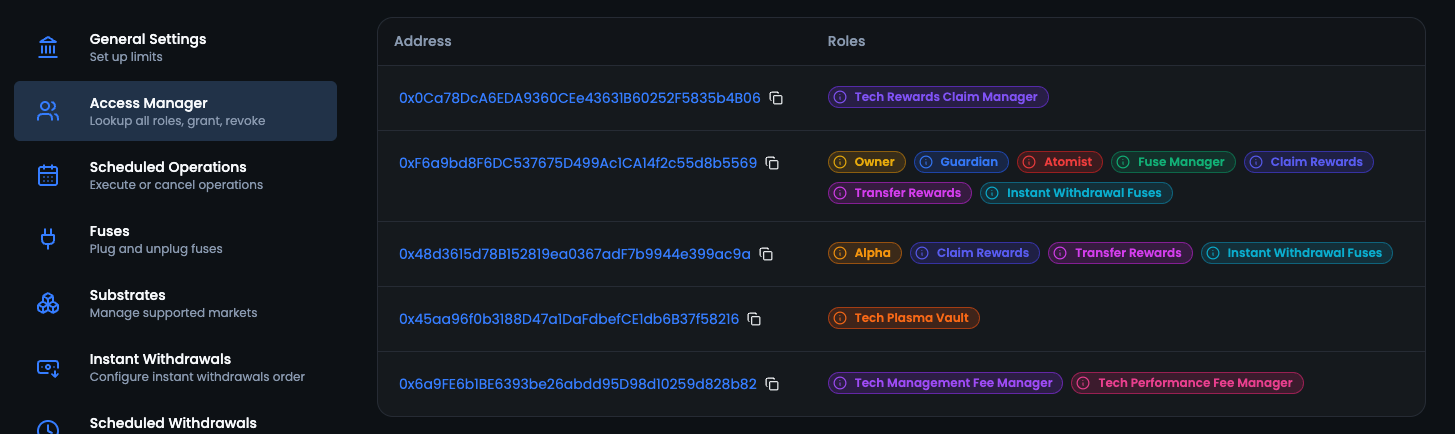
> For the complete documentation index, see [llms.txt](https://docs.ipor.io/llms.txt). Markdown versions of documentation pages are available by appending `.md` to page URLs; this page is available as [Markdown](https://docs.ipor.io/build-on-fusion/atomists/vault-configuration-step-by-step/access-management.md).
# Access Management
How OpenZeppelin Access Manager governs vault roles, and how to grant, revoke and time-lock them.
## Overview
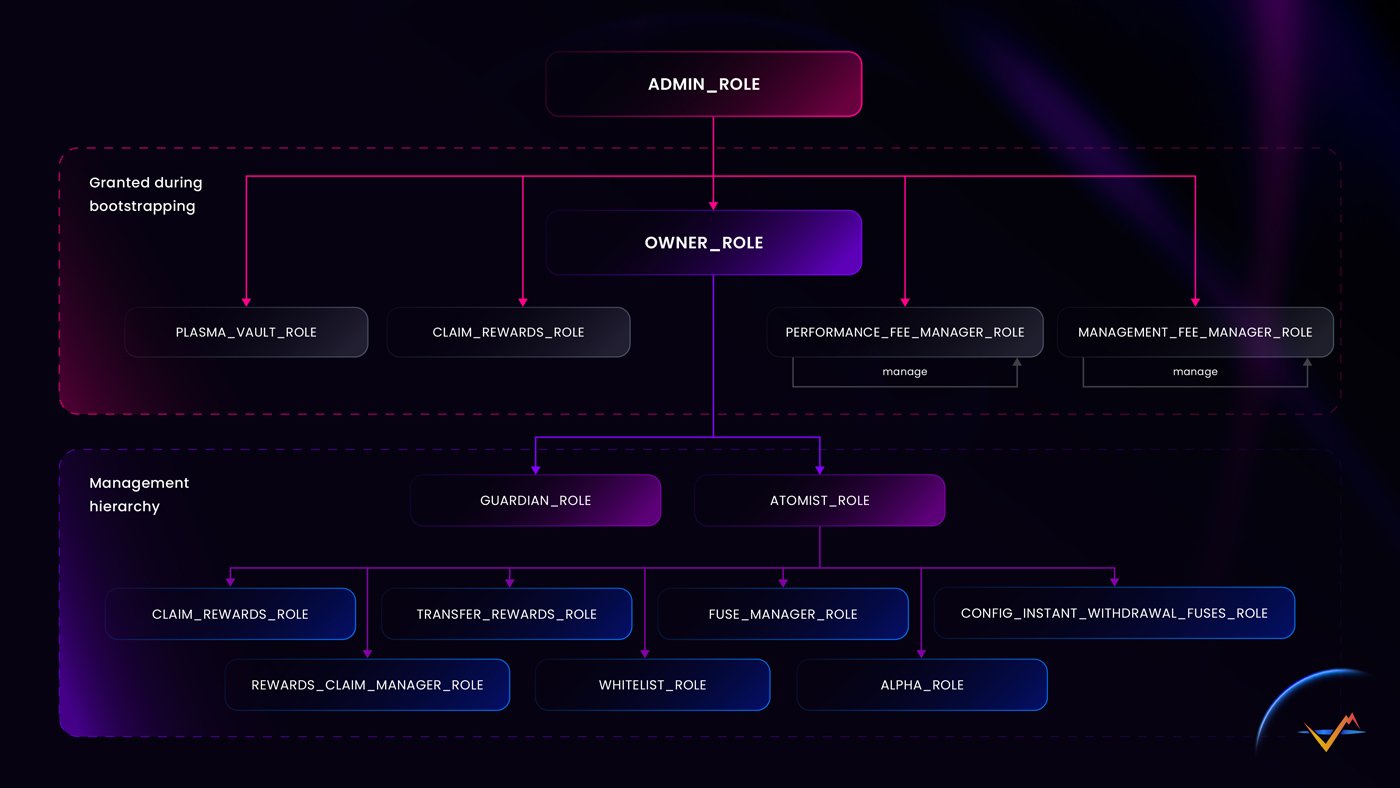
IPOR Fusion utilizes OpenZeppelin's AccessManager to restrict function access through a role-based system. The roles below are ordered from highest to lowest authority. (Developer note: The list of roles is available in the GitHub repository: )
## Grant Delays (The Waiting Room)
When [timelocks](/build-on-fusion/atomists/vault-configuration-step-by-step/timelocks-and-execution-delays.md) are enabled, adding a new account to an important role follows a strict procedure to prevent the sudden injection of foreign keys into governance.
When a new account is granted an important role, its membership does not activate immediately — it waits out that role's grant delay first (recommended: 14 days for `OWNER`, 3 days for the configuration tier). This closes the "inject a key into governance" path: even a grant that completes successfully produces an account that cannot act yet.
The rule itself is protected too. Changing a grant delay via `setGrantDelay` arms only after a hardcoded 5-day minimum setback (`minSetback`) — and reducing one takes the larger of 5 days and the size of the reduction. Nobody, including a legitimate administrator, can shorten the waiting room and walk a new key straight in. Note that grant delays are `ADMIN`-gated: they must be configured before `ADMIN` is renounced, or they become permanently unavailable.
*Developer Note:* Re-granting an existing member — for example raising their execution delay — is not subject to the grant delay. This is deliberate: it keeps hardening instantaneous.
## Admin Role
An account with this role has the rights to manage the IporFusionAccessManager in general. It is the highest role, capable of managing all roles including `ADMIN_ROLE` and `OWNER_ROLE`.
This is a technical role used during the bootstrapping phase of a vault. In a fully secured, timelocked vault deployment, the `ADMIN` role is ultimately **renounced**. *Note:* When a vault is created in supervised mode, the `ADMIN` role must be **manually renounced** (after making the `OWNER` self-administered) to remove the "skeleton key" that could override all security mechanisms instantly.
## Owner Role
The highest administrative role, defined during the vault's bootstrapping process. The account with this role has rights to manage Owners, Guardians, Atomists, and configure execution delays (timelocks).
* Self-managed (if `getRoleAdmin(OWNER) == OWNER`, the Owner can change itself to another Owner)
* Single user (recommended use of multisig for this role)
**Best practices**
* **14-Day Timelock:** The Owner role should be configured with a 14-day execution delay to ensure all top-level administrative changes are publicly visible well in advance.
* **Strict Key Separation:** Use a highly secure, dedicated multisig wallet. The accounts holding the Owner role must be strictly separated from accounts holding operational roles (like Atomist or Alpha) and must be completely distinct from Guardian keys.
* **Cold Wallet Usage:** Treat the Owner multisig effectively as a cold wallet used only for structural vault changes.
## Atomist Role
This role serves as the primary managing accounts for the vault, overseeing most day-to-day settings, such as configuring Fuse Managers, Alphas, fees, and other parameters.
* Configurable by the Owner
* Allows multiple users
#### Best practices
* Use multiple Atomists to ensure redundancy.
* Apply timelocks to selected Atomist actions whenever feasible.
## Alpha
The account with this role has rights to execute the strategy on the vault using execute method, typically as an automated strategy manager.
* Configurable by the Atomist
* Allows multiple users
Depending on the level of automation, the following roles can be assigned to the same wallet managed by Alpha in the IPOR Fusion system:
### CONFIG\_INSTANT\_WITHDRAWAL\_FUSES\_ROLE (900)
This role configures fuses, such as credit market deposit fuses, to enable instant withdrawals, allowing liquidity providers (LPs) to withdraw assets from the vault immediately. The role holder defines the order of configured markets to ensure asset availability for LPs. A key requirement is that the market (a collection of fuses linked to an external platform) must be fully liquid from the vault’s perspective. If liquidity is used as collateral for borrowing, instant withdrawals could trigger liquidation, so such markets should not be used. For complex vault strategies involving adding or removing credit positions, assign this role to Alpha for efficiency. Alternatively, a dedicated address or Atomist can manage it.
#### Best Practices
* Ensure markets selected for instant withdrawals are highly liquid to avoid liquidation risks.
* Use timelocks for changes to fuse configurations to allow review by Guardians or LPs.
### WITHDRAW\_MANAGER\_REQUEST\_FEE\_ROLE (901)
This role sets the request fee, charged when an LP submits a withdrawal request from a scheduled withdrawal vault. The fee is applied at the time of the request, not redemption. For strategies with algorithmically adjusting fees, assign this role to Alpha. Alternatively, Atomists can manage it based on the vault’s strategy.
#### Best Practices
* Use a multisig wallet for managing this role to enhance security.
* Monitor fee adjustments to align with the vault’s strategy and LP expectations.
### WITHDRAW\_MANAGER\_WITHDRAW\_FEE\_ROLE (902)
This role sets the withdrawal fee, analogous to the request fee but charged during instant withdrawals.
#### Best Practices
* Align withdrawal fees with the vault’s operational strategy.
* Use a multisig wallet for secure management.
### UPDATE\_MARKETS\_BALANCES\_ROLE (1000)
This role manually updates cached market balances for deposits or withdrawals if automation (e.g., via pre-hooks) is not enabled. This is necessary for less active vaults to ensure accurate balance reporting. For efficiency, assign this role to an automated service.
#### Best Practices
* Automate balance updates with pre-hooks when possible to reduce manual intervention.
* Grant this role to a secure, automated service to ensure timely updates.
### UPDATE\_REWARDS\_BALANCE\_ROLE (1100)
Similar to the previous role, this role updates the balances of incentives claimable by the vault through the rewards manager. For automated workflows, assign this role to Alpha.
#### Best Practices
* Integrate with automated reward tracking systems to streamline updates.
* Use a secure wallet or service for this role to prevent unauthorized access.
### CLAIM\_REWARDS\_ROLE (600)
This role allows claiming rewards on behalf of the vault. For practical reasons, assign this role to Alpha to automate reward collection.
#### Best Practices
* Use a secure, automated system like Alpha to ensure timely reward claims.
* Monitor reward claims to verify correct distribution.
### TRANSFER\_REWARDS\_ROLE (700)
This role enables the transfer of claimed rewards to the rewards claim manager. In the IPOR Fusion Plasma Vault, reward management (e.g., selling, staking, or transferring) can be handled by a dedicated module. If no such module exists, Alpha can manage rewards manually. Assigning this role to Alpha allows it to transfer rewards to itself for processing.
#### Best Practices
* Use a dedicated rewards management module when available to streamline operations.
## Guardian Role
This role serves as the emergency brake for the vault. The Guardian has the authority to reject time-locked actions and to [pause](/build-on-fusion/developer-guide/pause-functionality.md) or unpause the vault in case of an emergency.
* Configurable by the Owner
* Allows for multiple users
* **Cannot be timelocked:** Guardians must always retain a 0-day execution delay to function as an instant emergency brake.
**Guardian Capabilities & Limitations:**
* **Veto Configuration Changes:** The Guardian can unilaterally cancel pending operational and configuration transactions scheduled by the Owner, Atomist, or Fuse Manager (any function gated through the access manager's target-function-role map).
* **Emergency Pause:** The Guardian can instantly pause the vault, freezing all execution actions (including user deposits and withdrawals).
* **LIMITATION - No Role Management Veto:** Crucially, role-management calls (`grantRole`, `revokeRole`, `setGrantDelay`) are OpenZeppelin admin functions. **Guardians CANNOT cancel these actions.** Only the scheduler themselves or an `ADMIN` can cancel role changes. For permission changes, the timelock provides a *detection-and-exit window* for depositors, not a Guardian veto.
#### **Best Practices**
* **Instant Reaction:** Guardians must hold a **0-day execution delay** so they can react instantly to emergencies.
* **Key Separation:** Guardian keys must be independent and separate from Owner keys. The emergency brake must fail independently of the roles it is meant to brake.
* **Monitoring is Mandatory:** Because Guardians cannot veto role changes, robust on-chain monitoring for `RoleGranted` and `RoleRevoked` events is required to alert depositors of unauthorized permission changes during the exit window.
* If using automated risk monitoring, consider granting the Guardian role to an emergency mechanism to enable automatic vault pausing.
## Fuse Manager Role
The account with this role has rights to manage the FuseManager contract, add or remove fuses, balance fuses and reward fuses.
* Configurable by the Atomist
* Allows for multiple users
#### Best Practices
* For a more decentralized setup, use a dedicated, time-locked account to manage fuses, as they impact the strategy.
## Claim Rewards Role
Account with this role has rights to claim rewards from the PlasmaVault using and interacting with the RewardsClaimManager contract.If PlasmaVault has a dedicated smart contract to handle the harvested rewards, the role should be granted to that contract.
* Configurable by the Atomist
* Allows for multiple users
## Transfer Rewards Role
An account with this role has rights to transfer rewards from the PlasmaVault to the RewardsClaimManager.If PlasmaVault has a dedicated smart contract to handle the harvested rewards, the role could be granted to that contract.
* Configurable by the Atomist
* Allows for multiple users
## Rewards Claim Manager Role
Technical role for the RewardsClaimManager contract. Account with this role has rights to claim rewards from the PlasmaVault. For practical reasons, it can be granted to the same entity holding either an Alpha or Atomist role.Configurable by the AtomistAllows for multiple usersPerformance Fee Manager RoleThe account with this role has rights to manage the performance fee, define the performance fee rate, and manage the performance fee recipient.Self managedAllows for multiple usersManagement Fee Manager RoleThe account with this role has rights to manage the management fee, define the management fee rate, and manage the management fee recipient.Self-managedAllows for multiple usersWhitelist RoleThe account with this role has rights to deposit/mint and withdraw/redeem assets from the Plasma Vault.Configurable by the AtomistAllows for multiple usersConfig Instant Withdrawal Fuses RoleAn account with this role has rights to configure instant withdrawal fuses order.
## Technical Roles (Must remain at 0-day delay)
Certain roles act as the internal plumbing of the IPOR Fusion system. These roles are held by system contracts (or automated keepers) and are essential for the fundamental operation of the vault.
Applying an execution delay (timelock) to any of these roles will break the vault's core mechanics. The following roles **must always remain at a 0-day execution delay** and should never have a minimal execution delay (floor) set:
* `TECH_PLASMA_VAULT` (3)
* `TECH_CONTEXT_MANAGER` (5)
* `TECH_WITHDRAW_MANAGER` (6)
* `TECH_VAULT_TRANSFER_SHARES` (7)
* `TECH_REWARDS_CLAIM` (601)
* `TECH_PERF_FEE` (400) and `TECH_MGMT_FEE` (500) *(Only when held by the internal FeeManager/plumbing on factory vaults. If held by governance, these require a 3-day delay).*
## **PreHooksManager** Role
As outlined in the [pre-hook configuration](/build-on-fusion/developer-guide/configuring-pre-hooks.md), all changes made by the PreHooksManager must be subject to a timelock. This delay allows liquidity providers (LPs) and other administrators to respond if pre-hooks are set incorrectly.
#### Best practices
* Implement a sufficiently long timelock for PreHooksManager actions.
* Use a multisig wallet to administer pre-hooks for enhanced security.
## **Whitelist / Open Vault**
By default, each new vault in the IPOR Fusion system is initialized with a whitelist, restricting minting and redeeming of shares to whitelisted addresses only. Atomists can add addresses to the whitelist or disable it entirely, making the vault open to all users. Once the whitelist is disabled, it cannot be re-enabled.
#### Best Practices
* Retain the whitelist during the testing period, even if you plan to open the vault to all users.
* Use a secure multisig wallet for Atomists managing the whitelist to enhance security.
## Cross-Chain Access Management
For Fusion vaults that utilize cross-chain strategies, the access management model is extended to secure the asynchronous nature of remote capital deployment. This includes dedicated attestation and emergency recovery roles:
* **Attestation Roles:** Independent Proposer and Approver roles are required to validate and recognize remote Net Asset Value (NAV) on the source chain.
* **Emergency Roles:** Rescue Admin and Rescue Guardian roles provide a bifurcated, time-delayed break-glass mechanism for severe bridge or transport failures.
To maintain maximum security, the protocol strictly enforces that these paired roles (Proposer/Approver and Admin/Guardian) must be held by separate, independent addresses.
For a complete breakdown of these specialized roles and their operational responsibilities, please refer to the [**Governance and Operating Roles**](https://docs.ipor.io/build-on-fusion/atomists/vault-configuration-step-by-step/pages/83p9PjEar3zUrTGq1HXJ#id-3.2-operational-roles) section in the Cross-Chain Vault Integration: Business & Operations Guide.